<?xml version="1.0" encoding="utf-8" standalone="yes"?><feed xmlns="http://www.w3.org/2005/Atom" xml:lang="en"><script src="https://www.rss.style/js/atom-style.js" xmlns="http://www.w3.org/1999/xhtml"/><title>Tower of Kubes</title><link rel="self" type="application/atom+xml" hreflang="en" href="https://www.towerofkubes.com/tags/tools/feed.xml"/><link rel="alternate" type="application/atom+xml" hreflang="he" href="https://www.towerofkubes.com/he/tags/tools/feed.xml"/><link rel="alternate" type="application/atom+xml" hreflang="x-default" href="https://www.towerofkubes.com/tags/tools/feed.xml"/><link rel="alternate" type="text/html" hreflang="en" href="https://www.towerofkubes.com/tags/tools/"/><link rel="alternate" type="application/rss+xml" hreflang="en" href="https://www.towerofkubes.com/tags/tools/index.xml"/><id>/</id><updated>2026-05-05T00:00:00Z</updated><author><name>Ro'i Bandel</name></author><generator>Hugo 0.157.0</generator><entry><title>OpenCode: The Agentic Tool That Anthropic and Google Don't Want You To Use</title><link rel="alternate" type="text/html" hreflang="en" href="https://www.towerofkubes.com/articles/opencode/"/><id>https://www.towerofkubes.com/articles/opencode/</id><updated>2026-05-05T00:00:00Z</updated><summary type="html">OpenCode is the open-source agentic CLI tool that both Anthropic and Google moved to block from their subscription APIs. Here’s a hands-on look at what makes it genuinely different, and whether it’s worth switching from Claude Code.</summary><content type="html"><![CDATA[<p>For the past four months, <a href="https://opencode.ai"  target="_blank" rel="noreferrer">OpenCode</a> has been my primary agent tool. A piece of AI industry drama is what brought it to my attention.</p>
<figure><img
    class="my-0 rounded-md"
    loading="lazy"
    decoding="async"
    fetchpriority="auto"
    alt="OpenCode logo with tagline: “The open source AI coding agent”"
    width="1280"
    height="721"
    src="/articles/opencode/opencode-logo-with-tagline_hu_897512d6efaab35c.webp"
    srcset="/articles/opencode/opencode-logo-with-tagline_hu_897512d6efaab35c.webp 800w, /articles/opencode/opencode-logo-with-tagline.webp 1280w"
    sizes="(min-width: 768px) 50vw, 65vw"
    data-zoom-src="/articles/opencode/opencode-logo-with-tagline.webp"></figure>

<h2 class="relative group">Background
    <div id="background" class="anchor"></div>
    
</h2>
<p>In January 2026, I started seeing drama online: <a href="https://github.com/anomalyco/opencode/issues/7410"  target="_blank" rel="noreferrer">Anthropic blocks third-party use of Claude subscriptions</a>. The most surprising part to me wasn’t that Anthropic decided to block this type of usage, that’s unfortunate but expected. What surprised me was that I hadn’t known this was even possible in the first place.</p>
<p>I had briefly read about OpenCode and Crush during my <a href="/articles/agentic-cli-tools-comparison/" >Agentic CLI Tools Comparison</a>, but hadn’t used them due to their <a href="/articles/agentic-cli-tools-comparison/#byo-bring-your-own-api-keys" >BYO (Bring Your Own) API key requirement</a>, which in most cases is significantly more expensive than subscription tiers. As it turns out, people had found ways to use those subscriptions anyway. OpenCode had implemented an OAuth flow that spoofed Claude Code’s HTTP headers to authenticate against Anthropic’s API with a Claude Pro or Max subscription. This gave OpenCode users access to Claude models at subscription pricing, a significant cost advantage.</p>

<h3 class="relative group">The Crackdown
    <div id="the-crackdown" class="anchor"></div>
    
</h3>
<p>Anthropic’s response came in several phases. Active enforcement began on January 9, 2026, when Anthropic deployed server-side protections blocking all unofficial OAuth access. On February 19, Anthropic updated its legal compliance page to make the OAuth restriction explicit: OAuth tokens obtained from Claude subscription accounts are only permitted for use with official Claude tools.</p>
<p>Legal requests followed, and in mid-March OpenCode’s maintainers <a href="https://github.com/anomalyco/opencode/pull/18186"  target="_blank" rel="noreferrer">merged a PR</a> removing the Anthropic OAuth plugin from the project. By early April, Anthropic extended restrictions to OpenClaw and other third-party harnesses. Google ran the same playbook with Gemini around the same period, banning third-party OAuth access and issuing account-level suspensions.</p>

<h3 class="relative group">The Community Reaction
    <div id="the-community-reaction" class="anchor"></div>
    
</h3>
<p>The <a href="https://news.ycombinator.com/item?id=46549823"  target="_blank" rel="noreferrer">Hacker News thread</a> filled with genuine disappointment. Many users felt OpenCode was a significantly better tool than Claude Code. The main advantages cited were its open-source <a href="https://github.com/anomalyco/opencode#MIT-1-ov-file"  target="_blank" rel="noreferrer">MIT license</a>, an optional web UI and client/server architecture, and the absence of flickering, a complaint about Claude Code that hasn’t gone away. OpenCode had also grown remarkably fast, reaching over 150,000 GitHub stars.</p>
<p>OpenAI and GitHub went the other direction. Tibo, OpenAI’s Codex lead, <a href="https://x.com/thsottiaux/status/2009742187484065881"  target="_blank" rel="noreferrer">announced on X</a> that Codex subscribers could use their subscription directly within OpenCode, and GitHub formally <a href="https://github.blog/changelog/2026-01-16-github-copilot-now-supports-opencode/"  target="_blank" rel="noreferrer">announced support for OpenCode</a> across all GitHub Copilot subscriptions. That’s what originally got me to give OpenCode a real try, paired with GitHub Copilot and ChatGPT subscriptions, and I’ve been using it regularly since.</p>

<h2 class="relative group">My Impressions of OpenCode
    <div id="my-impressions-of-opencode" class="anchor"></div>
    
</h2>
<p>OpenCode immediately seemed appealing when I started using it. Until that point, Claude Code had remained my preferred agentic CLI tool. In the months since I wrote <a href="/articles/agentic-cli-tools-comparison/" >Agentic CLI Tools Comparison</a>, I had continued experimenting with different CLI tools and models, notably <a href="/articles/claude-sonnet-4.5-and-claude-code-2.0/" >Claude Code 2.0</a>, Codex CLI, Gemini CLI, and GitHub Copilot CLI. Claude Code consistently remained the best tool in my opinion, both in terms of UI design and features, and in terms of Anthropic’s models feeling the strongest at coding and agentic tool usage based on my experience. The other tools felt like UI imitations of Claude Code running different models, with no meaningful improvements. OpenCode is genuinely different, though. It runs on a client/server model with an HTTP API, supports 75+ AI providers including local models, and has native multi-session support.</p>
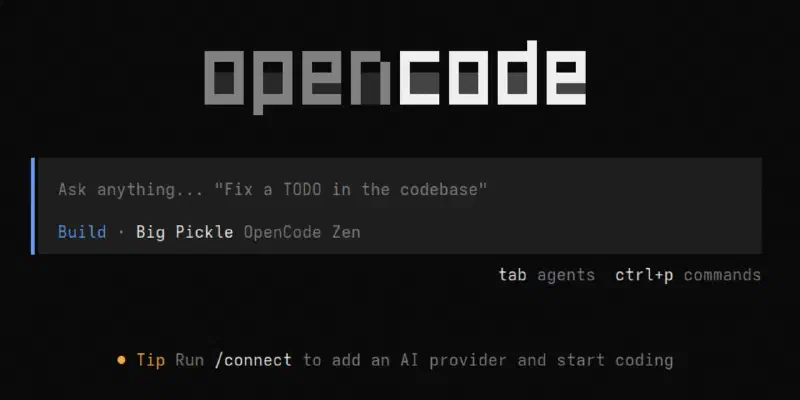
<p>When opening OpenCode in a terminal, it feels familiar but different. The starting screen looks a lot like a classic search engine, with the prompt box centered on the screen, rather than being off to the bottom like in most other agentic CLI tools.</p>
<figure><img
    class="my-0 rounded-md"
    loading="lazy"
    decoding="async"
    fetchpriority="auto"
    alt="OpenCode welcome screen"
    width="1280"
    height="640"
    src="/articles/opencode/opencode-welcome-screen_hu_74a83788b244a153.webp"
    srcset="/articles/opencode/opencode-welcome-screen_hu_74a83788b244a153.webp 800w, /articles/opencode/opencode-welcome-screen.webp 1280w"
    sizes="(min-width: 768px) 50vw, 65vw"
    data-zoom-src="/articles/opencode/opencode-welcome-screen.webp"></figure>
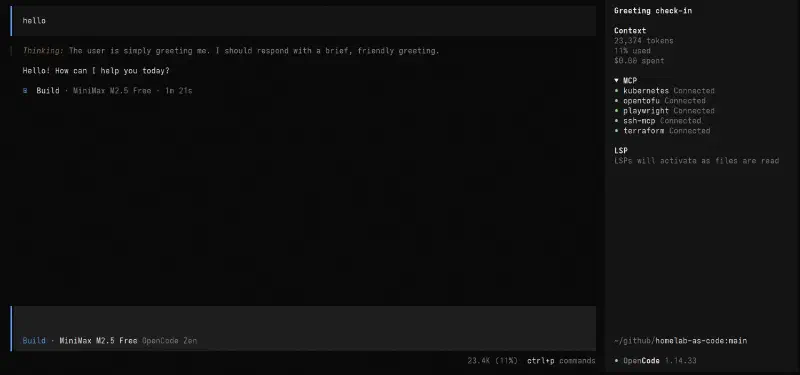
<p>However, once you enter an initial prompt, the prompt box moves to the bottom of the terminal, making for a more familiar look. In my opinion, OpenCode strikes a good balance: it will feel familiar to users who have used Claude Code (and similar tools) before, but at the same time it does not feel like a clone of other tools. OpenCode does a lot of unique things that other tools don’t do. For example, OpenCode has a useful sidebar that displays information about active MCPs, LSPs (language servers) and token usage for the current session.</p>
<figure><img
    class="my-0 rounded-md"
    loading="lazy"
    decoding="async"
    fetchpriority="auto"
    alt="OpenCode sidebar showing MCP connections, LSP status, and token usage"
    width="1920"
    height="900"
    src="/articles/opencode/opencode-sidebar_hu_c305c873a185037.webp"
    srcset="/articles/opencode/opencode-sidebar_hu_c305c873a185037.webp 800w, /articles/opencode/opencode-sidebar_hu_116abb3292d419d0.webp 1280w"
    sizes="(min-width: 768px) 50vw, 65vw"
    data-zoom-src="/articles/opencode/opencode-sidebar.webp"></figure>
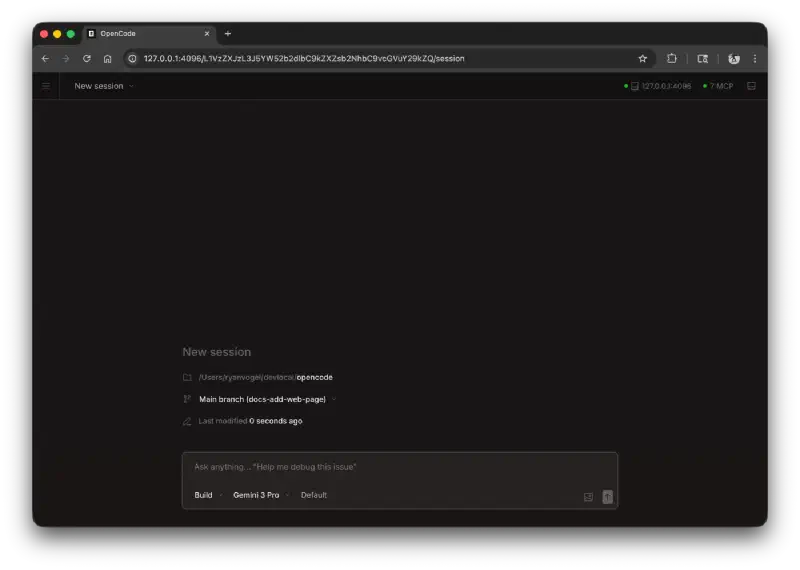
<p>The look of OpenCode becomes even more unique when using its <a href="https://opencode.ai/docs/web/"  target="_blank" rel="noreferrer">web UI</a> or the OpenCode desktop app.</p>
<figure><img
    class="my-0 rounded-md"
    loading="lazy"
    decoding="async"
    fetchpriority="auto"
    alt="OpenCode Web - New Session"
    width="1400"
    height="997"
    src="/articles/opencode/opencode-web-homepage-new-session_hu_2e42a15a6c01ef0b.webp"
    srcset="/articles/opencode/opencode-web-homepage-new-session_hu_2e42a15a6c01ef0b.webp 800w, /articles/opencode/opencode-web-homepage-new-session_hu_9c29e52cad0c0b1.webp 1280w"
    sizes="(min-width: 768px) 50vw, 65vw"
    data-zoom-src="/articles/opencode/opencode-web-homepage-new-session.webp"></figure>
<p><em>Image source: <a href="https://opencode.ai/docs/web/"  target="_blank" rel="noreferrer">Web | OpenCode</a></em></p>

<h3 class="relative group">Models and Providers
    <div id="models-and-providers" class="anchor"></div>
    
</h3>
<p>When first using OpenCode, it defaults to using the OpenCode Zen models. As of today, <a href="https://opencode.ai/docs/zen/#pricing"  target="_blank" rel="noreferrer">OpenCode Zen offers several free models</a>, as well as paid models.</p>

    <div class="admonition tip">
      <div class="admonition-header"><svg xmlns="http://www.w3.org/2000/svg" viewBox="0 0 384 512"><path d="M272 384c9.6-31.9 29.5-59.1 49.2-86.2c0 0 0 0 0 0c5.2-7.1 10.4-14.2 15.4-21.4c19.8-28.5 31.4-63 31.4-100.3C368 78.8 289.2 0 192 0S16 78.8 16 176c0 37.3 11.6 71.9 31.4 100.3c5 7.2 10.2 14.3 15.4 21.4c0 0 0 0 0 0c19.8 27.1 39.7 54.4 49.2 86.2l160 0zM192 512c44.2 0 80-35.8 80-80l0-16-160 0 0 16c0 44.2 35.8 80 80 80zM112 176c0 8.8-7.2 16-16 16s-16-7.2-16-16c0-61.9 50.1-112 112-112c8.8 0 16 7.2 16 16s-7.2 16-16 16c-44.2 0-80 35.8-80 80z"/></svg>
        <span>When using OpenCode Zen, it’s recommended to read about the <a href="https://opencode.ai/docs/zen/#privacy"  target="_blank" rel="noreferrer">privacy for each model</a>.</span>
      </div>
    </div><p>These paid models can either be used by paying for credits (similar to OpenRouter) or using the <a href="https://opencode.ai/go"  target="_blank" rel="noreferrer">OpenCode Go subscription</a>. However, OpenCode does not limit to only using their offering. One of the best features of OpenCode is its wide <a href="https://opencode.ai/docs/providers/"  target="_blank" rel="noreferrer">provider</a> support. LLM models can be used from practically any provider (that hasn’t outright blocked OpenCode), or even use local models. This provides users a lot of flexibility to use the same tool across many different models, with one unified agent harness. It also means users are not “locked-in” to one provider if they want to continue using OpenCode. When providers change the terms, such as Claude and Gemini limiting usage of OpenCode, or <a href="https://github.blog/news-insights/company-news/github-copilot-is-moving-to-usage-based-billing/"  target="_blank" rel="noreferrer">GitHub Copilot changing the terms of their subscriptions</a>, OpenCode users can just move to other providers and continue their existing workflow.</p>

<h3 class="relative group">Agentic Tool Usage
    <div id="agentic-tool-usage" class="anchor"></div>
    
</h3>
<p>Using one tool for all providers also means that I can have a unified place to configure my <a href="https://modelcontextprotocol.io"  target="_blank" rel="noreferrer">MCP</a> servers, <a href="https://agentskills.io"  target="_blank" rel="noreferrer">Skills</a> and <a href="https://agents.md/"  target="_blank" rel="noreferrer">AGENTS.md</a> files. While there have been attempts to standardize the agents world, including the <a href="https://aaif.io/"  target="_blank" rel="noreferrer">Agentic AI Foundation (AAIF)</a>, the reality is that agentic tools still have different ways to configure. For example, Anthropic to date has refused to adopt the usage of the <code>AGENTS.md</code> file, instead referring only to the <code>CLAUDE.md</code> file.</p>
<p>OpenCode supports these emerging agent standards, as well as <a href="https://opencode.ai/docs/lsp/"  target="_blank" rel="noreferrer">LSP servers</a> (Language Server Protocol, which has been around before agents, to give code editors better support for programming languages). At the same time, <a href="https://opencode.ai/docs/config/"  target="_blank" rel="noreferrer">OpenCode also has its own config file</a>.</p>
<p>As an example, if you want to configure <a href="/articles/chrome-devtools-mcp" >Chrome DevTools MCP server</a>, add the following to your <a href="https://opencode.ai/docs/config/"  target="_blank" rel="noreferrer">OpenCode config</a>:</p>
<div class="highlight-wrapper"><div class="highlight"><pre tabindex="0" class="chroma"><code class="language-json" data-lang="json"><span class="line"><span class="cl"><span class="p">{</span>
</span></span><span class="line"><span class="cl">  <span class="nt">"$schema"</span><span class="p">:</span> <span class="s2">"https://opencode.ai/config.json"</span><span class="p">,</span>
</span></span><span class="line"><span class="cl">  <span class="nt">"mcp"</span><span class="p">:</span> <span class="p">{</span>
</span></span><span class="line"><span class="cl">    <span class="nt">"chrome-devtools"</span><span class="p">:</span> <span class="p">{</span>
</span></span><span class="line"><span class="cl">      <span class="nt">"type"</span><span class="p">:</span> <span class="s2">"local"</span><span class="p">,</span>
</span></span><span class="line"><span class="cl">      <span class="nt">"command"</span><span class="p">:</span> <span class="p">[</span><span class="s2">"npx"</span><span class="p">,</span> <span class="s2">"-y"</span><span class="p">,</span> <span class="s2">"chrome-devtools-mcp@latest"</span><span class="p">]</span>
</span></span><span class="line"><span class="cl">    <span class="p">}</span>
</span></span><span class="line"><span class="cl">  <span class="p">}</span>
</span></span><span class="line"><span class="cl"><span class="p">}</span></span></span></code></pre></div></div>
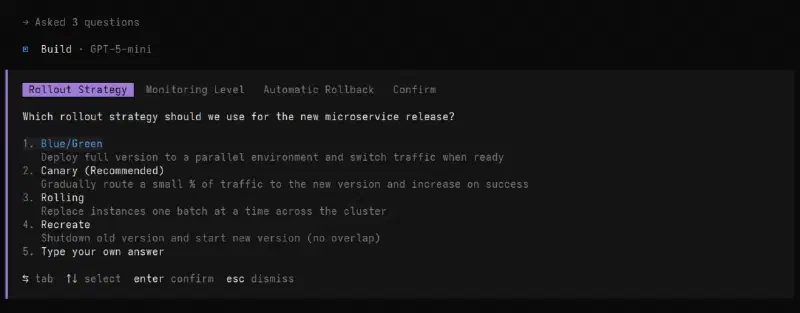
<p>OpenCode also supports a range of <a href="https://opencode.ai/docs/tools/"  target="_blank" rel="noreferrer">built-in tools</a>, including web searches. One of my personal favorite tools is the <a href="https://opencode.ai/docs/tools/#question"  target="_blank" rel="noreferrer">question tool</a>. It allows the model to ask you questions mid-task: for gathering preferences, clarifying instructions, or getting decisions on implementation choices. Each question includes a header, question text, and a list of options, with the ability to type a custom answer. When there are multiple questions, you can navigate between them before submitting.</p>
<figure><img
    class="my-0 rounded-md"
    loading="lazy"
    decoding="async"
    fetchpriority="auto"
    alt="OpenCode question tool prompting a choice of rollout strategy"
    width="1280"
    height="500"
    src="/articles/opencode/opencode-question-tool_hu_88c5c43675966c68.webp"
    srcset="/articles/opencode/opencode-question-tool_hu_88c5c43675966c68.webp 800w, /articles/opencode/opencode-question-tool.webp 1280w"
    sizes="(min-width: 768px) 50vw, 65vw"
    data-zoom-src="/articles/opencode/opencode-question-tool.webp"></figure>

<h3 class="relative group">It’s Dangerous: Permissions and Safety
    <div id="its-dangerous-permissions-and-safety" class="anchor"></div>
    
</h3>
<p>OpenCode is a powerful tool, and with great power comes great responsibility. By default, it will happily edit anything, run anything, and delete anything without asking, which can feel great for vibe-coding but can also wreak havoc on your machine and codebases if left unchecked. For users that are coming from Claude Code, the default permissions feel similar to the <code>claude --dangerously-skip-permissions</code> flag. By default, OpenCode does not ask permission for anything. It edits files freely and can run <em>any</em> command. Even when using “Plan” mode (instead of “Build” mode), OpenCode can still run commands (by default the “Plan” mode only disallows file edits). Fortunately, this is fairly easy to fix. To get a locked-down OpenCode, add this to your <a href="https://opencode.ai/docs/config/"  target="_blank" rel="noreferrer">OpenCode config</a>:</p>
<div class="highlight-wrapper"><div class="highlight"><pre tabindex="0" class="chroma"><code class="language-json" data-lang="json"><span class="line"><span class="cl"><span class="p">{</span>
</span></span><span class="line"><span class="cl">  <span class="nt">"$schema"</span><span class="p">:</span> <span class="s2">"https://opencode.ai/config.json"</span><span class="p">,</span>
</span></span><span class="line"><span class="cl">  <span class="nt">"permission"</span><span class="p">:</span> <span class="p">{</span>
</span></span><span class="line"><span class="cl">    <span class="nt">"*"</span><span class="p">:</span> <span class="s2">"ask"</span>
</span></span><span class="line"><span class="cl">  <span class="p">}</span>
</span></span><span class="line"><span class="cl"><span class="p">}</span></span></span></code></pre></div></div>

    <div class="admonition tip">
      <div class="admonition-header"><svg xmlns="http://www.w3.org/2000/svg" viewBox="0 0 384 512"><path d="M272 384c9.6-31.9 29.5-59.1 49.2-86.2c0 0 0 0 0 0c5.2-7.1 10.4-14.2 15.4-21.4c19.8-28.5 31.4-63 31.4-100.3C368 78.8 289.2 0 192 0S16 78.8 16 176c0 37.3 11.6 71.9 31.4 100.3c5 7.2 10.2 14.3 15.4 21.4c0 0 0 0 0 0c19.8 27.1 39.7 54.4 49.2 86.2l160 0zM192 512c44.2 0 80-35.8 80-80l0-16-160 0 0 16c0 44.2 35.8 80 80 80zM112 176c0 8.8-7.2 16-16 16s-16-7.2-16-16c0-61.9 50.1-112 112-112c8.8 0 16 7.2 16 16s-7.2 16-16 16c-44.2 0-80 35.8-80 80z"/></svg>
        <span><a href="https://opencode.ai/docs/permissions/"  target="_blank" rel="noreferrer">OpenCode Permissions</a> can be customized further.</span>
      </div>
    </div><p>It is also worth running OpenCode in a sandboxed environment. Refer to my previous article on <a href="/articles/claude-code-sandboxing" >Claude Code Sandboxing</a> for examples on how to achieve this.</p>

<h2 class="relative group">Final Verdict: Is OpenCode Better Than Claude Code?
    <div id="final-verdict-is-opencode-better-than-claude-code" class="anchor"></div>
    
</h2>
<p>Overall, OpenCode is a very compelling agent tool, with wide model support and lots of features. It is certainly among the best AI tools I have ever used.</p>
<p>On the question of “OpenCode vs. Claude Code”, I would say both tools are honestly equally strong. OpenCode felt like a breath of fresh air after months of using Claude Code, with many unique features. For example, mouse support, which Claude Code has only recently gained and is currently still a preview feature. At the same time, going back to Claude Code after several months of only using OpenCode, I have noticed Anthropic have not been resting and have been frantically adding new features to Claude Code, including plugins and a plugin marketplace, Agent Teams for multi-agent orchestration, the <code>/btw</code> command for lightweight side questions, and Auto mode, a new permission tier that sits between manual approval and skipping permissions entirely.</p>
<p>Overall, OpenCode feels surprisingly more polished (despite being developed by a much smaller team), while Claude Code has the edge in raw features. Nevertheless, the tools feel very close in quality. The choice between them ultimately comes down to one question: do you have a Claude subscription?</p>
<p>As I explained at the opening of this article, Anthropic has made their stance clear that Claude subscriptions are only for use within official Claude tools, and third-party tool usage is blocked for subscribers. Claude Code also locks you into Claude models exclusively, with no support for other providers.</p>
<p>If you’re already paying for a Claude subscription, Claude Code is the natural fit, as it’s the only tool where Anthropic’s subscriptions are officially supported. If you’re not, OpenCode’s model flexibility and open-source nature make it a compelling alternative that gives you full control over both your models and your costs.</p>
<hr>
<p><em>Featured image by <a href="https://unsplash.com/@sonance?utm_source=hugo&utm_medium=referral"  target="_blank" rel="noreferrer">Viktor Forgacs</a> on <a href="https://unsplash.com/photos/red-and-white-open-neon-signage-LNwIJHUtED4?utm_source=hugo&utm_medium=referral"  target="_blank" rel="noreferrer">Unsplash</a>.</em></p>
]]></content><author><name>Ro'i Bandel</name></author><category term="ai" label="Ai" scheme="https://www.towerofkubes.com/tags/ai/"/><category term="cli" label="Cli" scheme="https://www.towerofkubes.com/tags/cli/"/><category term="tools" label="Tools" scheme="https://www.towerofkubes.com/tags/tools/"/><category term="llm" label="Llm" scheme="https://www.towerofkubes.com/tags/llm/"/><category term="backman-feed" label="Backman-Feed" scheme="https://www.towerofkubes.com/tags/backman-feed/"/><published>2026-05-05T00:00:00Z</published></entry><entry><title>Chrome DevTools MCP server</title><link rel="alternate" type="text/html" hreflang="en" href="https://www.towerofkubes.com/articles/chrome-devtools-mcp/"/><id>https://www.towerofkubes.com/articles/chrome-devtools-mcp/</id><updated>2025-11-16T00:00:00Z</updated><summary type="html">Comparison of Playwright MCP server vs. Chrome DevTools MCP server</summary><content type="html"><![CDATA[<p>I have recently been using <a href="https://github.com/ChromeDevTools/chrome-devtools-mcp"  target="_blank" rel="noreferrer">Chrome DevTools MCP server</a> (which I tend to call Chrome MCP) to work on personal projects, notably <a href="https://github.com/CALMe25"  target="_blank" rel="noreferrer">CALMe</a>. In my first day of using MCP, I added <a href="https://github.com/microsoft/playwright-mcp"  target="_blank" rel="noreferrer">Playwright MCP server</a> to my <code>.mcp.json</code>. Both Playwright MCP and Chrome DevTools are MCP <em>servers</em> that work in similar ways, they give MCP <em>clients</em> (<a href="/articles/agentic-cli-tools-comparison/" >agentic CLI tools</a>) various tools that give the ability to browse web pages, click on buttons, read console logs and even “see” how the web page looks by allowing the client to take screenshots/snapshots. Playwright MCP is based on the <a href="https://github.com/microsoft/playwright"  target="_blank" rel="noreferrer">Playwright</a> framework for Web Testing and Automation, and is developed by Microsoft. Chrome DevTools MCP is based on the world’s most popular browser, and specifically its <a href="https://developer.chrome.com/docs/devtools"  target="_blank" rel="noreferrer">DevTools</a>, and is developed by Google. Two big tech giants, which means these MCPs are well developed.</p>

<h2 class="relative group">The comment that prompted me to try Chrome DevTools MCP
    <div id="the-comment-that-prompted-me-to-try-chrome-devtools-mcp" class="anchor"></div>
    
</h2>
<p>While Playwright MCP was working okay for me, I saw that Chrome DevTools was released after and wondered if it’s any better.</p>
<p>A comment from this thread (which I also linked in Cool MCP Servers) prompted me to try it: <a href="https://www.reddit.com/r/ClaudeCode/comments/1olhiam/what_mcps_are_you_using_with_claude_code_right_now/#nmkg5oz"  target="_blank" rel="noreferrer">What MCPs are you using with Claude Code right now? : r/ClaudeCode</a></p>

    <div class="admonition question">
      <div class="admonition-header"><svg xmlns="http://www.w3.org/2000/svg" viewBox="0 0 512 512"><path d="M256 512A256 256 0 1 0 256 0a256 256 0 1 0 0 512zM169.8 165.3c7.9-22.3 29.1-37.3 52.8-37.3l58.3 0c34.9 0 63.1 28.3 63.1 63.1c0 22.6-12.1 43.5-31.7 54.8L280 264.4c-.2 13-10.9 23.6-24 23.6c-13.3 0-24-10.7-24-24l0-13.5c0-8.6 4.6-16.5 12.1-20.8l44.3-25.4c4.7-2.7 7.6-7.7 7.6-13.1c0-8.4-6.8-15.1-15.1-15.1l-58.3 0c-3.4 0-6.4 2.1-7.5 5.3l-.4 1.2c-4.4 12.5-18.2 19-30.6 14.6s-19-18.2-14.6-30.6l.4-1.2zM224 352a32 32 0 1 1 64 0 32 32 0 1 1 -64 0z"/></svg>
        <span>Question</span>
      </div>
      <div class="admonition-content">
        <p>What’s the advantage of chrome devtools vs playwright mcp?</p>
      </div>
    </div><hr>

    <div class="admonition conclusion">
      <div class="admonition-header"><svg xmlns="http://www.w3.org/2000/svg" viewBox="0 0 576 512"><path d="M0 64C0 28.7 28.7 0 64 0L224 0l0 128c0 17.7 14.3 32 32 32l128 0 0 38.6C310.1 219.5 256 287.4 256 368c0 59.1 29.1 111.3 73.7 143.3c-3.2 .5-6.4 .7-9.7 .7L64 512c-35.3 0-64-28.7-64-64L0 64zm384 64l-128 0L256 0 384 128zM288 368a144 144 0 1 1 288 0 144 144 0 1 1 -288 0zm211.3-43.3c-6.2-6.2-16.4-6.2-22.6 0L416 385.4l-28.7-28.7c-6.2-6.2-16.4-6.2-22.6 0s-6.2 16.4 0 22.6l40 40c6.2 6.2 16.4 6.2 22.6 0l72-72c6.2-6.2 6.2-16.4 0-22.6z"/></svg>
        <span>Conclusion</span>
      </div>
      <div class="admonition-content">
        <p>Faster, more capable. Reads the console logs, and can execute scripts. The long screenshots are great too</p>
<p>I used to use playwright but Chrome dev tools blew me away</p>
      </div>
    </div>
<h2 class="relative group">Guide: Using Chrome DevTools MCP
    <div id="guide-using-chrome-devtools-mcp" class="anchor"></div>
    
</h2>

<h3 class="relative group">Claude Code
    <div id="claude-code" class="anchor"></div>
    
</h3>
<p><strong>At the project level, run:</strong></p>
<div class="highlight-wrapper"><div class="highlight"><pre tabindex="0" class="chroma"><code class="language-shell" data-lang="shell"><span class="line"><span class="cl">claude mcp add --scope project chrome-devtools npx chrome-devtools-mcp@latest</span></span></code></pre></div></div>
<p><strong>This configures the following in the <code>.mcp.json</code> file:</strong></p>
<div class="highlight-wrapper"><div class="highlight"><pre tabindex="0" class="chroma"><code class="language-json" data-lang="json"><span class="line"><span class="cl"><span class="p">{</span>
</span></span><span class="line"><span class="cl">  <span class="nt">"mcpServers"</span><span class="p">:</span> <span class="p">{</span>
</span></span><span class="line"><span class="cl">    <span class="nt">"chrome-devtools"</span><span class="p">:</span> <span class="p">{</span>
</span></span><span class="line"><span class="cl">      <span class="nt">"type"</span><span class="p">:</span> <span class="s2">"stdio"</span><span class="p">,</span>
</span></span><span class="line"><span class="cl">      <span class="nt">"command"</span><span class="p">:</span> <span class="s2">"npx"</span><span class="p">,</span>
</span></span><span class="line"><span class="cl">      <span class="nt">"args"</span><span class="p">:</span> <span class="p">[</span>
</span></span><span class="line"><span class="cl">        <span class="s2">"chrome-devtools-mcp@latest"</span>
</span></span><span class="line"><span class="cl">      <span class="p">],</span>
</span></span><span class="line"><span class="cl">      <span class="nt">"env"</span><span class="p">:</span> <span class="p">{}</span>
</span></span><span class="line"><span class="cl">    <span class="p">}</span>
</span></span><span class="line"><span class="cl">  <span class="p">}</span>
</span></span><span class="line"><span class="cl"><span class="p">}</span></span></span></code></pre></div></div>
<p>Then simply open a new instance of <code>claude</code> and confirm that you trust the folder and MCP server. Run the <code>/mcp</code> slash command to verify that the MCP server appears as “✔ connected”.</p>
<p>To use the MCP server, I simply tell Claude something like “use chrome mcp to test and troubleshoot website x”. I would add more context depending on the specific task, but in general this is enough to let Claude know that it can use this MCP server.</p>

<h3 class="relative group">Codex CLI
    <div id="codex-cli" class="anchor"></div>
    
</h3>
<p>The Codex CLI sandbox makes working with Chrome DevTools MCP more challenging, though I managed to make it work (<strong>Source:</strong> <a href="https://github.com/ChromeDevTools/chrome-devtools-mcp?tab=readme-ov-file#connecting-to-a-running-chrome-instance"  target="_blank" rel="noreferrer">Connecting to a running Chrome instance | ChromeDevTools/chrome-devtools-mcp: Chrome DevTools for coding agents</a>).</p>
<p><strong>Run the following command:</strong></p>
<div class="highlight-wrapper"><div class="highlight"><pre tabindex="0" class="chroma"><code class="language-shell" data-lang="shell"><span class="line"><span class="cl">codex mcp add chrome-devtools -- npx chrome-devtools-mcp@latest --browser-url<span class="o">=</span><span class="s2">"http://127.0.0.1:9222"</span></span></span></code></pre></div></div>
<p><strong>In addition, if live websites need to be tested, allow network access by adding the following lines to the global Codex config:</strong></p>
<div class="highlight-wrapper"><div class="highlight"><pre tabindex="0" class="chroma"><code class="language-toml" data-lang="toml"><span class="line"><span class="cl"><span class="p">[</span><span class="nx">mcp_servers</span><span class="p">.</span><span class="nx">chrome-devtools</span><span class="p">]</span> 
</span></span><span class="line"><span class="cl"><span class="nx">command</span> <span class="p">=</span> <span class="s2">"npx"</span> 
</span></span><span class="line"><span class="cl"><span class="nx">args</span> <span class="p">=</span> <span class="p">[</span><span class="s2">"chrome-devtools-mcp@latest"</span><span class="p">,</span> <span class="s2">"--browser-url=http://127.0.0.1:9222"</span><span class="p">]</span>
</span></span><span class="line"><span class="cl">
</span></span><span class="line"><span class="cl"><span class="p">[</span><span class="nx">sandbox_workspace_write</span><span class="p">]</span> 
</span></span><span class="line"><span class="cl"><span class="nx">network_access</span> <span class="p">=</span> <span class="kc">true</span> </span></span></code></pre></div></div>
<p><strong>Now, every time we want to use Codex CLI with Chrome DevTools MCP, we must first run this command in the background:</strong></p>
<div class="highlight-wrapper"><div class="highlight"><pre tabindex="0" class="chroma"><code class="language-bash" data-lang="bash"><span class="line"><span class="cl">nohup /usr/bin/google-chrome --remote-debugging-port<span class="o">=</span><span class="m">9222</span> --user-data-dir<span class="o">=</span>/tmp/chrome-debug-headful --no-first-run --disable-gpu about:blank >/tmp/chrome-launch.log 2><span class="p">&</span><span class="m">1</span></span></span></code></pre></div></div>

<h3 class="relative group">Gemini CLI
    <div id="gemini-cli" class="anchor"></div>
    
</h3>
<p><strong>At the project level, run:</strong></p>
<div class="highlight-wrapper"><div class="highlight"><pre tabindex="0" class="chroma"><code class="language-shell" data-lang="shell"><span class="line"><span class="cl">gemini mcp add chrome-devtools npx chrome-devtools-mcp@latest</span></span></code></pre></div></div>
<p><strong>This configures the following project settings:</strong></p>
<div class="highlight-wrapper"><div class="highlight"><pre tabindex="0" class="chroma"><code class="language-json" data-lang="json"><span class="line"><span class="cl"><span class="p">{</span>
</span></span><span class="line"><span class="cl">  <span class="nt">"mcpServers"</span><span class="p">:</span> <span class="p">{</span>
</span></span><span class="line"><span class="cl">    <span class="nt">"chrome-devtools"</span><span class="p">:</span> <span class="p">{</span>
</span></span><span class="line"><span class="cl">      <span class="nt">"command"</span><span class="p">:</span> <span class="s2">"npx"</span><span class="p">,</span>
</span></span><span class="line"><span class="cl">      <span class="nt">"args"</span><span class="p">:</span> <span class="p">[</span>
</span></span><span class="line"><span class="cl">        <span class="s2">"chrome-devtools-mcp@latest"</span>
</span></span><span class="line"><span class="cl">      <span class="p">]</span>
</span></span><span class="line"><span class="cl">    <span class="p">}</span>
</span></span><span class="line"><span class="cl">  <span class="p">}</span>
</span></span><span class="line"><span class="cl"><span class="p">}</span></span></span></code></pre></div></div>

<h3 class="relative group">Other MCP clients
    <div id="other-mcp-clients" class="anchor"></div>
    
</h3>
<p>Follow the instructions in <a href="https://github.com/ChromeDevTools/chrome-devtools-mcp?tab=readme-ov-file#mcp-client-configuration"  target="_blank" rel="noreferrer">MCP Client configuration | ChromeDevTools/chrome-devtools-mcp: Chrome DevTools for coding agents</a>.</p>
<hr>
<p><em>Featured image by <a href="https://unsplash.com/@growtika?utm_source=hugo&utm_medium=referral"  target="_blank" rel="noreferrer">Growtika</a> on <a href="https://unsplash.com/?utm_source=hugo&utm_medium=referral"  target="_blank" rel="noreferrer">Unsplash</a>.</em></p>
]]></content><author><name>Ro'i Bandel</name></author><category term="chrome" label="Chrome" scheme="https://www.towerofkubes.com/tags/chrome/"/><category term="browser" label="Browser" scheme="https://www.towerofkubes.com/tags/browser/"/><category term="ai" label="Ai" scheme="https://www.towerofkubes.com/tags/ai/"/><category term="tools" label="Tools" scheme="https://www.towerofkubes.com/tags/tools/"/><category term="agents" label="Agents" scheme="https://www.towerofkubes.com/tags/agents/"/><category term="mcp" label="Mcp" scheme="https://www.towerofkubes.com/tags/mcp/"/><category term="google" label="Google" scheme="https://www.towerofkubes.com/tags/google/"/><published>2025-11-16T00:00:00Z</published></entry><entry><title>Oxc Workflow</title><link rel="alternate" type="text/html" hreflang="en" href="https://www.towerofkubes.com/articles/oxc-workflow/"/><id>https://www.towerofkubes.com/articles/oxc-workflow/</id><updated>2025-11-10T00:00:00Z</updated><summary type="html">How to setup new Node.js projects, with linting and formatting using Oxc.</summary><content type="html"><![CDATA[<p>Here’s how I like to setup new Node.js projects, with linting and formatting using Oxc.</p>

<h2 class="relative group">Oxc
    <div id="oxc" class="anchor"></div>
    
</h2>
<p>I wrote about Oxc (The JavaScript Oxidation Compiler) in <a href="/articles/next-generation-tooling-for-developers/" >Next Generation Tooling for Developers</a>. When I first wrote this article, Oxc already included a linter (<a href="https://www.npmjs.com/package/oxlint"  target="_blank" rel="noreferrer"><code>oxlint</code></a>, which can replace ESLint), but the formatter was not available yet. Since then, VoidZero has continued the development of Oxc, not only launching Vite+ but also launching a formatter (<a href="https://www.npmjs.com/package/oxfmt"  target="_blank" rel="noreferrer"><code>oxfmt</code></a>, which can replace Prettier). With the combination of <a href="https://www.npmjs.com/package/oxlint"  target="_blank" rel="noreferrer"><code>oxlint</code></a> and <a href="https://www.npmjs.com/package/oxfmt"  target="_blank" rel="noreferrer"><code>oxfmt</code></a>, I now have a modern-alternative to ESLint + Prettier. Note that this might not work as a replacement in all existing projects that rely on specific configurations of ESLint and/or Prettier. However, for new Node.js projects, I will strive to go with the Oxc stack.</p>

<h3 class="relative group">Why Oxc instead of ESLint + Prettier?
    <div id="why-oxc-instead-of-eslint--prettier" class="anchor"></div>
    
</h3>
<p>The two main reasons I prefer Oxc is speed and ease of configuration; as I have explained in <a href="/articles/next-generation-tooling-for-developers/" >Next Generation Tooling for Developers</a>, the Rust-based tools are noticeably faster. In addition, they have a more modern design with more intutive configuration. In particular, ESLint has become a nightmare to configure after the breaking changes in ESLint v9.</p>

<h2 class="relative group">Guide
    <div id="guide" class="anchor"></div>
    
</h2>

<h3 class="relative group">One-time run
    <div id="one-time-run" class="anchor"></div>
    
</h3>
<p>These tools can be run in a project without being installed or added to <code>package.json</code> using npx commands:</p>
<div class="highlight-wrapper"><div class="highlight"><pre tabindex="0" class="chroma"><code class="language-shell" data-lang="shell"><span class="line"><span class="cl">npx oxlint@latest</span></span></code></pre></div></div>
<hr>
<div class="highlight-wrapper"><div class="highlight"><pre tabindex="0" class="chroma"><code class="language-shell" data-lang="shell"><span class="line"><span class="cl">npx oxfmt@latest</span></span></code></pre></div></div>

<h3 class="relative group">Install Oxc tools in NPM project
    <div id="install-oxc-tools-in-npm-project" class="anchor"></div>
    
</h3>
<p>For consistent usage in an npm project, Oxc packages can be added as <a href="https://docs.npmjs.com/specifying-dependencies-and-devdependencies-in-a-package-json-file"  target="_blank" rel="noreferrer"><code>devDependencies</code></a>.</p>
<div class="highlight-wrapper"><div class="highlight"><pre tabindex="0" class="chroma"><code class="language-shell" data-lang="shell"><span class="line"><span class="cl">npm install --save-dev oxlint@latest oxlint-tsgolint@latest oxfmt@latest</span></span></code></pre></div></div>

<h3 class="relative group">Initialize configuration for oxlint
    <div id="initialize-configuration-for-oxlint" class="anchor"></div>
    
</h3>

    <div class="admonition quote">
      <div class="admonition-header"><svg xmlns="http://www.w3.org/2000/svg" viewBox="0 0 448 512"><path d="M448 296c0 66.3-53.7 120-120 120l-8 0c-17.7 0-32-14.3-32-32s14.3-32 32-32l8 0c30.9 0 56-25.1 56-56l0-8-64 0c-35.3 0-64-28.7-64-64l0-64c0-35.3 28.7-64 64-64l64 0c35.3 0 64 28.7 64 64l0 32 0 32 0 72zm-256 0c0 66.3-53.7 120-120 120l-8 0c-17.7 0-32-14.3-32-32s14.3-32 32-32l8 0c30.9 0 56-25.1 56-56l0-8-64 0c-35.3 0-64-28.7-64-64l0-64c0-35.3 28.7-64 64-64l64 0c35.3 0 64 28.7 64 64l0 32 0 32 0 72z"/></svg>
        <span>Quote</span>
      </div>
      <div class="admonition-content">
        <p>Configuration files for Oxlint are written in JSON, with support for comments (JSONC). Oxlint will automatically search for files named <code>.oxlintrc.json</code> and automatically use those. But you can name the file anything when you are using the <code>--config</code> CLI option.</p>
      </div>
    </div><ul>
<li><a href="https://oxc.rs/docs/guide/usage/linter/config.html"  target="_blank" rel="noreferrer">Configuring Oxlint | The JavaScript Oxidation Compiler</a></li>
</ul>
<p>Use the <a href="https://oxc.rs/docs/guide/usage/linter/cli.html#basic-configuration"  target="_blank" rel="noreferrer"><code>--init</code></a> option to initialize a <code>.oxlintrc.json</code> file:</p>
<div class="highlight-wrapper"><div class="highlight"><pre tabindex="0" class="chroma"><code class="language-shell" data-lang="shell"><span class="line"><span class="cl"><span class="c1">## If installed</span>
</span></span><span class="line"><span class="cl">./node_modules/.bin/oxlint --init</span></span></code></pre></div></div>
<hr>
<div class="highlight-wrapper"><div class="highlight"><pre tabindex="0" class="chroma"><code class="language-shell" data-lang="shell"><span class="line"><span class="cl"><span class="c1">## If not installed</span>
</span></span><span class="line"><span class="cl">npx oxlint@latest --init</span></span></code></pre></div></div>

<h3 class="relative group">Initialize configuration for oxfmt
    <div id="initialize-configuration-for-oxfmt" class="anchor"></div>
    
</h3>

    <div class="admonition quote">
      <div class="admonition-header"><svg xmlns="http://www.w3.org/2000/svg" viewBox="0 0 448 512"><path d="M448 296c0 66.3-53.7 120-120 120l-8 0c-17.7 0-32-14.3-32-32s14.3-32 32-32l8 0c30.9 0 56-25.1 56-56l0-8-64 0c-35.3 0-64-28.7-64-64l0-64c0-35.3 28.7-64 64-64l64 0c35.3 0 64 28.7 64 64l0 32 0 32 0 72zm-256 0c0 66.3-53.7 120-120 120l-8 0c-17.7 0-32-14.3-32-32s14.3-32 32-32l8 0c30.9 0 56-25.1 56-56l0-8-64 0c-35.3 0-64-28.7-64-64l0-64c0-35.3 28.7-64 64-64l64 0c35.3 0 64 28.7 64 64l0 32 0 32 0 72z"/></svg>
        <span>Quote</span>
      </div>
      <div class="admonition-content">
        <p>By default, <code>oxfmt</code> automatically tries to find the nearest <code>.oxfmtrc.json</code> or <code>.oxfmtrc.jsonc</code> file from current working directory. If not found, default configuration is used.</p>
<p>Also you can specify your config file by <code>-c yourconfig.jsonc</code> flag.</p>
<p>Almost all format options are compatible with Prettier’s <a href="https://prettier.io/docs/options"  target="_blank" rel="noreferrer">options</a>. So you may finish your setup by just renaming <code>.prettierrc.json</code> to <code>.oxfmtrc.jsonc</code>.</p>
      </div>
    </div><ul>
<li><a href="https://oxc.rs/docs/guide/usage/formatter.html#configuration-file"  target="_blank" rel="noreferrer">Formatter | The JavaScript Oxidation Compiler</a></li>
</ul>
<p>Use the <a href="https://oxc.rs/docs/guide/usage/formatter/cli.html#mode-options"  target="_blank" rel="noreferrer"><code>--init</code></a> option to initialize a <code>.oxfmtrc.json</code> file:</p>
<div class="highlight-wrapper"><div class="highlight"><pre tabindex="0" class="chroma"><code class="language-shell" data-lang="shell"><span class="line"><span class="cl"><span class="c1">## If installed</span>
</span></span><span class="line"><span class="cl">./node_modules/.bin/oxfmt --init</span></span></code></pre></div></div>
<hr>
<div class="highlight-wrapper"><div class="highlight"><pre tabindex="0" class="chroma"><code class="language-shell" data-lang="shell"><span class="line"><span class="cl"><span class="c1">## If not installed</span>
</span></span><span class="line"><span class="cl">npx oxfmt@latest --init</span></span></code></pre></div></div>
<hr>

    <details class="admonition note">
      <summary class="admonition-header"><svg xmlns="http://www.w3.org/2000/svg" viewBox="0 0 576 512"><path d="M0 64C0 28.7 28.7 0 64 0L224 0l0 128c0 17.7 14.3 32 32 32l128 0 0 125.7-86.8 86.8c-10.3 10.3-17.5 23.1-21 37.2l-18.7 74.9c-2.3 9.2-1.8 18.8 1.3 27.5L64 512c-35.3 0-64-28.7-64-64L0 64zm384 64l-128 0L256 0 384 128zM549.8 235.7l14.4 14.4c15.6 15.6 15.6 40.9 0 56.6l-29.4 29.4-71-71 29.4-29.4c15.6-15.6 40.9-15.6 56.6 0zM311.9 417L441.1 287.8l71 71L382.9 487.9c-4.1 4.1-9.2 7-14.9 8.4l-60.1 15c-5.5 1.4-11.2-.2-15.2-4.2s-5.6-9.7-4.2-15.2l15-60.1c1.4-5.6 4.3-10.8 8.4-14.9z"/></svg>
        <span>A previous version of this article, suggested to use prettier-init (before oxfmt had the <code>--init</code> option).</span>
      </summary>
      <div class="admonition-content">
        <p>The <a href="https://github.com/gabrielperales/prettier-init"  target="_blank" rel="noreferrer">prettier-init</a> tool can be used to help bootstrap configuration:</p>
<div class="highlight-wrapper"><div class="highlight"><pre tabindex="0" class="chroma"><code class="language-shell" data-lang="shell"><span class="line"><span class="cl">npx prettier-init@latest
</span></span><span class="line"><span class="cl">mv <span class="s2">".prettierrc.json"</span> <span class="s2">".oxfmtrc.json"</span></span></span></code></pre></div></div>
      </div>
    </details>
<h3 class="relative group"><code>scripts</code> block in <code>package.json</code>
    <div id="scripts-block-in-packagejson" class="anchor"></div>
    
</h3>
<p>For easy and consistent usage across the project, add to the <code>scripts</code> block in <code>package.json</code>:</p>
<div class="highlight-wrapper"><div class="highlight"><pre tabindex="0" class="chroma"><code class="language-json" data-lang="json"><span class="line"><span class="cl">  <span class="s2">"scripts"</span><span class="err">:</span> <span class="p">{</span>
</span></span><span class="line"><span class="cl">    <span class="nt">"lint"</span><span class="p">:</span> <span class="s2">"oxlint --type-aware --type-check ."</span><span class="p">,</span>
</span></span><span class="line"><span class="cl">    <span class="nt">"lint:fix"</span><span class="p">:</span> <span class="s2">"oxlint --type-aware --type-check . --fix"</span><span class="p">,</span>
</span></span><span class="line"><span class="cl">    <span class="nt">"lint:fix-all"</span><span class="p">:</span> <span class="s2">"oxlint --type-aware --type-check . --fix --fix-suggestions --fix-dangerously"</span><span class="p">,</span>
</span></span><span class="line"><span class="cl">    <span class="nt">"format"</span><span class="p">:</span> <span class="s2">"oxfmt ."</span><span class="p">,</span>
</span></span><span class="line"><span class="cl">    <span class="nt">"format:check"</span><span class="p">:</span> <span class="s2">"oxfmt . --check"</span>
</span></span><span class="line"><span class="cl">  <span class="p">}</span><span class="err">,</span></span></span></code></pre></div></div>

<h3 class="relative group">Commit and push all changed and added files
    <div id="commit-and-push-all-changed-and-added-files" class="anchor"></div>
    
</h3>
<p>Commit and push all relevant files that were changed or added:</p>
<div class="highlight-wrapper"><div class="highlight"><pre tabindex="0" class="chroma"><code class="language-shell" data-lang="shell"><span class="line"><span class="cl">git add <span class="s2">".oxfmtrc.json"</span> <span class="s2">".oxlintrc.json"</span> <span class="s2">"package.json"</span> <span class="s2">"package-lock.json"</span>
</span></span><span class="line"><span class="cl">git commit -s
</span></span><span class="line"><span class="cl">git push</span></span></code></pre></div></div>
<hr>
<p><em>Featured image by <a href="https://unsplash.com/@6heinz3r?utm_source=hugo&utm_medium=referral"  target="_blank" rel="noreferrer">Gabriel Heinzer</a> on <a href="https://unsplash.com/?utm_source=hugo&utm_medium=referral"  target="_blank" rel="noreferrer">Unsplash</a>.</em></p>
]]></content><author><name>Ro'i Bandel</name></author><category term="node" label="Node" scheme="https://www.towerofkubes.com/tags/node/"/><category term="javascript" label="Javascript" scheme="https://www.towerofkubes.com/tags/javascript/"/><category term="typescript" label="Typescript" scheme="https://www.towerofkubes.com/tags/typescript/"/><category term="tools" label="Tools" scheme="https://www.towerofkubes.com/tags/tools/"/><category term="snippets" label="Snippets" scheme="https://www.towerofkubes.com/tags/snippets/"/><published>2025-11-10T00:00:00Z</published></entry><entry><title>Lima and Colima</title><link rel="alternate" type="text/html" hreflang="en" href="https://www.towerofkubes.com/articles/lima-and-colima/"/><id>https://www.towerofkubes.com/articles/lima-and-colima/</id><updated>2025-10-16T00:00:00Z</updated><summary type="html">Overview of Lima and Colima on macOS, how they differ, install commands, Docker usage examples, and Apple’s native Container runtime.</summary><content type="html"><![CDATA[<p>Today I learned about <a href="https://lima-vm.io/"  target="_blank" rel="noreferrer">Lima</a> and <a href="https://github.com/abiosoft/colima"  target="_blank" rel="noreferrer">Colima</a>, which help run Linux VMs and containers on macOS.</p>
<p>I learned about these tools while writing <a href="/articles/how-to-install-docker/" >How To Install Docker</a>. Although I’ve heard about them in the past, I kept forgetting what they were called, which is one reason I am writing about them now.</p>

<h2 class="relative group">Lima
    <div id="lima" class="anchor"></div>
    
</h2>

    <div class="admonition quote">
      <div class="admonition-header"><svg xmlns="http://www.w3.org/2000/svg" viewBox="0 0 448 512"><path d="M448 296c0 66.3-53.7 120-120 120l-8 0c-17.7 0-32-14.3-32-32s14.3-32 32-32l8 0c30.9 0 56-25.1 56-56l0-8-64 0c-35.3 0-64-28.7-64-64l0-64c0-35.3 28.7-64 64-64l64 0c35.3 0 64 28.7 64 64l0 32 0 32 0 72zm-256 0c0 66.3-53.7 120-120 120l-8 0c-17.7 0-32-14.3-32-32s14.3-32 32-32l8 0c30.9 0 56-25.1 56-56l0-8-64 0c-35.3 0-64-28.7-64-64l0-64c0-35.3 28.7-64 64-64l64 0c35.3 0 64 28.7 64 64l0 32 0 32 0 72z"/></svg>
        <span>Lima launches Linux virtual machines with automatic file sharing and port forwarding (similar to WSL2).</span>
      </div>
    </div><ul>
<li><a href="https://lima-vm.io/docs/"  target="_blank" rel="noreferrer">Lima: Linux Machines | Lima</a></li>
</ul>
<p>As this description states, Lima is similar to WSL. When using Windows, I have gotten used to a workflow based around WSL, both <a href="/articles/how-to-install-docker/" >for Docker</a> and <a href="/articles/git-setup-for-windows-and-wsl/" >with Git</a>. I have not used macOS yet but expect to one day get a MacBook as a work laptop, and will have to learn an effective workflow for macOS.</p>

<h2 class="relative group">Colima
    <div id="colima" class="anchor"></div>
    
</h2>

    <div class="admonition quote">
      <div class="admonition-header"><svg xmlns="http://www.w3.org/2000/svg" viewBox="0 0 448 512"><path d="M448 296c0 66.3-53.7 120-120 120l-8 0c-17.7 0-32-14.3-32-32s14.3-32 32-32l8 0c30.9 0 56-25.1 56-56l0-8-64 0c-35.3 0-64-28.7-64-64l0-64c0-35.3 28.7-64 64-64l64 0c35.3 0 64 28.7 64 64l0 32 0 32 0 72zm-256 0c0 66.3-53.7 120-120 120l-8 0c-17.7 0-32-14.3-32-32s14.3-32 32-32l8 0c30.9 0 56-25.1 56-56l0-8-64 0c-35.3 0-64-28.7-64-64l0-64c0-35.3 28.7-64 64-64l64 0c35.3 0 64 28.7 64 64l0 32 0 32 0 72z"/></svg>
        <span>Colima - container runtimes on macOS (and Linux) with minimal setup.</span>
      </div>
    </div><ul>
<li><a href="https://github.com/abiosoft/colima"  target="_blank" rel="noreferrer">GitHub - abiosoft/colima: Container runtimes on macOS (and Linux) with minimal setup</a></li>
</ul>

<h2 class="relative group">Differences between Lima and Colima
    <div id="differences-between-lima-and-colima" class="anchor"></div>
    
</h2>

    <div class="admonition quote">
      <div class="admonition-header"><svg xmlns="http://www.w3.org/2000/svg" viewBox="0 0 448 512"><path d="M448 296c0 66.3-53.7 120-120 120l-8 0c-17.7 0-32-14.3-32-32s14.3-32 32-32l8 0c30.9 0 56-25.1 56-56l0-8-64 0c-35.3 0-64-28.7-64-64l0-64c0-35.3 28.7-64 64-64l64 0c35.3 0 64 28.7 64 64l0 32 0 32 0 72zm-256 0c0 66.3-53.7 120-120 120l-8 0c-17.7 0-32-14.3-32-32s14.3-32 32-32l8 0c30.9 0 56-25.1 56-56l0-8-64 0c-35.3 0-64-28.7-64-64l0-64c0-35.3 28.7-64 64-64l64 0c35.3 0 64 28.7 64 64l0 32 0 32 0 72z"/></svg>
        <span>How does Colima compare to Lima?</span>
      </div>
      <div class="admonition-content">
        <p>Colima is basically a higher level usage of Lima and utilises Lima to provide Docker, Containerd and/or Kubernetes.</p>
      </div>
    </div><ul>
<li><a href="https://github.com/abiosoft/colima/blob/main/docs/FAQ.md#how-does-colima-compare-to-lima"  target="_blank" rel="noreferrer">colima/docs/FAQ.md at main · abiosoft/colima · GitHub</a></li>
</ul>
<hr>

    <div class="admonition quote">
      <div class="admonition-header"><svg xmlns="http://www.w3.org/2000/svg" viewBox="0 0 448 512"><path d="M448 296c0 66.3-53.7 120-120 120l-8 0c-17.7 0-32-14.3-32-32s14.3-32 32-32l8 0c30.9 0 56-25.1 56-56l0-8-64 0c-35.3 0-64-28.7-64-64l0-64c0-35.3 28.7-64 64-64l64 0c35.3 0 64 28.7 64 64l0 32 0 32 0 72zm-256 0c0 66.3-53.7 120-120 120l-8 0c-17.7 0-32-14.3-32-32s14.3-32 32-32l8 0c30.9 0 56-25.1 56-56l0-8-64 0c-35.3 0-64-28.7-64-64l0-64c0-35.3 28.7-64 64-64l64 0c35.3 0 64 28.7 64 64l0 32 0 32 0 72z"/></svg>
        <span>“How does Lima relate to Colima?”</span>
      </div>
      <div class="admonition-content">
        <p><a href="https://github.com/abiosoft/colima"  target="_blank" rel="noreferrer">Colima</a> is a third-party project that wraps Lima to provide an alternative user experience for launching containers.</p>
<p>The key difference is that Colima launches Docker by default, while Lima launches containerd by default.</p>
      </div>
    </div><ul>
<li><a href="https://lima-vm.io/docs/faq/colima/"  target="_blank" rel="noreferrer">Colima (third-party project) | Lima</a></li>
</ul>
<p>It’s worth noting that current versions of Lima also support <a href="https://lima-vm.io/docs/examples/containers/docker/"  target="_blank" rel="noreferrer">using Docker as a container runtime</a>, and the same is true the other way: Colima supports <a href="https://github.com/abiosoft/colima?tab=readme-ov-file#containerd"  target="_blank" rel="noreferrer">using containerd as a container runtime</a>.</p>

<h2 class="relative group">Installation
    <div id="installation" class="anchor"></div>
    
</h2>

<h3 class="relative group">Install Lima
    <div id="install-lima" class="anchor"></div>
    
</h3>
<ul>
<li><a href="https://lima-vm.io/docs/installation/"  target="_blank" rel="noreferrer">Installation | Lima</a></li>
</ul>

    <div class="admonition example">
      <div class="admonition-header"><svg xmlns="http://www.w3.org/2000/svg" viewBox="0 0 640 512"><path d="M192 96a48 48 0 1 0 0-96 48 48 0 1 0 0 96zm-8 384l0-128 16 0 0 128c0 17.7 14.3 32 32 32s32-14.3 32-32l0-288 56 0 64 0 16 0c17.7 0 32-14.3 32-32s-14.3-32-32-32l-16 0 0-64 192 0 0 192-192 0 0-32-64 0 0 48c0 26.5 21.5 48 48 48l224 0c26.5 0 48-21.5 48-48l0-224c0-26.5-21.5-48-48-48L368 0c-26.5 0-48 21.5-48 48l0 80-76.9 0-65.9 0c-33.7 0-64.9 17.7-82.3 46.6l-58.3 97c-9.1 15.1-4.2 34.8 10.9 43.9s34.8 4.2 43.9-10.9L120 256.9 120 480c0 17.7 14.3 32 32 32s32-14.3 32-32z"/></svg>
        <span>Example</span>
      </div>
      <div class="admonition-content">
        <div class="highlight-wrapper"><div class="highlight"><pre tabindex="0" class="chroma"><code class="language-shell" data-lang="shell"><span class="line"><span class="cl"><span class="c1"># Homebrew</span>
</span></span><span class="line"><span class="cl">brew install lima</span></span></code></pre></div></div>
<hr>
<div class="highlight-wrapper"><div class="highlight"><pre tabindex="0" class="chroma"><code class="language-shell" data-lang="shell"><span class="line"><span class="cl"><span class="c1"># MacPorts</span>
</span></span><span class="line"><span class="cl">sudo port install lima</span></span></code></pre></div></div>
<hr>
<div class="highlight-wrapper"><div class="highlight"><pre tabindex="0" class="chroma"><code class="language-shell" data-lang="shell"><span class="line"><span class="cl"><span class="c1"># Nix</span>
</span></span><span class="line"><span class="cl">nix-env -i lima</span></span></code></pre></div></div>
      </div>
    </div>
<h3 class="relative group">Install Colima
    <div id="install-colima" class="anchor"></div>
    
</h3>
<p>Colima is available on Homebrew, MacPorts, and Nix. <a href="https://github.com/abiosoft/colima/blob/main/docs/INSTALL.md"  target="_blank" rel="noreferrer">Check here for other installation options</a>.</p>

    <div class="admonition example">
      <div class="admonition-header"><svg xmlns="http://www.w3.org/2000/svg" viewBox="0 0 640 512"><path d="M192 96a48 48 0 1 0 0-96 48 48 0 1 0 0 96zm-8 384l0-128 16 0 0 128c0 17.7 14.3 32 32 32s32-14.3 32-32l0-288 56 0 64 0 16 0c17.7 0 32-14.3 32-32s-14.3-32-32-32l-16 0 0-64 192 0 0 192-192 0 0-32-64 0 0 48c0 26.5 21.5 48 48 48l224 0c26.5 0 48-21.5 48-48l0-224c0-26.5-21.5-48-48-48L368 0c-26.5 0-48 21.5-48 48l0 80-76.9 0-65.9 0c-33.7 0-64.9 17.7-82.3 46.6l-58.3 97c-9.1 15.1-4.2 34.8 10.9 43.9s34.8 4.2 43.9-10.9L120 256.9 120 480c0 17.7 14.3 32 32 32s32-14.3 32-32z"/></svg>
        <span>Example</span>
      </div>
      <div class="admonition-content">
        <div class="highlight-wrapper"><div class="highlight"><pre tabindex="0" class="chroma"><code class="language-shell" data-lang="shell"><span class="line"><span class="cl"><span class="c1"># Homebrew</span>
</span></span><span class="line"><span class="cl">brew install colima</span></span></code></pre></div></div>
<hr>
<div class="highlight-wrapper"><div class="highlight"><pre tabindex="0" class="chroma"><code class="language-shell" data-lang="shell"><span class="line"><span class="cl"><span class="c1"># MacPorts</span>
</span></span><span class="line"><span class="cl">sudo port install colima</span></span></code></pre></div></div>
<hr>
<div class="highlight-wrapper"><div class="highlight"><pre tabindex="0" class="chroma"><code class="language-shell" data-lang="shell"><span class="line"><span class="cl"><span class="c1"># Nix</span>
</span></span><span class="line"><span class="cl">nix-env -iA nixpkgs.colima</span></span></code></pre></div></div>
      </div>
    </div>
<h2 class="relative group">Using Docker with Lima and Colima
    <div id="using-docker-with-lima-and-colima" class="anchor"></div>
    
</h2>

<h3 class="relative group">Docker with Lima
    <div id="docker-with-lima" class="anchor"></div>
    
</h3>
<p><a href="https://lima-vm.io/docs/examples/containers/docker/"  target="_blank" rel="noreferrer">Documentation / Examples / Containers / Docker | Lima</a></p>

<h4 class="relative group">Lima Docker Rootless
    <div id="lima-docker-rootless" class="anchor"></div>
    
</h4>
<div class="highlight-wrapper"><div class="highlight"><pre tabindex="0" class="chroma"><code class="language-shell" data-lang="shell"><span class="line"><span class="cl">limactl start template://docker
</span></span><span class="line"><span class="cl"><span class="nb">export</span> <span class="nv">DOCKER_HOST</span><span class="o">=</span><span class="k">$(</span>limactl list docker --format <span class="s1">'unix://{{.Dir}}/sock/docker.sock'</span><span class="k">)</span>
</span></span><span class="line"><span class="cl">docker run -d --name nginx -p 127.0.0.1:8080:80 nginx:alpine</span></span></code></pre></div></div>

<h4 class="relative group">Lima Docker Rootful
    <div id="lima-docker-rootful" class="anchor"></div>
    
</h4>
<div class="highlight-wrapper"><div class="highlight"><pre tabindex="0" class="chroma"><code class="language-shell" data-lang="shell"><span class="line"><span class="cl">limactl start template://docker-rootful
</span></span><span class="line"><span class="cl"><span class="nb">export</span> <span class="nv">DOCKER_HOST</span><span class="o">=</span><span class="k">$(</span>limactl list docker-rootful --format <span class="s1">'unix://{{.Dir}}/sock/docker.sock'</span><span class="k">)</span>
</span></span><span class="line"><span class="cl">docker run -d --name nginx -p 127.0.0.1:8080:80 nginx:alpine</span></span></code></pre></div></div>

<h3 class="relative group">Docker with Colima
    <div id="docker-with-colima" class="anchor"></div>
    
</h3>
<p>Docker client is required for Docker runtime. Installable with brew <code>brew install docker</code>.</p>
<p>You can use the <code>docker</code> client on macOS after <code>colima start</code> with no additional setup.</p>
<div class="highlight-wrapper"><div class="highlight"><pre tabindex="0" class="chroma"><code class="language-shell" data-lang="shell"><span class="line"><span class="cl">brew install docker
</span></span><span class="line"><span class="cl">colima start</span></span></code></pre></div></div>

<h2 class="relative group">Linux Support
    <div id="linux-support" class="anchor"></div>
    
</h2>
<p><strong>Both run on Linux hosts.</strong> Lima also supports <a href="https://github.com/lima-vm/lima?tab=readme-ov-file#lima-linux-machines"  target="_blank" rel="noreferrer">non-macOS hosts (Linux, NetBSD, etc.)</a> and <a href="https://github.com/abiosoft/colima?tab=readme-ov-file#features"  target="_blank" rel="noreferrer">Colima’s README lists Linux as supported</a>.</p>
<p>There’s less reason to use Lima/Colima on Linux than on macOS, but it may still be useful in certain cases, since it is another way to run VMs on Linux.</p>

<h2 class="relative group">Apple Container
    <div id="apple-container" class="anchor"></div>
    
</h2>
<p>After years of mac users using projects such as Lima, Colima and others in order to run containers on macOS, Apple released their own solution a few months ago: <a href="https://opensource.apple.com/projects/container/"  target="_blank" rel="noreferrer">Container</a>. This seems like a good solution that likely has good performance. Notably, this solution is not based on Docker, but can nevertheless run OCI containers.</p>
<hr>
<p><em>Featured image by <a href="https://unsplash.com/@creatorsproduce?utm_source=hugo&utm_medium=referral"  target="_blank" rel="noreferrer">Aarom Ore</a> on <a href="https://unsplash.com/photos/city-on-island-during-day-Yrqyn1Gb80k?utm_source=hugo&utm_medium=referral"  target="_blank" rel="noreferrer">Unsplash</a>.</em></p>
]]></content><author><name>Ro'i Bandel</name></author><category term="tools" label="Tools" scheme="https://www.towerofkubes.com/tags/tools/"/><category term="container" label="Container" scheme="https://www.towerofkubes.com/tags/container/"/><category term="til" label="Til" scheme="https://www.towerofkubes.com/tags/til/"/><category term="snippets" label="Snippets" scheme="https://www.towerofkubes.com/tags/snippets/"/><category term="guide" label="Guide" scheme="https://www.towerofkubes.com/tags/guide/"/><published>2025-10-16T00:00:00Z</published></entry><entry><title>Next Generation Tooling for Developers</title><link rel="alternate" type="text/html" hreflang="en" href="https://www.towerofkubes.com/articles/next-generation-tooling-for-developers/"/><id>https://www.towerofkubes.com/articles/next-generation-tooling-for-developers/</id><updated>2025-10-12T00:00:00Z</updated><summary type="html">In recent months I have been learning about Astral, and have started using uv and ruff. This led me to try to find similar tools for other languages.</summary><content type="html"><![CDATA[<p>In recent months I have been learning about <a href="https://astral.sh/"  target="_blank" rel="noreferrer">Astral: High-performance Python tooling</a>. I first learned about Astral’s tools from this article: <a href="https://www.cesarsotovalero.net/blog/i-am-switching-to-python-and-actually-liking-it.html"  target="_blank" rel="noreferrer">I’m Switching to Python and Actually Liking It</a> and have started using uv and ruff. This led me to try to find similar tools for other languages.</p>

<h2 class="relative group">What makes a tool “next generation”?
    <div id="what-makes-a-tool-next-generation" class="anchor"></div>
    
</h2>

    <div class="admonition note">
      <div class="admonition-header"><svg xmlns="http://www.w3.org/2000/svg" viewBox="0 0 576 512"><path d="M0 64C0 28.7 28.7 0 64 0L224 0l0 128c0 17.7 14.3 32 32 32l128 0 0 125.7-86.8 86.8c-10.3 10.3-17.5 23.1-21 37.2l-18.7 74.9c-2.3 9.2-1.8 18.8 1.3 27.5L64 512c-35.3 0-64-28.7-64-64L0 64zm384 64l-128 0L256 0 384 128zM549.8 235.7l14.4 14.4c15.6 15.6 15.6 40.9 0 56.6l-29.4 29.4-71-71 29.4-29.4c15.6-15.6 40.9-15.6 56.6 0zM311.9 417L441.1 287.8l71 71L382.9 487.9c-4.1 4.1-9.2 7-14.9 8.4l-60.1 15c-5.5 1.4-11.2-.2-15.2-4.2s-5.6-9.7-4.2-15.2l15-60.1c1.4-5.6 4.3-10.8 8.4-14.9z"/></svg>
        <span>Note</span>
      </div>
      <div class="admonition-content">
        <p>I am not focusing on AI tools in this article. I have other articles on this subject (such as <a href="/articles/agentic-cli-tools-comparison/" >Agentic CLI Tools Comparison</a>).</p>
      </div>
    </div><p>The projects below have a few things in common. The projects are led by companies which have similar missions to develop modern tooling for developers. All of the tools below are open-source under the <a href="https://opensource.org/license/mit"  target="_blank" rel="noreferrer">MIT License</a>.</p>
<p>Most of the tools are written in modern compiled languages such as Rust or Go. Many of the tools boast significant performance improvements compared to previous tools, as well as a more modern design with better <a href="https://en.wikipedia.org/wiki/Developer_Experience"  target="_blank" rel="noreferrer">Developer Experience</a> (DX or DevEx).</p>
<p>As a result, these tools tend to feel both <em>faster</em> and <em>easier</em> to use than the tools that they aim to replace.</p>

<h2 class="relative group">Toolsets
    <div id="toolsets" class="anchor"></div>
    
</h2>

<h3 class="relative group">Python
    <div id="python" class="anchor"></div>
    
</h3>

<h4 class="relative group"><a href="https://astral.sh/"  target="_blank" rel="noreferrer">Astral: High-performance Python tooling</a>
    <div id="astral-high-performance-python-tooling" class="anchor"></div>
    
</h4>

<h5 class="relative group">Astrals’s Mission
    <div id="astralss-mission" class="anchor"></div>
    
</h5>

    <div class="admonition quote">
      <div class="admonition-header"><svg xmlns="http://www.w3.org/2000/svg" viewBox="0 0 448 512"><path d="M448 296c0 66.3-53.7 120-120 120l-8 0c-17.7 0-32-14.3-32-32s14.3-32 32-32l8 0c30.9 0 56-25.1 56-56l0-8-64 0c-35.3 0-64-28.7-64-64l0-64c0-35.3 28.7-64 64-64l64 0c35.3 0 64 28.7 64 64l0 32 0 32 0 72zm-256 0c0 66.3-53.7 120-120 120l-8 0c-17.7 0-32-14.3-32-32s14.3-32 32-32l8 0c30.9 0 56-25.1 56-56l0-8-64 0c-35.3 0-64-28.7-64-64l0-64c0-35.3 28.7-64 64-64l64 0c35.3 0 64 28.7 64 64l0 32 0 32 0 72z"/></svg>
        <span>Quote</span>
      </div>
      <div class="admonition-content">
        <p><strong>Astral’s Mission</strong></p>
<p><strong>We build</strong> high-performance developer tools for the <strong>Python</strong> ecosystem.</p>
<p>Our mission is to make the <strong>Python</strong> ecosystem more productive.</p>
<p>By building tools that enable developers to <strong>ship great software, faster.</strong></p>
<p>Tools that change <strong>how we work.</strong></p>
      </div>
    </div><ul>
<li><a href="https://astral.sh/about"  target="_blank" rel="noreferrer">About | Astral</a></li>
</ul>

<h5 class="relative group">Astral’s Projects
    <div id="astrals-projects" class="anchor"></div>
    
</h5>
<ul>
<li><strong>uv (<a href="https://docs.astral.sh/uv/"  target="_blank" rel="noreferrer">Docs</a> | <a href="https://github.com/astral-sh/ruff"  target="_blank" rel="noreferrer">GitHub</a>):</strong> An extremely fast Python package and project manager, written in Rust.</li>
<li><strong>ruff (<a href="https://docs.astral.sh/ruff/"  target="_blank" rel="noreferrer">Docs</a> | <a href="https://github.com/astral-sh/ruff"  target="_blank" rel="noreferrer">GitHub</a>):</strong> An extremely fast Python linter and code formatter, written in Rust.</li>
<li><strong>ty (<a href="https://docs.astral.sh/ty/"  target="_blank" rel="noreferrer">Docs</a> | <a href="https://github.com/astral-sh/ty"  target="_blank" rel="noreferrer">GitHub</a>):</strong> An extremely fast Python type checker and language server, written in Rust.</li>
<li><strong>python-build-standalone (<a href="https://gregoryszorc.com/docs/python-build-standalone/main/"  target="_blank" rel="noreferrer">Docs</a> | <a href="https://github.com/astral-sh/python-build-standalone"  target="_blank" rel="noreferrer">GitHub</a>):</strong> This project produces standalone, highly-redistributable builds of Python. Used in uv.</li>
</ul>

    <div class="admonition note">
      <div class="admonition-header"><svg xmlns="http://www.w3.org/2000/svg" viewBox="0 0 576 512"><path d="M0 64C0 28.7 28.7 0 64 0L224 0l0 128c0 17.7 14.3 32 32 32l128 0 0 125.7-86.8 86.8c-10.3 10.3-17.5 23.1-21 37.2l-18.7 74.9c-2.3 9.2-1.8 18.8 1.3 27.5L64 512c-35.3 0-64-28.7-64-64L0 64zm384 64l-128 0L256 0 384 128zM549.8 235.7l14.4 14.4c15.6 15.6 15.6 40.9 0 56.6l-29.4 29.4-71-71 29.4-29.4c15.6-15.6 40.9-15.6 56.6 0zM311.9 417L441.1 287.8l71 71L382.9 487.9c-4.1 4.1-9.2 7-14.9 8.4l-60.1 15c-5.5 1.4-11.2-.2-15.2-4.2s-5.6-9.7-4.2-15.2l15-60.1c1.4-5.6 4.3-10.8 8.4-14.9z"/></svg>
        <span>Note</span>
      </div>
      <div class="admonition-content">
        <p><a href="https://rye.astral.sh/"  target="_blank" rel="noreferrer">Rye</a> is another tool that was maintained by Astral, however it is no longer developed and uv is considered “the <a href="https://lucumr.pocoo.org/2024/8/21/harvest-season/"  target="_blank" rel="noreferrer">successor project</a> from the same maintainers”.</p>
      </div>
    </div>
<h3 class="relative group">JavaScript/TypeScript
    <div id="javascripttypescript" class="anchor"></div>
    
</h3>

<h4 class="relative group"><a href="https://voidzero.dev/"  target="_blank" rel="noreferrer">VoidZero | Next Generation Tooling for the Web</a>
    <div id="voidzero--next-generation-tooling-for-the-web" class="anchor"></div>
    
</h4>

<h5 class="relative group">VoidZero’s Mission
    <div id="voidzeros-mission" class="anchor"></div>
    
</h5>

    <div class="admonition quote">
      <div class="admonition-header"><svg xmlns="http://www.w3.org/2000/svg" viewBox="0 0 448 512"><path d="M448 296c0 66.3-53.7 120-120 120l-8 0c-17.7 0-32-14.3-32-32s14.3-32 32-32l8 0c30.9 0 56-25.1 56-56l0-8-64 0c-35.3 0-64-28.7-64-64l0-64c0-35.3 28.7-64 64-64l64 0c35.3 0 64 28.7 64 64l0 32 0 32 0 72zm-256 0c0 66.3-53.7 120-120 120l-8 0c-17.7 0-32-14.3-32-32s14.3-32 32-32l8 0c30.9 0 56-25.1 56-56l0-8-64 0c-35.3 0-64-28.7-64-64l0-64c0-35.3 28.7-64 64-64l64 0c35.3 0 64 28.7 64 64l0 32 0 32 0 72z"/></svg>
        <span>Quote</span>
      </div>
      <div class="admonition-content">
        <p><strong>The Mission</strong></p>
<p>We are building a unified high-performance toolchain for JavaScript: including parser, transformer, resolver, linter, formatter, minifier, bundler, test runner, and meta framework support. Our mission is to make the next generation of JavaScript developers more productive than ever before.</p>
      </div>
    </div><ul>
<li><a href="https://voidzero.dev/"  target="_blank" rel="noreferrer">VoidZero | Next Generation Tooling for the Web</a></li>
</ul>

<h5 class="relative group">VoidZero’s Projects
    <div id="voidzeros-projects" class="anchor"></div>
    
</h5>
<ul>
<li><strong>Vite (<a href="https://vite.dev"  target="_blank" rel="noreferrer">Website</a> | <a href="https://github.com/vitejs/vite"  target="_blank" rel="noreferrer">GitHub</a>):</strong> The build tool for the web.</li>
<li><strong>Vitest (<a href="https://vitest.dev/"  target="_blank" rel="noreferrer">Website</a> | <a href="https://github.com/vitest-dev/vitest"  target="_blank" rel="noreferrer">GitHub</a>):</strong> Next generation testing framework powered by Vite.</li>
<li><strong>Rolldown (<a href="https://rolldown.rs/"  target="_blank" rel="noreferrer">Website</a> | <a href="https://github.com/rolldown/rolldown"  target="_blank" rel="noreferrer">GitHub</a>):</strong> Fast Rust bundler for JavaScript/TypeScript with Rollup-compatible API.</li>
<li><strong>The JavaScript Oxidation Compiler (Oxc) (<a href="https://oxc.rs/"  target="_blank" rel="noreferrer">Website</a> | <a href="https://github.com/oxc-project"  target="_blank" rel="noreferrer">GitHub</a>):</strong> A collection of JavaScript tools written in Rust.</li>
</ul>

<h4 class="relative group"><a href="https://webinfra.org/"  target="_blank" rel="noreferrer">ByteDance Web Infra Team</a>
    <div id="bytedance-web-infra-team" class="anchor"></div>
    
</h4>

<h5 class="relative group">Web Infra’s Mission
    <div id="web-infras-mission" class="anchor"></div>
    
</h5>

    <div class="admonition quote">
      <div class="admonition-header"><svg xmlns="http://www.w3.org/2000/svg" viewBox="0 0 448 512"><path d="M448 296c0 66.3-53.7 120-120 120l-8 0c-17.7 0-32-14.3-32-32s14.3-32 32-32l8 0c30.9 0 56-25.1 56-56l0-8-64 0c-35.3 0-64-28.7-64-64l0-64c0-35.3 28.7-64 64-64l64 0c35.3 0 64 28.7 64 64l0 32 0 32 0 72zm-256 0c0 66.3-53.7 120-120 120l-8 0c-17.7 0-32-14.3-32-32s14.3-32 32-32l8 0c30.9 0 56-25.1 56-56l0-8-64 0c-35.3 0-64-28.7-64-64l0-64c0-35.3 28.7-64 64-64l64 0c35.3 0 64 28.7 64 64l0 32 0 32 0 72z"/></svg>
        <span>Quote</span>
      </div>
      <div class="admonition-content">
        <p><strong>Web Infra</strong></p>
<p>We are from ByteDance, our goal is to build an open technical ecosystem to promote the development of frontend technology.</p>
      </div>
    </div><ul>
<li><a href="https://github.com/web-infra-dev"  target="_blank" rel="noreferrer">Web Infra · GitHub</a></li>
</ul>

<h5 class="relative group">Web Infras’s Projects
    <div id="web-infrass-projects" class="anchor"></div>
    
</h5>
<ul>
<li><strong>Rspack (<a href="https://rspack.rs"  target="_blank" rel="noreferrer">Website</a> | <a href="https://github.com/web-infra-dev/rspack"  target="_blank" rel="noreferrer">GitHub</a>):</strong> Fast Rust-based web bundler with webpack-compatible API.</li>
<li><strong>Rsbuild (<a href="https://rsbuild.rs"  target="_blank" rel="noreferrer">Website</a> | <a href="https://github.com/web-infra-dev/rsbuild"  target="_blank" rel="noreferrer">GitHub</a>):</strong> Zero-config build tool powered by Rspack.</li>
<li><strong>Rspress (<a href="https://rspress.rs"  target="_blank" rel="noreferrer">Website</a> | <a href="https://github.com/web-infra-dev/rspress"  target="_blank" rel="noreferrer">GitHub</a>):</strong> A fast Rsbuild-based static site generator.</li>
<li><strong>Rsdoctor (<a href="https://rsdoctor.rs"  target="_blank" rel="noreferrer">Website</a> | <a href="https://github.com/web-infra-dev/rsdoctor"  target="_blank" rel="noreferrer">GitHub</a>):</strong> A one-stop build analyzer for Rspack and webpack.</li>
<li><strong>Rslib (<a href="https://rslib.rs"  target="_blank" rel="noreferrer">Website</a> | <a href="https://github.com/web-infra-dev/rslib"  target="_blank" rel="noreferrer">GitHub</a>):</strong> Create JavaScript libraries in a simple and intuitive way.</li>
<li><strong>Rstest (<a href="https://rstest.rs"  target="_blank" rel="noreferrer">Website</a> | <a href="https://github.com/web-infra-dev/rstest"  target="_blank" rel="noreferrer">GitHub</a>):</strong> The testing framework powered by Rspack.</li>
<li><strong>Rslint (<a href="https://rslint.rs"  target="_blank" rel="noreferrer">Website</a> | <a href="https://github.com/web-infra-dev/rslint"  target="_blank" rel="noreferrer">GitHub</a>):</strong> High-performance JavaScript and TypeScript linter written in Go.</li>
<li><strong>Midscene.js (<a href="https://midscenejs.com"  target="_blank" rel="noreferrer">Website</a> | <a href="https://github.com/web-infra-dev/midscene"  target="_blank" rel="noreferrer">GitHub</a>):</strong> AI Operator for Web, Android, Automation & Testing.</li>
<li><strong>Modern.js (<a href="https://modernjs.dev"  target="_blank" rel="noreferrer">Website</a> | <a href="https://github.com/web-infra-dev/modern.js"  target="_blank" rel="noreferrer">GitHub</a>):</strong> Progressive web framework based on React and Rsbuild.</li>
<li><strong>Garfish (<a href="https://www.garfishjs.org"  target="_blank" rel="noreferrer">Website</a> | <a href="https://github.com/web-infra-dev/garfish"  target="_blank" rel="noreferrer">GitHub</a>):</strong> Powerful micro front-end framework.</li>
</ul>

<h2 class="relative group">Business Model
    <div id="business-model" class="anchor"></div>
    
</h2>
<p>All of the tools mentioned above are primarily developed and maintained by companies. This raises the question, if the tools are FOSS (Free and Open Source), what are their business models?</p>
<p>ByteDance of course owns TikTok. They make enough money already and can afford contributing to open-source if they so chose. My theory is that ByteDance likely wants to continue contributing to open-source to put them in the same positive light as Western tech companies (for example Meta, who developed many open-source projects including React, Docusaurus and <a href="https://www.llama.com/"  target="_blank" rel="noreferrer">Llama</a>).</p>
<p>On the other hand, Astral and VoidZero are both venture-backed. While they can afford to lose money for a period while gaining users, eventually they will want to find a way to extract value. In the past, when the founders of the companies were asked about this, they gave somewhat vague statements.</p>
<p>However, more recently, Astral introduced <a href="https://astral.sh/pyx"  target="_blank" rel="noreferrer">pyx</a> (a Python-native package registry):</p>

    <div class="admonition quote">
      <div class="admonition-header"><svg xmlns="http://www.w3.org/2000/svg" viewBox="0 0 448 512"><path d="M448 296c0 66.3-53.7 120-120 120l-8 0c-17.7 0-32-14.3-32-32s14.3-32 32-32l8 0c30.9 0 56-25.1 56-56l0-8-64 0c-35.3 0-64-28.7-64-64l0-64c0-35.3 28.7-64 64-64l64 0c35.3 0 64 28.7 64 64l0 32 0 32 0 72zm-256 0c0 66.3-53.7 120-120 120l-8 0c-17.7 0-32-14.3-32-32s14.3-32 32-32l8 0c30.9 0 56-25.1 56-56l0-8-64 0c-35.3 0-64-28.7-64-64l0-64c0-35.3 28.7-64 64-64l64 0c35.3 0 64 28.7 64 64l0 32 0 32 0 72z"/></svg>
        <span>Quote</span>
      </div>
      <div class="admonition-content">
        <p>Beyond the product itself, <a href="https://astral.sh/pyx"  target="_blank" rel="noreferrer">pyx</a> is also an instantiation of our strategy: <strong>our tools (uv, Ruff, ty, etc.) remain free, open source, and permissively licensed — forever.</strong> Nothing changes there. Instead, we’ll offer paid, hosted services like <a href="https://astral.sh/pyx"  target="_blank" rel="noreferrer">pyx</a> that represent the “natural next thing you need” when you’re already using our tools: the Astral platform.</p>
      </div>
    </div><ul>
<li><a href="https://astral.sh/blog/introducing-pyx"  target="_blank" rel="noreferrer">pyx: a Python-native package registry, now in Beta</a></li>
</ul>
<p>It is likely that VoidZero will go for a similar strategy in the future, by introducing paid services that go alongside the free tools.</p>
<p>The tools themselves are still FOSS, and all are licensed under the permissive <a href="https://opensource.org/license/mit"  target="_blank" rel="noreferrer">MIT License</a>. These companies know that if they ever attempt to change the license or terms for these tools, the community will immediately fork the projects (as has happened <em>many</em> times in the past with <em>other</em> open-source projects).</p>

    <div class="admonition note">
      <div class="admonition-header"><svg xmlns="http://www.w3.org/2000/svg" viewBox="0 0 576 512"><path d="M0 64C0 28.7 28.7 0 64 0L224 0l0 128c0 17.7 14.3 32 32 32l128 0 0 125.7-86.8 86.8c-10.3 10.3-17.5 23.1-21 37.2l-18.7 74.9c-2.3 9.2-1.8 18.8 1.3 27.5L64 512c-35.3 0-64-28.7-64-64L0 64zm384 64l-128 0L256 0 384 128zM549.8 235.7l14.4 14.4c15.6 15.6 15.6 40.9 0 56.6l-29.4 29.4-71-71 29.4-29.4c15.6-15.6 40.9-15.6 56.6 0zM311.9 417L441.1 287.8l71 71L382.9 487.9c-4.1 4.1-9.2 7-14.9 8.4l-60.1 15c-5.5 1.4-11.2-.2-15.2-4.2s-5.6-9.7-4.2-15.2l15-60.1c1.4-5.6 4.3-10.8 8.4-14.9z"/></svg>
        <span>Note</span>
      </div>
      <div class="admonition-content">
        <p><strong>UPDATE:</strong> VoidZero has launched <a href="https://viteplus.dev/"  target="_blank" rel="noreferrer">Vite+</a>.</p>
      </div>
    </div>
<h2 class="relative group">My Experience
    <div id="my-experience" class="anchor"></div>
    
</h2>
<ul>
<li>
<p>I have listed a lot of tools from these companies, of course I have not tried all of the tools mentioned above.</p>
</li>
<li>
<p>I have been using Astral’s projects, uv and Ruff, and had good experience with both, and I want to try ty as well. As I’m getting more into TypeScript development with React, Docusaurus and Cloud Development Kit (CDK), I have been trying out some of the TypeScript tools as well.</p>
</li>
<li>
<p>In the case of Docusaurus, I tried <a href="https://docusaurus.io/blog/releases/3.6#docusaurus-faster"  target="_blank" rel="noreferrer">Docusaurus Faster</a> which uses Rspack (by Web Infra), as well as SWC and Lightning CSS. This makes it almost as fast as Rspress (another project by Web Infra). The difference in build times is immediately noticeable compared to building Docusaurus with Webpack.</p>
</li>
<li>
<p>The speed difference is also felt in uv; compared to pip, uv downloads the same packages noticeably faster. I have further explained my love for uv in <a href="/articles/uv-is-incredible/" >uv is incredible</a>.</p>
</li>
<li>
<p>Ruff works well as both a Linter and Formatter. Ty does the same for type checking in Python.</p>
</li>
<li>
<p>Besides the speed, I have also noticed these tools tend to be <em>easier</em> to use than the older, less modern tools that the aim to replace. The focus on <a href="https://en.wikipedia.org/wiki/Developer_Experience"  target="_blank" rel="noreferrer">Developer Experience</a> (DX or DevEx) is apparent.</p>
</li>
<li>
<p>Recently, I have been trying out TypeScript Linters and Formatters and wrote about the Rust Alternatives. Oxc looks promising, it currently has a <a href="https://oxc.rs/docs/guide/usage/linter.html"  target="_blank" rel="noreferrer">Linter</a>, while the Prettier-compatible <a href="https://oxc.rs/docs/contribute/formatter"  target="_blank" rel="noreferrer">Formatter</a> is still under development. Once the <a href="https://oxc.rs/docs/contribute/formatter"  target="_blank" rel="noreferrer">Formatter</a> is ready, I will try using Oxc (instead of ESLint + Prettier), at least for projects that don’t require specific ESLint plugins that aren’t yet <a href="https://github.com/oxc-project/oxc/issues/481"  target="_blank" rel="noreferrer">supported by Oxc</a>.</p>
</li>
</ul>

    <div class="admonition note">
      <div class="admonition-header"><svg xmlns="http://www.w3.org/2000/svg" viewBox="0 0 576 512"><path d="M0 64C0 28.7 28.7 0 64 0L224 0l0 128c0 17.7 14.3 32 32 32l128 0 0 125.7-86.8 86.8c-10.3 10.3-17.5 23.1-21 37.2l-18.7 74.9c-2.3 9.2-1.8 18.8 1.3 27.5L64 512c-35.3 0-64-28.7-64-64L0 64zm384 64l-128 0L256 0 384 128zM549.8 235.7l14.4 14.4c15.6 15.6 15.6 40.9 0 56.6l-29.4 29.4-71-71 29.4-29.4c15.6-15.6 40.9-15.6 56.6 0zM311.9 417L441.1 287.8l71 71L382.9 487.9c-4.1 4.1-9.2 7-14.9 8.4l-60.1 15c-5.5 1.4-11.2-.2-15.2-4.2s-5.6-9.7-4.2-15.2l15-60.1c1.4-5.6 4.3-10.8 8.4-14.9z"/></svg>
        <span>Note</span>
      </div>
      <div class="admonition-content">
        <p><strong>UPDATE:</strong> <a href="https://oxc.rs/docs/guide/usage/formatter"  target="_blank" rel="noreferrer">oxfmt</a> is now available and I have been using it in my projects alongside <a href="https://oxc.rs/docs/guide/usage/linter.html"  target="_blank" rel="noreferrer">oxlint</a>.</p>
      </div>
    </div><ul>
<li>I wrote more about using Oxc in <a href="/articles/oxc-workflow/" >Oxc Workflow</a>).</li>
</ul>

<h3 class="relative group">Vite
    <div id="vite" class="anchor"></div>
    
</h3>
<ul>
<li>
<p>Out of all the projects I listed here, Vite is probably the most widely used. It’s popular enough to have gotten its own documentary: <a href="https://youtu.be/bmWQqAKLgT4"  target="_blank" rel="noreferrer">Vite: The Documentary - YouTube</a></p>
</li>
<li>
<p>I have been using Vite for React apps, notably <a href="https://github.com/CALMe25"  target="_blank" rel="noreferrer">CALMe</a>. Ever since <a href="https://github.com/facebook/create-react-app"  target="_blank" rel="noreferrer">create-react-app</a> has been deprecated, I have been consistently seeing Vite as one of the top recommendations, including in the <a href="https://react.dev/"  target="_blank" rel="noreferrer">React Documentation</a>: <a href="https://react.dev/learn/creating-a-react-app#start-from-scratch"  target="_blank" rel="noreferrer">Creating a React App</a> and <a href="https://react.dev/learn/build-a-react-app-from-scratch"  target="_blank" rel="noreferrer">Build a React app from Scratch</a>.</p>
</li>
<li>
<p>Vite is being integrated with Rolldown: <a href="https://vite.dev/guide/rolldown"  target="_blank" rel="noreferrer">Rolldown Integration | Vite</a></p>
</li>
</ul>
<hr>
<p><em>Featured image by <a href="https://unsplash.com/@tonchik?utm_source=hugo&utm_medium=referral"  target="_blank" rel="noreferrer">Anton Savinov</a> on <a href="https://unsplash.com/?utm_source=hugo&utm_medium=referral"  target="_blank" rel="noreferrer">Unsplash</a>.</em></p>
]]></content><author><name>Ro'i Bandel</name></author><category term="tools" label="Tools" scheme="https://www.towerofkubes.com/tags/tools/"/><category term="programming" label="Programming" scheme="https://www.towerofkubes.com/tags/programming/"/><category term="typescript" label="Typescript" scheme="https://www.towerofkubes.com/tags/typescript/"/><category term="javascript" label="Javascript" scheme="https://www.towerofkubes.com/tags/javascript/"/><category term="python" label="Python" scheme="https://www.towerofkubes.com/tags/python/"/><category term="astral" label="Astral" scheme="https://www.towerofkubes.com/tags/astral/"/><category term="uv" label="Uv" scheme="https://www.towerofkubes.com/tags/uv/"/><published>2025-10-12T00:00:00Z</published></entry><entry><title>uv is incredible</title><link rel="alternate" type="text/html" hreflang="en" href="https://www.towerofkubes.com/articles/uv-is-incredible/"/><id>https://www.towerofkubes.com/articles/uv-is-incredible/</id><updated>2025-09-30T00:00:00Z</updated><summary type="html">I have recently learned about uv and the uv workflow. Since then, I’ve been using uv a lot more, both for personal projects and at work!</summary><content type="html"><![CDATA[<p>I have recently learned about uv and the uv workflow. Since then, I’ve been using uv a lot more, both for personal projects and at work!</p>

<h2 class="relative group">uv is the best
    <div id="uv-is-the-best" class="anchor"></div>
    
</h2>

    <div class="admonition quote">
      <div class="admonition-header"><svg xmlns="http://www.w3.org/2000/svg" viewBox="0 0 448 512"><path d="M448 296c0 66.3-53.7 120-120 120l-8 0c-17.7 0-32-14.3-32-32s14.3-32 32-32l8 0c30.9 0 56-25.1 56-56l0-8-64 0c-35.3 0-64-28.7-64-64l0-64c0-35.3 28.7-64 64-64l64 0c35.3 0 64 28.7 64 64l0 32 0 32 0 72zm-256 0c0 66.3-53.7 120-120 120l-8 0c-17.7 0-32-14.3-32-32s14.3-32 32-32l8 0c30.9 0 56-25.1 56-56l0-8-64 0c-35.3 0-64-28.7-64-64l0-64c0-35.3 28.7-64 64-64l64 0c35.3 0 64 28.7 64 64l0 32 0 32 0 72z"/></svg>
        <span>Quote</span>
      </div>
      <div class="admonition-content">
        <p><em>My conclusion is: if your situation allows it, always try</em> <code>uv</code> <em>first. Then fall back on something else if that doesn’t work out.</em></p>
      </div>
    </div><ul>
<li><a href="https://www.bitecode.dev/p/a-year-of-uv-pros-cons-and-should"  target="_blank" rel="noreferrer">A year of uv: pros, cons, and should you migrate</a></li>
</ul>
<p>While reading more about uv, I found these two articles:</p>
<ol>
<li><a href="https://hynek.me/articles/docker-uv/"  target="_blank" rel="noreferrer">Production-ready Python Docker Containers with uv</a> (Hynek Schlawack)</li>
<li><a href="https://www.bitecode.dev/p/a-year-of-uv-pros-cons-and-should"  target="_blank" rel="noreferrer">A year of uv: pros, cons, and should you migrate</a> (Bite code! | Substack)</li>
</ol>
<p>What’s interesting, is that these both of these articles each link to older articles where they each extensively compared tools for Python dependency management.</p>
<ol>
<li><a href="https://hynek.me/articles/python-app-deps-2018/"  target="_blank" rel="noreferrer">Python Application Dependency Management</a> (Hynek Schlawack)</li>
<li><a href="https://www.bitecode.dev/p/why-not-tell-people-to-simply-use"  target="_blank" rel="noreferrer">Why not tell people to “simply” use pyenv, poetry, pipx or anaconda</a> (Bite code! | Substack)</li>
</ol>
<p>The articles reach similar conclusions, in that the existing tools can be useful but have limitations. However, both articles have been updated to have disclaimers at the top:</p>

    <div class="admonition quote">
      <div class="admonition-header"><svg xmlns="http://www.w3.org/2000/svg" viewBox="0 0 448 512"><path d="M448 296c0 66.3-53.7 120-120 120l-8 0c-17.7 0-32-14.3-32-32s14.3-32 32-32l8 0c30.9 0 56-25.1 56-56l0-8-64 0c-35.3 0-64-28.7-64-64l0-64c0-35.3 28.7-64 64-64l64 0c35.3 0 64 28.7 64 64l0 32 0 32 0 72zm-256 0c0 66.3-53.7 120-120 120l-8 0c-17.7 0-32-14.3-32-32s14.3-32 32-32l8 0c30.9 0 56-25.1 56-56l0-8-64 0c-35.3 0-64-28.7-64-64l0-64c0-35.3 28.7-64 64-64l64 0c35.3 0 64 28.7 64 64l0 32 0 32 0 72z"/></svg>
        <span>Quote</span>
      </div>
      <div class="admonition-content">
        <p>This article is really old.</p>
<p>If you want to see how I manage my dependencies since 2024, the short answer is <a href="https://docs.astral.sh/uv/"  target="_blank" rel="noreferrer"><em>uv</em></a>, and the long answers are:</p>
<ul>
<li><a href="https://hynek.me/articles/docker-uv/"  target="_blank" rel="noreferrer"><em>Production-ready Python Docker Containers with uv</em></a></li>
<li>and <a href="https://hynek.me/articles/python-virtualenv-redux/"  target="_blank" rel="noreferrer"><em>Python Project-Local Virtualenv Management Redux</em></a></li>
</ul>
<p>Spoiler: Everything got pretty good.</p>
      </div>
    </div><ul>
<li><a href="https://hynek.me/articles/python-app-deps-2018/"  target="_blank" rel="noreferrer">Python Application Dependency Management</a> (Hynek Schlawack)</li>
</ul>

    <div class="admonition quote">
      <div class="admonition-header"><svg xmlns="http://www.w3.org/2000/svg" viewBox="0 0 448 512"><path d="M448 296c0 66.3-53.7 120-120 120l-8 0c-17.7 0-32-14.3-32-32s14.3-32 32-32l8 0c30.9 0 56-25.1 56-56l0-8-64 0c-35.3 0-64-28.7-64-64l0-64c0-35.3 28.7-64 64-64l64 0c35.3 0 64 28.7 64 64l0 32 0 32 0 72zm-256 0c0 66.3-53.7 120-120 120l-8 0c-17.7 0-32-14.3-32-32s14.3-32 32-32l8 0c30.9 0 56-25.1 56-56l0-8-64 0c-35.3 0-64-28.7-64-64l0-64c0-35.3 28.7-64 64-64l64 0c35.3 0 64 28.7 64 64l0 32 0 32 0 72z"/></svg>
        <span>Quote</span>
      </div>
      <div class="admonition-content">
        <p><em>THIS ARTICLE HAS BEEN WRITTEN BEFORE <a href="https://docs.astral.sh/uv/"  target="_blank" rel="noreferrer">UV</a> EXISTED. UV SOLVES MOST OF THOSE PROBLEMS. YOU CAN TELL PEOPLE TO “SIMPLY” USE UV.</em></p>
      </div>
    </div><ul>
<li><a href="https://www.bitecode.dev/p/why-not-tell-people-to-simply-use"  target="_blank" rel="noreferrer">Why not tell people to “simply” use pyenv, poetry, pipx or anaconda</a> (Bite code! | Substack)</li>
</ul>
<p>As far as I am aware, the authors were not inspired by each other. They both tried to solve the problems of Python dependency management, found the previous tools lacking, and now love uv.</p>

<h2 class="relative group">My Opinion
    <div id="my-opinion" class="anchor"></div>
    
</h2>
<p>I have personally <em>not</em> compared every single Python dependency management tool, but do give weight to the opinion of those who have. In the past, I have heard about tools like virtualenv, pyenev, poetry and others, and decided to simply stick with pip and venv. However, after hearing increasingly good things about uv, I decided to try it myself. I have now used it for several projects, both work and personal projects. My conclusion: it’s good.</p>
<p>I don’t know if I will be using uv for every project. As good as uv is, I am still sometimes hesitant to add a new build dependency. I also had some concerns about the venture-backed nature of uv (which I addressed in when writing about the Business Model in <a href="/articles/next-generation-tooling-for-developers/" >Next Generation Tooling for Developers</a>).</p>
<p>At the same time, uv works really well and is even fun to use, so I’ll probably trend towards using it more often than not. The fact that the tool is open source and strives to conform to Python PEP standards also makes me feel comfortable using it. For example, uv works with <a href="https://pip.pypa.io/en/latest/reference/build-system/pyproject-toml/"  target="_blank" rel="noreferrer"><code>pyproject.toml</code></a>. In theory, I could replace uv with another tool in the future but still use the same file. I looked at what it takes to use <code>pyproject.toml</code> on its own and found this article: <a href="https://til.simonwillison.net/python/pyproject"  target="_blank" rel="noreferrer">Python packages with pyproject.toml and nothing else | Simon Willison’s TILs</a>. This shows me that it’s possible to work this way without using a tool like uv, however using uv makes things much easier!</p>
<hr>
<p><em>Featured image by <a href="https://unsplash.com/@pointblanq?utm_source=hugo&utm_medium=referral"  target="_blank" rel="noreferrer">Point Blanq</a> on <a href="https://unsplash.com/?utm_source=hugo&utm_medium=referral"  target="_blank" rel="noreferrer">Unsplash</a>.</em></p>
]]></content><author><name>Ro'i Bandel</name></author><category term="python" label="Python" scheme="https://www.towerofkubes.com/tags/python/"/><category term="tools" label="Tools" scheme="https://www.towerofkubes.com/tags/tools/"/><category term="programming" label="Programming" scheme="https://www.towerofkubes.com/tags/programming/"/><category term="astral" label="Astral" scheme="https://www.towerofkubes.com/tags/astral/"/><category term="uv" label="Uv" scheme="https://www.towerofkubes.com/tags/uv/"/><published>2025-09-30T00:00:00Z</published></entry><entry><title>Agentic CLI Tools Comparison</title><link rel="alternate" type="text/html" hreflang="en" href="https://www.towerofkubes.com/articles/agentic-cli-tools-comparison/"/><id>https://www.towerofkubes.com/articles/agentic-cli-tools-comparison/</id><updated>2025-09-28T00:00:00Z</updated><summary type="html">Comparison of Claude Code vs. Cursor CLI vs. Gemini CLI vs. Codex CLI</summary><content type="html"><![CDATA[<p>GitHub Copilot CLI is the latest Agentic CLI tool. Yet another Agentic CLI tool in the same style of Claude Code, Cursor CLI, Gemini CLI, Codex CLI and Qwen Code (and probably others that I am forgetting). So far I have tried all of these except for Qwen, and am now trying GitHub Copilot CLI as well.</p>

<h2 class="relative group">All Agentic CLI tools look the same
    <div id="all-agentic-cli-tools-look-the-same" class="anchor"></div>
    
</h2>
<p>All of these tools are superficially similar. Claude Code, GPT-5, Cursor CLI, Gemini CLI, Qwen Code and now GitHub Copilot CLI all have a TUI design that looks almost exactly the same, not even trying to hide that they’re copying each other. The notable exception is Codex CLI, which has its own TUI design. Honestly though I find Codex’s TUI to be inferior and kind of wish it also copied the others. I think the common design works well and don’t mind it, it’s just funny that all of these companies copy each other.</p>
<p>Another thing that is similar is that all these tools have npm as their primary installation option. While most tools can also be installed in other ways (such as <a href="https://brew.sh/"  target="_blank" rel="noreferrer">Homebrew</a>), npm is usually recommended first in their respective README files. Of course, npm has been widely-used for years and many developers already have it installed (these tools are primarily for developers, though they can do more than coding); however, I’ve personally never before seen npm recommended as the primary installation method before this wave of Agentic CLI tools started. Some of the tools are written in TypeScript so it makes sense. On the other hand, there’s Codex CLI, which has its own design and is written in Rust, but nevertheless <a href="https://www.npmjs.com/package/@openai/codex"  target="_blank" rel="noreferrer">adapted to work with npm</a> (TIL <a href="https://dev.to/kennethlarsen/how-to-distribute-a-rust-binary-on-npm-75n"  target="_blank" rel="noreferrer">Rust binaries can be distributed on npm</a>).</p>

<h2 class="relative group">Agentic CLI tools have differences
    <div id="agentic-cli-tools-have-differences" class="anchor"></div>
    
</h2>
<p>I <a href="/articles/agentic-cli-tools-comparison/#all-agentic-cli-tools-look-the-same" >mentioned</a> these tools are <em>superficially</em> similar, however that doesn’t mean they all work the same. Outside of design and installation method, there’s the matter of <em>functionality</em> and how well these tools actually work. Differences include:</p>

<h3 class="relative group">Model
    <div id="model" class="anchor"></div>
    
</h3>
<p>Some tools are designed to work with one companie’s models. Claude Code of course uses Claude Sonnet and Claude Opus. OpenAI’s Codex CLI uses GPT-5 models (including GPT‑5-Codex). Gemini CLI uses Gemini 2.5 and 3 (Pro with a fallback to Fast). Other tools support a variety of different models through one service, for example Cursor CLI and GitHub Copilot CLI (the same is true for their non-CLI offerings). Others allow you to <a href="/articles/agentic-cli-tools-comparison/#byo-bring-your-own-api-keys" >BYO (Bring Your Own) API keys</a> (notably <a href="https://opencode.ai/"  target="_blank" rel="noreferrer">OpenCode</a>).</p>

<h3 class="relative group">Tools & Agentic Abilities
    <div id="tools--agentic-abilities" class="anchor"></div>
    
</h3>
<p>Even when two tools use the same AI model, that doesn’t necessarily mean they will work the same. These tools have agentic abilities, enhanced with tools and prompts. Tools can built-in or provided with MCP. As an example, Claude Code has a wide variety of built-in tools that allows it to read and write locals files, browse the web (Search and Fetch websites) and more. On the other hand, while Codex Is Improving, it still does not have as many built-in tools as Claude Code. When tools are missing or limited, the gap can be bridged either with other CLI programs (that these agentic tools know how to run directly) or MCP servers. Most if not all of these tools support both running CLI commands and interacting with MCP servers. Notably, <a href="https://cursor.com/docs/cli/mcp"  target="_blank" rel="noreferrer">Cursor CLI now supports MCP</a> as well (when I first tried it, Cursor CLI was missing MCP support).</p>

<h3 class="relative group">License
    <div id="license" class="anchor"></div>
    
</h3>
<p>Not all of these tools are open source. In a way that is somewhat deceiving, several of these tools have a GitHub repo that is little more than a closed-source LICENSE and README, but does not actually include any code. At present, this even includes GitHub Copilot CLI, which is marked as Public Preview and has <a href="https://docs.github.com/en/site-policy/github-terms/github-pre-release-license-terms"  target="_blank" rel="noreferrer">Pre-release License Terms</a> (it is not clear to me what the license terms would be <em>after</em> release). Claude Code and Cursor CLI are also closed source (others may have copied CC’s design, but not its code). Gemini CLI is open source and was later forked to Qwen Code, which is also open source (both Apache-2.0). OpenCode is also open source (as its name implies), under MIT. <a href="https://github.com/charmbracelet/crush"  target="_blank" rel="noreferrer">charmbracelet/crush</a> (from the same people who created some of my favorite Go CLI and TUI Frameworks) uses this weird license: <a href="https://github.com/charmbracelet/crush/blob/main/LICENSE.md"  target="_blank" rel="noreferrer">Functional Source License, Version 1.1, MIT Future License</a>.</p>

<h3 class="relative group">Pricing & Usage Limits
    <div id="pricing--usage-limits" class="anchor"></div>
    
</h3>
<p>These tools have different limits.</p>

<h4 class="relative group">Claude Code
    <div id="claude-code" class="anchor"></div>
    
</h4>
<p>Out of all of these tools I have (so far) used Claude Code the most and am most fimilar with their <a href="https://claude.com/pricing"  target="_blank" rel="noreferrer">pricing</a> and usage limits. I am using Claude Pro on the $20 a month plan. Claude Code also has the crazy expensive Max plans ($100 or $200 a month). I have mentioned previously in my Claude Code notes about my experience using the Claude Code $20 plan. My experience honestly haven’t changed much. While there was some drama about Claude Code changing usage limits, I still rarely run into usage limits. When I do, I have to wait at most a few hours for the usage limits to reset. In that time I can either use other tools or take a break. Other than not having access to the Opus model on CC, I don’t feel like I’m missing anything by not being on Max and am still baffled at how people justify the price of those Max plans. ccusage implies I use more than $100 a month, significantly more than what I pay. Anthropic either operates at a loss or can somehow afford to do that since it’s their own models.</p>

<h3 class="relative group">Gemini CLI
    <div id="gemini-cli" class="anchor"></div>
    
</h3>
<p>Gemini CLI has a generous free tier and is what I currently recommend for people wanting to try an agentic tool for free. I’m not sure whether my Google AI Pro trial increases my Gemini CLI usage limits or if it’s unrelated, I’m honestly kind of confused with Google’s various AI plans (in typical Google fashion).</p>

    <div class="admonition note">
      <div class="admonition-header"><svg xmlns="http://www.w3.org/2000/svg" viewBox="0 0 576 512"><path d="M0 64C0 28.7 28.7 0 64 0L224 0l0 128c0 17.7 14.3 32 32 32l128 0 0 125.7-86.8 86.8c-10.3 10.3-17.5 23.1-21 37.2l-18.7 74.9c-2.3 9.2-1.8 18.8 1.3 27.5L64 512c-35.3 0-64-28.7-64-64L0 64zm384 64l-128 0L256 0 384 128zM549.8 235.7l14.4 14.4c15.6 15.6 15.6 40.9 0 56.6l-29.4 29.4-71-71 29.4-29.4c15.6-15.6 40.9-15.6 56.6 0zM311.9 417L441.1 287.8l71 71L382.9 487.9c-4.1 4.1-9.2 7-14.9 8.4l-60.1 15c-5.5 1.4-11.2-.2-15.2-4.2s-5.6-9.7-4.2-15.2l15-60.1c1.4-5.6 4.3-10.8 8.4-14.9z"/></svg>
        <span>Note</span>
      </div>
      <div class="admonition-content">
        <p><strong>UPDATE:</strong> <a href="https://blog.google/technology/developers/gemini-cli-code-assist-higher-limits/"  target="_blank" rel="noreferrer">Google AI Pro and Ultra subscribers now get Gemini CLI and Gemini Code Assist with higher limits.</a></p>
      </div>
    </div>
<h3 class="relative group">Codex
    <div id="codex" class="anchor"></div>
    
</h3>
<p>Included with paid <a href="https://chatgpt.com/pricing/"  target="_blank" rel="noreferrer">ChatGPT plans</a> including Plus, Pro and Team.</p>

<h3 class="relative group">BYO (Bring Your Own) API keys
    <div id="byo-bring-your-own-api-keys" class="anchor"></div>
    
</h3>
<p>Ironically, the FOSS tools such as opencode and crush might actually be more expensive in this case. When using an API key you have to pay the “real” cost of running the AI model which can end up significantly more expensive than a set plan. The same is true when using Claude Code with an API key instead of a plan; in all but very moderate use a plan would make more sense. Even the expensive Max plans often end up cheaper than what equivalent API use would cost.</p>

<h2 class="relative group">My Opinion
    <div id="my-opinion" class="anchor"></div>
    
</h2>
<p>Claude Code remains my most used agentic CLI tool. Neverthelss, I am still actively experimenting with other tools, I have used Gemini CLI increasingly more in recent weeks (Gemini’s free tier is really good), and am also trying Codex due to its improvements. However, while these tools feel similar in many ways and the competition is closer than ever, I still feel that Claude Code with <a href="/articles/claude-sonnet-4.5-and-claude-code-2.0/" >Claude Sonnet 4.5</a> is noticeably better than all other tools that I have used. This may change in the near future as all of these tools are actively developed and new ones are introduced all the time.</p>
<p>This is in addition to other AI tools which I am also actively using. Right now I am mainly using the web and app versions of ChatGPT, Gemini, Claude and Perplexity Pro (I also use <a href="/articles/gpt-5/#microsoft-copilot-with-gpt-5" >Microsoft Copilot</a> at work, but it’s not very good).</p>
<hr>
<p><em>Featured image by <a href="https://unsplash.com/@steve_j?utm_source=hugo&utm_medium=referral"  target="_blank" rel="noreferrer">Steve Johnson</a> on <a href="https://unsplash.com/?utm_source=hugo&utm_medium=referral"  target="_blank" rel="noreferrer">Unsplash</a>.</em></p>
]]></content><author><name>Ro'i Bandel</name></author><category term="ai" label="Ai" scheme="https://www.towerofkubes.com/tags/ai/"/><category term="tools" label="Tools" scheme="https://www.towerofkubes.com/tags/tools/"/><category term="cli" label="Cli" scheme="https://www.towerofkubes.com/tags/cli/"/><category term="tui" label="Tui" scheme="https://www.towerofkubes.com/tags/tui/"/><published>2025-09-28T00:00:00Z</published></entry><entry><title>GPT-5</title><link rel="alternate" type="text/html" hreflang="en" href="https://www.towerofkubes.com/articles/gpt-5/"/><id>https://www.towerofkubes.com/articles/gpt-5/</id><updated>2025-08-16T00:00:00Z</updated><summary type="html">Hands-on impressions of GPT-5 across ChatGPT, Cursor CLI, and Microsoft Copilot, plus notes on quotas, hallucinations, and the auto-router trade-offs.</summary><content type="html"><![CDATA[
<h2 class="relative group">This Week I Learned about GPT-5
    <div id="this-week-i-learned-about-gpt-5" class="anchor"></div>
    
</h2>
<p>At the <a href="https://openai.com/gpt-5/"  target="_blank" rel="noreferrer">announcement post</a>, OpenAI made some bold claims about GPT-5. <strong>Including:</strong></p>

    <details class="admonition quote">
      <summary class="admonition-header"><svg xmlns="http://www.w3.org/2000/svg" viewBox="0 0 448 512"><path d="M448 296c0 66.3-53.7 120-120 120l-8 0c-17.7 0-32-14.3-32-32s14.3-32 32-32l8 0c30.9 0 56-25.1 56-56l0-8-64 0c-35.3 0-64-28.7-64-64l0-64c0-35.3 28.7-64 64-64l64 0c35.3 0 64 28.7 64 64l0 32 0 32 0 72zm-256 0c0 66.3-53.7 120-120 120l-8 0c-17.7 0-32-14.3-32-32s14.3-32 32-32l8 0c30.9 0 56-25.1 56-56l0-8-64 0c-35.3 0-64-28.7-64-64l0-64c0-35.3 28.7-64 64-64l64 0c35.3 0 64 28.7 64 64l0 32 0 32 0 72z"/></svg>
        <span>The best response, every time</span>
      </summary>
      <div class="admonition-content">
        <p>ChatGPT is now designed to think deeply when you need it to.</p>
      </div>
    </details><hr>

    <details class="admonition quote">
      <summary class="admonition-header"><svg xmlns="http://www.w3.org/2000/svg" viewBox="0 0 448 512"><path d="M448 296c0 66.3-53.7 120-120 120l-8 0c-17.7 0-32-14.3-32-32s14.3-32 32-32l8 0c30.9 0 56-25.1 56-56l0-8-64 0c-35.3 0-64-28.7-64-64l0-64c0-35.3 28.7-64 64-64l64 0c35.3 0 64 28.7 64 64l0 32 0 32 0 72zm-256 0c0 66.3-53.7 120-120 120l-8 0c-17.7 0-32-14.3-32-32s14.3-32 32-32l8 0c30.9 0 56-25.1 56-56l0-8-64 0c-35.3 0-64-28.7-64-64l0-64c0-35.3 28.7-64 64-64l64 0c35.3 0 64 28.7 64 64l0 32 0 32 0 72z"/></svg>
        <span>Great at coding</span>
      </summary>
      <div class="admonition-content">
        <p>As a coding collaborator, GPT‑5 tackles complex tasks end-to-end and delivers more readily usable code, better design, and is more effective at debugging.</p>
      </div>
    </details><hr>

    <details class="admonition quote">
      <summary class="admonition-header"><svg xmlns="http://www.w3.org/2000/svg" viewBox="0 0 448 512"><path d="M448 296c0 66.3-53.7 120-120 120l-8 0c-17.7 0-32-14.3-32-32s14.3-32 32-32l8 0c30.9 0 56-25.1 56-56l0-8-64 0c-35.3 0-64-28.7-64-64l0-64c0-35.3 28.7-64 64-64l64 0c35.3 0 64 28.7 64 64l0 32 0 32 0 72zm-256 0c0 66.3-53.7 120-120 120l-8 0c-17.7 0-32-14.3-32-32s14.3-32 32-32l8 0c30.9 0 56-25.1 56-56l0-8-64 0c-35.3 0-64-28.7-64-64l0-64c0-35.3 28.7-64 64-64l64 0c35.3 0 64 28.7 64 64l0 32 0 32 0 72z"/></svg>
        <span>An expressive writing partner</span>
      </summary>
      <div class="admonition-content">
        <p>Create clearer, more compelling messaging for everything from stories to speeches and beyond.</p>
      </div>
    </details><hr>

    <details class="admonition quote">
      <summary class="admonition-header"><svg xmlns="http://www.w3.org/2000/svg" viewBox="0 0 448 512"><path d="M448 296c0 66.3-53.7 120-120 120l-8 0c-17.7 0-32-14.3-32-32s14.3-32 32-32l8 0c30.9 0 56-25.1 56-56l0-8-64 0c-35.3 0-64-28.7-64-64l0-64c0-35.3 28.7-64 64-64l64 0c35.3 0 64 28.7 64 64l0 32 0 32 0 72zm-256 0c0 66.3-53.7 120-120 120l-8 0c-17.7 0-32-14.3-32-32s14.3-32 32-32l8 0c30.9 0 56-25.1 56-56l0-8-64 0c-35.3 0-64-28.7-64-64l0-64c0-35.3 28.7-64 64-64l64 0c35.3 0 64 28.7 64 64l0 32 0 32 0 72z"/></svg>
        <span>More useful health answers</span>
      </summary>
      <div class="admonition-content">
        <p>Our best model yet for health-related questions, providing more precise and reliable responses while acting as more of a proactive thought partner.</p>
      </div>
    </details><hr>

    <details class="admonition quote">
      <summary class="admonition-header"><svg xmlns="http://www.w3.org/2000/svg" viewBox="0 0 448 512"><path d="M448 296c0 66.3-53.7 120-120 120l-8 0c-17.7 0-32-14.3-32-32s14.3-32 32-32l8 0c30.9 0 56-25.1 56-56l0-8-64 0c-35.3 0-64-28.7-64-64l0-64c0-35.3 28.7-64 64-64l64 0c35.3 0 64 28.7 64 64l0 32 0 32 0 72zm-256 0c0 66.3-53.7 120-120 120l-8 0c-17.7 0-32-14.3-32-32s14.3-32 32-32l8 0c30.9 0 56-25.1 56-56l0-8-64 0c-35.3 0-64-28.7-64-64l0-64c0-35.3 28.7-64 64-64l64 0c35.3 0 64 28.7 64 64l0 32 0 32 0 72z"/></svg>
        <span>Safer and more accurate</span>
      </summary>
      <div class="admonition-content">
        <p>Our most reliable model yet. It’s less prone to hallucinations and pretending to know things.</p>
      </div>
    </details><p>The last two points seemed particularly <em>sus</em> to me. Health answers? I still wouldn’t trust that. “Less prone to hallucinations”? That’s a big claim. Hallucinations have consistently been one of the biggest issues with LLM models. Even though it’s not as bad as the ChatGPT 3.5 days, it’s not clear if this problem will ever be fully solved without a paradigm shift.</p>

<h2 class="relative group">My Experimentation
    <div id="my-experimentation" class="anchor"></div>
    
</h2>
<p>During the week, I experimented with GPT-5. My first impressions on Friday weren’t too positive. Sam Altman tweeted that “the autoswitcher broke” and promised improvements.</p>
<p>GPT-5 did feel better the following week, but still not as good as it was hyped to be. My favorite model until now was OpenAI o3, and even ChatGPT-5 Thinking often didn’t seem as good as I remembered it. Not that I was able to compare, since access to previous models was removed altogether! I eventually got 4o back (after massive backlash from people who formed deep bondings with 4o), but I didn’t get o3 on ChatGPT Team and so was not able to compare.</p>
<p>After a few days, I learned to use GPT-5 better. Because of the auto-router, GPT-5 benefits from more prompt engineering (“think deeply”). This felt like a step back, since previous models got good at knowing what I want. Or I just already learnt how to use them. A few months ago I was confused with ChatGPT offering so many confusingly named models (what’s better, o3 or o4-mini high?). However, I eventually learned to use them and now missed the choice being taken away from me. Even though, from a user perspective, a model that knows how to choose for you to give you the best answer <em>should</em> be a better option. On the other hand, I suspect GPT-5’s auto-router is actually a cost-cutting measure in disguise, behind the scenes too often opting to use cheaper models even though they give noticeably worse answers.</p>
<p>The results I’ve been getting with ChatGPT 5 have been really inconsistent. Some answers are great, others are dumb. I guess that’s par for the course for AI but I was expecting an improvement, and this doesn’t feel like it. The jumps between ChatGPT 3.5 to 4, or 4o to o3 felt more considerable to me.</p>
<p>As for the claim of reduced hallucinations? This has not been my experience. I caught ChatGPT 5 lying in many occasions. It’s hard to compare if it’s any worse than previous models (again because I lost access to them), but it does sometimes feel like it.</p>
<p>Even ChatGPT 5 Thinking hallucinates. In one instance, I was asking ChatGPT 5 (Auto) how to configure a certain GitHub setting for an Organization. ChatGPT 5 confidently answered that it’s <em>impossible</em>. I then switched model to ChatGPT 5 Thinking to see if I would get a different answer. After several minutes of “thinking”, ChatGPT 5 Thinking confidently answered that it’s <em>possible</em> and even gave me exact instructions. Except, the instructions were impossible to follow because the answer was entirely hallucinated. In this case, ChatGPT 5 was more correct than ChatGPT 5 Thinking. The setting didn’t exist (even though both I and ChatGPT 5 Thinking wish that it did).</p>

<h2 class="relative group">Cursor CLI with GPT-5
    <div id="cursor-cli-with-gpt-5" class="anchor"></div>
    
</h2>
<p>A few hours after GPT-5 was announced, Cursor announced the release of <a href="https://cursor.com/cli"  target="_blank" rel="noreferrer">Cursor CLI</a> plus <strong>free GPT-5 credits for one week</strong>. My 1 month Claude Pro subscription was just ending, so I decided to use Cursor CLI with GPT-5 for the week to experiment with both (compared to Claude Code with Sonnet 4).</p>
<p>Cursor CLI is clearly inspired by Claude Code. I don’t mind the rip-off personally since I like Claude Code. In Claude Code with Sonnet 4 the agent is far more transparent about what it is doing and tends to consult more; it even shows a checklist of the tasks the agent plans and executes. That clarity is missing in Cursor CLI for now: it explains less, simply makes changes, and sometimes it’s not clear why - though you can always stop it and ask questions.</p>
<p>Another thing missing in Cursor CLI is support for MCP, even though regular Cursor already has solid MCP support. But Cursor CLI came out less than a week ago. I assume they will improve it over time.</p>
<p>Aside from those gaps, I got decent results with Cursor CLI. The quality felt comparable to Claude Code, and the interface is almost a complete copy.</p>
<p>After the GPT-5 free credits ended for me, I decided to go back to Claude Code for now (I resubscribed for 1 month of Claude Pro). While Cursor CLI might improve in the future, for now it’s not as good as Claude Code. I also worry that the CLI might be an afterthought for Cursor.</p>

<h2 class="relative group">Microsoft Copilot with GPT-5
    <div id="microsoft-copilot-with-gpt-5" class="anchor"></div>
    
</h2>
<p>At my current client, the only approved AI tool is Microsoft 365 Copilot (<em>not</em> GitHub Copilot). I had subpar results with it in the past, so I was glad that it was now updated to use GPT-5.</p>
<p>This was also a good way to experiment with GPT-5 for free. Even without an account, Microsoft Copilot offers a generous amount of GPT-5 requests (you have to remember to enable GPT-5 every time you start a new chat).</p>
<p>Still, the experience of using GPT-5 in Microsoft Copilot feels different from using it in ChatGPT, despite claiming to use the same model. I suspect the infamous auto-router likes to give Microsoft Copilot the cheaper models more often than not, unless you prompt it specifically not to. Even when prompting heavily, I still got considerably faster results than ChatGPT 5 Thinking. Perhaps the Azure backend is more optimized here or maybe Microsoft Copilot rarely gets routed to the best models by GPT-5.</p>
<p>Regardless, I did feel an improvement in the answers compared to the previous Microsoft Copilot models (“Quick response” and “Think Deeper”, which I believe are based on some variation of GPT-4). Even so, Microsoft Copilot is still limited in other ways (compared to ChatGPT), such as a small context window.</p>
<p>Overall conclusion, Microsoft Copilot is usable for basic work but far from my preference. I wouldn’t use it unless I had no other choice (which is the case at the current client).</p>

<h2 class="relative group">Usage Notes
    <div id="usage-notes" class="anchor"></div>
    
</h2>
<ul>
<li>3,000 GPT-5 Thinking messages per week is a massive bump; it used to be ~200, and o3 was once limited to just 50 (I hit that every week until I started pairing it with Claude).</li>
<li>I had to ration o3 carefully, so I’m glad the cap is higher now. I doubt I’ll reach 2,000 messages a week even if ChatGPT were my only tool.</li>
<li>Defaulting to Thinking mode takes a lot longer - sometimes minutes. Usually the answer is better (often worth the wait), but not always.</li>
<li>At least once GPT-5 (Auto) gave the correct answer while GPT-5 Thinking spent minutes and returned the opposite, wrong answer.</li>
</ul>

<h2 class="relative group">My Overall Impressions on GPT-5
    <div id="my-overall-impressions-on-gpt-5" class="anchor"></div>
    
</h2>
<p>Overall a disappointment, but still useful. I will continue to use it, particularly with ChatGPT 5 Thinking.</p>
<p>OpenAI has addressed some of the negative feedback already and will no doubt continue to improve GPT-5.</p>
<hr>
<p><em>Featured image by <a href="https://unsplash.com/@omilaev?utm_source=hugo&utm_medium=referral"  target="_blank" rel="noreferrer">Igor Omilaev</a> on <a href="https://unsplash.com/?utm_source=hugo&utm_medium=referral"  target="_blank" rel="noreferrer">Unsplash</a>.</em></p>
]]></content><author><name>Ro'i Bandel</name></author><category term="ai" label="Ai" scheme="https://www.towerofkubes.com/tags/ai/"/><category term="llm" label="Llm" scheme="https://www.towerofkubes.com/tags/llm/"/><category term="gpt" label="Gpt" scheme="https://www.towerofkubes.com/tags/gpt/"/><category term="tools" label="Tools" scheme="https://www.towerofkubes.com/tags/tools/"/><category term="openai" label="Openai" scheme="https://www.towerofkubes.com/tags/openai/"/><published>2025-08-16T00:00:00Z</published></entry><entry><title>KYAML</title><link rel="alternate" type="text/html" hreflang="en" href="https://www.towerofkubes.com/articles/kyaml/"/><id>https://www.towerofkubes.com/articles/kyaml/</id><updated>2025-08-11T00:00:00Z</updated><summary type="html">Today I learned, in Kubernetes v1.34, kubectl will also support a new strict subset of YAML called KYAML.</summary><content type="html"><![CDATA[<p>Today I learned, in Kubernetes v1.34, <code>kubectl</code> will also support a new strict subset of YAML called KYAML.</p>

<h2 class="relative group">Resources
    <div id="resources" class="anchor"></div>
    
</h2>
<ul>
<li><a href="https://kubernetes.io/blog/2025/07/28/kubernetes-v1-34-sneak-peek/#support-for-kyaml-a-kubernetes-dialect-of-yaml"  target="_blank" rel="noreferrer">Support for KYAML: a Kubernetes dialect of YAML | Kubernetes v1.34 Sneak Peek | Kubernetes</a></li>
<li><a href="https://thenewstack.io/kubernetes-is-getting-a-better-yaml/"  target="_blank" rel="noreferrer">Kubernetes Will Solve YAML Headaches with KYAML - The New Stack</a></li>
<li><a href="https://medium.com/@simardeep.oberoi/kyaml-kubernetes-answer-to-yaml-s-configuration-chaos-0c0c09f51587"  target="_blank" rel="noreferrer">KYAML: Kubernetes’ Answer to YAML’s Configuration Chaos | by Simardeep Singh | Aug, 2025 | Medium</a></li>
<li><a href="https://kubernetes.io/blog/2025/08/27/kubernetes-v1-34-release/#alpha-support-for-kyaml-a-kubernetes-dialect-of-yaml"  target="_blank" rel="noreferrer">Kubernetes v1.34: Of Wind & Will (O’ WaW)</a></li>
</ul>

<h2 class="relative group">Shell Script
    <div id="shell-script" class="anchor"></div>
    
</h2>
<p>I coded a simple script to convert all Kubernetes manifests in a directory from YAML to KYAML.</p>
<p>Initially, I wanted to code my own converter, but then found out that the upstream Kubernetes project already has a new yamlfmt tool (different from <a href="https://github.com/google/yamlfmt"  target="_blank" rel="noreferrer">google/yamlfmt</a>).</p>
<div class="highlight-wrapper"><div class="highlight"><pre tabindex="0" class="chroma"><code class="language-bash" data-lang="bash"><span class="line"><span class="cl"><span class="cp">#!/bin/sh
</span></span></span><span class="line"><span class="cl"><span class="c1"># kyamlify.sh — Rename *.yaml -> *.kyaml then format to KYAML (POSIX)</span>
</span></span><span class="line"><span class="cl"><span class="c1"># Usage: ./kyamlify.sh [ROOT_DIR]</span>
</span></span><span class="line"><span class="cl"><span class="c1"># Env: YAMLFMT_VERSION (default: master)</span>
</span></span><span class="line"><span class="cl">
</span></span><span class="line"><span class="cl"><span class="nb">set</span> -eu
</span></span><span class="line"><span class="cl">
</span></span><span class="line"><span class="cl"><span class="nv">ROOT_DIR</span><span class="o">=</span><span class="s2">"</span><span class="si">${</span><span class="nv">1</span><span class="k">:-</span><span class="nv">kubernetes</span><span class="si">}</span><span class="s2">"</span>
</span></span><span class="line"><span class="cl"><span class="nv">YAMLFMT_VERSION</span><span class="o">=</span><span class="s2">"</span><span class="si">${</span><span class="nv">YAMLFMT_VERSION</span><span class="k">:-</span><span class="nv">master</span><span class="si">}</span><span class="s2">"</span>
</span></span><span class="line"><span class="cl">
</span></span><span class="line"><span class="cl"><span class="c1"># Require Go</span>
</span></span><span class="line"><span class="cl"><span class="nb">command</span> -v go >/dev/null 2><span class="p">&</span><span class="m">1</span> <span class="o">||</span> <span class="o">{</span> <span class="nb">echo</span> <span class="s2">"error: Go not found in PATH"</span> ><span class="p">&</span>2<span class="p">;</span> <span class="nb">exit</span> 1<span class="p">;</span> <span class="o">}</span>
</span></span><span class="line"><span class="cl">
</span></span><span class="line"><span class="cl"><span class="nb">echo</span> <span class="s2">"→ Installing yamlfmt @ </span><span class="nv">$YAMLFMT_VERSION</span><span class="s2">"</span>
</span></span><span class="line"><span class="cl">go install <span class="s2">"sigs.k8s.io/yaml/yamlfmt@</span><span class="si">${</span><span class="nv">YAMLFMT_VERSION</span><span class="si">}</span><span class="s2">"</span>
</span></span><span class="line"><span class="cl">
</span></span><span class="line"><span class="cl"><span class="nb">echo</span> <span class="s2">"→ Formatting all YAML files under </span><span class="si">${</span><span class="nv">ROOT_DIR</span><span class="si">}</span><span class="s2"> as KYAML"</span>
</span></span><span class="line"><span class="cl">find <span class="s2">"</span><span class="si">${</span><span class="nv">ROOT_DIR</span><span class="si">}</span><span class="s2">"</span> -type f -name <span class="s1">'*.yaml'</span> -print0 <span class="se">\
</span></span></span><span class="line"><span class="cl">  <span class="p">|</span> xargs -0 -n1 <span class="s2">"</span><span class="k">$(</span>go env GOPATH<span class="k">)</span><span class="s2">/bin/yamlfmt"</span> -o kyaml -w</span></span></code></pre></div></div>

<h2 class="relative group">KYAML Rules
    <div id="kyaml-rules" class="anchor"></div>
    
</h2>

    <div class="admonition quote">
      <div class="admonition-header"><svg xmlns="http://www.w3.org/2000/svg" viewBox="0 0 448 512"><path d="M448 296c0 66.3-53.7 120-120 120l-8 0c-17.7 0-32-14.3-32-32s14.3-32 32-32l8 0c30.9 0 56-25.1 56-56l0-8-64 0c-35.3 0-64-28.7-64-64l0-64c0-35.3 28.7-64 64-64l64 0c35.3 0 64 28.7 64 64l0 32 0 32 0 72zm-256 0c0 66.3-53.7 120-120 120l-8 0c-17.7 0-32-14.3-32-32s14.3-32 32-32l8 0c30.9 0 56-25.1 56-56l0-8-64 0c-35.3 0-64-28.7-64-64l0-64c0-35.3 28.7-64 64-64l64 0c35.3 0 64 28.7 64 64l0 32 0 32 0 72z"/></svg>
        <span>Quote</span>
      </div>
      <div class="admonition-content">
        <p><a href="https://kep.k8s.io/5295"  target="_blank" rel="noreferrer">KEP-5295</a> introduces KYAML, which tries to address the most significant problems by:</p>
<ul>
<li>Always double-quoting value strings</li>
<li>Leaving keys unquoted unless they are potentially ambiguous</li>
<li>Always using <code>{}</code> for mappings (associative arrays)</li>
<li>Always using <code>[]</code> for lists</li>
</ul>
      </div>
    </div><ul>
<li><a href="https://kubernetes.io/blog/2025/07/28/kubernetes-v1-34-sneak-peek/#support-for-kyaml-a-kubernetes-dialect-of-yaml"  target="_blank" rel="noreferrer">Support for KYAML: a Kubernetes dialect of YAML | Kubernetes v1.34 Sneak Peek | Kubernetes</a></li>
</ul>
<p>These rules are similar in practice to <a href="https://json5.org/"  target="_blank" rel="noreferrer">JSON5</a>. However, while JSON5 is a <em>superset</em> of JSON (as well as a <em>subset</em> of ES5), KYAML is a <em>subset</em> of YAML.</p>
<p>In fact, I suspect that by adding <code>---</code> to the first line of a JSON5 file, it would be valid KYAML.</p>
<p>By the way, starting the file with <code>---</code> is <strong>required</strong> for KYAML (while it’s optional in YAML).</p>

<h2 class="relative group">Experimentation and Additional Observations
    <div id="experimentation-and-additional-observations" class="anchor"></div>
    
</h2>
<ul>
<li>I was initially excited about converting all my Kubernetes manifests to the “safer” KYAML format.</li>
<li>I ran my script then followed it by running <a href="https://github.com/adrienverge/yamllint"  target="_blank" rel="noreferrer"><code>yamllint</code></a>, which introduced a few warnings post-conversion.</li>
<li>After fixing all yamllint warnings, I had well-formatted KYAML files.</li>
<li>I considered whether to rename all converted manifest files to use a <code>*.kyaml</code> suffix. I decided against this since I couldn’t find any evidence of this file extension.</li>
<li>KYAML files are 100% valid YAML files, and work with existing tooling. This includes existing Kubernetes versions and tooling.</li>
<li>The main thing introduced with Kubernetes v1.34 is a <code>kubectl get -o kyaml</code> option.</li>
<li>Keeping the <code>*.yaml</code> file extension makes sense since KYAML is still valid YAML and existing tools expect <code>*.yaml</code> or <code>*.yml</code> file extensions, not <code>*.kyaml</code></li>
<li>After running the script, fixing formatting, and deciding to keep the filenames the same, I could add all modified files in <code>homelab-as-code</code> to a new <code>kyaml</code> branch and make a commit.</li>
<li>I considered opening a Pull Request, however, am still undecided.</li>
<li>My main consideration is whether the KYAML format would impact usability, making it harder for me to write and edit manifests.</li>
<li>I am not sure whether KYAML solves any real problems for me.</li>
<li>I understand YAML limitations but know how to avoid them by quoting values when needed, using linting and formatting tools (manually, with <a href="https://pre-commit.com/"  target="_blank" rel="noreferrer">pre-commit</a>and in CI).</li>
</ul>

<h2 class="relative group">My Opinion on the Format
    <div id="my-opinion-on-the-format" class="anchor"></div>
    
</h2>
<p>In a way, KYAML is itself “yet another markup language” (despite using existing YAML rules). It is far from the first solution to problems with existing markup languages.</p>
<p>One notable limitation of standarad JSON is no comments. Both <a href="https://json5.org/"  target="_blank" rel="noreferrer">JSON5</a> and Microsoft’s <a href="https://github.com/microsoft/node-jsonc-parser"  target="_blank" rel="noreferrer">JSONC</a> (JSON with comments, primarily used in VS Code’s <a href="https://code.visualstudio.com/docs/configure/settings#_settings-json-file"  target="_blank" rel="noreferrer">setttings.json</a> file) previously addressed this. KYAML has the benefit of being a <em>subset</em> of YAML and designed to work with all existing YAML tooling.</p>
<p>In theory, KYAML could be a “safer” way to write production-grade manifests. However, this was already possible to do with JSON files. Kubernetes manifests can all be written in JSON, but there is a reason that this is rarely done in practice.</p>
<p>JSON files are arguably less readable and harder to work with (for humans, not machines) than YAML. At the same time, JSON files are very much machine-parsable with a lot of existing tooling like <a href="https://jqlang.org/"  target="_blank" rel="noreferrer">jq</a> (though YAML tooling exists as well).</p>
<p>In imitating JSON but staying YAML, KYAML can feel like the worst of both, rather than the best of both world. Not as clean as JSON, and not as “human-readable” as YAML.</p>
<hr>
<p><em>Featured image by <a href="https://unsplash.com/@marvelous?utm_source=hugo&utm_medium=referral"  target="_blank" rel="noreferrer">Marvin Meyer</a> on <a href="https://unsplash.com/?utm_source=hugo&utm_medium=referral"  target="_blank" rel="noreferrer">Unsplash</a>.</em></p>
]]></content><author><name>Ro'i Bandel</name></author><category term="kubernetes" label="Kubernetes" scheme="https://www.towerofkubes.com/tags/kubernetes/"/><category term="k8s" label="K8s" scheme="https://www.towerofkubes.com/tags/k8s/"/><category term="yaml" label="Yaml" scheme="https://www.towerofkubes.com/tags/yaml/"/><category term="tools" label="Tools" scheme="https://www.towerofkubes.com/tags/tools/"/><category term="til" label="Til" scheme="https://www.towerofkubes.com/tags/til/"/><published>2025-08-11T00:00:00Z</published></entry><entry><title>OpenAI o3 Review</title><link rel="alternate" type="text/html" hreflang="en" href="https://www.towerofkubes.com/articles/openai-o3/"/><id>https://www.towerofkubes.com/articles/openai-o3/</id><updated>2025-05-28T00:00:00Z</updated><summary type="html">Hands-on review of OpenAI o3: deep research-style answers, multi-source web lookups, latency tradeoffs, and comparisons to ChatGPT 4o/4.5/4.1.</summary><content type="html"><![CDATA[<p>I’ve used o3 extensively, and I think it’s a really strong model compared to earlier ChatGPT models.</p>
<p>It doesn’t just “think”; it also does web research and cross-checks sources to reach a conclusion. Other ChatGPT models can browse too, but o3 digs deeper and pulls more sources (when I read its “thoughts,” it said it tries to fetch at least 10 sources).</p>
<p>This is similar to what Deep Research does, which makes sense because ChatGPT’s DR used the o3 model even before it launched. However, DR returns essay-length answers (and is limited to 10 uses per month on ChatGPT Plus), which isn’t always practical. o3 gives answers closer in length to the other ChatGPT models. There are Plus usage limits, but I had to use it quite a lot before hitting them.</p>
<p>The model “thinks” for several minutes before responding. Usually it’s worth the wait, except for simple questions another model could answer faster. For complex questions, o3 is often noticeably better. I tried tough coding prompts that 4o struggled with (confident answers with hallucinations), then asked o3 and got much better results. For bigger tasks I sometimes had to tweak the prompt a few times, but in most cases o3 eventually delivered (unlike 4o).</p>
<p>The model isn’t perfect. There are still hallucinations and mistakes. Neverthless, in my experience fewer than other models I’ve tried.</p>
<p>AI moves so fast that it’s hard to keep up. Last month o3 was probably the best model around, and now people say Gemini 2.5 has overtaken it. It takes time to use a new model enough to really understand its strengths and weaknesses.</p>
<p>I also played a bit with ChatGPT 4.5 and 4.1. I haven’t used them much yet and so far I’m less impressed.</p>
<p>I haven’t tried o4 or o4-mini-high yet. Assuming o3 is better, I’d rather wait a few minutes for deeper reasoning. For simpler questions I still default to 4o.</p>
<hr>
<p><em>Featured image by <a href="https://unsplash.com/@siva_photography?utm_source=hugo&utm_medium=referral"  target="_blank" rel="noreferrer">Levart_Photographer</a> on <a href="https://unsplash.com/photos/a-computer-screen-with-a-bunch-of-buttons-on-it-drwpcjkvxuU?utm_source=hugo&utm_medium=referral"  target="_blank" rel="noreferrer">Unsplash</a>.</em></p>
]]></content><author><name>Ro'i Bandel</name></author><category term="ai" label="Ai" scheme="https://www.towerofkubes.com/tags/ai/"/><category term="tools" label="Tools" scheme="https://www.towerofkubes.com/tags/tools/"/><category term="openai" label="Openai" scheme="https://www.towerofkubes.com/tags/openai/"/><category term="llm" label="Llm" scheme="https://www.towerofkubes.com/tags/llm/"/><category term="gpt" label="Gpt" scheme="https://www.towerofkubes.com/tags/gpt/"/><category term="chatgpt" label="Chatgpt" scheme="https://www.towerofkubes.com/tags/chatgpt/"/><published>2025-05-28T00:00:00Z</published></entry></feed>