

For the past four months, OpenCode has been my primary agent tool. A piece of AI industry drama is what brought it to my attention.
Background
In January 2026, I started seeing drama online: Anthropic blocks third-party use of Claude subscriptions. The most surprising part to me wasn’t that Anthropic decided to block this type of usage; that’s unfortunate but expected. What surprised me was that I hadn’t known this was even possible in the first place.
I had briefly read about OpenCode and Crush during my Agentic CLI Tools Comparison, but hadn’t used them due to their BYO (Bring Your Own) API key requirement, which in most cases is significantly more expensive than subscription tiers. As it turns out, people had found ways to use those subscriptions anyway. OpenCode had implemented an OAuth flow that spoofed Claude Code’s HTTP headers to authenticate against Anthropic’s API with a Claude Pro or Max subscription. This gave OpenCode users access to Claude models at subscription pricing, a significant cost advantage.
The Crackdown
Anthropic’s response came in several phases. Active enforcement began on January 9, 2026, when Anthropic deployed server-side protections blocking all unofficial OAuth access. On February 19, Anthropic updated its legal compliance page to make the OAuth restriction explicit: OAuth tokens obtained from Claude subscription accounts are only permitted for use with official Claude tools.
Legal requests followed, and in mid-March OpenCode’s maintainers merged a PR removing the Anthropic OAuth plugin from the project. By early April, Anthropic extended restrictions to OpenClaw and other third-party harnesses. Google ran the same playbook with Gemini around the same period, banning third-party OAuth access and issuing account-level suspensions.
The Community Reaction
The Hacker News thread filled with genuine disappointment. Many users felt OpenCode was a significantly better tool than Claude Code. The main advantages cited were its open-source MIT license, an optional web UI and client/server architecture, and the absence of flickering, a complaint about Claude Code that hasn’t gone away. OpenCode had also grown remarkably fast, reaching over 150,000 GitHub stars.
OpenAI and GitHub went the other direction. Tibo, OpenAI’s Codex lead, announced on X that Codex subscribers could use their subscription directly within OpenCode, and GitHub formally announced support for OpenCode across all GitHub Copilot subscriptions. That’s what originally got me to give OpenCode a real try, paired with GitHub Copilot and ChatGPT subscriptions, and I’ve been using it regularly since.
My Impressions of OpenCode
OpenCode immediately seemed appealing when I started using it. Until that point, Claude Code had remained my preferred agentic CLI tool. In the months since I wrote Agentic CLI Tools Comparison, I had continued experimenting with different CLI tools and models, notably Claude Code 2.0, Codex CLI, Gemini CLI, and GitHub Copilot CLI. Claude Code consistently remained the best tool in my opinion, both in terms of UI design and features, and in terms of Anthropic’s models feeling the strongest at coding and agentic tool usage based on my experience. The other tools felt like UI imitations of Claude Code running different models, with no meaningful improvements. OpenCode is genuinely different, though. It runs on a client/server model with an HTTP API, supports 75+ AI providers including local models, and has native multi-session support.
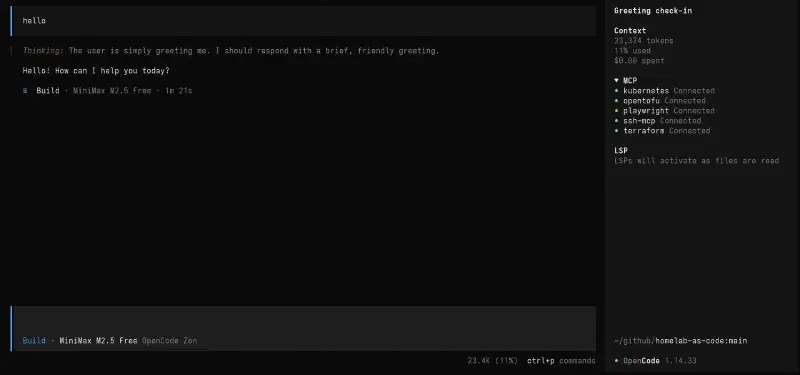
When opening OpenCode in a terminal, it feels familiar but different. The starting screen looks a lot like a classic search engine, with the prompt box centered on the screen, rather than being off to the bottom like in most other agentic CLI tools.
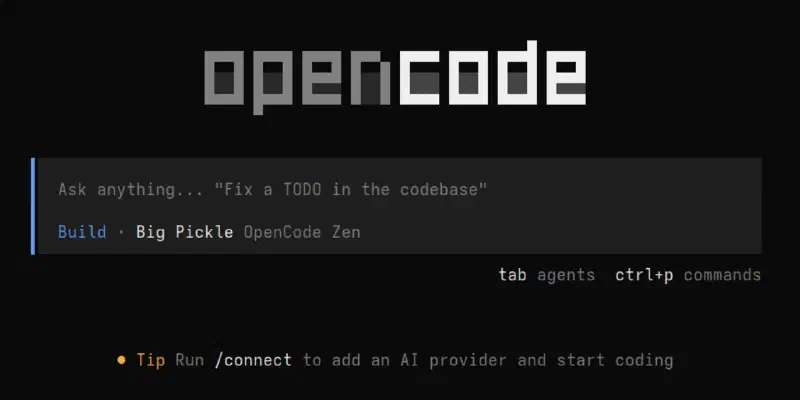
However, once you enter an initial prompt, the prompt box moves to the bottom of the terminal, making for a more familiar look. In my opinion, OpenCode strikes a good balance: it will feel familiar to users who have used Claude Code (and similar tools) before, but at the same time it does not feel like a clone of other tools. OpenCode does a lot of unique things that other tools don’t do. For example, OpenCode has a useful sidebar that displays information about active MCPs, LSPs (language servers) and token usage for the current session.
The look of OpenCode becomes even more unique when using its web UI or the OpenCode desktop app.
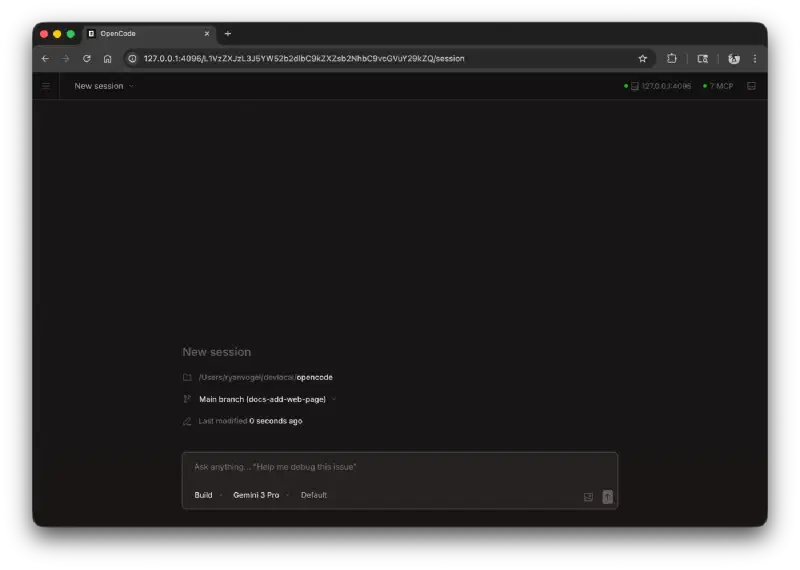
Image source: Web | OpenCode
Models and Providers
When first using OpenCode, it defaults to using the OpenCode Zen models. As of today, OpenCode Zen offers several free models, as well as paid models.
These paid models can either be used by paying for credits (similar to OpenRouter) or using the OpenCode Go subscription. However, OpenCode does not limit users to its own offering. One of the best features of OpenCode is its wide provider support. Users can access LLMs from practically any provider (that hasn’t outright blocked OpenCode), or even use local models. This provides users with a lot of flexibility to use the same tool across many different models, with one unified agent harness. It also means users are not “locked in” to one provider if they want to continue using OpenCode. When providers change the terms, such as Claude and Gemini limiting usage of OpenCode, or GitHub Copilot changing the terms of their subscriptions, OpenCode users can just move to other providers and continue their existing workflow.
Agentic Tool Usage
Using one tool for all providers also means that I can have a unified place to configure my MCP servers, Skills and AGENTS.md files. While there have been attempts to standardize the world of agents, including the Agentic AI Foundation (AAIF), the reality is that agentic tools still have different configuration methods. For example, Anthropic to date has refused to adopt the usage of the AGENTS.md file, instead referring only to the CLAUDE.md file.
OpenCode supports these emerging agent standards, as well as LSP servers (Language Server Protocol, which has been around before agents, to give code editors better support for programming languages). At the same time, OpenCode also has its own config file.
As an example, if you want to configure the Chrome DevTools MCP server, add the following to your OpenCode config:
{
  "$schema": "https://opencode.ai/config.json",
  "mcp": {
    "chrome-devtools": {
      "type": "local",
      "command": ["npx", "-y", "chrome-devtools-mcp@latest"]
    }
  }
}
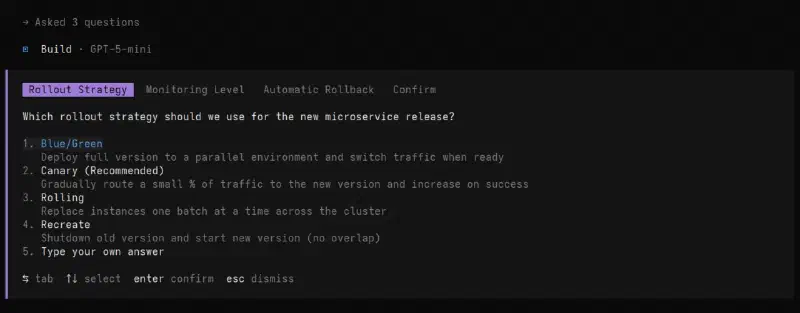
OpenCode also supports a range of built-in tools, including web searches. One of my personal favorite tools is the question tool. It allows the model to ask you questions mid-task: for gathering preferences, clarifying instructions, or getting decisions on implementation choices. Each question includes a header, question text, and a list of options, with the ability to type a custom answer. When there are multiple questions, you can navigate between them before submitting.
It’s Dangerous: Permissions and Safety
OpenCode is a powerful tool, and with great power comes great responsibility. By default, it will happily edit anything, run anything, and delete anything without asking, which can feel great for vibe-coding but can also wreak havoc on your machine and codebases if left unchecked. For users that are coming from Claude Code, the default permissions feel similar to the claude --dangerously-skip-permissions flag. By default, OpenCode does not ask permission for anything. It edits files freely and can run any command. Even when using “Plan” mode (instead of “Build” mode), OpenCode can still run commands (by default the “Plan” mode only disallows file edits). Fortunately, this is fairly easy to fix. To get a locked-down OpenCode, add this to your OpenCode config:
{
  "$schema": "https://opencode.ai/config.json",
  "permission": {
    "*": "ask"
  }
}It is also worth running OpenCode in a sandboxed environment. Refer to my previous article on Claude Code Sandboxing for examples on how to achieve this.
Final Verdict: Is OpenCode Better Than Claude Code?
Overall, OpenCode is a very compelling agent tool, with wide model support and lots of features. It is certainly among the best AI tools I have ever used.
On the question of “OpenCode vs. Claude Code”, I would say both tools are honestly equally strong. OpenCode felt like a breath of fresh air after months of using Claude Code, with many unique features. One example is mouse support, which Claude Code has only recently gained and which is currently still a preview feature. At the same time, going back to Claude Code after several months of only using OpenCode, I have noticed Anthropic have not been resting and have been frantically adding new features to Claude Code, including plugins and a plugin marketplace, Agent Teams for multi-agent orchestration, the /btw command for lightweight side questions, and Auto mode, a new permission tier that sits between manual approval and skipping permissions entirely.
Overall, OpenCode feels surprisingly more polished (despite being developed by a much smaller team), while Claude Code has the edge in raw features. Nevertheless, the tools feel very close in quality. The choice between them ultimately comes down to one question: do you have a Claude subscription?
As I explained at the opening of this article, Anthropic has made it clear that Claude subscriptions are only for use within official Claude tools, and third-party tool usage is blocked for subscribers. Claude Code also locks you into Claude models exclusively, with no support for other providers.
If you’re already paying for a Claude subscription, Claude Code is the natural fit, as it’s the only tool where Anthropic’s subscriptions are officially supported. If you’re not, OpenCode’s model flexibility and open-source nature make it a compelling alternative that gives you full control over both your models and your costs.
Featured image by Viktor Forgacs on Unsplash.