<?xml version="1.0" encoding="utf-8" standalone="yes"?><feed xmlns="http://www.w3.org/2005/Atom" xml:lang="en"><script src="https://www.rss.style/js/atom-style.js" xmlns="http://www.w3.org/1999/xhtml"/><title>Tower of Kubes</title><link rel="self" type="application/atom+xml" hreflang="en" href="https://www.towerofkubes.com/articles/feed.xml"/><link rel="alternate" type="application/atom+xml" hreflang="he" href="https://www.towerofkubes.com/he/articles/feed.xml"/><link rel="alternate" type="application/atom+xml" hreflang="x-default" href="https://www.towerofkubes.com/articles/feed.xml"/><link rel="alternate" type="text/html" hreflang="en" href="https://www.towerofkubes.com/articles/"/><link rel="alternate" type="application/rss+xml" hreflang="en" href="https://www.towerofkubes.com/articles/index.xml"/><id>/</id><updated>2026-05-05T00:00:00Z</updated><author><name>Ro'i Bandel</name></author><generator>Hugo 0.157.0</generator><entry><title>OpenCode: The Agentic Tool That Anthropic and Google Don't Want You To Use</title><link rel="alternate" type="text/html" hreflang="en" href="https://www.towerofkubes.com/articles/opencode/"/><id>https://www.towerofkubes.com/articles/opencode/</id><updated>2026-05-05T00:00:00Z</updated><summary type="html">OpenCode is the open-source agentic CLI tool that both Anthropic and Google moved to block from their subscription APIs. Here’s a hands-on look at what makes it genuinely different, and whether it’s worth switching from Claude Code.</summary><content type="html"><![CDATA[<p>For the past four months, <a href="https://opencode.ai"  target="_blank" rel="noreferrer">OpenCode</a> has been my primary agent tool. A piece of AI industry drama is what brought it to my attention.</p>
<figure><img
    class="my-0 rounded-md"
    loading="lazy"
    decoding="async"
    fetchpriority="auto"
    alt="OpenCode logo with tagline: “The open source AI coding agent”"
    width="1280"
    height="721"
    src="/articles/opencode/opencode-logo-with-tagline_hu_897512d6efaab35c.webp"
    srcset="/articles/opencode/opencode-logo-with-tagline_hu_897512d6efaab35c.webp 800w, /articles/opencode/opencode-logo-with-tagline.webp 1280w"
    sizes="(min-width: 768px) 50vw, 65vw"
    data-zoom-src="/articles/opencode/opencode-logo-with-tagline.webp"></figure>

<h2 class="relative group">Background
    <div id="background" class="anchor"></div>
    
</h2>
<p>In January 2026, I started seeing drama online: <a href="https://github.com/anomalyco/opencode/issues/7410"  target="_blank" rel="noreferrer">Anthropic blocks third-party use of Claude subscriptions</a>. The most surprising part to me wasn’t that Anthropic decided to block this type of usage, that’s unfortunate but expected. What surprised me was that I hadn’t known this was even possible in the first place.</p>
<p>I had briefly read about OpenCode and Crush during my <a href="/articles/agentic-cli-tools-comparison/" >Agentic CLI Tools Comparison</a>, but hadn’t used them due to their <a href="/articles/agentic-cli-tools-comparison/#byo-bring-your-own-api-keys" >BYO (Bring Your Own) API key requirement</a>, which in most cases is significantly more expensive than subscription tiers. As it turns out, people had found ways to use those subscriptions anyway. OpenCode had implemented an OAuth flow that spoofed Claude Code’s HTTP headers to authenticate against Anthropic’s API with a Claude Pro or Max subscription. This gave OpenCode users access to Claude models at subscription pricing, a significant cost advantage.</p>

<h3 class="relative group">The Crackdown
    <div id="the-crackdown" class="anchor"></div>
    
</h3>
<p>Anthropic’s response came in several phases. Active enforcement began on January 9, 2026, when Anthropic deployed server-side protections blocking all unofficial OAuth access. On February 19, Anthropic updated its legal compliance page to make the OAuth restriction explicit: OAuth tokens obtained from Claude subscription accounts are only permitted for use with official Claude tools.</p>
<p>Legal requests followed, and in mid-March OpenCode’s maintainers <a href="https://github.com/anomalyco/opencode/pull/18186"  target="_blank" rel="noreferrer">merged a PR</a> removing the Anthropic OAuth plugin from the project. By early April, Anthropic extended restrictions to OpenClaw and other third-party harnesses. Google ran the same playbook with Gemini around the same period, banning third-party OAuth access and issuing account-level suspensions.</p>

<h3 class="relative group">The Community Reaction
    <div id="the-community-reaction" class="anchor"></div>
    
</h3>
<p>The <a href="https://news.ycombinator.com/item?id=46549823"  target="_blank" rel="noreferrer">Hacker News thread</a> filled with genuine disappointment. Many users felt OpenCode was a significantly better tool than Claude Code. The main advantages cited were its open-source <a href="https://github.com/anomalyco/opencode#MIT-1-ov-file"  target="_blank" rel="noreferrer">MIT license</a>, an optional web UI and client/server architecture, and the absence of flickering, a complaint about Claude Code that hasn’t gone away. OpenCode had also grown remarkably fast, reaching over 150,000 GitHub stars.</p>
<p>OpenAI and GitHub went the other direction. Tibo, OpenAI’s Codex lead, <a href="https://x.com/thsottiaux/status/2009742187484065881"  target="_blank" rel="noreferrer">announced on X</a> that Codex subscribers could use their subscription directly within OpenCode, and GitHub formally <a href="https://github.blog/changelog/2026-01-16-github-copilot-now-supports-opencode/"  target="_blank" rel="noreferrer">announced support for OpenCode</a> across all GitHub Copilot subscriptions. That’s what originally got me to give OpenCode a real try, paired with GitHub Copilot and ChatGPT subscriptions, and I’ve been using it regularly since.</p>

<h2 class="relative group">My Impressions of OpenCode
    <div id="my-impressions-of-opencode" class="anchor"></div>
    
</h2>
<p>OpenCode immediately seemed appealing when I started using it. Until that point, Claude Code had remained my preferred agentic CLI tool. In the months since I wrote <a href="/articles/agentic-cli-tools-comparison/" >Agentic CLI Tools Comparison</a>, I had continued experimenting with different CLI tools and models, notably <a href="/articles/claude-sonnet-4.5-and-claude-code-2.0/" >Claude Code 2.0</a>, Codex CLI, Gemini CLI, and GitHub Copilot CLI. Claude Code consistently remained the best tool in my opinion, both in terms of UI design and features, and in terms of Anthropic’s models feeling the strongest at coding and agentic tool usage based on my experience. The other tools felt like UI imitations of Claude Code running different models, with no meaningful improvements. OpenCode is genuinely different, though. It runs on a client/server model with an HTTP API, supports 75+ AI providers including local models, and has native multi-session support.</p>
<p>When opening OpenCode in a terminal, it feels familiar but different. The starting screen looks a lot like a classic search engine, with the prompt box centered on the screen, rather than being off to the bottom like in most other agentic CLI tools.</p>
<figure><img
    class="my-0 rounded-md"
    loading="lazy"
    decoding="async"
    fetchpriority="auto"
    alt="OpenCode welcome screen"
    width="1280"
    height="640"
    src="/articles/opencode/opencode-welcome-screen_hu_74a83788b244a153.webp"
    srcset="/articles/opencode/opencode-welcome-screen_hu_74a83788b244a153.webp 800w, /articles/opencode/opencode-welcome-screen.webp 1280w"
    sizes="(min-width: 768px) 50vw, 65vw"
    data-zoom-src="/articles/opencode/opencode-welcome-screen.webp"></figure>
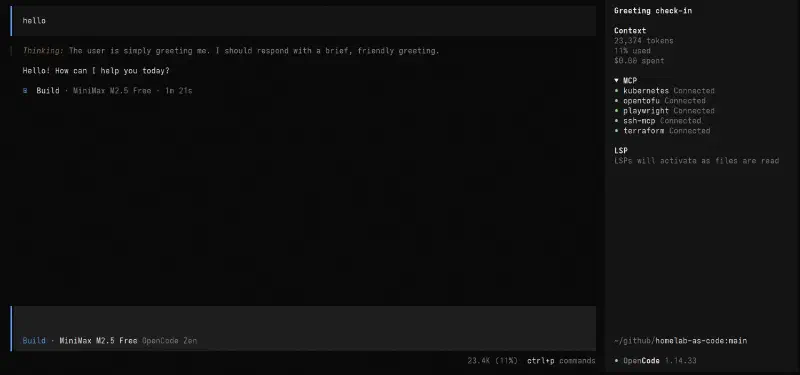
<p>However, once you enter an initial prompt, the prompt box moves to the bottom of the terminal, making for a more familiar look. In my opinion, OpenCode strikes a good balance: it will feel familiar to users who have used Claude Code (and similar tools) before, but at the same time it does not feel like a clone of other tools. OpenCode does a lot of unique things that other tools don’t do. For example, OpenCode has a useful sidebar that displays information about active MCPs, LSPs (language servers) and token usage for the current session.</p>
<figure><img
    class="my-0 rounded-md"
    loading="lazy"
    decoding="async"
    fetchpriority="auto"
    alt="OpenCode sidebar showing MCP connections, LSP status, and token usage"
    width="1920"
    height="900"
    src="/articles/opencode/opencode-sidebar_hu_c305c873a185037.webp"
    srcset="/articles/opencode/opencode-sidebar_hu_c305c873a185037.webp 800w, /articles/opencode/opencode-sidebar_hu_116abb3292d419d0.webp 1280w"
    sizes="(min-width: 768px) 50vw, 65vw"
    data-zoom-src="/articles/opencode/opencode-sidebar.webp"></figure>
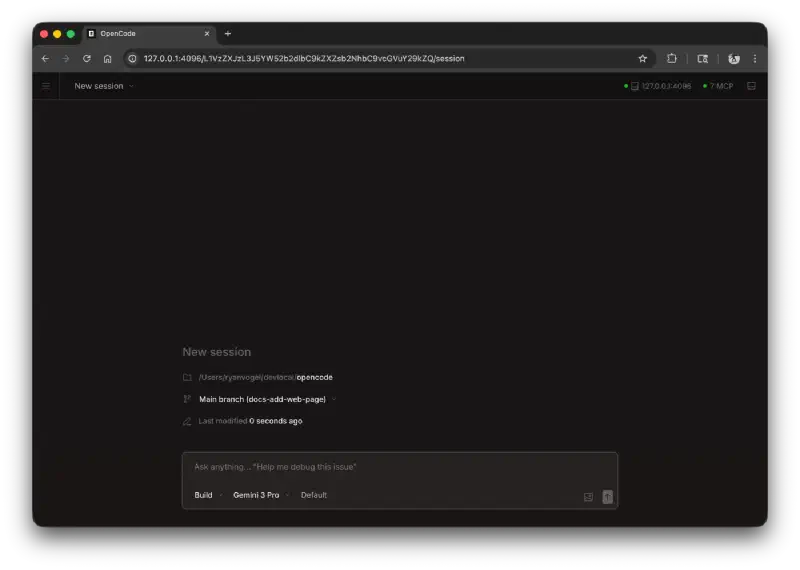
<p>The look of OpenCode becomes even more unique when using its <a href="https://opencode.ai/docs/web/"  target="_blank" rel="noreferrer">web UI</a> or the OpenCode desktop app.</p>
<figure><img
    class="my-0 rounded-md"
    loading="lazy"
    decoding="async"
    fetchpriority="auto"
    alt="OpenCode Web - New Session"
    width="1400"
    height="997"
    src="/articles/opencode/opencode-web-homepage-new-session_hu_2e42a15a6c01ef0b.webp"
    srcset="/articles/opencode/opencode-web-homepage-new-session_hu_2e42a15a6c01ef0b.webp 800w, /articles/opencode/opencode-web-homepage-new-session_hu_9c29e52cad0c0b1.webp 1280w"
    sizes="(min-width: 768px) 50vw, 65vw"
    data-zoom-src="/articles/opencode/opencode-web-homepage-new-session.webp"></figure>
<p><em>Image source: <a href="https://opencode.ai/docs/web/"  target="_blank" rel="noreferrer">Web | OpenCode</a></em></p>

<h3 class="relative group">Models and Providers
    <div id="models-and-providers" class="anchor"></div>
    
</h3>
<p>When first using OpenCode, it defaults to using the OpenCode Zen models. As of today, <a href="https://opencode.ai/docs/zen/#pricing"  target="_blank" rel="noreferrer">OpenCode Zen offers several free models</a>, as well as paid models.</p>

    <div class="admonition tip">
      <div class="admonition-header"><svg xmlns="http://www.w3.org/2000/svg" viewBox="0 0 384 512"><path d="M272 384c9.6-31.9 29.5-59.1 49.2-86.2c0 0 0 0 0 0c5.2-7.1 10.4-14.2 15.4-21.4c19.8-28.5 31.4-63 31.4-100.3C368 78.8 289.2 0 192 0S16 78.8 16 176c0 37.3 11.6 71.9 31.4 100.3c5 7.2 10.2 14.3 15.4 21.4c0 0 0 0 0 0c19.8 27.1 39.7 54.4 49.2 86.2l160 0zM192 512c44.2 0 80-35.8 80-80l0-16-160 0 0 16c0 44.2 35.8 80 80 80zM112 176c0 8.8-7.2 16-16 16s-16-7.2-16-16c0-61.9 50.1-112 112-112c8.8 0 16 7.2 16 16s-7.2 16-16 16c-44.2 0-80 35.8-80 80z"/></svg>
        <span>When using OpenCode Zen, it’s recommended to read about the <a href="https://opencode.ai/docs/zen/#privacy"  target="_blank" rel="noreferrer">privacy for each model</a>.</span>
      </div>
    </div><p>These paid models can either be used by paying for credits (similar to OpenRouter) or using the <a href="https://opencode.ai/go"  target="_blank" rel="noreferrer">OpenCode Go subscription</a>. However, OpenCode does not limit to only using their offering. One of the best features of OpenCode is its wide <a href="https://opencode.ai/docs/providers/"  target="_blank" rel="noreferrer">provider</a> support. LLM models can be used from practically any provider (that hasn’t outright blocked OpenCode), or even use local models. This provides users a lot of flexibility to use the same tool across many different models, with one unified agent harness. It also means users are not “locked-in” to one provider if they want to continue using OpenCode. When providers change the terms, such as Claude and Gemini limiting usage of OpenCode, or <a href="https://github.blog/news-insights/company-news/github-copilot-is-moving-to-usage-based-billing/"  target="_blank" rel="noreferrer">GitHub Copilot changing the terms of their subscriptions</a>, OpenCode users can just move to other providers and continue their existing workflow.</p>

<h3 class="relative group">Agentic Tool Usage
    <div id="agentic-tool-usage" class="anchor"></div>
    
</h3>
<p>Using one tool for all providers also means that I can have a unified place to configure my <a href="https://modelcontextprotocol.io"  target="_blank" rel="noreferrer">MCP</a> servers, <a href="https://agentskills.io"  target="_blank" rel="noreferrer">Skills</a> and <a href="https://agents.md/"  target="_blank" rel="noreferrer">AGENTS.md</a> files. While there have been attempts to standardize the agents world, including the <a href="https://aaif.io/"  target="_blank" rel="noreferrer">Agentic AI Foundation (AAIF)</a>, the reality is that agentic tools still have different ways to configure. For example, Anthropic to date has refused to adopt the usage of the <code>AGENTS.md</code> file, instead referring only to the <code>CLAUDE.md</code> file.</p>
<p>OpenCode supports these emerging agent standards, as well as <a href="https://opencode.ai/docs/lsp/"  target="_blank" rel="noreferrer">LSP servers</a> (Language Server Protocol, which has been around before agents, to give code editors better support for programming languages). At the same time, <a href="https://opencode.ai/docs/config/"  target="_blank" rel="noreferrer">OpenCode also has its own config file</a>.</p>
<p>As an example, if you want to configure <a href="/articles/chrome-devtools-mcp" >Chrome DevTools MCP server</a>, add the following to your <a href="https://opencode.ai/docs/config/"  target="_blank" rel="noreferrer">OpenCode config</a>:</p>
<div class="highlight-wrapper"><div class="highlight"><pre tabindex="0" class="chroma"><code class="language-json" data-lang="json"><span class="line"><span class="cl"><span class="p">{</span>
</span></span><span class="line"><span class="cl">  <span class="nt">"$schema"</span><span class="p">:</span> <span class="s2">"https://opencode.ai/config.json"</span><span class="p">,</span>
</span></span><span class="line"><span class="cl">  <span class="nt">"mcp"</span><span class="p">:</span> <span class="p">{</span>
</span></span><span class="line"><span class="cl">    <span class="nt">"chrome-devtools"</span><span class="p">:</span> <span class="p">{</span>
</span></span><span class="line"><span class="cl">      <span class="nt">"type"</span><span class="p">:</span> <span class="s2">"local"</span><span class="p">,</span>
</span></span><span class="line"><span class="cl">      <span class="nt">"command"</span><span class="p">:</span> <span class="p">[</span><span class="s2">"npx"</span><span class="p">,</span> <span class="s2">"-y"</span><span class="p">,</span> <span class="s2">"chrome-devtools-mcp@latest"</span><span class="p">]</span>
</span></span><span class="line"><span class="cl">    <span class="p">}</span>
</span></span><span class="line"><span class="cl">  <span class="p">}</span>
</span></span><span class="line"><span class="cl"><span class="p">}</span></span></span></code></pre></div></div>
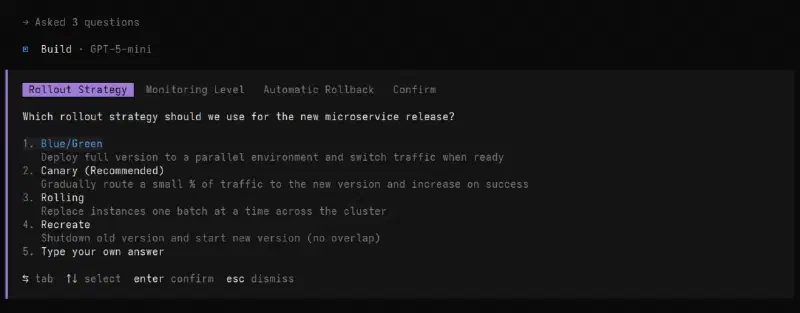
<p>OpenCode also supports a range of <a href="https://opencode.ai/docs/tools/"  target="_blank" rel="noreferrer">built-in tools</a>, including web searches. One of my personal favorite tools is the <a href="https://opencode.ai/docs/tools/#question"  target="_blank" rel="noreferrer">question tool</a>. It allows the model to ask you questions mid-task: for gathering preferences, clarifying instructions, or getting decisions on implementation choices. Each question includes a header, question text, and a list of options, with the ability to type a custom answer. When there are multiple questions, you can navigate between them before submitting.</p>
<figure><img
    class="my-0 rounded-md"
    loading="lazy"
    decoding="async"
    fetchpriority="auto"
    alt="OpenCode question tool prompting a choice of rollout strategy"
    width="1280"
    height="500"
    src="/articles/opencode/opencode-question-tool_hu_88c5c43675966c68.webp"
    srcset="/articles/opencode/opencode-question-tool_hu_88c5c43675966c68.webp 800w, /articles/opencode/opencode-question-tool.webp 1280w"
    sizes="(min-width: 768px) 50vw, 65vw"
    data-zoom-src="/articles/opencode/opencode-question-tool.webp"></figure>

<h3 class="relative group">It’s Dangerous: Permissions and Safety
    <div id="its-dangerous-permissions-and-safety" class="anchor"></div>
    
</h3>
<p>OpenCode is a powerful tool, and with great power comes great responsibility. By default, it will happily edit anything, run anything, and delete anything without asking, which can feel great for vibe-coding but can also wreak havoc on your machine and codebases if left unchecked. For users that are coming from Claude Code, the default permissions feel similar to the <code>claude --dangerously-skip-permissions</code> flag. By default, OpenCode does not ask permission for anything. It edits files freely and can run <em>any</em> command. Even when using “Plan” mode (instead of “Build” mode), OpenCode can still run commands (by default the “Plan” mode only disallows file edits). Fortunately, this is fairly easy to fix. To get a locked-down OpenCode, add this to your <a href="https://opencode.ai/docs/config/"  target="_blank" rel="noreferrer">OpenCode config</a>:</p>
<div class="highlight-wrapper"><div class="highlight"><pre tabindex="0" class="chroma"><code class="language-json" data-lang="json"><span class="line"><span class="cl"><span class="p">{</span>
</span></span><span class="line"><span class="cl">  <span class="nt">"$schema"</span><span class="p">:</span> <span class="s2">"https://opencode.ai/config.json"</span><span class="p">,</span>
</span></span><span class="line"><span class="cl">  <span class="nt">"permission"</span><span class="p">:</span> <span class="p">{</span>
</span></span><span class="line"><span class="cl">    <span class="nt">"*"</span><span class="p">:</span> <span class="s2">"ask"</span>
</span></span><span class="line"><span class="cl">  <span class="p">}</span>
</span></span><span class="line"><span class="cl"><span class="p">}</span></span></span></code></pre></div></div>

    <div class="admonition tip">
      <div class="admonition-header"><svg xmlns="http://www.w3.org/2000/svg" viewBox="0 0 384 512"><path d="M272 384c9.6-31.9 29.5-59.1 49.2-86.2c0 0 0 0 0 0c5.2-7.1 10.4-14.2 15.4-21.4c19.8-28.5 31.4-63 31.4-100.3C368 78.8 289.2 0 192 0S16 78.8 16 176c0 37.3 11.6 71.9 31.4 100.3c5 7.2 10.2 14.3 15.4 21.4c0 0 0 0 0 0c19.8 27.1 39.7 54.4 49.2 86.2l160 0zM192 512c44.2 0 80-35.8 80-80l0-16-160 0 0 16c0 44.2 35.8 80 80 80zM112 176c0 8.8-7.2 16-16 16s-16-7.2-16-16c0-61.9 50.1-112 112-112c8.8 0 16 7.2 16 16s-7.2 16-16 16c-44.2 0-80 35.8-80 80z"/></svg>
        <span><a href="https://opencode.ai/docs/permissions/"  target="_blank" rel="noreferrer">OpenCode Permissions</a> can be customized further.</span>
      </div>
    </div><p>It is also worth running OpenCode in a sandboxed environment. Refer to my previous article on <a href="/articles/claude-code-sandboxing" >Claude Code Sandboxing</a> for examples on how to achieve this.</p>

<h2 class="relative group">Final Verdict: Is OpenCode Better Than Claude Code?
    <div id="final-verdict-is-opencode-better-than-claude-code" class="anchor"></div>
    
</h2>
<p>Overall, OpenCode is a very compelling agent tool, with wide model support and lots of features. It is certainly among the best AI tools I have ever used.</p>
<p>On the question of “OpenCode vs. Claude Code”, I would say both tools are honestly equally strong. OpenCode felt like a breath of fresh air after months of using Claude Code, with many unique features. For example, mouse support, which Claude Code has only recently gained and is currently still a preview feature. At the same time, going back to Claude Code after several months of only using OpenCode, I have noticed Anthropic have not been resting and have been frantically adding new features to Claude Code, including plugins and a plugin marketplace, Agent Teams for multi-agent orchestration, the <code>/btw</code> command for lightweight side questions, and Auto mode, a new permission tier that sits between manual approval and skipping permissions entirely.</p>
<p>Overall, OpenCode feels surprisingly more polished (despite being developed by a much smaller team), while Claude Code has the edge in raw features. Nevertheless, the tools feel very close in quality. The choice between them ultimately comes down to one question: do you have a Claude subscription?</p>
<p>As I explained at the opening of this article, Anthropic has made their stance clear that Claude subscriptions are only for use within official Claude tools, and third-party tool usage is blocked for subscribers. Claude Code also locks you into Claude models exclusively, with no support for other providers.</p>
<p>If you’re already paying for a Claude subscription, Claude Code is the natural fit, as it’s the only tool where Anthropic’s subscriptions are officially supported. If you’re not, OpenCode’s model flexibility and open-source nature make it a compelling alternative that gives you full control over both your models and your costs.</p>
<hr>
<p><em>Featured image by <a href="https://unsplash.com/@sonance?utm_source=hugo&utm_medium=referral"  target="_blank" rel="noreferrer">Viktor Forgacs</a> on <a href="https://unsplash.com/photos/red-and-white-open-neon-signage-LNwIJHUtED4?utm_source=hugo&utm_medium=referral"  target="_blank" rel="noreferrer">Unsplash</a>.</em></p>
]]></content><author><name>Ro'i Bandel</name></author><category term="ai" label="Ai" scheme="https://www.towerofkubes.com/tags/ai/"/><category term="cli" label="Cli" scheme="https://www.towerofkubes.com/tags/cli/"/><category term="tools" label="Tools" scheme="https://www.towerofkubes.com/tags/tools/"/><category term="llm" label="Llm" scheme="https://www.towerofkubes.com/tags/llm/"/><category term="backman-feed" label="Backman-Feed" scheme="https://www.towerofkubes.com/tags/backman-feed/"/><published>2026-05-05T00:00:00Z</published></entry><entry><title>TrueNAS Removes SMART Scheduling</title><link rel="alternate" type="text/html" hreflang="en" href="https://www.towerofkubes.com/articles/truenas-removes-smart-scheduling/"/><id>https://www.towerofkubes.com/articles/truenas-removes-smart-scheduling/</id><updated>2026-01-25T00:00:00Z</updated><summary type="html">TrueNAS 25.10 (Goldeye) removed SMART Scheduling from the Web UI. This has made a lot of people very angry and has been widely regarded as a bad move.</summary><content type="html"><![CDATA[<p>I have recently learned that <a href="https://www.truenas.com/docs/scale/25.10/gettingstarted/versionnotes/"  target="_blank" rel="noreferrer">TrueNAS 25.10 (Goldeye)</a> removed SMART Scheduling from the Web UI:</p>

    <div class="admonition quote">
      <div class="admonition-header"><svg xmlns="http://www.w3.org/2000/svg" viewBox="0 0 448 512"><path d="M448 296c0 66.3-53.7 120-120 120l-8 0c-17.7 0-32-14.3-32-32s14.3-32 32-32l8 0c30.9 0 56-25.1 56-56l0-8-64 0c-35.3 0-64-28.7-64-64l0-64c0-35.3 28.7-64 64-64l64 0c35.3 0 64 28.7 64 64l0 32 0 32 0 72zm-256 0c0 66.3-53.7 120-120 120l-8 0c-17.7 0-32-14.3-32-32s14.3-32 32-32l8 0c30.9 0 56-25.1 56-56l0-8-64 0c-35.3 0-64-28.7-64-64l0-64c0-35.3 28.7-64 64-64l64 0c35.3 0 64 28.7 64 64l0 32 0 32 0 72z"/></svg>
        <span>Quote</span>
      </div>
      <div class="admonition-content">
        <p><strong>SMART Monitoring:</strong></p>
<ul>
<li>25.10 removes the built-in SMART test scheduling and monitoring interface to improve user flexibility for disk monitoring. The smartmontools binaries remain installed and continue to be used internally by TrueNAS, ensuring that existing third-party scripts and monitoring tools continue to work unchanged. Users seeking advanced SMART monitoring can install the “Scrutiny” app from the TrueNAS catalog, which offers superior disk health tracking with historical data storage, customizable alerts, and automatic drive detection. TrueNAS maintains monitoring of critical disk health indicators and automatically migrates existing scheduled SMART tests to cron tasks during upgrade.
See <a href="https://www.truenas.com/docs/scale/25.10/gettingstarted/versionnotes/#disk-management"  target="_blank" rel="noreferrer">Disk Management</a> for more information on disk health monitoring in 25.10 and beyond.</li>
</ul>
      </div>
    </div><ul>
<li><a href="https://www.truenas.com/docs/scale/25.10/gettingstarted/versionnotes/"  target="_blank" rel="noreferrer">25.10 (Goldeye) Version Notes | TrueNAS Documentation Hub</a></li>
</ul>
<p>This is a baffling change. TrueNAS is a <strong>NAS</strong> (Network Attached Storage) operating system. Data integrity is important for NAS users, it is important enough that TrueNAS has a “Data Protection” tab (which was where SMART tests used to be scheduled, before that section was removed in the 25.10 update).</p>
<p>SMART tests have their flaws, even so they can be very valuable and were used by many TrueNAS users, including me! One of the reasons I liked using TrueNAS was how easy it was to schedule SMART tests and ZFS scrub tasks.</p>

<h2 class="relative group">What Are SMART Tests?
    <div id="what-are-smart-tests" class="anchor"></div>
    
</h2>
<p>SMART (Self-Monitoring, Analysis and Reporting Technology) is the drive’s built-in health reporting. It exposes <strong>attributes</strong> (error counters, temps, reallocated/pending sectors, etc.) and can run <strong>self-tests</strong> on demand.</p>
<p>The two tests most people schedule are:</p>
<ul>
<li><strong>Short test</strong>: quick sanity check.</li>
<li><strong>Long/extended test</strong>: full surface scan that can take hours (and may impact performance while running).</li>
</ul>
<p>SMART tests don’t replace <strong>ZFS scrubs</strong> (scrubs verify data end-to-end), but they’re still useful as an early warning system for drives that are slowly going bad.</p>

<h2 class="relative group">What Exactly Did TrueNAS Remove?
    <div id="what-exactly-did-truenas-remove" class="anchor"></div>
    
</h2>
<p>Technically, iXsystems did not remove any SMART functionality from the system, only a UI section. SMART tests can still be scheduled using cron, though it is more cumbersome. For such a critical task, I appreciate having a UI that explains when tests are scheduled and makes it easy to schedule them at different times.</p>
<p>Indeed, the SMART UI in TrueNAS was never great. For as much as I avoid using TrueNAS apps (for reasons such as TrueNAS having broken every single app in the past when they moved from Kubernetes to Docker), the one app I always install is <a href="https://github.com/AnalogJ/scrutiny"  target="_blank" rel="noreferrer">Scrutiny</a>. It explains the SMART results better than any other app that I have found. Nevertheless, I take issue with the recommendation to use it as if it’s an alternative (“Users seeking advanced SMART monitoring can install the “Scrutiny” app from the TrueNAS catalog, which offers superior disk health tracking with historical data storage, customizable alerts, and automatic drive detection”). Scrutiny is great at displaying SMART results, however it <em>does not</em> schedule the tests itself. <a href="https://github.com/AnalogJ/scrutiny/issues/506#issuecomment-1688484758"  target="_blank" rel="noreferrer">Scrutiny is also seeking new maintainers</a>. What would’ve been nice was if instead of just pointing users to a third-party app, iXsystems would have stepped up and contributed to Scrutiny, acknowledging the things it does better than TrueNAS itself while also working to bring a better SMART UI to TrueNAS. Notably, iXsystems have contributed back to OpenZFS.</p>

<h2 class="relative group">How Did the TrueNAS Community Respond?
    <div id="how-did-the-truenas-community-respond" class="anchor"></div>
    
</h2>
<p>What was perhaps more infuriating than the decision itself was the stubbornness in ignoring the community feedback that followed. A feature request to <a href="https://forums.truenas.com/t/not-accepted-bring-back-smart-scheduling-to-ui/57703"  target="_blank" rel="noreferrer">Bring back SMART scheduling to UI</a> was opened on the <a href="https://forums.truenas.com/c/features/12"  target="_blank" rel="noreferrer">Feature Requests</a> section on the TrueNAS forums, stating “Literally no one approves this change. Bring it back.”. The feature request gained <a href="https://forums.truenas.com/t/not-accepted-bring-back-smart-scheduling-to-ui/57703/54"  target="_blank" rel="noreferrer">significant traction</a>: it received 121 votes and 110 responses. In the end, after internal discussion, the feature was <a href="https://forums.truenas.com/t/not-accepted-bring-back-smart-scheduling-to-ui/57703/109"  target="_blank" rel="noreferrer">denied</a> (with explanations that many users didn’t find convincing).</p>
<p>If this doesn’t prove that iXsystems doesn’t care about community feedback, I don’t know what does. So much for TrueNAS “Community Edition”.</p>

<h2 class="relative group">Will I Keep Using TrueNAS?
    <div id="will-i-keep-using-truenas" class="anchor"></div>
    
</h2>
<p>I have been using TrueNAS for several years, since the release of TrueNAS SCALE in 2022 (which has since been renamed to TrueNAS Community Edition). I have maintained <a href="https://github.com/roib20/proxmox-scripts/tree/main/proxmox-truenas-script"  target="_blank" rel="noreferrer">scripts that help install TrueNAS on Proxmox VE</a>. To this day, TrueNAS remains a critical part of my homelab.</p>
<p>Of course there are alternatives. Before I moved to TrueNAS, I was using <a href="https://www.openmediavault.org/"  target="_blank" rel="noreferrer">OpenMediaVault</a> (OMV). I have high praise for that project, and unlike TrueNAS and Unraid, OMV is community-driven with no profit motives (<a href="https://www.openmediavault.org/donate.html"  target="_blank" rel="noreferrer">donations are accepted</a>). The main reason I moved to TrueNAS at the time was the native ZFS integration. OMV relies on a <a href="https://github.com/OpenMediaVault-Plugin-Developers/openmediavault-zfs"  target="_blank" rel="noreferrer">plugin</a> to enable ZFS. It works, but I preferred a system that’s designed to work with ZFS from the get-go (I was able to export my ZFS pool from OMV and import it into TrueNAS with no data loss).</p>
<p>These days, if I were to move away from TrueNAS, I will likely go the DIY route instead. When I think of what I use TrueNAS for, all I really need is a system that supports ZFS, NFS/SMB data shares, SMART tests and <a href="https://github.com/AnalogJ/scrutiny"  target="_blank" rel="noreferrer">Scrutiny</a>. I am currently experimenting with a NixOS installation that does all of that in one declarative configuration.</p>
<p>Nevertheless, for now I plan to stay with TrueNAS (at least until I finish examining NixOS for this purpose). I will continue using TrueNAS for the time being, ensure SMART tests are still scheduled in cron, as well as continue using Scrutiny.</p>
<p>There is value in having a curated and tested NAS distribution, even if I don’t agree with all of their decisions. I am reminded of <a href="https://youtu.be/Npu7jkJk5nM"  target="_blank" rel="noreferrer">the time that Linus Sebastian lost a petabyte of data</a>, due to having manually configured ZFS on CentOS without data scrubbing. In TrueNAS, data scrubbing is configured by default to run automatically, and at least the scheduling UI for that has not been removed.</p>
<hr>
<p><em>Featured image by <a href="https://unsplash.com/@frank041985?utm_source=hugo&utm_medium=referral"  target="_blank" rel="noreferrer">Frank R</a> on <a href="https://unsplash.com/photos/black-and-silver-hard-disk-drive-SaiJ_n1TvCU?utm_source=hugo&utm_medium=referral"  target="_blank" rel="noreferrer">Unsplash</a>.</em></p>
]]></content><author><name>Ro'i Bandel</name></author><category term="self-hosted" label="Self-Hosted" scheme="https://www.towerofkubes.com/tags/self-hosted/"/><category term="nas" label="Nas" scheme="https://www.towerofkubes.com/tags/nas/"/><category term="homelab" label="Homelab" scheme="https://www.towerofkubes.com/tags/homelab/"/><published>2026-01-25T00:00:00Z</published></entry><entry><title>Claude Code Sandboxing</title><link rel="alternate" type="text/html" hreflang="en" href="https://www.towerofkubes.com/articles/claude-code-sandboxing/"/><id>https://www.towerofkubes.com/articles/claude-code-sandboxing/</id><updated>2026-01-13T00:00:00Z</updated><summary type="html">Ways to run Claude Code in a sandbox</summary><content type="html"><![CDATA[<p>A couple of days ago, my coworker Roey Wullman wrote this article: <a href="https://www.develeap.com/claude-code-sandboxing-stop-babysitting-your-ai-assistant/roey/"  target="_blank" rel="noreferrer">Claude Code Sandboxing: Stop Babysitting Your AI Assistant</a> (published in <a href="https://www.develeap.com/magazine/"  target="_blank" rel="noreferrer">Develeap’s Magazine</a>).</p>
<p>This morning, I saw the latest announcement by Anthropic: <a href="https://claude.com/blog/cowork-research-preview"  target="_blank" rel="noreferrer">Introducing Cowork | Claude</a>, then read the <a href="https://news.ycombinator.com/item?id=46593022"  target="_blank" rel="noreferrer">comments on Hacker News</a>. Some of the comments discussed how secure Cowork is (or isn’t) and how it’s sandboxing works. Then other comments mentioned different approaches of sandboxing <a href="/articles/claude-sonnet-4.5-and-claude-code-2.0/" >Claude Code</a> (e.g. <a href="https://news.ycombinator.com/item?id=46594916"  target="_blank" rel="noreferrer">this comment</a> and <a href="https://news.ycombinator.com/item?id=46594059"  target="_blank" rel="noreferrer">these comments</a>).</p>

<h2 class="relative group">Ways to Sandbox Claude Code
    <div id="ways-to-sandbox-claude-code" class="anchor"></div>
    
</h2>
<ul>
<li><a href="https://www.develeap.com/claude-code-sandboxing-stop-babysitting-your-ai-assistant/roey/"  target="_blank" rel="noreferrer">Claude Code Sandboxing: Stop Babysitting Your AI Assistant - Develeap</a></li>
<li><a href="https://github.com/nezhar/claude-container"  target="_blank" rel="noreferrer">nezhar/claude-container: Container workflow for Claude Code. Complete isolation from host system while maintaining persistent credentials and workspace access.</a></li>
<li><a href="https://github.com/ashishb/amazing-sandbox"  target="_blank" rel="noreferrer">ashishb/amazing-sandbox: Amazing Sandbox  - inspired from https://ashishb.net/programming/run-tools-inside-docker/</a></li>
<li><a href="https://github.com/dagger/container-use"  target="_blank" rel="noreferrer">dagger/container-use: Development environments for coding agents. Enable multiple agents to work safely and independently with your preferred stack.</a></li>
<li><a href="https://github.com/mensfeld/claude-on-incus"  target="_blank" rel="noreferrer">mensfeld/claude-on-incus: Run coding agents in isolated Incus containers with session persistence, workspace isolation, and multi-slot support.</a></li>
</ul>
<hr>
<p><em>Featured image by <a href="https://unsplash.com/@markusspiske?utm_source=hugo&utm_medium=referral"  target="_blank" rel="noreferrer">Markus Spiske</a> on <a href="https://unsplash.com/photos/green-and-black-tractor-toy-KU3lOAiP-tQ?utm_source=hugo&utm_medium=referral"  target="_blank" rel="noreferrer">Unsplash</a>.</em></p>
]]></content><author><name>Ro'i Bandel</name></author><category term="claude" label="Claude" scheme="https://www.towerofkubes.com/tags/claude/"/><category term="ai" label="Ai" scheme="https://www.towerofkubes.com/tags/ai/"/><category term="llm" label="Llm" scheme="https://www.towerofkubes.com/tags/llm/"/><category term="security" label="Security" scheme="https://www.towerofkubes.com/tags/security/"/><published>2026-01-13T00:00:00Z</published></entry><entry><title>New Configuration Languages - MAML and TOON</title><link rel="alternate" type="text/html" hreflang="en" href="https://www.towerofkubes.com/articles/new-configuration-languages/"/><id>https://www.towerofkubes.com/articles/new-configuration-languages/</id><updated>2025-11-18T00:00:00Z</updated><summary type="html">MAML and TOON are two new configuration languages.</summary><content type="html"><![CDATA[<p>I came across this article today: <a href="https://medv.io/blog/things-i-dont-like-in-configuration-languages"  target="_blank" rel="noreferrer">Things I Don’t Like in Configuration Languages</a>. It mentions an overwhelming amount of configuration languages. XML, JSON and YAML are well known, but there are many others, some of which I have heard about and even used (for example, I have used TOML, JSON5 and JSONC), others were entirely new to me (there are more JSON variants than I realized). The article didn’t even mention <a href="/articles/kyaml/" >KYAML</a>.</p>
<p>What’s the solution for this mess? More configuration languages!</p>
<figure><img
    class="my-0 rounded-md"
    loading="lazy"
    decoding="async"
    fetchpriority="low"
    alt="xkcd: Standards"
    src="https://imgs.xkcd.com/comics/standards_2x.png"
    ></figure>
<ul>
<li><a href="https://xkcd.com/927/"  target="_blank" rel="noreferrer">xkcd: Standards</a></li>
</ul>

<h2 class="relative group"><a href="https://maml.dev/"  target="_blank" rel="noreferrer">MAML</a>
    <div id="maml" class="anchor"></div>
    
</h2>

    <details class="admonition quote">
      <summary class="admonition-header"><svg xmlns="http://www.w3.org/2000/svg" viewBox="0 0 448 512"><path d="M448 296c0 66.3-53.7 120-120 120l-8 0c-17.7 0-32-14.3-32-32s14.3-32 32-32l8 0c30.9 0 56-25.1 56-56l0-8-64 0c-35.3 0-64-28.7-64-64l0-64c0-35.3 28.7-64 64-64l64 0c35.3 0 64 28.7 64 64l0 32 0 32 0 72zm-256 0c0 66.3-53.7 120-120 120l-8 0c-17.7 0-32-14.3-32-32s14.3-32 32-32l8 0c30.9 0 56-25.1 56-56l0-8-64 0c-35.3 0-64-28.7-64-64l0-64c0-35.3 28.7-64 64-64l64 0c35.3 0 64 28.7 64 64l0 32 0 32 0 72z"/></svg>
        <span>Quote</span>
      </summary>
      <div class="admonition-content">
        <p>Minimal. Human-readable. Machine-parsable.</p>

<h2 class="relative group">Rationale
    <div id="rationale" class="anchor"></div>
    
</h2>
<p>JSON is the most popular <em>data-interchange</em> format. But it isn’t a very good <em>configuration</em> language.</p>
<p><strong>MAML</strong> keeps JSON’s simplicity and adds only the needed bits for a good configuration language:</p>
<ol>
<li>Comments</li>
<li>Multiline raw strings</li>
<li>Optional commas</li>
<li>Optional key quotes</li>
<li>Ordered key-value objects</li>
</ol>
<p><strong>MAML</strong> is human-readable and <em>easy to parse</em>.</p>
      </div>
    </details><hr>

    <div class="admonition note">
      <div class="admonition-header"><svg xmlns="http://www.w3.org/2000/svg" viewBox="0 0 576 512"><path d="M0 64C0 28.7 28.7 0 64 0L224 0l0 128c0 17.7 14.3 32 32 32l128 0 0 125.7-86.8 86.8c-10.3 10.3-17.5 23.1-21 37.2l-18.7 74.9c-2.3 9.2-1.8 18.8 1.3 27.5L64 512c-35.3 0-64-28.7-64-64L0 64zm384 64l-128 0L256 0 384 128zM549.8 235.7l14.4 14.4c15.6 15.6 15.6 40.9 0 56.6l-29.4 29.4-71-71 29.4-29.4c15.6-15.6 40.9-15.6 56.6 0zM311.9 417L441.1 287.8l71 71L382.9 487.9c-4.1 4.1-9.2 7-14.9 8.4l-60.1 15c-5.5 1.4-11.2-.2-15.2-4.2s-5.6-9.7-4.2-15.2l15-60.1c1.4-5.6 4.3-10.8 8.4-14.9z"/></svg>
        <span>Note</span>
      </div>
      <div class="admonition-content">
        <p><em>Not to be confused</em> with <a href="https://en.wikipedia.org/wiki/Microsoft_Assistance_Markup_Language"  target="_blank" rel="noreferrer">Microsoft Assistance Markup Language</a>.</p>
      </div>
    </div><p>MAML aims to improve on JSON’s strength and overcome its shortcomings.</p>

<h2 class="relative group"><a href="https://github.com/toon-format/toon"  target="_blank" rel="noreferrer">TOON</a>
    <div id="toon" class="anchor"></div>
    
</h2>

    <details class="admonition quote">
      <summary class="admonition-header"><svg xmlns="http://www.w3.org/2000/svg" viewBox="0 0 448 512"><path d="M448 296c0 66.3-53.7 120-120 120l-8 0c-17.7 0-32-14.3-32-32s14.3-32 32-32l8 0c30.9 0 56-25.1 56-56l0-8-64 0c-35.3 0-64-28.7-64-64l0-64c0-35.3 28.7-64 64-64l64 0c35.3 0 64 28.7 64 64l0 32 0 32 0 72zm-256 0c0 66.3-53.7 120-120 120l-8 0c-17.7 0-32-14.3-32-32s14.3-32 32-32l8 0c30.9 0 56-25.1 56-56l0-8-64 0c-35.3 0-64-28.7-64-64l0-64c0-35.3 28.7-64 64-64l64 0c35.3 0 64 28.7 64 64l0 32 0 32 0 72z"/></svg>
        <span>Quote</span>
      </summary>
      <div class="admonition-content">
        <p>Token-Oriented Object Notation (TOON)
Token-Oriented Object Notation** is a compact, human-readable encoding of the JSON data model for LLM prompts. It provides a lossless serialization of the same objects, arrays, and primitives as JSON, but in a syntax that minimizes tokens and makes structure easy for models to follow.</p>
<p>TOON combines YAML’s indentation-based structure for nested objects with a CSV-style tabular layout for uniform arrays. TOON’s sweet spot is uniform arrays of objects (multiple fields per row, same structure across items), achieving CSV-like compactness while adding explicit structure that helps LLMs parse and validate data reliably. For deeply nested or non-uniform data, JSON may be more efficient.</p>
<p>The similarity to CSV is intentional: CSV is simple and ubiquitous, and TOON aims to keep that familiarity while remaining a lossless, drop-in representation of JSON for Large Language Models.</p>
<p>Think of it as a translation layer: use JSON programmatically, and encode it as TOON for LLM input.</p>
      </div>
    </details><p>TOON aims to be a token-efficient JSON alternative for LLM prompts. It takes inspiration from YAML and CSV.</p>

<h2 class="relative group">My Opinion
    <div id="my-opinion" class="anchor"></div>
    
</h2>
<p>Unlike <a href="/articles/kyaml/" >KYAML</a>, which I tried out almost as soon as I found out about it, I don’t think I will be an early-adopter of either MAML nor TOON. I still don’t quite understand MAML’s rationale, but will be reading more about it. As for TOON, beyond the initial hype, it’s still not clear how good it actually is. Let’s see if either of these gain any traction.</p>
<hr>
<p><em>Featured image by <a href="https://unsplash.com/@flowforfrank?utm_source=hugo&utm_medium=referral"  target="_blank" rel="noreferrer">Ferenc Almasi</a> on <a href="https://unsplash.com/?utm_source=hugo&utm_medium=referral"  target="_blank" rel="noreferrer">Unsplash</a>.</em></p>
]]></content><author><name>Ro'i Bandel</name></author><category term="yaml" label="Yaml" scheme="https://www.towerofkubes.com/tags/yaml/"/><category term="json" label="Json" scheme="https://www.towerofkubes.com/tags/json/"/><published>2025-11-18T00:00:00Z</published></entry><entry><title>Cloudflare Workers</title><link rel="alternate" type="text/html" hreflang="en" href="https://www.towerofkubes.com/articles/cloudflare-workers/"/><id>https://www.towerofkubes.com/articles/cloudflare-workers/</id><updated>2025-11-18T00:00:00Z</updated><summary type="html">Although Cloudflare Pages is still around, &lt;a href="https://blog.cloudflare.com/pages-and-workers-are-converging-into-one-experience/"  target="_blank" rel="noreferrer">since 2023&lt;/a> Cloudflare has been merging some of the features into Workers. Nowadays, while both Pages and Workers can be used, Workers is the preferred option. Workers now has all the same static asset hosting features as Pages, plus additional features.</summary><content type="html"><![CDATA[
<h2 class="relative group">Introduction
    <div id="introduction" class="anchor"></div>
    
</h2>
<p>I have been considering different options for hosting static-sites for free. In my personal notes, I previously wrote about three differenet services for static website hosting: GitHub Pages, Cloudflare Pages and Codeberg Pages. Two of these options now have more modern alternatives: <a href="/articles/grebedoc/" >Grebedoc</a> instead of Codeberg Pages and Cloudflare Workers instead of Cloudflare Pages.</p>

<h2 class="relative group">Cloudflare Workers vs Cloudflare Pages
    <div id="cloudflare-workers-vs-cloudflare-pages" class="anchor"></div>
    
</h2>
<p>Although Cloudflare Pages is still around, <a href="https://blog.cloudflare.com/pages-and-workers-are-converging-into-one-experience/"  target="_blank" rel="noreferrer">since 2023</a> Cloudflare has been merging some of the features into Workers. Nowadays, while both Pages and Workers can be used, Workers is the preferred option (<a href="https://developers.cloudflare.com/workers/static-assets/migration-guides/migrate-from-pages/"  target="_blank" rel="noreferrer">Migrate from Pages to Workers · Cloudflare Workers docs</a>). Workers now has all the same static asset hosting features as Pages, plus additional features.</p>

<h3 class="relative group">Pricing
    <div id="pricing" class="anchor"></div>
    
</h3>
<p>In terms of pricing, <a href="https://www.cloudflare.com/plans/developer-platform/"  target="_blank" rel="noreferrer">Workers & Pages Pricing | Cloudflare</a> lists the prices for both Workers and Pages. At first glance, the Workers Free tier appears to be more limited than Pages Free tier. Pages Free boasts “Unlimited sites”, “Unlimited requests” and “Unlimited bandwidth”, while Workers Free says “Includes 100k requests per day”, which is a far cry from “unlimited”. However, delving into the <a href="https://developers.cloudflare.com/workers/static-assets/billing-and-limitations/"  target="_blank" rel="noreferrer">Cloudflare Worker docs</a>, reveals the distinction:</p>

    <div class="admonition quote">
      <div class="admonition-header"><svg xmlns="http://www.w3.org/2000/svg" viewBox="0 0 448 512"><path d="M448 296c0 66.3-53.7 120-120 120l-8 0c-17.7 0-32-14.3-32-32s14.3-32 32-32l8 0c30.9 0 56-25.1 56-56l0-8-64 0c-35.3 0-64-28.7-64-64l0-64c0-35.3 28.7-64 64-64l64 0c35.3 0 64 28.7 64 64l0 32 0 32 0 72zm-256 0c0 66.3-53.7 120-120 120l-8 0c-17.7 0-32-14.3-32-32s14.3-32 32-32l8 0c30.9 0 56-25.1 56-56l0-8-64 0c-35.3 0-64-28.7-64-64l0-64c0-35.3 28.7-64 64-64l64 0c35.3 0 64 28.7 64 64l0 32 0 32 0 72z"/></svg>
        <span>Quote</span>
      </div>
      <div class="admonition-content">
        <ul>
<li>Requests to static assets are free and unlimited. Requests to the Worker script (for example, in the case of SSR content) are billed according to Workers pricing. Refer to <a href="https://developers.cloudflare.com/workers/platform/pricing/#example-2"  target="_blank" rel="noreferrer">pricing</a> for an example.</li>
<li>There is no additional cost for storing Assets.</li>
</ul>
      </div>
    </div><ul>
<li><a href="https://developers.cloudflare.com/workers/static-assets/billing-and-limitations/"  target="_blank" rel="noreferrer">Billing and Limitations · Cloudflare Workers docs</a></li>
</ul>
<p>Therefore, my understanding is that Cloudflare Workers is free and unlimited for static assets, and only costs money with requests to Worker scripts (importantly, clients loading static assets do not count as “requests”). This is essentially the same as Cloudflare Pages pricing, it only starts to potentially cost money if you go beyond what Pages can do and into other Worker features.</p>

<h2 class="relative group">Why use Cloudflare Workers?
    <div id="why-use-cloudflare-workers" class="anchor"></div>
    
</h2>
<p>Despite today’s outage, I find Cloudflare to be generally reliable and use its free tier for most of my self-hosted websites and services. The only thing I pay for is domain registration, and domains are fairly priced (offered <a href="https://www.cloudflare.com/application-services/solutions/low-cost-domain-names/"  target="_blank" rel="noreferrer">at cost</a>). Many people have concerns over Cloudflare’s control of the web. I understand those concerns but it’s not something that I personally worry about. I enjoy taking advantage of their generous free tier either way.</p>
<p>Because I already use Cloudflare as my domain registrar, it makes sense to also take advantage of their static website hosting features and the included unlimited traffic.</p>

<h3 class="relative group">Compared to GitHub Pages
    <div id="compared-to-github-pages" class="anchor"></div>
    
</h3>
<p>Both Cloudflare Pages and Workers have less limitations than GitHub Pages. The most notable limitation of GitHub Pages that I can find is that the <a href="https://github.com/pricing"  target="_blank" rel="noreferrer">free tier</a> of GitHub Pages and wikis only allows using “Public repositories”.</p>

<h3 class="relative group">Compared to self-hosting
    <div id="compared-to-self-hosting" class="anchor"></div>
    
</h3>
<p>Self-hosting a website is possible as I have the infrastructure for it at home. After I completed the bootcamp, I kept my final project (<a href="https://github.com/roib20/petinvent"  target="_blank" rel="noreferrer">PetInvent</a>) up for several months on a self-hosted Docker Compose stack (PetInvent + PostgreSQL + nginx), which was running on my homelab along my other other self-hosted services. However, I don’t have the same uptime as Cloudflare. And even if I did, I still rely on Cloudflare anyway (Tunnels + domain), even for self-hosting. I might as well use their hosting as well if it doesn’t cost me anything.</p>

<h2 class="relative group">Documentation
    <div id="documentation" class="anchor"></div>
    
</h2>
<p>Some relevant pages from <a href="https://developers.cloudflare.com/workers/"  target="_blank" rel="noreferrer">Cloudflare Workers docs</a>:</p>
<ul>
<li><a href="https://developers.cloudflare.com/workers/"  target="_blank" rel="noreferrer">Overview · Cloudflare Workers docs</a></li>
<li><a href="https://developers.cloudflare.com/workers/framework-guides/"  target="_blank" rel="noreferrer">Framework guides · Cloudflare Workers docs</a></li>
<li><a href="https://developers.cloudflare.com/workers/static-assets/"  target="_blank" rel="noreferrer">Static Assets · Cloudflare Workers docs</a></li>
</ul>

    <div class="admonition tip">
      <div class="admonition-header"><svg xmlns="http://www.w3.org/2000/svg" viewBox="0 0 384 512"><path d="M272 384c9.6-31.9 29.5-59.1 49.2-86.2c0 0 0 0 0 0c5.2-7.1 10.4-14.2 15.4-21.4c19.8-28.5 31.4-63 31.4-100.3C368 78.8 289.2 0 192 0S16 78.8 16 176c0 37.3 11.6 71.9 31.4 100.3c5 7.2 10.2 14.3 15.4 21.4c0 0 0 0 0 0c19.8 27.1 39.7 54.4 49.2 86.2l160 0zM192 512c44.2 0 80-35.8 80-80l0-16-160 0 0 16c0 44.2 35.8 80 80 80zM112 176c0 8.8-7.2 16-16 16s-16-7.2-16-16c0-61.9 50.1-112 112-112c8.8 0 16 7.2 16 16s-7.2 16-16 16c-44.2 0-80 35.8-80 80z"/></svg>
        <span>Tip</span>
      </div>
      <div class="admonition-content">
        <p>Cloudflare Workers docs have <a href="https://developers.cloudflare.com/workers/framework-guides/"  target="_blank" rel="noreferrer">guides for various frameworks</a> which I am using or considering using, including <a href="https://developers.cloudflare.com/workers/framework-guides/web-apps/react/"  target="_blank" rel="noreferrer">React + Vite</a> and <a href="https://developers.cloudflare.com/workers/framework-guides/web-apps/more-web-frameworks/docusaurus/"  target="_blank" rel="noreferrer">Docusaurus</a>. These guides can either be followed directly, or <a href="https://developers.cloudflare.com/workers/get-started/guide/"  target="_blank" rel="noreferrer"><code>npm create cloudflare@latest</code></a> can help bootstrap a project for various frameworks with correct Workers configurations.</p>
      </div>
    </div>
<h2 class="relative group">Can I use Cloudflare Workers for my projects?
    <div id="can-i-use-cloudflare-workers-for-my-projects" class="anchor"></div>
    
</h2>
<p>Based on the docs, Cloudflare Workers may be ideal for <a href="https://docs.calme.win/"  target="_blank" rel="noreferrer">CALMe</a>, which uses React + Vite for the frontend and Docusaurus for the documentation. My current goal is to set up a Continuous Deployment for <a href="https://docs.calme.win/"  target="_blank" rel="noreferrer">CALMe</a>, with the <code>main</code> branch deploying live to my FQDN on Cloudflare using Cloudflare Workers. After I get <code>main</code> working, I can setup a fancier CD flow with previews on pull requests.</p>
<p>For my personal website, I was leaning towards using <a href="https://gohugo.io/host-and-deploy/host-on-cloudflare/"  target="_blank" rel="noreferrer">Hugo, which works with Cloudflare Workers</a>.</p>
<hr>
<p><em>Featured image by <a href="https://unsplash.com/@sharadmbhat?utm_source=hugo&utm_medium=referral"  target="_blank" rel="noreferrer">Sharad Bhat</a> on <a href="https://unsplash.com/?utm_source=hugo&utm_medium=referral"  target="_blank" rel="noreferrer">Unsplash</a>.</em></p>
]]></content><author><name>Ro'i Bandel</name></author><category term="spa" label="Spa" scheme="https://www.towerofkubes.com/tags/spa/"/><category term="static" label="Static" scheme="https://www.towerofkubes.com/tags/static/"/><category term="cloud" label="Cloud" scheme="https://www.towerofkubes.com/tags/cloud/"/><category term="cloudflare" label="Cloudflare" scheme="https://www.towerofkubes.com/tags/cloudflare/"/><category term="ci/cd" label="Ci/Cd" scheme="https://www.towerofkubes.com/tags/ci/cd/"/><category term="self-hosted" label="Self-Hosted" scheme="https://www.towerofkubes.com/tags/self-hosted/"/><published>2025-11-18T00:00:00Z</published></entry><entry><title>Chrome DevTools MCP server</title><link rel="alternate" type="text/html" hreflang="en" href="https://www.towerofkubes.com/articles/chrome-devtools-mcp/"/><id>https://www.towerofkubes.com/articles/chrome-devtools-mcp/</id><updated>2025-11-16T00:00:00Z</updated><summary type="html">Comparison of Playwright MCP server vs. Chrome DevTools MCP server</summary><content type="html"><![CDATA[<p>I have recently been using <a href="https://github.com/ChromeDevTools/chrome-devtools-mcp"  target="_blank" rel="noreferrer">Chrome DevTools MCP server</a> (which I tend to call Chrome MCP) to work on personal projects, notably <a href="https://github.com/CALMe25"  target="_blank" rel="noreferrer">CALMe</a>. In my first day of using MCP, I added <a href="https://github.com/microsoft/playwright-mcp"  target="_blank" rel="noreferrer">Playwright MCP server</a> to my <code>.mcp.json</code>. Both Playwright MCP and Chrome DevTools are MCP <em>servers</em> that work in similar ways, they give MCP <em>clients</em> (<a href="/articles/agentic-cli-tools-comparison/" >agentic CLI tools</a>) various tools that give the ability to browse web pages, click on buttons, read console logs and even “see” how the web page looks by allowing the client to take screenshots/snapshots. Playwright MCP is based on the <a href="https://github.com/microsoft/playwright"  target="_blank" rel="noreferrer">Playwright</a> framework for Web Testing and Automation, and is developed by Microsoft. Chrome DevTools MCP is based on the world’s most popular browser, and specifically its <a href="https://developer.chrome.com/docs/devtools"  target="_blank" rel="noreferrer">DevTools</a>, and is developed by Google. Two big tech giants, which means these MCPs are well developed.</p>

<h2 class="relative group">The comment that prompted me to try Chrome DevTools MCP
    <div id="the-comment-that-prompted-me-to-try-chrome-devtools-mcp" class="anchor"></div>
    
</h2>
<p>While Playwright MCP was working okay for me, I saw that Chrome DevTools was released after and wondered if it’s any better.</p>
<p>A comment from this thread (which I also linked in Cool MCP Servers) prompted me to try it: <a href="https://www.reddit.com/r/ClaudeCode/comments/1olhiam/what_mcps_are_you_using_with_claude_code_right_now/#nmkg5oz"  target="_blank" rel="noreferrer">What MCPs are you using with Claude Code right now? : r/ClaudeCode</a></p>

    <div class="admonition question">
      <div class="admonition-header"><svg xmlns="http://www.w3.org/2000/svg" viewBox="0 0 512 512"><path d="M256 512A256 256 0 1 0 256 0a256 256 0 1 0 0 512zM169.8 165.3c7.9-22.3 29.1-37.3 52.8-37.3l58.3 0c34.9 0 63.1 28.3 63.1 63.1c0 22.6-12.1 43.5-31.7 54.8L280 264.4c-.2 13-10.9 23.6-24 23.6c-13.3 0-24-10.7-24-24l0-13.5c0-8.6 4.6-16.5 12.1-20.8l44.3-25.4c4.7-2.7 7.6-7.7 7.6-13.1c0-8.4-6.8-15.1-15.1-15.1l-58.3 0c-3.4 0-6.4 2.1-7.5 5.3l-.4 1.2c-4.4 12.5-18.2 19-30.6 14.6s-19-18.2-14.6-30.6l.4-1.2zM224 352a32 32 0 1 1 64 0 32 32 0 1 1 -64 0z"/></svg>
        <span>Question</span>
      </div>
      <div class="admonition-content">
        <p>What’s the advantage of chrome devtools vs playwright mcp?</p>
      </div>
    </div><hr>

    <div class="admonition conclusion">
      <div class="admonition-header"><svg xmlns="http://www.w3.org/2000/svg" viewBox="0 0 576 512"><path d="M0 64C0 28.7 28.7 0 64 0L224 0l0 128c0 17.7 14.3 32 32 32l128 0 0 38.6C310.1 219.5 256 287.4 256 368c0 59.1 29.1 111.3 73.7 143.3c-3.2 .5-6.4 .7-9.7 .7L64 512c-35.3 0-64-28.7-64-64L0 64zm384 64l-128 0L256 0 384 128zM288 368a144 144 0 1 1 288 0 144 144 0 1 1 -288 0zm211.3-43.3c-6.2-6.2-16.4-6.2-22.6 0L416 385.4l-28.7-28.7c-6.2-6.2-16.4-6.2-22.6 0s-6.2 16.4 0 22.6l40 40c6.2 6.2 16.4 6.2 22.6 0l72-72c6.2-6.2 6.2-16.4 0-22.6z"/></svg>
        <span>Conclusion</span>
      </div>
      <div class="admonition-content">
        <p>Faster, more capable. Reads the console logs, and can execute scripts. The long screenshots are great too</p>
<p>I used to use playwright but Chrome dev tools blew me away</p>
      </div>
    </div>
<h2 class="relative group">Guide: Using Chrome DevTools MCP
    <div id="guide-using-chrome-devtools-mcp" class="anchor"></div>
    
</h2>

<h3 class="relative group">Claude Code
    <div id="claude-code" class="anchor"></div>
    
</h3>
<p><strong>At the project level, run:</strong></p>
<div class="highlight-wrapper"><div class="highlight"><pre tabindex="0" class="chroma"><code class="language-shell" data-lang="shell"><span class="line"><span class="cl">claude mcp add --scope project chrome-devtools npx chrome-devtools-mcp@latest</span></span></code></pre></div></div>
<p><strong>This configures the following in the <code>.mcp.json</code> file:</strong></p>
<div class="highlight-wrapper"><div class="highlight"><pre tabindex="0" class="chroma"><code class="language-json" data-lang="json"><span class="line"><span class="cl"><span class="p">{</span>
</span></span><span class="line"><span class="cl">  <span class="nt">"mcpServers"</span><span class="p">:</span> <span class="p">{</span>
</span></span><span class="line"><span class="cl">    <span class="nt">"chrome-devtools"</span><span class="p">:</span> <span class="p">{</span>
</span></span><span class="line"><span class="cl">      <span class="nt">"type"</span><span class="p">:</span> <span class="s2">"stdio"</span><span class="p">,</span>
</span></span><span class="line"><span class="cl">      <span class="nt">"command"</span><span class="p">:</span> <span class="s2">"npx"</span><span class="p">,</span>
</span></span><span class="line"><span class="cl">      <span class="nt">"args"</span><span class="p">:</span> <span class="p">[</span>
</span></span><span class="line"><span class="cl">        <span class="s2">"chrome-devtools-mcp@latest"</span>
</span></span><span class="line"><span class="cl">      <span class="p">],</span>
</span></span><span class="line"><span class="cl">      <span class="nt">"env"</span><span class="p">:</span> <span class="p">{}</span>
</span></span><span class="line"><span class="cl">    <span class="p">}</span>
</span></span><span class="line"><span class="cl">  <span class="p">}</span>
</span></span><span class="line"><span class="cl"><span class="p">}</span></span></span></code></pre></div></div>
<p>Then simply open a new instance of <code>claude</code> and confirm that you trust the folder and MCP server. Run the <code>/mcp</code> slash command to verify that the MCP server appears as “✔ connected”.</p>
<p>To use the MCP server, I simply tell Claude something like “use chrome mcp to test and troubleshoot website x”. I would add more context depending on the specific task, but in general this is enough to let Claude know that it can use this MCP server.</p>

<h3 class="relative group">Codex CLI
    <div id="codex-cli" class="anchor"></div>
    
</h3>
<p>The Codex CLI sandbox makes working with Chrome DevTools MCP more challenging, though I managed to make it work (<strong>Source:</strong> <a href="https://github.com/ChromeDevTools/chrome-devtools-mcp?tab=readme-ov-file#connecting-to-a-running-chrome-instance"  target="_blank" rel="noreferrer">Connecting to a running Chrome instance | ChromeDevTools/chrome-devtools-mcp: Chrome DevTools for coding agents</a>).</p>
<p><strong>Run the following command:</strong></p>
<div class="highlight-wrapper"><div class="highlight"><pre tabindex="0" class="chroma"><code class="language-shell" data-lang="shell"><span class="line"><span class="cl">codex mcp add chrome-devtools -- npx chrome-devtools-mcp@latest --browser-url<span class="o">=</span><span class="s2">"http://127.0.0.1:9222"</span></span></span></code></pre></div></div>
<p><strong>In addition, if live websites need to be tested, allow network access by adding the following lines to the global Codex config:</strong></p>
<div class="highlight-wrapper"><div class="highlight"><pre tabindex="0" class="chroma"><code class="language-toml" data-lang="toml"><span class="line"><span class="cl"><span class="p">[</span><span class="nx">mcp_servers</span><span class="p">.</span><span class="nx">chrome-devtools</span><span class="p">]</span> 
</span></span><span class="line"><span class="cl"><span class="nx">command</span> <span class="p">=</span> <span class="s2">"npx"</span> 
</span></span><span class="line"><span class="cl"><span class="nx">args</span> <span class="p">=</span> <span class="p">[</span><span class="s2">"chrome-devtools-mcp@latest"</span><span class="p">,</span> <span class="s2">"--browser-url=http://127.0.0.1:9222"</span><span class="p">]</span>
</span></span><span class="line"><span class="cl">
</span></span><span class="line"><span class="cl"><span class="p">[</span><span class="nx">sandbox_workspace_write</span><span class="p">]</span> 
</span></span><span class="line"><span class="cl"><span class="nx">network_access</span> <span class="p">=</span> <span class="kc">true</span> </span></span></code></pre></div></div>
<p><strong>Now, every time we want to use Codex CLI with Chrome DevTools MCP, we must first run this command in the background:</strong></p>
<div class="highlight-wrapper"><div class="highlight"><pre tabindex="0" class="chroma"><code class="language-bash" data-lang="bash"><span class="line"><span class="cl">nohup /usr/bin/google-chrome --remote-debugging-port<span class="o">=</span><span class="m">9222</span> --user-data-dir<span class="o">=</span>/tmp/chrome-debug-headful --no-first-run --disable-gpu about:blank >/tmp/chrome-launch.log 2><span class="p">&</span><span class="m">1</span></span></span></code></pre></div></div>

<h3 class="relative group">Gemini CLI
    <div id="gemini-cli" class="anchor"></div>
    
</h3>
<p><strong>At the project level, run:</strong></p>
<div class="highlight-wrapper"><div class="highlight"><pre tabindex="0" class="chroma"><code class="language-shell" data-lang="shell"><span class="line"><span class="cl">gemini mcp add chrome-devtools npx chrome-devtools-mcp@latest</span></span></code></pre></div></div>
<p><strong>This configures the following project settings:</strong></p>
<div class="highlight-wrapper"><div class="highlight"><pre tabindex="0" class="chroma"><code class="language-json" data-lang="json"><span class="line"><span class="cl"><span class="p">{</span>
</span></span><span class="line"><span class="cl">  <span class="nt">"mcpServers"</span><span class="p">:</span> <span class="p">{</span>
</span></span><span class="line"><span class="cl">    <span class="nt">"chrome-devtools"</span><span class="p">:</span> <span class="p">{</span>
</span></span><span class="line"><span class="cl">      <span class="nt">"command"</span><span class="p">:</span> <span class="s2">"npx"</span><span class="p">,</span>
</span></span><span class="line"><span class="cl">      <span class="nt">"args"</span><span class="p">:</span> <span class="p">[</span>
</span></span><span class="line"><span class="cl">        <span class="s2">"chrome-devtools-mcp@latest"</span>
</span></span><span class="line"><span class="cl">      <span class="p">]</span>
</span></span><span class="line"><span class="cl">    <span class="p">}</span>
</span></span><span class="line"><span class="cl">  <span class="p">}</span>
</span></span><span class="line"><span class="cl"><span class="p">}</span></span></span></code></pre></div></div>

<h3 class="relative group">Other MCP clients
    <div id="other-mcp-clients" class="anchor"></div>
    
</h3>
<p>Follow the instructions in <a href="https://github.com/ChromeDevTools/chrome-devtools-mcp?tab=readme-ov-file#mcp-client-configuration"  target="_blank" rel="noreferrer">MCP Client configuration | ChromeDevTools/chrome-devtools-mcp: Chrome DevTools for coding agents</a>.</p>
<hr>
<p><em>Featured image by <a href="https://unsplash.com/@growtika?utm_source=hugo&utm_medium=referral"  target="_blank" rel="noreferrer">Growtika</a> on <a href="https://unsplash.com/?utm_source=hugo&utm_medium=referral"  target="_blank" rel="noreferrer">Unsplash</a>.</em></p>
]]></content><author><name>Ro'i Bandel</name></author><category term="chrome" label="Chrome" scheme="https://www.towerofkubes.com/tags/chrome/"/><category term="browser" label="Browser" scheme="https://www.towerofkubes.com/tags/browser/"/><category term="ai" label="Ai" scheme="https://www.towerofkubes.com/tags/ai/"/><category term="tools" label="Tools" scheme="https://www.towerofkubes.com/tags/tools/"/><category term="agents" label="Agents" scheme="https://www.towerofkubes.com/tags/agents/"/><category term="mcp" label="Mcp" scheme="https://www.towerofkubes.com/tags/mcp/"/><category term="google" label="Google" scheme="https://www.towerofkubes.com/tags/google/"/><published>2025-11-16T00:00:00Z</published></entry><entry><title>Home Assistant on Kubernetes</title><link rel="alternate" type="text/html" hreflang="en" href="https://www.towerofkubes.com/articles/home-assistant-on-k8s/"/><id>https://www.towerofkubes.com/articles/home-assistant-on-k8s/</id><updated>2025-11-13T00:00:00Z</updated><summary type="html">Run Home Assistant on Kubernetes with the Helm chart, covering persistence, add-ons, replicas, and how it compares to Home Assistant OS for homelab smart home deployments.</summary><content type="html"><![CDATA[<p>Today I learned Home Assistant can run on K8s using this Helm Chart: <a href="https://github.com/pajikos/home-assistant-helm-chart"  target="_blank" rel="noreferrer">pajikos/home-assistant-helm-chart: Helm Chart for Home Assistant</a></p>

    <div class="admonition quote">
      <div class="admonition-header"><svg xmlns="http://www.w3.org/2000/svg" viewBox="0 0 448 512"><path d="M448 296c0 66.3-53.7 120-120 120l-8 0c-17.7 0-32-14.3-32-32s14.3-32 32-32l8 0c30.9 0 56-25.1 56-56l0-8-64 0c-35.3 0-64-28.7-64-64l0-64c0-35.3 28.7-64 64-64l64 0c35.3 0 64 28.7 64 64l0 32 0 32 0 72zm-256 0c0 66.3-53.7 120-120 120l-8 0c-17.7 0-32-14.3-32-32s14.3-32 32-32l8 0c30.9 0 56-25.1 56-56l0-8-64 0c-35.3 0-64-28.7-64-64l0-64c0-35.3 28.7-64 64-64l64 0c35.3 0 64 28.7 64 64l0 32 0 32 0 72z"/></svg>
        <span>Quote</span>
      </div>
      <div class="admonition-content">
        <p>This Helm chart bootstraps a Home Assistant instance on Kubernetes, supports configurable persistence, controller types, add-ons (e.g. code-server), and is auto-updated with new Home Assistant releases.</p>
      </div>
    </div><ul>
<li><a href="https://t.me/KubeBuilders/1423"  target="_blank" rel="noreferrer">Telegram: View @KubeBuilders</a></li>
</ul>

<h2 class="relative group">My Opinion
    <div id="my-opinion" class="anchor"></div>
    
</h2>
<p>For over two years, I have been running <a href="http://home-assistant.io/"  target="_blank" rel="noreferrer">Home Assistant</a> on <a href="https://www.home-assistant.io/green/"  target="_blank" rel="noreferrer">Home Assistant Green</a>, which comes pre-installed with <a href="https://developers.home-assistant.io/docs/operating-system/"  target="_blank" rel="noreferrer">Home Assistant OS</a>.</p>
<p>The device has been working perfectly well for all of my smart home needs. Even though it is not the most cost-effective way to run Home Assistant, it is a well-designed device, fast enough for my needs and power efficient.</p>
<p>If I were buying a new dedicated device for Home Assistant today, I may have preferred to get a mini PC instead, since some mini PCs are similar in price to the HA Green but significantly more powerful (though maybe not as power efficient). However, I would still strive to run Home Assistant with <a href="https://developers.home-assistant.io/docs/operating-system/"  target="_blank" rel="noreferrer">Home Assistant OS</a>.</p>

<h3 class="relative group">Why standalone device for Home Assistant
    <div id="why-standalone-device-for-home-assistant" class="anchor"></div>
    
</h3>
<p>On recent podcast episodes of Linux Unplugged (including <a href="https://linuxunplugged.com/637"  target="_blank" rel="noreferrer">LINUX Unplugged 637: Chris’ Smart Home Disaster</a>), Chris talked about considering a move away from the Home Assistant Yellow (which is more powerful than the HA Green), perhaps towards a mini PC running multiple services (rather than just a mini PC). Chris also debated the benefits of running Home Assistant on NixOS vs Home Assistant OS. Nevertheless, I tend to agree with Chris’s long-standing stance that it’s best to give Home Assistant its own device, because of how essential it can be to a home.</p>

<h3 class="relative group">Why Home Assistant OS
    <div id="why-home-assistant-os" class="anchor"></div>
    
</h3>
<p>I run all my <em>other</em> self-hosted services in containers. Why not Home Assistant as well? The reason is that <a href="https://developers.home-assistant.io/docs/operating-system/"  target="_blank" rel="noreferrer">Home Assistant OS</a> makes everything easy. Notably, Home Assistant Container installations don’t have access to add-ons.</p>

    <div class="admonition quote">
      <div class="admonition-header"><svg xmlns="http://www.w3.org/2000/svg" viewBox="0 0 448 512"><path d="M448 296c0 66.3-53.7 120-120 120l-8 0c-17.7 0-32-14.3-32-32s14.3-32 32-32l8 0c30.9 0 56-25.1 56-56l0-8-64 0c-35.3 0-64-28.7-64-64l0-64c0-35.3 28.7-64 64-64l64 0c35.3 0 64 28.7 64 64l0 32 0 32 0 72zm-256 0c0 66.3-53.7 120-120 120l-8 0c-17.7 0-32-14.3-32-32s14.3-32 32-32l8 0c30.9 0 56-25.1 56-56l0-8-64 0c-35.3 0-64-28.7-64-64l0-64c0-35.3 28.7-64 64-64l64 0c35.3 0 64 28.7 64 64l0 32 0 32 0 72z"/></svg>
        <span>Quote</span>
      </div>
      <div class="admonition-content">
        <p>Add-ons are additional standalone third-party software packages that can be installed on Home Assistant OS. <a href="https://www.home-assistant.io/getting-started/concepts-terminology/#add-ons"  target="_blank" rel="noreferrer">\[Learn more\]</a></p>
      </div>
    </div><ul>
<li><a href="https://www.home-assistant.io/installation/"  target="_blank" rel="noreferrer">Installation - Home Assistant</a></li>
</ul>
<p>Although Add-ons are really just containers, and many Home Assistant users manage to install them as separate containers, this requires elaborate configurations to make the different containers work together with Home Assistant. Even though I’ve been doing Docker Compose stacks (for example, applications that have multiple containers including a database), the moment I found out that HAOS allows one-click installation of Add-ons, I immediately gravitated towards that simplicity. Some examples of Add-ons that I use and rely on are <a href="https://www.home-assistant.io/integrations/matter/"  target="_blank" rel="noreferrer">Matter Server</a>, <a href="https://www.zigbee2mqtt.io/"  target="_blank" rel="noreferrer">Zigbee2MQTT</a> and <a href="https://www.music-assistant.io/"  target="_blank" rel="noreferrer">Music Assistant</a>.</p>
<p>Backups are also fairly simple on HAOS.</p>

<h3 class="relative group">Benefits of the Home Assistant Helm Chart
    <div id="benefits-of-the-home-assistant-helm-chart" class="anchor"></div>
    
</h3>
<p>Nevertheless, I do find the idea of this Home Assistant Helm Chart compelling. Features such as replicas and partial add-ons support make this an interesting alternative to HAOS. I may run a test deployment in my parent’s home, since that’s where my homelab cluster is.</p>
<hr>
<p><em>Featured image by <a href="https://unsplash.com/@jakubzerdzicki?utm_source=hugo&utm_medium=referral"  target="_blank" rel="noreferrer">Jakub Żerdzicki</a> on <a href="https://unsplash.com/photos/a-cell-phone-is-connected-to-a-light-switch-We56jns_zLE?utm_source=hugo&utm_medium=referral"  target="_blank" rel="noreferrer">Unsplash</a>.</em></p>
]]></content><author><name>Ro'i Bandel</name></author><category term="k8s" label="K8s" scheme="https://www.towerofkubes.com/tags/k8s/"/><category term="homeassistant" label="Homeassistant" scheme="https://www.towerofkubes.com/tags/homeassistant/"/><category term="homelab" label="Homelab" scheme="https://www.towerofkubes.com/tags/homelab/"/><category term="smarthome" label="Smarthome" scheme="https://www.towerofkubes.com/tags/smarthome/"/><category term="self-hosted" label="Self-Hosted" scheme="https://www.towerofkubes.com/tags/self-hosted/"/><category term="til" label="Til" scheme="https://www.towerofkubes.com/tags/til/"/><published>2025-11-13T00:00:00Z</published></entry><entry><title>Grebedoc</title><link rel="alternate" type="text/html" hreflang="en" href="https://www.towerofkubes.com/articles/grebedoc/"/><id>https://www.towerofkubes.com/articles/grebedoc/</id><updated>2025-11-13T00:00:00Z</updated><summary type="html">Today I learned about Grebedoc — static site hosting for git forges.</summary><content type="html"><![CDATA[<p>Today I learned about <a href="https://grebedoc.dev/"  target="_blank" rel="noreferrer">Grebedoc — static site hosting for git forges</a>.</p>

    <div class="admonition note">
      <div class="admonition-header"><svg xmlns="http://www.w3.org/2000/svg" viewBox="0 0 576 512"><path d="M0 64C0 28.7 28.7 0 64 0L224 0l0 128c0 17.7 14.3 32 32 32l128 0 0 125.7-86.8 86.8c-10.3 10.3-17.5 23.1-21 37.2l-18.7 74.9c-2.3 9.2-1.8 18.8 1.3 27.5L64 512c-35.3 0-64-28.7-64-64L0 64zm384 64l-128 0L256 0 384 128zM549.8 235.7l14.4 14.4c15.6 15.6 15.6 40.9 0 56.6l-29.4 29.4-71-71 29.4-29.4c15.6-15.6 40.9-15.6 56.6 0zM311.9 417L441.1 287.8l71 71L382.9 487.9c-4.1 4.1-9.2 7-14.9 8.4l-60.1 15c-5.5 1.4-11.2-.2-15.2-4.2s-5.6-9.7-4.2-15.2l15-60.1c1.4-5.6 4.3-10.8 8.4-14.9z"/></svg>
        <span>Note</span>
      </div>
      <div class="admonition-content">
        <p>Grebedoc is Codeberg spelled backwards. I find this name very clever, especially since it has “doc” in it (static site hosting can be used for Markdown Documentation|documentation).</p>
      </div>
    </div><p>This is a new option for Static Website Hosting, which can serve as an alternative to GitHub Pages. Codeberg already a similar solution called <a href="https://docs.codeberg.org/codeberg-pages/"  target="_blank" rel="noreferrer">Codeberg Pages</a>, though Codeberg Pages had a big scary warning that says it is in <a href="https://codeberg.org/Codeberg/pages-server/issues/399"  target="_blank" rel="noreferrer">maintenance mode</a>. Grebedoc is using new software, <a href="https://codeberg.org/git-pages/git-pages"  target="_blank" rel="noreferrer">git-pages</a>, so does not rely on <a href="https://codeberg.org/Codeberg"  target="_blank" rel="noreferrer">Codeberg</a>/<a href="https://codeberg.org/Codeberg/pages-server"  target="_blank" rel="noreferrer">pages-server</a> (which is the part of the Codeberg Pages stack that is in maintenance mode).</p>

<h2 class="relative group">Origin Story
    <div id="origin-story" class="anchor"></div>
    
</h2>

    <div class="admonition quote">
      <div class="admonition-header"><svg xmlns="http://www.w3.org/2000/svg" viewBox="0 0 448 512"><path d="M448 296c0 66.3-53.7 120-120 120l-8 0c-17.7 0-32-14.3-32-32s14.3-32 32-32l8 0c30.9 0 56-25.1 56-56l0-8-64 0c-35.3 0-64-28.7-64-64l0-64c0-35.3 28.7-64 64-64l64 0c35.3 0 64 28.7 64 64l0 32 0 32 0 72zm-256 0c0 66.3-53.7 120-120 120l-8 0c-17.7 0-32-14.3-32-32s14.3-32 32-32l8 0c30.9 0 56-25.1 56-56l0-8-64 0c-35.3 0-64-28.7-64-64l0-64c0-35.3 28.7-64 64-64l64 0c35.3 0 64 28.7 64 64l0 32 0 32 0 72z"/></svg>
        <span>Quote</span>
      </div>
      <div class="admonition-content">
        <p>One of Grebedoc maintainers here! I came up with the idea for Grebedoc (and its underlying software, git-pages) when I realized that I have an extreme degree of dependency on GitHub Pages from many years of using GitHub, but it also seemed pretty likely that sooner or later, GitHub will stop subsidizing my efforts one way or another, and I need a backup plan.</p>
<p>I originally wanted to just use Codeberg Pages, but it had some significant scaling and uptime issues (that I don’t want to rehash here). I ended up concluding that the reasonable way forward is a redesign, which is what I’ve built and deployed with a small team of other volunteers. It took about a month of work and the whole thing, anycast and all, costs about 35€/mo to run. Also, Codeberg Pages is currently trialing the use of git-pages as the new pages backend, and you should be able to use it on the *.codeberg.page domain already (it responds to the same POST/PUT requests as Grebedoc)/</p>
      </div>
    </div><ul>
<li><a href="https://lobste.rs/~whitequark"  target="_blank" rel="noreferrer">whitequark</a>’s comment on <a href="https://lobste.rs/c/wmoqsn"  target="_blank" rel="noreferrer">Grebedoc — static site hosting for git forges | Lobsters</a></li>
</ul>
<p>The fact that the entire global stack “costs about 35€/mo to run” is impressive. Though, I wonder what the increase in cost will be when more people start using Grebedoc.</p>

<h2 class="relative group">Can I use Grebedoc for my personal projects?
    <div id="can-i-use-grebedoc-for-my-personal-projects" class="anchor"></div>
    
</h2>
<p>One of my concerns was that Grebedoc sites would <em>have</em> to use a Codeberg repository. Codeberg looks good, though it is more limiting than GitHub or GitLab since <a href="https://docs.codeberg.org/getting-started/faq/#can-i-host-content-without-a-free-and-open-source-license%3F"  target="_blank" rel="noreferrer">they require every repo to use an open source license</a>. This also raises concerns when creating a website/blog of my own, will any content hosted on a Codeberg repo also have to be licensed for the public domain?</p>
<p>However, based on <a href="https://grebedoc.dev/"  target="_blank" rel="noreferrer">grebedoc.dev</a>, using Codeberg is <strong>not</strong> mandatory. There is a small learning curve to understanding how to host a site on Grebedoc, but the main page explains different scenarios clearly. There is a size limitation:</p>

    <div class="admonition quote">
      <div class="admonition-header"><svg xmlns="http://www.w3.org/2000/svg" viewBox="0 0 448 512"><path d="M448 296c0 66.3-53.7 120-120 120l-8 0c-17.7 0-32-14.3-32-32s14.3-32 32-32l8 0c30.9 0 56-25.1 56-56l0-8-64 0c-35.3 0-64-28.7-64-64l0-64c0-35.3 28.7-64 64-64l64 0c35.3 0 64 28.7 64 64l0 32 0 32 0 72zm-256 0c0 66.3-53.7 120-120 120l-8 0c-17.7 0-32-14.3-32-32s14.3-32 32-32l8 0c30.9 0 56-25.1 56-56l0-8-64 0c-35.3 0-64-28.7-64-64l0-64c0-35.3 28.7-64 64-64l64 0c35.3 0 64 28.7 64 64l0 32 0 32 0 72z"/></svg>
        <span>Quote</span>
      </div>
      <div class="admonition-content">
        <p>The size of a website is currently limited to <strong>1 GiB</strong>. We are aiming to eventually raise this to 10 GiB.</p>
      </div>
    </div><hr>

    <div class="admonition note">
      <div class="admonition-header"><svg xmlns="http://www.w3.org/2000/svg" viewBox="0 0 576 512"><path d="M0 64C0 28.7 28.7 0 64 0L224 0l0 128c0 17.7 14.3 32 32 32l128 0 0 125.7-86.8 86.8c-10.3 10.3-17.5 23.1-21 37.2l-18.7 74.9c-2.3 9.2-1.8 18.8 1.3 27.5L64 512c-35.3 0-64-28.7-64-64L0 64zm384 64l-128 0L256 0 384 128zM549.8 235.7l14.4 14.4c15.6 15.6 15.6 40.9 0 56.6l-29.4 29.4-71-71 29.4-29.4c15.6-15.6 40.9-15.6 56.6 0zM311.9 417L441.1 287.8l71 71L382.9 487.9c-4.1 4.1-9.2 7-14.9 8.4l-60.1 15c-5.5 1.4-11.2-.2-15.2-4.2s-5.6-9.7-4.2-15.2l15-60.1c1.4-5.6 4.3-10.8 8.4-14.9z"/></svg>
        <span>Note</span>
      </div>
      <div class="admonition-content">
        <p><strong>UPDATE:</strong> Originally, the size limit was 768 MiB, but this has recently been raised to 1 GiB.</p>
      </div>
    </div><p>Based on all of that, it looks like I should be able to host small websites (up to 1 GiB) on Grebedoc, no matter which Git forge I choose to use and the repo can also remain private. I can use my own domains if I want, though Grebedoc also allows using <code>*.grebedoc.dev</code> or <code>*.codeberg.page</code> subdomains. All of this is <strong>free</strong>, as far as I can tell there is no paid-tier (Codeberg is a non-profit, they can be <a href="https://join.codeberg.org/"  target="_blank" rel="noreferrer">supported</a>, but this is not required for using anything they offer).</p>

<h2 class="relative group">Resources
    <div id="resources" class="anchor"></div>
    
</h2>
<ul>
<li><a href="https://grebedoc.dev/"  target="_blank" rel="noreferrer">Grebedoc — static site hosting for git forges</a></li>
<li><a href="https://news.ycombinator.com/item?id=45888143"  target="_blank" rel="noreferrer">Grebedoc – static site hosting for Git forges | Hacker News</a></li>
<li><a href="https://lobste.rs/s/btdj9j/grebedoc_static_site_hosting_for_git"  target="_blank" rel="noreferrer">Grebedoc — static site hosting for git forges | Lobsters</a></li>
<li><a href="https://unterwaditzer.net/2025/codeberg.html"  target="_blank" rel="noreferrer">Moving from GitHub to Codeberg, for lazy people - Markus Unterwaditzer</a></li>
</ul>
<hr>
<p><em>Featured image by <a href="https://unsplash.com/@trolf?utm_source=hugo&utm_medium=referral"  target="_blank" rel="noreferrer">Tina Rolf</a> on <a href="https://unsplash.com/?utm_source=hugo&utm_medium=referral"  target="_blank" rel="noreferrer">Unsplash</a>.</em></p>
]]></content><author><name>Ro'i Bandel</name></author><category term="til" label="Til" scheme="https://www.towerofkubes.com/tags/til/"/><category term="web" label="Web" scheme="https://www.towerofkubes.com/tags/web/"/><category term="website" label="Website" scheme="https://www.towerofkubes.com/tags/website/"/><category term="git" label="Git" scheme="https://www.towerofkubes.com/tags/git/"/><published>2025-11-13T00:00:00Z</published></entry><entry><title>Pre-commit hooks for Node.js projects</title><link rel="alternate" type="text/html" hreflang="en" href="https://www.towerofkubes.com/articles/pre-commit-hooks/"/><id>https://www.towerofkubes.com/articles/pre-commit-hooks/</id><updated>2025-11-10T00:00:00Z</updated><summary type="html">Step-by-step Node.js pre-commit setup: Husky + lint-staged + Oxc to enforce linting, formatting, and TypeScript checks before every git commit.</summary><content type="html"><![CDATA[<p>This is my workflow for integrating pre-commit hooks for Node.js (NPM) projects. I combine this with my <a href="/articles/oxc-workflow/" >Oxc Workflow</a>.</p>

<h2 class="relative group">What is a Git pre-commit hook?
    <div id="what-is-a-git-pre-commit-hook" class="anchor"></div>
    
</h2>
<p>A <code>pre-commit</code> is a type of <a href="https://git-scm.com/book/ms/v2/Customizing-Git-Git-Hooks"  target="_blank" rel="noreferrer">Git Hook</a> that runs before each commit. It can help with verifying code standards (linting, formatting, testing etc.).</p>

<h2 class="relative group">Pre-commit tools
    <div id="pre-commit-tools" class="anchor"></div>
    
</h2>

<h3 class="relative group"><a href="https://pre-commit.com/"  target="_blank" rel="noreferrer">pre-commit</a>
    <div id="pre-commit" class="anchor"></div>
    
</h3>
<p>A tool written in Python, though can be used with projects in any language. Can be configured to run many hooks including <a href="https://github.com/pre-commit/pre-commit-hooks"  target="_blank" rel="noreferrer">pre-commit/pre-commit-hooks</a> and <a href="https://github.com/gitleaks/gitleaks?tab=readme-ov-file#pre-commit"  target="_blank" rel="noreferrer">Gitleaks</a>. I have used this tool and like it for Python and other projects, though for Node.js projects, I prefer the options below.</p>

<h3 class="relative group"><a href="https://typicode.github.io/husky/"  target="_blank" rel="noreferrer">Husky</a>
    <div id="husky" class="anchor"></div>
    
</h3>
<p>A pre-commit hooks tool written in JavaScript. I prefer this tool for Node.js projects since it can be easily integrated in <code>package.json</code> scripts.</p>

<h3 class="relative group"><a href="https://www.npmjs.com/package/lint-staged"  target="_blank" rel="noreferrer">lint-staged</a>
    <div id="lint-staged" class="anchor"></div>
    
</h3>
<p>Another tool that’s written in JavaScript, to help run checks against staged files (see <a href="/articles/pre-commit-hooks/#guide-husky--lint-staged--oxc-workflow" >Guide</a> below). Lint-staged does not configure git pre-commit hooks on its own, but can be combined with Husky.</p>

<h3 class="relative group"><a href="https://github.com/toplenboren/simple-git-hooks"  target="_blank" rel="noreferrer">simple-git-hooks</a>
    <div id="simple-git-hooks" class="anchor"></div>
    
</h3>
<p>Another git hooks manager written in JavaScript. Use to be more lightweight than Husky, but newer versions of Husky closed the gap.</p>

<h2 class="relative group">Guide: Husky + Lint-staged + Oxc workflow
    <div id="guide-husky--lint-staged--oxc-workflow" class="anchor"></div>
    
</h2>
<ol>
<li>
<p>Configure <code>oxlint</code> and <code>oxfmt</code> based on my <a href="/articles/oxc-workflow/" >Oxc Workflow</a>.</p>
</li>
<li>
<p>Install <code>devDependencies</code>:</p>
</li>
</ol>
<div class="highlight-wrapper"><div class="highlight"><pre tabindex="0" class="chroma"><code class="language-shell" data-lang="shell"><span class="line"><span class="cl">npm install --save-dev husky lint-staged</span></span></code></pre></div></div>
<!-- markdownlint-disable MD029 -->
<ol start="3">
<li>Initialize <code>husky</code>:</li>
</ol>
<div class="highlight-wrapper"><div class="highlight"><pre tabindex="0" class="chroma"><code class="language-shell" data-lang="shell"><span class="line"><span class="cl"><span class="c1"># Installed</span>
</span></span><span class="line"><span class="cl">./node_modules/.bin/husky --init</span></span></code></pre></div></div>
<hr>
<div class="highlight-wrapper"><div class="highlight"><pre tabindex="0" class="chroma"><code class="language-shell" data-lang="shell"><span class="line"><span class="cl"><span class="c1"># Not installed</span>
</span></span><span class="line"><span class="cl">npx run husky --init</span></span></code></pre></div></div>
<ol start="4">
<li>Configure <code>lint-staged</code> to run Oxc and <code>tsc</code> checks:</li>
</ol>
<div class="highlight-wrapper"><div class="highlight"><pre tabindex="0" class="chroma"><code class="language-typescript" data-lang="typescript"><span class="line"><span class="cl"><span class="p">[</span><span class="cm">/**
</span></span></span><span class="line"><span class="cl"><span class="cm"> * @filename: lint-staged.config.js
</span></span></span><span class="line"><span class="cl"><span class="cm"> * @type {import('lint-staged').Configuration}
</span></span></span><span class="line"><span class="cl"><span class="cm"> */</span>
</span></span><span class="line"><span class="cl"><span class="kr">export</span> <span class="k">default</span> <span class="p">{</span>
</span></span><span class="line"><span class="cl">  <span class="s1">'**/*.[jt]s?(x)'</span><span class="o">:</span> <span class="p">[</span>
</span></span><span class="line"><span class="cl">    <span class="s1">'oxfmt'</span><span class="p">,</span>
</span></span><span class="line"><span class="cl">    <span class="s1">'oxlint --type-aware --type-check --fix'</span><span class="p">,</span>
</span></span><span class="line"><span class="cl">  <span class="p">],</span>
</span></span><span class="line"><span class="cl">  <span class="s1">'**/*.ts?(x)'</span><span class="o">:</span> <span class="p">()</span> <span class="o">=></span> <span class="s1">'tsc -p tsconfig.json --noEmit'</span><span class="p">,</span>
</span></span><span class="line"><span class="cl"><span class="p">}</span></span></span></code></pre></div></div>

    <div class="admonition note">
      <div class="admonition-header"><svg xmlns="http://www.w3.org/2000/svg" viewBox="0 0 576 512"><path d="M0 64C0 28.7 28.7 0 64 0L224 0l0 128c0 17.7 14.3 32 32 32l128 0 0 125.7-86.8 86.8c-10.3 10.3-17.5 23.1-21 37.2l-18.7 74.9c-2.3 9.2-1.8 18.8 1.3 27.5L64 512c-35.3 0-64-28.7-64-64L0 64zm384 64l-128 0L256 0 384 128zM549.8 235.7l14.4 14.4c15.6 15.6 15.6 40.9 0 56.6l-29.4 29.4-71-71 29.4-29.4c15.6-15.6 40.9-15.6 56.6 0zM311.9 417L441.1 287.8l71 71L382.9 487.9c-4.1 4.1-9.2 7-14.9 8.4l-60.1 15c-5.5 1.4-11.2-.2-15.2-4.2s-5.6-9.7-4.2-15.2l15-60.1c1.4-5.6 4.3-10.8 8.4-14.9z"/></svg>
        <span>Note</span>
      </div>
      <div class="admonition-content">
        <p>Can be further configured, but this is a good start for a project using TypeScript and Oxc.</p>
      </div>
    </div><ol start="5">
<li>Configure <code>husky</code> to run <code>lint-staged</code> as a pre-commit hook:</li>
</ol>
<div class="highlight-wrapper"><div class="highlight"><pre tabindex="0" class="chroma"><code class="language-shell" data-lang="shell"><span class="line"><span class="cl">npm <span class="nb">exec</span> -- lint-staged --config lint-staged.config.js</span></span></code></pre></div></div>
<ol start="6">
<li>Add a <code>prepare</code>script in <code>package.json</code> :</li>
</ol>
<div class="highlight-wrapper"><div class="highlight"><pre tabindex="0" class="chroma"><code class="language-json" data-lang="json"><span class="line"><span class="cl">  <span class="s2">"scripts"</span><span class="err">:</span> <span class="p">{</span>
</span></span><span class="line"><span class="cl">    <span class="nt">"prepare"</span><span class="p">:</span> <span class="s2">"husky"</span>
</span></span><span class="line"><span class="cl">  <span class="p">}</span><span class="err">,</span></span></span></code></pre></div></div>

    <div class="admonition note">
      <div class="admonition-header"><svg xmlns="http://www.w3.org/2000/svg" viewBox="0 0 576 512"><path d="M0 64C0 28.7 28.7 0 64 0L224 0l0 128c0 17.7 14.3 32 32 32l128 0 0 125.7-86.8 86.8c-10.3 10.3-17.5 23.1-21 37.2l-18.7 74.9c-2.3 9.2-1.8 18.8 1.3 27.5L64 512c-35.3 0-64-28.7-64-64L0 64zm384 64l-128 0L256 0 384 128zM549.8 235.7l14.4 14.4c15.6 15.6 15.6 40.9 0 56.6l-29.4 29.4-71-71 29.4-29.4c15.6-15.6 40.9-15.6 56.6 0zM311.9 417L441.1 287.8l71 71L382.9 487.9c-4.1 4.1-9.2 7-14.9 8.4l-60.1 15c-5.5 1.4-11.2-.2-15.2-4.2s-5.6-9.7-4.2-15.2l15-60.1c1.4-5.6 4.3-10.8 8.4-14.9z"/></svg>
        <span>This script may have already been added by <code>husky --init</code>.</span>
      </div>
    </div><hr>
<p><em>Featured image by <a href="https://unsplash.com/@yancymin?utm_source=hugo&utm_medium=referral"  target="_blank" rel="noreferrer">Yancy Min</a> on <a href="https://unsplash.com/photos/a-close-up-of-a-text-description-on-a-computer-screen-842ofHC6MaI?utm_source=hugo&utm_medium=referral"  target="_blank" rel="noreferrer">Unsplash</a>.</em></p>
]]></content><author><name>Ro'i Bandel</name></author><category term="node" label="Node" scheme="https://www.towerofkubes.com/tags/node/"/><category term="javascript" label="Javascript" scheme="https://www.towerofkubes.com/tags/javascript/"/><category term="typescript" label="Typescript" scheme="https://www.towerofkubes.com/tags/typescript/"/><category term="pre-commit" label="Pre-Commit" scheme="https://www.towerofkubes.com/tags/pre-commit/"/><category term="git" label="Git" scheme="https://www.towerofkubes.com/tags/git/"/><published>2025-11-10T00:00:00Z</published></entry><entry><title>Oxc Workflow</title><link rel="alternate" type="text/html" hreflang="en" href="https://www.towerofkubes.com/articles/oxc-workflow/"/><id>https://www.towerofkubes.com/articles/oxc-workflow/</id><updated>2025-11-10T00:00:00Z</updated><summary type="html">How to setup new Node.js projects, with linting and formatting using Oxc.</summary><content type="html"><![CDATA[<p>Here’s how I like to setup new Node.js projects, with linting and formatting using Oxc.</p>

<h2 class="relative group">Oxc
    <div id="oxc" class="anchor"></div>
    
</h2>
<p>I wrote about Oxc (The JavaScript Oxidation Compiler) in <a href="/articles/next-generation-tooling-for-developers/" >Next Generation Tooling for Developers</a>. When I first wrote this article, Oxc already included a linter (<a href="https://www.npmjs.com/package/oxlint"  target="_blank" rel="noreferrer"><code>oxlint</code></a>, which can replace ESLint), but the formatter was not available yet. Since then, VoidZero has continued the development of Oxc, not only launching Vite+ but also launching a formatter (<a href="https://www.npmjs.com/package/oxfmt"  target="_blank" rel="noreferrer"><code>oxfmt</code></a>, which can replace Prettier). With the combination of <a href="https://www.npmjs.com/package/oxlint"  target="_blank" rel="noreferrer"><code>oxlint</code></a> and <a href="https://www.npmjs.com/package/oxfmt"  target="_blank" rel="noreferrer"><code>oxfmt</code></a>, I now have a modern-alternative to ESLint + Prettier. Note that this might not work as a replacement in all existing projects that rely on specific configurations of ESLint and/or Prettier. However, for new Node.js projects, I will strive to go with the Oxc stack.</p>

<h3 class="relative group">Why Oxc instead of ESLint + Prettier?
    <div id="why-oxc-instead-of-eslint--prettier" class="anchor"></div>
    
</h3>
<p>The two main reasons I prefer Oxc is speed and ease of configuration; as I have explained in <a href="/articles/next-generation-tooling-for-developers/" >Next Generation Tooling for Developers</a>, the Rust-based tools are noticeably faster. In addition, they have a more modern design with more intutive configuration. In particular, ESLint has become a nightmare to configure after the breaking changes in ESLint v9.</p>

<h2 class="relative group">Guide
    <div id="guide" class="anchor"></div>
    
</h2>

<h3 class="relative group">One-time run
    <div id="one-time-run" class="anchor"></div>
    
</h3>
<p>These tools can be run in a project without being installed or added to <code>package.json</code> using npx commands:</p>
<div class="highlight-wrapper"><div class="highlight"><pre tabindex="0" class="chroma"><code class="language-shell" data-lang="shell"><span class="line"><span class="cl">npx oxlint@latest</span></span></code></pre></div></div>
<hr>
<div class="highlight-wrapper"><div class="highlight"><pre tabindex="0" class="chroma"><code class="language-shell" data-lang="shell"><span class="line"><span class="cl">npx oxfmt@latest</span></span></code></pre></div></div>

<h3 class="relative group">Install Oxc tools in NPM project
    <div id="install-oxc-tools-in-npm-project" class="anchor"></div>
    
</h3>
<p>For consistent usage in an npm project, Oxc packages can be added as <a href="https://docs.npmjs.com/specifying-dependencies-and-devdependencies-in-a-package-json-file"  target="_blank" rel="noreferrer"><code>devDependencies</code></a>.</p>
<div class="highlight-wrapper"><div class="highlight"><pre tabindex="0" class="chroma"><code class="language-shell" data-lang="shell"><span class="line"><span class="cl">npm install --save-dev oxlint@latest oxlint-tsgolint@latest oxfmt@latest</span></span></code></pre></div></div>

<h3 class="relative group">Initialize configuration for oxlint
    <div id="initialize-configuration-for-oxlint" class="anchor"></div>
    
</h3>

    <div class="admonition quote">
      <div class="admonition-header"><svg xmlns="http://www.w3.org/2000/svg" viewBox="0 0 448 512"><path d="M448 296c0 66.3-53.7 120-120 120l-8 0c-17.7 0-32-14.3-32-32s14.3-32 32-32l8 0c30.9 0 56-25.1 56-56l0-8-64 0c-35.3 0-64-28.7-64-64l0-64c0-35.3 28.7-64 64-64l64 0c35.3 0 64 28.7 64 64l0 32 0 32 0 72zm-256 0c0 66.3-53.7 120-120 120l-8 0c-17.7 0-32-14.3-32-32s14.3-32 32-32l8 0c30.9 0 56-25.1 56-56l0-8-64 0c-35.3 0-64-28.7-64-64l0-64c0-35.3 28.7-64 64-64l64 0c35.3 0 64 28.7 64 64l0 32 0 32 0 72z"/></svg>
        <span>Quote</span>
      </div>
      <div class="admonition-content">
        <p>Configuration files for Oxlint are written in JSON, with support for comments (JSONC). Oxlint will automatically search for files named <code>.oxlintrc.json</code> and automatically use those. But you can name the file anything when you are using the <code>--config</code> CLI option.</p>
      </div>
    </div><ul>
<li><a href="https://oxc.rs/docs/guide/usage/linter/config.html"  target="_blank" rel="noreferrer">Configuring Oxlint | The JavaScript Oxidation Compiler</a></li>
</ul>
<p>Use the <a href="https://oxc.rs/docs/guide/usage/linter/cli.html#basic-configuration"  target="_blank" rel="noreferrer"><code>--init</code></a> option to initialize a <code>.oxlintrc.json</code> file:</p>
<div class="highlight-wrapper"><div class="highlight"><pre tabindex="0" class="chroma"><code class="language-shell" data-lang="shell"><span class="line"><span class="cl"><span class="c1">## If installed</span>
</span></span><span class="line"><span class="cl">./node_modules/.bin/oxlint --init</span></span></code></pre></div></div>
<hr>
<div class="highlight-wrapper"><div class="highlight"><pre tabindex="0" class="chroma"><code class="language-shell" data-lang="shell"><span class="line"><span class="cl"><span class="c1">## If not installed</span>
</span></span><span class="line"><span class="cl">npx oxlint@latest --init</span></span></code></pre></div></div>

<h3 class="relative group">Initialize configuration for oxfmt
    <div id="initialize-configuration-for-oxfmt" class="anchor"></div>
    
</h3>

    <div class="admonition quote">
      <div class="admonition-header"><svg xmlns="http://www.w3.org/2000/svg" viewBox="0 0 448 512"><path d="M448 296c0 66.3-53.7 120-120 120l-8 0c-17.7 0-32-14.3-32-32s14.3-32 32-32l8 0c30.9 0 56-25.1 56-56l0-8-64 0c-35.3 0-64-28.7-64-64l0-64c0-35.3 28.7-64 64-64l64 0c35.3 0 64 28.7 64 64l0 32 0 32 0 72zm-256 0c0 66.3-53.7 120-120 120l-8 0c-17.7 0-32-14.3-32-32s14.3-32 32-32l8 0c30.9 0 56-25.1 56-56l0-8-64 0c-35.3 0-64-28.7-64-64l0-64c0-35.3 28.7-64 64-64l64 0c35.3 0 64 28.7 64 64l0 32 0 32 0 72z"/></svg>
        <span>Quote</span>
      </div>
      <div class="admonition-content">
        <p>By default, <code>oxfmt</code> automatically tries to find the nearest <code>.oxfmtrc.json</code> or <code>.oxfmtrc.jsonc</code> file from current working directory. If not found, default configuration is used.</p>
<p>Also you can specify your config file by <code>-c yourconfig.jsonc</code> flag.</p>
<p>Almost all format options are compatible with Prettier’s <a href="https://prettier.io/docs/options"  target="_blank" rel="noreferrer">options</a>. So you may finish your setup by just renaming <code>.prettierrc.json</code> to <code>.oxfmtrc.jsonc</code>.</p>
      </div>
    </div><ul>
<li><a href="https://oxc.rs/docs/guide/usage/formatter.html#configuration-file"  target="_blank" rel="noreferrer">Formatter | The JavaScript Oxidation Compiler</a></li>
</ul>
<p>Use the <a href="https://oxc.rs/docs/guide/usage/formatter/cli.html#mode-options"  target="_blank" rel="noreferrer"><code>--init</code></a> option to initialize a <code>.oxfmtrc.json</code> file:</p>
<div class="highlight-wrapper"><div class="highlight"><pre tabindex="0" class="chroma"><code class="language-shell" data-lang="shell"><span class="line"><span class="cl"><span class="c1">## If installed</span>
</span></span><span class="line"><span class="cl">./node_modules/.bin/oxfmt --init</span></span></code></pre></div></div>
<hr>
<div class="highlight-wrapper"><div class="highlight"><pre tabindex="0" class="chroma"><code class="language-shell" data-lang="shell"><span class="line"><span class="cl"><span class="c1">## If not installed</span>
</span></span><span class="line"><span class="cl">npx oxfmt@latest --init</span></span></code></pre></div></div>
<hr>

    <details class="admonition note">
      <summary class="admonition-header"><svg xmlns="http://www.w3.org/2000/svg" viewBox="0 0 576 512"><path d="M0 64C0 28.7 28.7 0 64 0L224 0l0 128c0 17.7 14.3 32 32 32l128 0 0 125.7-86.8 86.8c-10.3 10.3-17.5 23.1-21 37.2l-18.7 74.9c-2.3 9.2-1.8 18.8 1.3 27.5L64 512c-35.3 0-64-28.7-64-64L0 64zm384 64l-128 0L256 0 384 128zM549.8 235.7l14.4 14.4c15.6 15.6 15.6 40.9 0 56.6l-29.4 29.4-71-71 29.4-29.4c15.6-15.6 40.9-15.6 56.6 0zM311.9 417L441.1 287.8l71 71L382.9 487.9c-4.1 4.1-9.2 7-14.9 8.4l-60.1 15c-5.5 1.4-11.2-.2-15.2-4.2s-5.6-9.7-4.2-15.2l15-60.1c1.4-5.6 4.3-10.8 8.4-14.9z"/></svg>
        <span>A previous version of this article, suggested to use prettier-init (before oxfmt had the <code>--init</code> option).</span>
      </summary>
      <div class="admonition-content">
        <p>The <a href="https://github.com/gabrielperales/prettier-init"  target="_blank" rel="noreferrer">prettier-init</a> tool can be used to help bootstrap configuration:</p>
<div class="highlight-wrapper"><div class="highlight"><pre tabindex="0" class="chroma"><code class="language-shell" data-lang="shell"><span class="line"><span class="cl">npx prettier-init@latest
</span></span><span class="line"><span class="cl">mv <span class="s2">".prettierrc.json"</span> <span class="s2">".oxfmtrc.json"</span></span></span></code></pre></div></div>
      </div>
    </details>
<h3 class="relative group"><code>scripts</code> block in <code>package.json</code>
    <div id="scripts-block-in-packagejson" class="anchor"></div>
    
</h3>
<p>For easy and consistent usage across the project, add to the <code>scripts</code> block in <code>package.json</code>:</p>
<div class="highlight-wrapper"><div class="highlight"><pre tabindex="0" class="chroma"><code class="language-json" data-lang="json"><span class="line"><span class="cl">  <span class="s2">"scripts"</span><span class="err">:</span> <span class="p">{</span>
</span></span><span class="line"><span class="cl">    <span class="nt">"lint"</span><span class="p">:</span> <span class="s2">"oxlint --type-aware --type-check ."</span><span class="p">,</span>
</span></span><span class="line"><span class="cl">    <span class="nt">"lint:fix"</span><span class="p">:</span> <span class="s2">"oxlint --type-aware --type-check . --fix"</span><span class="p">,</span>
</span></span><span class="line"><span class="cl">    <span class="nt">"lint:fix-all"</span><span class="p">:</span> <span class="s2">"oxlint --type-aware --type-check . --fix --fix-suggestions --fix-dangerously"</span><span class="p">,</span>
</span></span><span class="line"><span class="cl">    <span class="nt">"format"</span><span class="p">:</span> <span class="s2">"oxfmt ."</span><span class="p">,</span>
</span></span><span class="line"><span class="cl">    <span class="nt">"format:check"</span><span class="p">:</span> <span class="s2">"oxfmt . --check"</span>
</span></span><span class="line"><span class="cl">  <span class="p">}</span><span class="err">,</span></span></span></code></pre></div></div>

<h3 class="relative group">Commit and push all changed and added files
    <div id="commit-and-push-all-changed-and-added-files" class="anchor"></div>
    
</h3>
<p>Commit and push all relevant files that were changed or added:</p>
<div class="highlight-wrapper"><div class="highlight"><pre tabindex="0" class="chroma"><code class="language-shell" data-lang="shell"><span class="line"><span class="cl">git add <span class="s2">".oxfmtrc.json"</span> <span class="s2">".oxlintrc.json"</span> <span class="s2">"package.json"</span> <span class="s2">"package-lock.json"</span>
</span></span><span class="line"><span class="cl">git commit -s
</span></span><span class="line"><span class="cl">git push</span></span></code></pre></div></div>
<hr>
<p><em>Featured image by <a href="https://unsplash.com/@6heinz3r?utm_source=hugo&utm_medium=referral"  target="_blank" rel="noreferrer">Gabriel Heinzer</a> on <a href="https://unsplash.com/?utm_source=hugo&utm_medium=referral"  target="_blank" rel="noreferrer">Unsplash</a>.</em></p>
]]></content><author><name>Ro'i Bandel</name></author><category term="node" label="Node" scheme="https://www.towerofkubes.com/tags/node/"/><category term="javascript" label="Javascript" scheme="https://www.towerofkubes.com/tags/javascript/"/><category term="typescript" label="Typescript" scheme="https://www.towerofkubes.com/tags/typescript/"/><category term="tools" label="Tools" scheme="https://www.towerofkubes.com/tags/tools/"/><category term="snippets" label="Snippets" scheme="https://www.towerofkubes.com/tags/snippets/"/><published>2025-11-10T00:00:00Z</published></entry><entry><title>MCP Security</title><link rel="alternate" type="text/html" hreflang="en" href="https://www.towerofkubes.com/articles/mcp-security/"/><id>https://www.towerofkubes.com/articles/mcp-security/</id><updated>2025-11-04T00:00:00Z</updated><summary type="html">How to harden MCP security: real-world horror stories, supply-chain risks, malicious servers, and practical defenses for agentic CLI tools.</summary><content type="html"><![CDATA[<p><a href="https://zivawernick.wixstudio.com/home"  target="_blank" rel="noreferrer">Ziva Wernick</a> did a Google AI workshop today and learned about MCP. She raised valuable concerns about MCP security and privacy.</p>
<ol>
<li><strong>Security:</strong> Has to do with the security risk of using MCP servers, and the possibility of those servers to facilitate malicious actions.</li>
<li><strong>Privacy:</strong> Has to do with AI tools constantly collecting private information. In some cases there may be an option to opt-out, or pay for an enterprise license that limits what the provider can do with the data.</li>
</ol>
<p>I will focus on <strong>Security</strong> in regards to how it works with <a href="/articles/agentic-cli-tools-comparison/" >agentic CLI tools</a> and MCP servers.</p>

<h2 class="relative group">MCP Horror Stories
    <div id="mcp-horror-stories" class="anchor"></div>
    
</h2>
<p><a href="https://www.docker.com/blog/"  target="_blank" rel="noreferrer">Docker Blog</a> wrote a series called <strong>MCP Horror Stories</strong>:</p>
<ol>
<li><strong>Part 1:</strong> <a href="https://www.docker.com/blog/mcp-security-issues-threatening-ai-infrastructure/"  target="_blank" rel="noreferrer">MCP Security Issues Threatening AI Infrastructure | Docker</a></li>
<li><strong>Part 2:</strong> <a href="https://www.docker.com/blog/mcp-horror-stories-the-supply-chain-attack/"  target="_blank" rel="noreferrer">MCP Horror Stories: The Supply Chain Attack | Docker</a></li>
<li><strong>Part 3:</strong> <a href="https://www.docker.com/blog/mcp-horror-stories-github-prompt-injection/"  target="_blank" rel="noreferrer">The GitHub Prompt Injection Data Heist | Docker</a></li>
<li><strong>Part 4:</strong> <a href="https://www.docker.com/blog/mpc-horror-stories-cve-2025-49596-local-host-breach/"  target="_blank" rel="noreferrer">MCP Horror Stories: The Drive-By Localhost Breach | Docker</a></li>
</ol>
<p>Unrelated to Docker, there’s also this article that features “Five Horror Stories That Actually Happened”: <a href="https://www.ajeetraina.com/the-day-i-told-800-engineers-their-ai-dreams-could-become-security-nightmares/"  target="_blank" rel="noreferrer">The Day I Told 800+ Engineers Their AI Dreams Could Become Security Nightmares</a></p>

    <div class="admonition abstract">
      <div class="admonition-header"><svg xmlns="http://www.w3.org/2000/svg" viewBox="0 0 384 512"><path d="M64 0C28.7 0 0 28.7 0 64L0 448c0 35.3 28.7 64 64 64l256 0c35.3 0 64-28.7 64-64l0-288-128 0c-17.7 0-32-14.3-32-32L224 0 64 0zM256 0l0 128 128 0L256 0zM112 256l160 0c8.8 0 16 7.2 16 16s-7.2 16-16 16l-160 0c-8.8 0-16-7.2-16-16s7.2-16 16-16zm0 64l160 0c8.8 0 16 7.2 16 16s-7.2 16-16 16l-160 0c-8.8 0-16-7.2-16-16s7.2-16 16-16zm0 64l160 0c8.8 0 16 7.2 16 16s-7.2 16-16 16l-160 0c-8.8 0-16-7.2-16-16s7.2-16 16-16z"/></svg>
        <span>Five Horror Stories That Actually Happened 😱</span>
      </div>
      <div class="admonition-content">
        <ol>
<li>The GitHub Data Heist (CVSS: 9.6/10)</li>
<li>The mcp-remote Catastrophe (437,000 Environments Compromised)</li>
<li>Container Escape via Tool Poisoning (CVSS: 9.4/10)</li>
<li>The Great Secrets Exposure</li>
<li>WhatsApp MCP Shadowing</li>
</ol>
      </div>
    </div><hr>

    <div class="admonition info">
      <div class="admonition-header"><svg xmlns="http://www.w3.org/2000/svg" viewBox="0 0 512 512"><path d="M256 512A256 256 0 1 0 256 0a256 256 0 1 0 0 512zM216 336l24 0 0-64-24 0c-13.3 0-24-10.7-24-24s10.7-24 24-24l48 0c13.3 0 24 10.7 24 24l0 88 8 0c13.3 0 24 10.7 24 24s-10.7 24-24 24l-80 0c-13.3 0-24-10.7-24-24s10.7-24 24-24zm40-208a32 32 0 1 1 0 64 32 32 0 1 1 0-64z"/></svg>
        <span>For more information on each “horror story”, read the full article:</span>
      </div>
      <div class="admonition-content">
        <p><a href="https://www.ajeetraina.com/the-day-i-told-800-engineers-their-ai-dreams-could-become-security-nightmares/"  target="_blank" rel="noreferrer">The Day I Told 800+ Engineers Their AI Dreams Could Become Security Nightmares</a></p>
      </div>
    </div>
<h2 class="relative group">First Malicious MCP in the Wild
    <div id="first-malicious-mcp-in-the-wild" class="anchor"></div>
    
</h2>
<p>On 2025-09-25, <a href="https://www.koi.ai/blog"  target="_blank" rel="noreferrer">Koi Blog</a> wrote this article: <a href="https://www.koi.ai/blog/postmark-mcp-npm-malicious-backdoor-email-theft"  target="_blank" rel="noreferrer">First Malicious MCP in the Wild: The Postmark Backdoor That’s Stealing Your Emails | Koi Blog</a></p>

    <div class="admonition quote">
      <div class="admonition-header"><svg xmlns="http://www.w3.org/2000/svg" viewBox="0 0 448 512"><path d="M448 296c0 66.3-53.7 120-120 120l-8 0c-17.7 0-32-14.3-32-32s14.3-32 32-32l8 0c30.9 0 56-25.1 56-56l0-8-64 0c-35.3 0-64-28.7-64-64l0-64c0-35.3 28.7-64 64-64l64 0c35.3 0 64 28.7 64 64l0 32 0 32 0 72zm-256 0c0 66.3-53.7 120-120 120l-8 0c-17.7 0-32-14.3-32-32s14.3-32 32-32l8 0c30.9 0 56-25.1 56-56l0-8-64 0c-35.3 0-64-28.7-64-64l0-64c0-35.3 28.7-64 64-64l64 0c35.3 0 64 28.7 64 64l0 32 0 32 0 72z"/></svg>
        <span>Quote</span>
      </div>
      <div class="admonition-content">
        <p><code>postmark-mcp</code> - downloaded <strong>1,500 times every single week</strong>, integrated into hundreds of developer workflows. Since version <code>1.0.16</code>, it’s been quietly copying every email to the developer’s personal server. I’m talking password resets, invoices, internal memos, confidential documents - everything.</p>
<p>This is the <strong>world’s first sighting of a real world malicious MCP server</strong>. The attack surface for endpoint supply chain attacks is slowly becoming the enterprise’s biggest attack surface.</p>
      </div>
    </div><p>The article generated some discussion, including on Hacker News: <a href="https://news.ycombinator.com/item?id=45395957"  target="_blank" rel="noreferrer">A Postmark backdoor that’s downloading emails | Hacker News</a>. Some of the comments pointed out that the MCP risk isn’t really different from existing software risks:</p>

    <div class="admonition quote">
      <div class="admonition-header"><svg xmlns="http://www.w3.org/2000/svg" viewBox="0 0 448 512"><path d="M448 296c0 66.3-53.7 120-120 120l-8 0c-17.7 0-32-14.3-32-32s14.3-32 32-32l8 0c30.9 0 56-25.1 56-56l0-8-64 0c-35.3 0-64-28.7-64-64l0-64c0-35.3 28.7-64 64-64l64 0c35.3 0 64 28.7 64 64l0 32 0 32 0 72zm-256 0c0 66.3-53.7 120-120 120l-8 0c-17.7 0-32-14.3-32-32s14.3-32 32-32l8 0c30.9 0 56-25.1 56-56l0-8-64 0c-35.3 0-64-28.7-64-64l0-64c0-35.3 28.7-64 64-64l64 0c35.3 0 64 28.7 64 64l0 32 0 32 0 72z"/></svg>
        <span>Quote</span>
      </div>
      <div class="admonition-content">
        <p>This has nothing to do with MCP really, the same flaw is there in all software: you have to trust the author and the distributor. Nothing stops Microsoft from copying all your Outlook mail. Nothing stops Google from copying all your gmail. Nothing stops the Mutt project from copying all your email. Open source users like to think that “many eyes” keep the code clean and they probably do help, especially on popular projects where all commits get reviewed in detail, but the chance is still there. And the rest of us just trust the developers. This problem is as old as software.</p>
      </div>
    </div>
<h2 class="relative group">Are MCP Security risks real or overblown?
    <div id="are-mcp-security-risks-real-or-overblown" class="anchor"></div>
    
</h2>
<p>MCP security <strong>risks are a real concern</strong> and I do not want to downplay that. In many ways though, these risks have existed for as long as software itself, MCP is just the latest attack vendor.</p>
<p>I will note that the blogs I featured here, from Docker and Koi Security, are from companies that attempt to sell solutions to this problem. This does not mean that the problem is not real or that the solutions are not needed, just something to note. I actually do find <a href="https://www.docker.com/products/mcp-catalog-and-toolkit/"  target="_blank" rel="noreferrer">Docker’s MCP solutions</a> to be very interesting (I mention <a href="https://hub.docker.com/mcp"  target="_blank" rel="noreferrer">Docker MCP Catalog</a> below in <a href="/articles/mcp-security/#supply-chain-security" >Supply-Chain Security</a>).</p>

<h2 class="relative group">MCP Defense
    <div id="mcp-defense" class="anchor"></div>
    
</h2>
<p>The article “<a href="https://www.ajeetraina.com/the-day-i-told-800-engineers-their-ai-dreams-could-become-security-nightmares/"  target="_blank" rel="noreferrer">The Day I Told 800+ Engineers Their AI Dreams Could Become Security Nightmares</a>” (mentioned above  in <a href="/articles/mcp-security/#mcp-horror-stories" >MCP Horror Stories</a>), suggests five defense solutions:</p>

    <div class="admonition abstract">
      <div class="admonition-header"><svg xmlns="http://www.w3.org/2000/svg" viewBox="0 0 384 512"><path d="M64 0C28.7 0 0 28.7 0 64L0 448c0 35.3 28.7 64 64 64l256 0c35.3 0 64-28.7 64-64l0-288-128 0c-17.7 0-32-14.3-32-32L224 0 64 0zM256 0l0 128 128 0L256 0zM112 256l160 0c8.8 0 16 7.2 16 16s-7.2 16-16 16l-160 0c-8.8 0-16-7.2-16-16s7.2-16 16-16zm0 64l160 0c8.8 0 16 7.2 16 16s-7.2 16-16 16l-160 0c-8.8 0-16-7.2-16-16s7.2-16 16-16zm0 64l160 0c8.8 0 16 7.2 16 16s-7.2 16-16 16l-160 0c-8.8 0-16-7.2-16-16s7.2-16 16-16z"/></svg>
        <span>The Solution: Defense in Depth (That Actually Works) 🛡</span>
      </div>
      <div class="admonition-content">
        <ol>
<li>Component Isolation</li>
<li>️Attack Surface Reduction</li>
<li>Supply Chain Security</li>
<li>Input/Output Sanitization</li>
<li>WhatsApp MCP Shadowing</li>
</ol>
      </div>
    </div><hr>

    <div class="admonition info">
      <div class="admonition-header"><svg xmlns="http://www.w3.org/2000/svg" viewBox="0 0 512 512"><path d="M256 512A256 256 0 1 0 256 0a256 256 0 1 0 0 512zM216 336l24 0 0-64-24 0c-13.3 0-24-10.7-24-24s10.7-24 24-24l48 0c13.3 0 24 10.7 24 24l0 88 8 0c13.3 0 24 10.7 24 24s-10.7 24-24 24l-80 0c-13.3 0-24-10.7-24-24s10.7-24 24-24zm40-208a32 32 0 1 1 0 64 32 32 0 1 1 0-64z"/></svg>
        <span>For more information on each solution, read the full article:</span>
      </div>
      <div class="admonition-content">
        <p><a href="https://www.ajeetraina.com/the-day-i-told-800-engineers-their-ai-dreams-could-become-security-nightmares/"  target="_blank" rel="noreferrer">The Day I Told 800+ Engineers Their AI Dreams Could Become Security Nightmares</a></p>
      </div>
    </div>
<h2 class="relative group">What I Do
    <div id="what-i-do" class="anchor"></div>
    
</h2>
<p>So far I have been limiting my MCP usage to personal projects and learning. Below are some of the things I have noted while learning about how to use MCP “safely”:</p>

<h3 class="relative group">Supply-Chain Security
    <div id="supply-chain-security" class="anchor"></div>
    
</h3>
<p>When Ziva asked about the MCP security risks, she was told to “read the code”. While it’s true that many MCP servers are open-source, reviewing all of them is not exactly feasible. I often do a surface level look at the repo, its activity and amount of stars, but this is not same as reviewing the code in-depth. For this reason, I believe it is worth using <strong>MCP servers by known publishers</strong>. Docker does come in handy here with their <a href="https://hub.docker.com/mcp"  target="_blank" rel="noreferrer">Docker MCP Catalog</a>. While, this catalog is not as extensive as other MCP galleries, it focuses on quality over quantity. All of the MCP servers are in the Docker MCP Catalog are by known publishers. Note that I still refuse to use Docker Desktop (due to its license), but these MCP servers can also be used in Docker CLI together with an MCP client.</p>

<h3 class="relative group">MCP Server Configuration
    <div id="mcp-server-configuration" class="anchor"></div>
    
</h3>
<p>Some MCP servers may have permissive default permissions, but can be configured to be more “locked-down” and limited and what they can do and access.</p>
<p>As an example, <a href="https://github.com/containers/kubernetes-mcp-server"  target="_blank" rel="noreferrer">Kubernetes MCP Server</a> can be run in <a href="https://github.com/containers/kubernetes-mcp-server?tab=readme-ov-file#configuration-options"  target="_blank" rel="noreferrer"><strong>read-only mode</strong></a> (this is not the default but can be set with a flag when setting up the MCP server). In this mode, the Kubernetes MCP server cannot make changes to clusters (for example, it is unable to apply manifests, but can still view existing resources). Note that even in this mode there can be security risks. One example is viewing secrets. In Kubernetes, secrets are stored in Base64 strings, which are trivial to decode for anyone that has full read access to the cluster. I have personally witnessed Claude Code attempt to read and decode Kuberenets Secrets (either with Kubernetes MCP Server or just <code>kubectl</code> commands) when asked to help troubleshoot my homelab cluster. For this reason, when using <a href="/articles/agentic-cli-tools-comparison/" >agentic CLI tools</a>, I prefer to approve each command individually. Further, Kubernetes access can be regulated with <a href="https://kubernetes.io/docs/reference/access-authn-authz/rbac/"  target="_blank" rel="noreferrer">Role-based access control (RBAC)</a>.</p>

<h3 class="relative group">Ignore files
    <div id="ignore-files" class="anchor"></div>
    
</h3>
<p>Similar to <a href="https://git-scm.com/docs/gitignore"  target="_blank" rel="noreferrer"><code>.gitignore</code></a> files, most <a href="/articles/agentic-cli-tools-comparison/" >agentic CLI tools</a> have a way to exclude specific files from the context. For example, a <code>.env</code> file (that may include secrets), should be specifically excluded (when not doing this, I have seen Claude Code attempt to read these files). Unfortunately, there isn’t really a standard “ignore file” for this, each tool has it own way to achieve this. If using multiple tools, multiple files might be needed.</p>

<h4 class="relative group">Documentation on excluding/ignoring files
    <div id="documentation-on-excludingignoring-files" class="anchor"></div>
    
</h4>
<ul>
<li><a href="https://developers.google.com/gemini-code-assist/docs/create-aiexclude-file"  target="_blank" rel="noreferrer">Exclude files from Gemini Code Assist use  |  Google for Developers</a></li>
<li><a href="https://docs.claude.com/en/docs/claude-code/settings#excluding-sensitive-files"  target="_blank" rel="noreferrer">Claude Code settings - Claude Docs</a></li>
<li><a href="https://cursor.com/docs/context/ignore-files"  target="_blank" rel="noreferrer">Ignore files | Cursor Docs</a></li>
<li><a href="https://docs.github.com/en/copilot/how-tos/configure-content-exclusion/exclude-content-from-copilot"  target="_blank" rel="noreferrer">Excluding content from GitHub Copilot - GitHub Docs</a></li>
<li><a href="https://github.com/charmbracelet/crush?tab=readme-ov-file#ignoring-files"  target="_blank" rel="noreferrer">charmbracelet/crush: The glamourous AI coding agent for your favourite terminal 💘</a></li>
<li><a href="https://opencode.ai/docs/config/#watcher"  target="_blank" rel="noreferrer">Config | OpenCode</a></li>
</ul>
<hr>
<p><em>Featured image by <a href="https://unsplash.com/@flyd2069?utm_source=hugo&utm_medium=referral"  target="_blank" rel="noreferrer">FlyD</a> on <a href="https://unsplash.com/photos/red-and-black-love-lock-zAhAUSdRLJ8?utm_source=hugo&utm_medium=referral"  target="_blank" rel="noreferrer">Unsplash</a>.</em></p>
]]></content><author><name>Ro'i Bandel</name></author><category term="mcp" label="Mcp" scheme="https://www.towerofkubes.com/tags/mcp/"/><category term="ai" label="Ai" scheme="https://www.towerofkubes.com/tags/ai/"/><category term="security" label="Security" scheme="https://www.towerofkubes.com/tags/security/"/><published>2025-11-04T00:00:00Z</published></entry><entry><title>Tour de Sonol Around Kinneret 2025</title><link rel="alternate" type="text/html" hreflang="en" href="https://www.towerofkubes.com/articles/kinneret-cycling/"/><id>https://www.towerofkubes.com/articles/kinneret-cycling/</id><updated>2025-11-01T00:00:00Z</updated><summary type="html">After two years of postponements, the Kinneret cycling race finally happened again. It was the 45th edition of the event but my first time riding it.</summary><content type="html"><![CDATA[<p>After two years of postponements, the Kinneret cycling race finally happened again. It was the 45th edition of the event but my first time riding it. This was not my first time riding part of the Kinneret loop, though. I rode 40 KM during Tri Kinneret 2025 when I finished the Olympic triathlon in April 2025.</p>
<p>My friend Yehuda signed up for this event a year ago, but it kept getting postponed. His registration was carried over to the new date. I only registered a few weeks ago, after confirming I would be home on the event date (2025-11-01). We both registered for the 60.5 KM amateur course. Even though I am not at the same fitness level I was a few months ago, I kept riding about once a week for an hour on Zwift. From a fitness perspective, I believed I could finish the full distance.</p>
<p>Yehuda and I arrived on Friday at the <a href="https://jacobhotels.com/hotels/jacob-ohalo-kinneret/"  target="_blank" rel="noreferrer"><strong>Jacob Ohalo Kinneret</strong></a> hotel. Location-wise, the hotel was right at the start of the tour route, so there was no need to drive to the starting line. On Friday we brought pasta and had a carb-loading dinner. We went to sleep around 23:00. The next day we woke up at 6 a.m., got organized, and headed to the course at 7 a.m.</p>
<p>The ride took me about 3 hours; I finished at 10:15. I took water breaks but otherwise pedaled continuously. This was my first time riding clipped in outdoors. Until now, I had only used cleats on the trainer. I was afraid of falling. A few months ago I bought pedals with a power meter, Garmin Rally XC200, and shoes with compatible cleats. On Friday I practiced clipping in and out outdoors for the first time. After a few minutes I felt I understood it, and despite the risk I decided to ride the tour that way. Thankfully, I managed to ride the full course clipped in.</p>
<p>There were a lot of people at the tour; estimates talk about 10,000 riders. In Tri Kinneret most people had road or TT bikes. In contrast, on this tour I saw a wide variety of bikes: road, mountain, hybrid, tandem, hand cycles, and more. The age range was also wide; I saw young kids riding with their families. One kid told me his six-year-old sister had just learned to ride and was already doing 30 KM.</p>
<p>Even so, road bikes were the ideal bikes for this course. One hundred percent of the route was paved asphalt, with no off-road or dirt sections (like there were at Sovev Jerusalem). As a result, I could ride very fast on my road bike (Giant TCR). On one descent I reached a top speed of 56 KM/h. On the other hand, my average speed was much lower, 21 KM/h. In many sections I felt a need to slow down. The roads were closed to car traffic in all lanes, but there were so many bikes on the road and many people did not keep to the right when riding slowly.</p>
<p>This was my longest ride in terms of distance, but not in terms of time. Sovev Jerusalem in May 2025 was a more challenging ride because there were climbs, off-road sections, and I rode my mountain bike, which is heavier and slower than my road bike.</p>
<p>This ride was good preparation for Tri Kinneret 2026.</p>

<h2 class="relative group">Links
    <div id="links" class="anchor"></div>
    
</h2>
<ul>
<li><a href="https://bdg-events.co.il/events/sonol/"  target="_blank" rel="noreferrer">Tour de Sonol - 45th ride around the Kinneret</a></li>
<li><a href="https://www.facebook.com/p/%D7%98%D7%95%D7%A8-%D7%93%D7%94-%D7%A1%D7%95%D7%A0%D7%95%D7%9C-%D7%A1%D7%95%D7%91%D7%91-%D7%9B%D7%A0%D7%A8%D7%AA-100065046607738/"  target="_blank" rel="noreferrer">Tour de Sonol Around Kinneret</a></li>
<li><a href="https://www.shvoong.co.il/%D7%90%D7%99%D7%A8%D7%95%D7%A2-%D7%98%D7%95%D7%A8-%D7%93%D7%94-%D7%A1%D7%95%D7%A0%D7%95%D7%9C-%D7%A1%D7%95%D7%91%D7%91-%D7%9B%D7%A0%D7%A8%D7%AA-%D7%91%D7%90%D7%95%D7%A4%D7%A0%D7%99%D7%99%D7%9D-2/204267/"  target="_blank" rel="noreferrer">Tour de Sonol - Around Kinneret 2025 event launch (Shvoong)</a></li>
<li><a href="https://www.ynet.co.il/yedioth/article/yokra14553874"  target="_blank" rel="noreferrer">Around the Kinneret</a></li>
<li><a href="https://sports.walla.co.il/item/3791142"  target="_blank" rel="noreferrer">Tour de Sonol - Around Kinneret 2025 held for the 45th time - Walla Sport</a></li>
<li><a href="https://www.one.co.il/Article/25-26/7,444,0,63449/505322.html?ref=hp"  target="_blank" rel="noreferrer">Tour de Sonol Around Kinneret held for the 45th time</a></li>
</ul>

<h2 class="relative group">Official video
    <div id="official-video" class="anchor"></div>
    
</h2>
<!-- markdownlint-disable-next-line MD033 -->
<iframe src="https://www.facebook.com/plugins/video.php?height=314&href=https%3A%2F%2Fwww.facebook.com%2Freel%2F687636061076648%2F&show_text=true&width=560&t=0" width="560" height="429" style="border:none;overflow:hidden" scrolling="no" frameborder="0" allowfullscreen="true" allow="autoplay; clipboard-write; encrypted-media; picture-in-picture; web-share" allowFullScreen="true"></iframe>

<h2 class="relative group">Official poster
    <div id="official-poster" class="anchor"></div>
    
</h2>
<figure><img
    class="my-0 rounded-md"
    loading="lazy"
    decoding="async"
    fetchpriority="low"
    alt="Tour de Sonol at the Kinneret"
    src="https://bdg-events.co.il/wp-content/uploads/2025/03/Mobile-NEW-3.jpg"
    ></figure>
<hr>
<p><em>Featured image by <a href="https://unsplash.com/@johcoh2020?utm_source=hugo&utm_medium=referral"  target="_blank" rel="noreferrer">Johnnie Cohen</a> on <a href="https://unsplash.com/?utm_source=hugo&utm_medium=referral"  target="_blank" rel="noreferrer">Unsplash</a>.</em></p>
]]></content><author><name>Ro'i Bandel</name></author><category term="cycling" label="Cycling" scheme="https://www.towerofkubes.com/tags/cycling/"/><category term="sport" label="Sport" scheme="https://www.towerofkubes.com/tags/sport/"/><published>2025-11-01T00:00:00Z</published></entry><entry><title>Istio Gateway</title><link rel="alternate" type="text/html" hreflang="en" href="https://www.towerofkubes.com/articles/istio-gateway/"/><id>https://www.towerofkubes.com/articles/istio-gateway/</id><updated>2025-10-19T00:00:00Z</updated><summary type="html">Istio is known for its service mesh capabilities, however it can also serve as a Gateway and Ingress Controller, with support for both Ingress resources and Gateway API resources.</summary><content type="html"><![CDATA[
<h2 class="relative group">Istio as a Gateway and Ingress Controller
    <div id="istio-as-a-gateway-and-ingress-controller" class="anchor"></div>
    
</h2>
<p>Istio is known for its service mesh capabilities, however it can also serve as a Gateway and Ingress Controller, with support for both <a href="https://kubernetes.io/docs/concepts/services-networking/ingress/#the-ingress-resource"  target="_blank" rel="noreferrer">Ingress resources</a> and <a href="https://kubernetes.io/docs/concepts/services-networking/gateway/#resource-model"  target="_blank" rel="noreferrer">Gateway API resources</a>. Some view this use-case as <a href="https://www.reddit.com/r/kubernetes/comments/1m1frpy/what_are_the_advantages_of_using_istio_over_nginx/"  target="_blank" rel="noreferrer">overkill</a>. However, my own testing of using Istio exclusively as a gateway (without a service mesh) proves that it can in fact work quite well for this purpose. This is strengthened by the benchmarks done by <a href="https://blog.howardjohn.info/"  target="_blank" rel="noreferrer">Howard John</a>.</p>

<h2 class="relative group">My Rationale for using Istio
    <div id="my-rationale-for-using-istio" class="anchor"></div>
    
</h2>
<p>Here’s one potential reason I found to use Istio for ingress/gateway instead of Envoy Gateway: Coraza WAF.</p>
<p>I was previously using <a href="https://kubernetes.github.io/ingress-nginx/"  target="_blank" rel="noreferrer">ingress-nginx</a> which has easy-to-enable <a href="https://kubernetes.github.io/ingress-nginx/user-guide/third-party-addons/modsecurity/"  target="_blank" rel="noreferrer">support for ModSecurity</a> and OWASP CRS (Core Rule Set). Since <a href="https://kubernetes.github.io/ingress-nginx/"  target="_blank" rel="noreferrer">ingress-nginx</a> is planned to eventually be replaced with <a href="https://github.com/kubernetes-sigs/ingate"  target="_blank" rel="noreferrer">InGate</a>, I decided to look at the currently available Gateway API implementations and what WAF (Web Application Firewall) support they have. I found out that the more modern alternative to ModSecurity is <a href="https://coraza.io/"  target="_blank" rel="noreferrer">OWASP Coraza WAF</a>. From my research it seems to be able to use Coraza with Envoy Gateway you have to use Tetrate Enterprise Gateway.</p>
<p>However, upon further research I found this OpenShift guide: <a href="https://www.redhat.com/en/blog/creating-web-application-firewall-red-hat-openshift"  target="_blank" rel="noreferrer">Creating a Web Application Firewall in Red Hat OpenShift</a>. This guide uses <a href="https://github.com/corazawaf/coraza-proxy-wasm"  target="_blank" rel="noreferrer">Coraza Proxy WASM</a> with Istio. Istio seems to be required in order to be able to use the <a href="https://istio.io/latest/docs/reference/config/proxy_extensions/wasm-plugin/"  target="_blank" rel="noreferrer">WasmPlugin custom resource</a>. I believe that following this guide it should work with Istio on non-OpenShift K8s just the same.</p>

<h2 class="relative group">My Installation
    <div id="my-installation" class="anchor"></div>
    
</h2>
<p>I can confirm this works even without OpenShift! I tested this on my Talos staging cluster. Once Istio is installed and configured with the WASM Plugin for OWASP Coraza WAF, test malicious requests get blocked as expected.</p>
<p>The difficult part for me was getting Istio installed and figuring it out how to configure it as a gateway for Ingress and HTTPRoute resources. I wanted to avoid using the more advanced features of Istio (service mesh, ambient mesh etc.), at least for now. I have not used Istio before so there was a learning curve, certainly more complex than ingress-nginx. However, once I got Istio working as a gateway like I wanted, applying the WASM Plugin was relatively straightforward.</p>
<p>This is the solution that I am now using for my “homelab-as-code” Talos cluster.</p>

<h2 class="relative group">Istio Gateway Installation
    <div id="istio-gateway-installation" class="anchor"></div>
    
</h2>
<p><strong>The main resources which I followed are:</strong></p>
<ol>
<li><a href="https://istio.io/latest/docs/"  target="_blank" rel="noreferrer">Istio / Documentation</a></li>
<li><a href="https://istio.io/latest/docs/setup/install/helm/"  target="_blank" rel="noreferrer">Istio / Install with Helm</a></li>
<li><a href="https://tetrate.io/blog/istio-ingressclass-controller-with-helm"  target="_blank" rel="noreferrer">How to Install and Configure Istio Ingress with Helm</a></li>
<li><a href="https://www.redhat.com/en/blog/creating-web-application-firewall-red-hat-openshift"  target="_blank" rel="noreferrer">Creating a Web Application Firewall in Red Hat OpenShift</a></li>
</ol>
<p>I followed these resources, then adapted them for my own Argo CD GitOps structure and made them work with my existing <a href="https://github.com/adyanth/cloudflare-operator"  target="_blank" rel="noreferrer">adyanth/cloudflare-operator</a> and <a href="https://cert-manager.io/"  target="_blank" rel="noreferrer">cert-manager</a> deployments. I used some Istio custom resources to make the same Istio Gateway work with both <a href="https://kubernetes.io/docs/concepts/services-networking/ingress/#the-ingress-resource"  target="_blank" rel="noreferrer">Ingress resources</a> and <a href="https://kubernetes.io/docs/concepts/services-networking/gateway/#resource-model"  target="_blank" rel="noreferrer">Gateway API resources</a>. This essentially made Istio a drop-in replacement for my previous ingress-nginx deployment (any existing Ingress resources now use Istio as the default ingress class), with the added ability to now use Gateway API.</p>

<h2 class="relative group">Benchmarks
    <div id="benchmarks" class="anchor"></div>
    
</h2>
<p><a href="https://blog.howardjohn.info/"  target="_blank" rel="noreferrer">Howard John</a> works on Istio, so is not entirely without bias (which he admits). Nevertheless, he has created <a href="https://github.com/howardjohn/gateway-api-bench"  target="_blank" rel="noreferrer">Gateway API Benchmarks</a>, a common set of tests to evaluate a Gateway API implementation. Istio comes out quite favorably in the benchmark ("✅ No issues were found"): <a href="https://github.com/howardjohn/gateway-api-bench"  target="_blank" rel="noreferrer">howardjohn/gateway-api-bench: Gateway API Benchmarks provides a common set of tests to evaluate a Gateway API implementation</a>.</p>

    <div class="admonition tip">
      <div class="admonition-header"><svg xmlns="http://www.w3.org/2000/svg" viewBox="0 0 384 512"><path d="M272 384c9.6-31.9 29.5-59.1 49.2-86.2c0 0 0 0 0 0c5.2-7.1 10.4-14.2 15.4-21.4c19.8-28.5 31.4-63 31.4-100.3C368 78.8 289.2 0 192 0S16 78.8 16 176c0 37.3 11.6 71.9 31.4 100.3c5 7.2 10.2 14.3 15.4 21.4c0 0 0 0 0 0c19.8 27.1 39.7 54.4 49.2 86.2l160 0zM192 512c44.2 0 80-35.8 80-80l0-16-160 0 0 16c0 44.2 35.8 80 80 80zM112 176c0 8.8-7.2 16-16 16s-16-7.2-16-16c0-61.9 50.1-112 112-112c8.8 0 16 7.2 16 16s-7.2 16-16 16c-44.2 0-80 35.8-80 80z"/></svg>
        <span><strong>UPDATE:</strong> John Howard has released <a href="https://github.com/howardjohn/gateway-api-bench/blob/main/README-v2.md"  target="_blank" rel="noreferrer">Gateway API Benchmarks - Part 2</a>. According to the new benchmarks, Istio is still among the leading Gateway API implementations; however, the new Agentgateway has better performance in the <a href="https://github.com/howardjohn/gateway-api-bench/blob/main/README-v2.md#route-scale"  target="_blank" rel="noreferrer">Route Scale</a> and <a href="https://github.com/howardjohn/gateway-api-bench/blob/main/README-v2.md#listenerset-scale"  target="_blank" rel="noreferrer">ListenerSet Scale</a> benchmarks.</span>
      </div>
    </div><hr>
<p><em>Featured image by <a href="https://unsplash.com/@sammoghadam?utm_source=hugo&utm_medium=referral"  target="_blank" rel="noreferrer">Sam Moghadam</a> on <a href="https://unsplash.com/?utm_source=hugo&utm_medium=referral"  target="_blank" rel="noreferrer">Unsplash</a>.</em></p>
]]></content><author><name>Ro'i Bandel</name></author><category term="istio" label="Istio" scheme="https://www.towerofkubes.com/tags/istio/"/><category term="gateway" label="Gateway" scheme="https://www.towerofkubes.com/tags/gateway/"/><category term="ingress" label="Ingress" scheme="https://www.towerofkubes.com/tags/ingress/"/><category term="homelab" label="Homelab" scheme="https://www.towerofkubes.com/tags/homelab/"/><category term="k8s" label="K8s" scheme="https://www.towerofkubes.com/tags/k8s/"/><published>2025-10-19T00:00:00Z</published></entry><entry><title>Lima and Colima</title><link rel="alternate" type="text/html" hreflang="en" href="https://www.towerofkubes.com/articles/lima-and-colima/"/><id>https://www.towerofkubes.com/articles/lima-and-colima/</id><updated>2025-10-16T00:00:00Z</updated><summary type="html">Overview of Lima and Colima on macOS, how they differ, install commands, Docker usage examples, and Apple’s native Container runtime.</summary><content type="html"><![CDATA[<p>Today I learned about <a href="https://lima-vm.io/"  target="_blank" rel="noreferrer">Lima</a> and <a href="https://github.com/abiosoft/colima"  target="_blank" rel="noreferrer">Colima</a>, which help run Linux VMs and containers on macOS.</p>
<p>I learned about these tools while writing <a href="/articles/how-to-install-docker/" >How To Install Docker</a>. Although I’ve heard about them in the past, I kept forgetting what they were called, which is one reason I am writing about them now.</p>

<h2 class="relative group">Lima
    <div id="lima" class="anchor"></div>
    
</h2>

    <div class="admonition quote">
      <div class="admonition-header"><svg xmlns="http://www.w3.org/2000/svg" viewBox="0 0 448 512"><path d="M448 296c0 66.3-53.7 120-120 120l-8 0c-17.7 0-32-14.3-32-32s14.3-32 32-32l8 0c30.9 0 56-25.1 56-56l0-8-64 0c-35.3 0-64-28.7-64-64l0-64c0-35.3 28.7-64 64-64l64 0c35.3 0 64 28.7 64 64l0 32 0 32 0 72zm-256 0c0 66.3-53.7 120-120 120l-8 0c-17.7 0-32-14.3-32-32s14.3-32 32-32l8 0c30.9 0 56-25.1 56-56l0-8-64 0c-35.3 0-64-28.7-64-64l0-64c0-35.3 28.7-64 64-64l64 0c35.3 0 64 28.7 64 64l0 32 0 32 0 72z"/></svg>
        <span>Lima launches Linux virtual machines with automatic file sharing and port forwarding (similar to WSL2).</span>
      </div>
    </div><ul>
<li><a href="https://lima-vm.io/docs/"  target="_blank" rel="noreferrer">Lima: Linux Machines | Lima</a></li>
</ul>
<p>As this description states, Lima is similar to WSL. When using Windows, I have gotten used to a workflow based around WSL, both <a href="/articles/how-to-install-docker/" >for Docker</a> and <a href="/articles/git-setup-for-windows-and-wsl/" >with Git</a>. I have not used macOS yet but expect to one day get a MacBook as a work laptop, and will have to learn an effective workflow for macOS.</p>

<h2 class="relative group">Colima
    <div id="colima" class="anchor"></div>
    
</h2>

    <div class="admonition quote">
      <div class="admonition-header"><svg xmlns="http://www.w3.org/2000/svg" viewBox="0 0 448 512"><path d="M448 296c0 66.3-53.7 120-120 120l-8 0c-17.7 0-32-14.3-32-32s14.3-32 32-32l8 0c30.9 0 56-25.1 56-56l0-8-64 0c-35.3 0-64-28.7-64-64l0-64c0-35.3 28.7-64 64-64l64 0c35.3 0 64 28.7 64 64l0 32 0 32 0 72zm-256 0c0 66.3-53.7 120-120 120l-8 0c-17.7 0-32-14.3-32-32s14.3-32 32-32l8 0c30.9 0 56-25.1 56-56l0-8-64 0c-35.3 0-64-28.7-64-64l0-64c0-35.3 28.7-64 64-64l64 0c35.3 0 64 28.7 64 64l0 32 0 32 0 72z"/></svg>
        <span>Colima - container runtimes on macOS (and Linux) with minimal setup.</span>
      </div>
    </div><ul>
<li><a href="https://github.com/abiosoft/colima"  target="_blank" rel="noreferrer">GitHub - abiosoft/colima: Container runtimes on macOS (and Linux) with minimal setup</a></li>
</ul>

<h2 class="relative group">Differences between Lima and Colima
    <div id="differences-between-lima-and-colima" class="anchor"></div>
    
</h2>

    <div class="admonition quote">
      <div class="admonition-header"><svg xmlns="http://www.w3.org/2000/svg" viewBox="0 0 448 512"><path d="M448 296c0 66.3-53.7 120-120 120l-8 0c-17.7 0-32-14.3-32-32s14.3-32 32-32l8 0c30.9 0 56-25.1 56-56l0-8-64 0c-35.3 0-64-28.7-64-64l0-64c0-35.3 28.7-64 64-64l64 0c35.3 0 64 28.7 64 64l0 32 0 32 0 72zm-256 0c0 66.3-53.7 120-120 120l-8 0c-17.7 0-32-14.3-32-32s14.3-32 32-32l8 0c30.9 0 56-25.1 56-56l0-8-64 0c-35.3 0-64-28.7-64-64l0-64c0-35.3 28.7-64 64-64l64 0c35.3 0 64 28.7 64 64l0 32 0 32 0 72z"/></svg>
        <span>How does Colima compare to Lima?</span>
      </div>
      <div class="admonition-content">
        <p>Colima is basically a higher level usage of Lima and utilises Lima to provide Docker, Containerd and/or Kubernetes.</p>
      </div>
    </div><ul>
<li><a href="https://github.com/abiosoft/colima/blob/main/docs/FAQ.md#how-does-colima-compare-to-lima"  target="_blank" rel="noreferrer">colima/docs/FAQ.md at main · abiosoft/colima · GitHub</a></li>
</ul>
<hr>

    <div class="admonition quote">
      <div class="admonition-header"><svg xmlns="http://www.w3.org/2000/svg" viewBox="0 0 448 512"><path d="M448 296c0 66.3-53.7 120-120 120l-8 0c-17.7 0-32-14.3-32-32s14.3-32 32-32l8 0c30.9 0 56-25.1 56-56l0-8-64 0c-35.3 0-64-28.7-64-64l0-64c0-35.3 28.7-64 64-64l64 0c35.3 0 64 28.7 64 64l0 32 0 32 0 72zm-256 0c0 66.3-53.7 120-120 120l-8 0c-17.7 0-32-14.3-32-32s14.3-32 32-32l8 0c30.9 0 56-25.1 56-56l0-8-64 0c-35.3 0-64-28.7-64-64l0-64c0-35.3 28.7-64 64-64l64 0c35.3 0 64 28.7 64 64l0 32 0 32 0 72z"/></svg>
        <span>“How does Lima relate to Colima?”</span>
      </div>
      <div class="admonition-content">
        <p><a href="https://github.com/abiosoft/colima"  target="_blank" rel="noreferrer">Colima</a> is a third-party project that wraps Lima to provide an alternative user experience for launching containers.</p>
<p>The key difference is that Colima launches Docker by default, while Lima launches containerd by default.</p>
      </div>
    </div><ul>
<li><a href="https://lima-vm.io/docs/faq/colima/"  target="_blank" rel="noreferrer">Colima (third-party project) | Lima</a></li>
</ul>
<p>It’s worth noting that current versions of Lima also support <a href="https://lima-vm.io/docs/examples/containers/docker/"  target="_blank" rel="noreferrer">using Docker as a container runtime</a>, and the same is true the other way: Colima supports <a href="https://github.com/abiosoft/colima?tab=readme-ov-file#containerd"  target="_blank" rel="noreferrer">using containerd as a container runtime</a>.</p>

<h2 class="relative group">Installation
    <div id="installation" class="anchor"></div>
    
</h2>

<h3 class="relative group">Install Lima
    <div id="install-lima" class="anchor"></div>
    
</h3>
<ul>
<li><a href="https://lima-vm.io/docs/installation/"  target="_blank" rel="noreferrer">Installation | Lima</a></li>
</ul>

    <div class="admonition example">
      <div class="admonition-header"><svg xmlns="http://www.w3.org/2000/svg" viewBox="0 0 640 512"><path d="M192 96a48 48 0 1 0 0-96 48 48 0 1 0 0 96zm-8 384l0-128 16 0 0 128c0 17.7 14.3 32 32 32s32-14.3 32-32l0-288 56 0 64 0 16 0c17.7 0 32-14.3 32-32s-14.3-32-32-32l-16 0 0-64 192 0 0 192-192 0 0-32-64 0 0 48c0 26.5 21.5 48 48 48l224 0c26.5 0 48-21.5 48-48l0-224c0-26.5-21.5-48-48-48L368 0c-26.5 0-48 21.5-48 48l0 80-76.9 0-65.9 0c-33.7 0-64.9 17.7-82.3 46.6l-58.3 97c-9.1 15.1-4.2 34.8 10.9 43.9s34.8 4.2 43.9-10.9L120 256.9 120 480c0 17.7 14.3 32 32 32s32-14.3 32-32z"/></svg>
        <span>Example</span>
      </div>
      <div class="admonition-content">
        <div class="highlight-wrapper"><div class="highlight"><pre tabindex="0" class="chroma"><code class="language-shell" data-lang="shell"><span class="line"><span class="cl"><span class="c1"># Homebrew</span>
</span></span><span class="line"><span class="cl">brew install lima</span></span></code></pre></div></div>
<hr>
<div class="highlight-wrapper"><div class="highlight"><pre tabindex="0" class="chroma"><code class="language-shell" data-lang="shell"><span class="line"><span class="cl"><span class="c1"># MacPorts</span>
</span></span><span class="line"><span class="cl">sudo port install lima</span></span></code></pre></div></div>
<hr>
<div class="highlight-wrapper"><div class="highlight"><pre tabindex="0" class="chroma"><code class="language-shell" data-lang="shell"><span class="line"><span class="cl"><span class="c1"># Nix</span>
</span></span><span class="line"><span class="cl">nix-env -i lima</span></span></code></pre></div></div>
      </div>
    </div>
<h3 class="relative group">Install Colima
    <div id="install-colima" class="anchor"></div>
    
</h3>
<p>Colima is available on Homebrew, MacPorts, and Nix. <a href="https://github.com/abiosoft/colima/blob/main/docs/INSTALL.md"  target="_blank" rel="noreferrer">Check here for other installation options</a>.</p>

    <div class="admonition example">
      <div class="admonition-header"><svg xmlns="http://www.w3.org/2000/svg" viewBox="0 0 640 512"><path d="M192 96a48 48 0 1 0 0-96 48 48 0 1 0 0 96zm-8 384l0-128 16 0 0 128c0 17.7 14.3 32 32 32s32-14.3 32-32l0-288 56 0 64 0 16 0c17.7 0 32-14.3 32-32s-14.3-32-32-32l-16 0 0-64 192 0 0 192-192 0 0-32-64 0 0 48c0 26.5 21.5 48 48 48l224 0c26.5 0 48-21.5 48-48l0-224c0-26.5-21.5-48-48-48L368 0c-26.5 0-48 21.5-48 48l0 80-76.9 0-65.9 0c-33.7 0-64.9 17.7-82.3 46.6l-58.3 97c-9.1 15.1-4.2 34.8 10.9 43.9s34.8 4.2 43.9-10.9L120 256.9 120 480c0 17.7 14.3 32 32 32s32-14.3 32-32z"/></svg>
        <span>Example</span>
      </div>
      <div class="admonition-content">
        <div class="highlight-wrapper"><div class="highlight"><pre tabindex="0" class="chroma"><code class="language-shell" data-lang="shell"><span class="line"><span class="cl"><span class="c1"># Homebrew</span>
</span></span><span class="line"><span class="cl">brew install colima</span></span></code></pre></div></div>
<hr>
<div class="highlight-wrapper"><div class="highlight"><pre tabindex="0" class="chroma"><code class="language-shell" data-lang="shell"><span class="line"><span class="cl"><span class="c1"># MacPorts</span>
</span></span><span class="line"><span class="cl">sudo port install colima</span></span></code></pre></div></div>
<hr>
<div class="highlight-wrapper"><div class="highlight"><pre tabindex="0" class="chroma"><code class="language-shell" data-lang="shell"><span class="line"><span class="cl"><span class="c1"># Nix</span>
</span></span><span class="line"><span class="cl">nix-env -iA nixpkgs.colima</span></span></code></pre></div></div>
      </div>
    </div>
<h2 class="relative group">Using Docker with Lima and Colima
    <div id="using-docker-with-lima-and-colima" class="anchor"></div>
    
</h2>

<h3 class="relative group">Docker with Lima
    <div id="docker-with-lima" class="anchor"></div>
    
</h3>
<p><a href="https://lima-vm.io/docs/examples/containers/docker/"  target="_blank" rel="noreferrer">Documentation / Examples / Containers / Docker | Lima</a></p>

<h4 class="relative group">Lima Docker Rootless
    <div id="lima-docker-rootless" class="anchor"></div>
    
</h4>
<div class="highlight-wrapper"><div class="highlight"><pre tabindex="0" class="chroma"><code class="language-shell" data-lang="shell"><span class="line"><span class="cl">limactl start template://docker
</span></span><span class="line"><span class="cl"><span class="nb">export</span> <span class="nv">DOCKER_HOST</span><span class="o">=</span><span class="k">$(</span>limactl list docker --format <span class="s1">'unix://{{.Dir}}/sock/docker.sock'</span><span class="k">)</span>
</span></span><span class="line"><span class="cl">docker run -d --name nginx -p 127.0.0.1:8080:80 nginx:alpine</span></span></code></pre></div></div>

<h4 class="relative group">Lima Docker Rootful
    <div id="lima-docker-rootful" class="anchor"></div>
    
</h4>
<div class="highlight-wrapper"><div class="highlight"><pre tabindex="0" class="chroma"><code class="language-shell" data-lang="shell"><span class="line"><span class="cl">limactl start template://docker-rootful
</span></span><span class="line"><span class="cl"><span class="nb">export</span> <span class="nv">DOCKER_HOST</span><span class="o">=</span><span class="k">$(</span>limactl list docker-rootful --format <span class="s1">'unix://{{.Dir}}/sock/docker.sock'</span><span class="k">)</span>
</span></span><span class="line"><span class="cl">docker run -d --name nginx -p 127.0.0.1:8080:80 nginx:alpine</span></span></code></pre></div></div>

<h3 class="relative group">Docker with Colima
    <div id="docker-with-colima" class="anchor"></div>
    
</h3>
<p>Docker client is required for Docker runtime. Installable with brew <code>brew install docker</code>.</p>
<p>You can use the <code>docker</code> client on macOS after <code>colima start</code> with no additional setup.</p>
<div class="highlight-wrapper"><div class="highlight"><pre tabindex="0" class="chroma"><code class="language-shell" data-lang="shell"><span class="line"><span class="cl">brew install docker
</span></span><span class="line"><span class="cl">colima start</span></span></code></pre></div></div>

<h2 class="relative group">Linux Support
    <div id="linux-support" class="anchor"></div>
    
</h2>
<p><strong>Both run on Linux hosts.</strong> Lima also supports <a href="https://github.com/lima-vm/lima?tab=readme-ov-file#lima-linux-machines"  target="_blank" rel="noreferrer">non-macOS hosts (Linux, NetBSD, etc.)</a> and <a href="https://github.com/abiosoft/colima?tab=readme-ov-file#features"  target="_blank" rel="noreferrer">Colima’s README lists Linux as supported</a>.</p>
<p>There’s less reason to use Lima/Colima on Linux than on macOS, but it may still be useful in certain cases, since it is another way to run VMs on Linux.</p>

<h2 class="relative group">Apple Container
    <div id="apple-container" class="anchor"></div>
    
</h2>
<p>After years of mac users using projects such as Lima, Colima and others in order to run containers on macOS, Apple released their own solution a few months ago: <a href="https://opensource.apple.com/projects/container/"  target="_blank" rel="noreferrer">Container</a>. This seems like a good solution that likely has good performance. Notably, this solution is not based on Docker, but can nevertheless run OCI containers.</p>
<hr>
<p><em>Featured image by <a href="https://unsplash.com/@creatorsproduce?utm_source=hugo&utm_medium=referral"  target="_blank" rel="noreferrer">Aarom Ore</a> on <a href="https://unsplash.com/photos/city-on-island-during-day-Yrqyn1Gb80k?utm_source=hugo&utm_medium=referral"  target="_blank" rel="noreferrer">Unsplash</a>.</em></p>
]]></content><author><name>Ro'i Bandel</name></author><category term="tools" label="Tools" scheme="https://www.towerofkubes.com/tags/tools/"/><category term="container" label="Container" scheme="https://www.towerofkubes.com/tags/container/"/><category term="til" label="Til" scheme="https://www.towerofkubes.com/tags/til/"/><category term="snippets" label="Snippets" scheme="https://www.towerofkubes.com/tags/snippets/"/><category term="guide" label="Guide" scheme="https://www.towerofkubes.com/tags/guide/"/><published>2025-10-16T00:00:00Z</published></entry><entry><title>How To Install Docker</title><link rel="alternate" type="text/html" hreflang="en" href="https://www.towerofkubes.com/articles/how-to-install-docker/"/><id>https://www.towerofkubes.com/articles/how-to-install-docker/</id><updated>2025-10-16T00:00:00Z</updated><summary type="html">Step-by-step Docker Engine install on Linux and WSL with post-install steps, verification commands, and alternative container runtime options.</summary><content type="html"><![CDATA[<p>This is how I like to install Docker on my workstations.</p>

<h2 class="relative group">Choose Environment
    <div id="choose-environment" class="anchor"></div>
    
</h2>
<p>Docker runs best on Linux. If using Linux, skip to <a href="/articles/how-to-install-docker/#install-docker" >Install Docker</a> below. If using Windows, read the <a href="/articles/how-to-install-docker/#wsl" >WSL</a> section first.</p>

    <div class="admonition note">
      <div class="admonition-header"><svg xmlns="http://www.w3.org/2000/svg" viewBox="0 0 576 512"><path d="M0 64C0 28.7 28.7 0 64 0L224 0l0 128c0 17.7 14.3 32 32 32l128 0 0 125.7-86.8 86.8c-10.3 10.3-17.5 23.1-21 37.2l-18.7 74.9c-2.3 9.2-1.8 18.8 1.3 27.5L64 512c-35.3 0-64-28.7-64-64L0 64zm384 64l-128 0L256 0 384 128zM549.8 235.7l14.4 14.4c15.6 15.6 15.6 40.9 0 56.6l-29.4 29.4-71-71 29.4-29.4c15.6-15.6 40.9-15.6 56.6 0zM311.9 417L441.1 287.8l71 71L382.9 487.9c-4.1 4.1-9.2 7-14.9 8.4l-60.1 15c-5.5 1.4-11.2-.2-15.2-4.2s-5.6-9.7-4.2-15.2l15-60.1c1.4-5.6 4.3-10.8 8.4-14.9z"/></svg>
        <span>Note</span>
      </div>
      <div class="admonition-content">
        <p>I don’t use macOS so cannot advise on installation methods for Docker on macOS. However, Lima, Colima and Rancher Desktop are possible options. See <a href="/articles/how-to-install-docker/#alternative-docker-installation-methods" >Alternative Docker Installation Methods</a> below.</p>
      </div>
    </div>
<h2 class="relative group">WSL
    <div id="wsl" class="anchor"></div>
    
</h2>
<p>On Windows, Docker Engine can be installed inside WSL. This is an alternative to using Docker Desktop (unlike Docker CE, Docker Desktop is not open source).</p>

<h3 class="relative group">Install WSL command
    <div id="install-wsl-command" class="anchor"></div>
    
</h3>
<p>You can install everything you need to run WSL with a single command. Open PowerShell in administrator mode by right-clicking and selecting “Run as administrator”, enter the <code>wsl --install</code> command, then restart your machine.</p>
<div class="highlight-wrapper"><div class="highlight"><pre tabindex="0" class="chroma"><code class="language-powershell" data-lang="powershell"><span class="line"><span class="cl"><span class="n">wsl</span> <span class="p">-</span><span class="n">-install</span></span></span></code></pre></div></div>

    <div class="admonition note">
      <div class="admonition-header"><svg xmlns="http://www.w3.org/2000/svg" viewBox="0 0 576 512"><path d="M0 64C0 28.7 28.7 0 64 0L224 0l0 128c0 17.7 14.3 32 32 32l128 0 0 125.7-86.8 86.8c-10.3 10.3-17.5 23.1-21 37.2l-18.7 74.9c-2.3 9.2-1.8 18.8 1.3 27.5L64 512c-35.3 0-64-28.7-64-64L0 64zm384 64l-128 0L256 0 384 128zM549.8 235.7l14.4 14.4c15.6 15.6 15.6 40.9 0 56.6l-29.4 29.4-71-71 29.4-29.4c15.6-15.6 40.9-15.6 56.6 0zM311.9 417L441.1 287.8l71 71L382.9 487.9c-4.1 4.1-9.2 7-14.9 8.4l-60.1 15c-5.5 1.4-11.2-.2-15.2-4.2s-5.6-9.7-4.2-15.2l15-60.1c1.4-5.6 4.3-10.8 8.4-14.9z"/></svg>
        <span>Note</span>
      </div>
      <div class="admonition-content">
        <p>This command will enable the features necessary to run WSL and install the Ubuntu distribution of Linux. (<a href="https://learn.microsoft.com/en-us/windows/wsl/basic-commands#install"  target="_blank" rel="noreferrer">This default distribution can be changed</a>).</p>
      </div>
    </div>
<h2 class="relative group">Install Docker
    <div id="install-docker" class="anchor"></div>
    
</h2>

    <div class="admonition note">
      <div class="admonition-header"><svg xmlns="http://www.w3.org/2000/svg" viewBox="0 0 576 512"><path d="M0 64C0 28.7 28.7 0 64 0L224 0l0 128c0 17.7 14.3 32 32 32l128 0 0 125.7-86.8 86.8c-10.3 10.3-17.5 23.1-21 37.2l-18.7 74.9c-2.3 9.2-1.8 18.8 1.3 27.5L64 512c-35.3 0-64-28.7-64-64L0 64zm384 64l-128 0L256 0 384 128zM549.8 235.7l14.4 14.4c15.6 15.6 15.6 40.9 0 56.6l-29.4 29.4-71-71 29.4-29.4c15.6-15.6 40.9-15.6 56.6 0zM311.9 417L441.1 287.8l71 71L382.9 487.9c-4.1 4.1-9.2 7-14.9 8.4l-60.1 15c-5.5 1.4-11.2-.2-15.2-4.2s-5.6-9.7-4.2-15.2l15-60.1c1.4-5.6 4.3-10.8 8.4-14.9z"/></svg>
        <span>These commands all need to run in a Linux shell.</span>
      </div>
    </div>
<h3 class="relative group">1. Install using the official <a href="https://github.com/docker/docker-install"  target="_blank" rel="noreferrer">Docker installation script</a>
    <div id="1-install-using-the-official-docker-installation-script" class="anchor"></div>
    
</h3>
<div class="highlight-wrapper"><div class="highlight"><pre tabindex="0" class="chroma"><code class="language-bash" data-lang="bash"><span class="line"><span class="cl">/bin/sh -c <span class="s2">"</span><span class="k">$(</span>curl -fsSL https://get.docker.com<span class="k">)</span><span class="s2">"</span></span></span></code></pre></div></div>

    <div class="admonition important">
      <div class="admonition-header"><svg xmlns="http://www.w3.org/2000/svg" viewBox="0 0 512 512"><path d="M256 512A256 256 0 1 0 256 0a256 256 0 1 0 0 512zm0-384c13.3 0 24 10.7 24 24l0 112c0 13.3-10.7 24-24 24s-24-10.7-24-24l0-112c0-13.3 10.7-24 24-24zM224 352a32 32 0 1 1 64 0 32 32 0 1 1 -64 0z"/></svg>
        <span>If you are using WSL, you may get a warning about Docker Desktop. Since we do not use Docker Desktop, simply <strong>ignore</strong> this warning (wait 20 seconds and the installation will resume).</span>
      </div>
    </div>
<h3 class="relative group">2. After the install completes, complete the <a href="https://docs.docker.com/engine/install/linux-postinstall/"  target="_blank" rel="noreferrer">Linux post-installation steps for Docker Engine</a> by running the following commands
    <div id="2-after-the-install-completes-complete-the-linux-post-installation-steps-for-docker-engine-by-running-the-following-commands" class="anchor"></div>
    
</h3>
<div class="highlight-wrapper"><div class="highlight"><pre tabindex="0" class="chroma"><code class="language-bash" data-lang="bash"><span class="line"><span class="cl">sudo usermod -aG <span class="s2">"docker"</span> <span class="s2">"</span><span class="si">${</span><span class="nv">USER</span><span class="si">}</span><span class="s2">"</span>
</span></span><span class="line"><span class="cl">newgrp docker
</span></span><span class="line"><span class="cl">sudo systemctl <span class="nb">enable</span> --now docker.service
</span></span><span class="line"><span class="cl">sudo systemctl <span class="nb">enable</span> --now containerd.service</span></span></code></pre></div></div>

<h2 class="relative group">Optional: Confirm Docker Is Installed
    <div id="optional-confirm-docker-is-installed" class="anchor"></div>
    
</h2>

    <div class="admonition note">
      <div class="admonition-header"><svg xmlns="http://www.w3.org/2000/svg" viewBox="0 0 576 512"><path d="M0 64C0 28.7 28.7 0 64 0L224 0l0 128c0 17.7 14.3 32 32 32l128 0 0 125.7-86.8 86.8c-10.3 10.3-17.5 23.1-21 37.2l-18.7 74.9c-2.3 9.2-1.8 18.8 1.3 27.5L64 512c-35.3 0-64-28.7-64-64L0 64zm384 64l-128 0L256 0 384 128zM549.8 235.7l14.4 14.4c15.6 15.6 15.6 40.9 0 56.6l-29.4 29.4-71-71 29.4-29.4c15.6-15.6 40.9-15.6 56.6 0zM311.9 417L441.1 287.8l71 71L382.9 487.9c-4.1 4.1-9.2 7-14.9 8.4l-60.1 15c-5.5 1.4-11.2-.2-15.2-4.2s-5.6-9.7-4.2-15.2l15-60.1c1.4-5.6 4.3-10.8 8.4-14.9z"/></svg>
        <span>These commands all need to run in a Linux shell.</span>
      </div>
    </div>
<h3 class="relative group">1. Confirm <code>docker</code> is installed and check versions
    <div id="1-confirm-docker-is-installed-and-check-versions" class="anchor"></div>
    
</h3>
<div class="highlight-wrapper"><div class="highlight"><pre tabindex="0" class="chroma"><code class="language-bash" data-lang="bash"><span class="line"><span class="cl">docker version
</span></span><span class="line"><span class="cl">docker --version</span></span></code></pre></div></div>

<h3 class="relative group">2. Confirm the <code>docker buildx</code> and <code>docker compose</code> plugins are also installed (likely already installed alongside <code>docker</code>)
    <div id="2-confirm-the-docker-buildx-and-docker-compose-plugins-are-also-installed-likely-already-installed-alongside-docker" class="anchor"></div>
    
</h3>
<div class="highlight-wrapper"><div class="highlight"><pre tabindex="0" class="chroma"><code class="language-bash" data-lang="bash"><span class="line"><span class="cl">docker buildx version
</span></span><span class="line"><span class="cl">docker compose version</span></span></code></pre></div></div>

<h3 class="relative group">3. Run a test container
    <div id="3-run-a-test-container" class="anchor"></div>
    
</h3>
<div class="highlight-wrapper"><div class="highlight"><pre tabindex="0" class="chroma"><code class="language-bash" data-lang="bash"><span class="line"><span class="cl">docker run --rm hello-world</span></span></code></pre></div></div>

<h2 class="relative group">Alternative Docker Installation Methods
    <div id="alternative-docker-installation-methods" class="anchor"></div>
    
</h2>

    <div class="admonition note">
      <div class="admonition-header"><svg xmlns="http://www.w3.org/2000/svg" viewBox="0 0 576 512"><path d="M0 64C0 28.7 28.7 0 64 0L224 0l0 128c0 17.7 14.3 32 32 32l128 0 0 125.7-86.8 86.8c-10.3 10.3-17.5 23.1-21 37.2l-18.7 74.9c-2.3 9.2-1.8 18.8 1.3 27.5L64 512c-35.3 0-64-28.7-64-64L0 64zm384 64l-128 0L256 0 384 128zM549.8 235.7l14.4 14.4c15.6 15.6 15.6 40.9 0 56.6l-29.4 29.4-71-71 29.4-29.4c15.6-15.6 40.9-15.6 56.6 0zM311.9 417L441.1 287.8l71 71L382.9 487.9c-4.1 4.1-9.2 7-14.9 8.4l-60.1 15c-5.5 1.4-11.2-.2-15.2-4.2s-5.6-9.7-4.2-15.2l15-60.1c1.4-5.6 4.3-10.8 8.4-14.9z"/></svg>
        <span>Note</span>
      </div>
      <div class="admonition-content">
        <p>I do not suggest Docker Desktop as an installation method because it is not open source.</p>
      </div>
    </div><ul>
<li><strong>Manual Install:</strong> Follow the steps in <a href="https://docs.docker.com/engine/install/"  target="_blank" rel="noreferrer">Install | Docker Docs</a> according to your distribution.</li>
<li><strong>Ansible:</strong> Use <a href="https://github.com/geerlingguy/ansible-role-docker"  target="_blank" rel="noreferrer">geerlingguy/ansible-role-docker: Ansible Role - Docker</a>.</li>
<li><strong>Docker on NixOS:</strong> <a href="https://nixos.wiki/wiki/Docker"  target="_blank" rel="noreferrer">Docker - NixOS Wiki</a>.</li>
<li><strong>Rancher Desktop:</strong> Follow <a href="https://docs.rancherdesktop.io/getting-started/installation/"  target="_blank" rel="noreferrer">Installation | Rancher Desktop Docs</a>.</li>
<li><strong>Lima:</strong> <a href="https://lima-vm.io/"  target="_blank" rel="noreferrer">Lima</a>; <a href="https://github.com/lima-vm/lima"  target="_blank" rel="noreferrer">GitHub - lima-vm/lima: Linux virtual machines, with a focus on running containers</a>.</li>
<li><strong>Colima:</strong> <a href="https://github.com/abiosoft/colima"  target="_blank" rel="noreferrer">GitHub - abiosoft/colima: Container runtimes on macOS (and Linux) with minimal setup</a>.</li>
</ul>

<h2 class="relative group">Docker Alternatives for Running OCI Containers
    <div id="docker-alternatives-for-running-oci-containers" class="anchor"></div>
    
</h2>

    <div class="admonition note">
      <div class="admonition-header"><svg xmlns="http://www.w3.org/2000/svg" viewBox="0 0 576 512"><path d="M0 64C0 28.7 28.7 0 64 0L224 0l0 128c0 17.7 14.3 32 32 32l128 0 0 125.7-86.8 86.8c-10.3 10.3-17.5 23.1-21 37.2l-18.7 74.9c-2.3 9.2-1.8 18.8 1.3 27.5L64 512c-35.3 0-64-28.7-64-64L0 64zm384 64l-128 0L256 0 384 128zM549.8 235.7l14.4 14.4c15.6 15.6 15.6 40.9 0 56.6l-29.4 29.4-71-71 29.4-29.4c15.6-15.6 40.9-15.6 56.6 0zM311.9 417L441.1 287.8l71 71L382.9 487.9c-4.1 4.1-9.2 7-14.9 8.4l-60.1 15c-5.5 1.4-11.2-.2-15.2-4.2s-5.6-9.7-4.2-15.2l15-60.1c1.4-5.6 4.3-10.8 8.4-14.9z"/></svg>
        <span>Note</span>
      </div>
      <div class="admonition-content">
        <p>All of these tools can run <a href="https://opencontainers.org/"  target="_blank" rel="noreferrer">OCI containers</a> (sometimes referred to as “Docker containers”).</p>
      </div>
    </div><ul>
<li><a href="https://podman.io/"  target="_blank" rel="noreferrer">Podman</a> and <a href="https://podman-desktop.io/"  target="_blank" rel="noreferrer">Podman Desktop</a></li>
<li><a href="https://github.com/containerd/nerdctl"  target="_blank" rel="noreferrer">nerdctl (contaiNERD ctl)</a></li>
<li><a href="https://kubernetes.io/"  target="_blank" rel="noreferrer">Kubernetes</a></li>
</ul>

<h2 class="relative group">Resources
    <div id="resources" class="anchor"></div>
    
</h2>
<ul>
<li><a href="https://docs.docker.com/engine/install/"  target="_blank" rel="noreferrer">Install | Docker Docs</a></li>
<li><a href="https://docs.docker.com/engine/install/linux-postinstall/"  target="_blank" rel="noreferrer">Post-installation steps | Docker Docs</a></li>
<li><a href="https://github.com/docker/docker-install"  target="_blank" rel="noreferrer">GitHub - docker/docker-install: Docker installation script</a></li>
<li><a href="https://learn.microsoft.com/en-us/windows/wsl/install"  target="_blank" rel="noreferrer">Install WSL | Microsoft Learn</a></li>
</ul>
<hr>
<p><em>Featured image by <a href="https://unsplash.com/@carrier_lost?utm_source=hugo&utm_medium=referral"  target="_blank" rel="noreferrer">Ian Taylor</a> on <a href="https://unsplash.com/photos/blue-and-red-cargo-ship-on-sea-during-daytime-jOqJbvo1P9g?utm_source=hugo&utm_medium=referral"  target="_blank" rel="noreferrer">Unsplash</a>.</em></p>
]]></content><author><name>Ro'i Bandel</name></author><category term="docker" label="Docker" scheme="https://www.towerofkubes.com/tags/docker/"/><category term="guide" label="Guide" scheme="https://www.towerofkubes.com/tags/guide/"/><category term="snippets" label="Snippets" scheme="https://www.towerofkubes.com/tags/snippets/"/><published>2025-10-16T00:00:00Z</published></entry><entry><title>Git Setup for Windows and WSL</title><link rel="alternate" type="text/html" hreflang="en" href="https://www.towerofkubes.com/articles/git-setup-for-windows-and-wsl/"/><id>https://www.towerofkubes.com/articles/git-setup-for-windows-and-wsl/</id><updated>2025-10-16T00:00:00Z</updated><summary type="html">Configure Git once for both Windows and WSL: install Git and GCM, reuse your .gitconfig, and enable seamless credential handling across environments.</summary><content type="html"><![CDATA[
<h2 class="relative group">Introduction
    <div id="introduction" class="anchor"></div>
    
</h2>
<p>Setting up Git correctly on both <strong>Windows</strong> and <strong>WSL</strong> is essential for a smooth development workflow, especially in environments where you switch between the two.</p>

<h3 class="relative group">This guide ensures
    <div id="this-guide-ensures" class="anchor"></div>
    
</h3>
<ul>
<li><strong>Consistency</strong> – Your Git configuration and credentials work the same way in Windows and WSL, avoiding conflicts or repeated prompts.</li>
<li><strong>Security</strong> – By using <a href="https://github.com/git-ecosystem/git-credential-manager"  target="_blank" rel="noreferrer"><strong>Git Credential Manager (GCM)</strong></a> from Windows inside WSL, you get secure token storage without duplicating credentials.</li>
<li><strong>Efficiency</strong> – No need to manage separate credential helpers or manually sync <code>.gitconfig</code> files between systems.</li>
</ul>
<p>Follow these steps to install Git, configure it properly, and enable seamless authentication across both environments.</p>

<h2 class="relative group">Git for Windows Setup
    <div id="git-for-windows-setup" class="anchor"></div>
    
</h2>

    <div class="admonition note">
      <div class="admonition-header"><svg xmlns="http://www.w3.org/2000/svg" viewBox="0 0 576 512"><path d="M0 64C0 28.7 28.7 0 64 0L224 0l0 128c0 17.7 14.3 32 32 32l128 0 0 125.7-86.8 86.8c-10.3 10.3-17.5 23.1-21 37.2l-18.7 74.9c-2.3 9.2-1.8 18.8 1.3 27.5L64 512c-35.3 0-64-28.7-64-64L0 64zm384 64l-128 0L256 0 384 128zM549.8 235.7l14.4 14.4c15.6 15.6 15.6 40.9 0 56.6l-29.4 29.4-71-71 29.4-29.4c15.6-15.6 40.9-15.6 56.6 0zM311.9 417L441.1 287.8l71 71L382.9 487.9c-4.1 4.1-9.2 7-14.9 8.4l-60.1 15c-5.5 1.4-11.2-.2-15.2-4.2s-5.6-9.7-4.2-15.2l15-60.1c1.4-5.6 4.3-10.8 8.4-14.9z"/></svg>
        <span>Note</span>
      </div>
      <div class="admonition-content">
        <p>These commands all need to run in Windows PowerShell.</p>
      </div>
    </div>
<h3 class="relative group">1. Install Git for Windows. Git for Windows can be installed with the following command
    <div id="1-install-git-for-windows-git-for-windows-can-be-installed-with-the-following-command" class="anchor"></div>
    
</h3>
<div class="highlight-wrapper"><div class="highlight"><pre tabindex="0" class="chroma"><code class="language-powershell" data-lang="powershell"><span class="line"><span class="cl"><span class="n">winget</span> <span class="n">install</span> <span class="n">-e</span> <span class="p">-</span><span class="n">-id</span> <span class="n">Git</span><span class="p">.</span><span class="py">Git</span> <span class="p">-</span><span class="n">-source</span><span class="p">=</span><span class="n">winget</span></span></span></code></pre></div></div>

    <div class="admonition tip">
      <div class="admonition-header"><svg xmlns="http://www.w3.org/2000/svg" viewBox="0 0 384 512"><path d="M272 384c9.6-31.9 29.5-59.1 49.2-86.2c0 0 0 0 0 0c5.2-7.1 10.4-14.2 15.4-21.4c19.8-28.5 31.4-63 31.4-100.3C368 78.8 289.2 0 192 0S16 78.8 16 176c0 37.3 11.6 71.9 31.4 100.3c5 7.2 10.2 14.3 15.4 21.4c0 0 0 0 0 0c19.8 27.1 39.7 54.4 49.2 86.2l160 0zM192 512c44.2 0 80-35.8 80-80l0-16-160 0 0 16c0 44.2 35.8 80 80 80zM112 176c0 8.8-7.2 16-16 16s-16-7.2-16-16c0-61.9 50.1-112 112-112c8.8 0 16 7.2 16 16s-7.2 16-16 16c-44.2 0-80 35.8-80 80z"/></svg>
        <span>Tip</span>
      </div>
      <div class="admonition-content">
        <p>If you need Git LFS, also run the following command:</p>
<div class="highlight-wrapper"><div class="highlight"><pre tabindex="0" class="chroma"><code class="language-powershell" data-lang="powershell"><span class="line"><span class="cl"><span class="n">winget</span> <span class="n">install</span> <span class="n">-e</span> <span class="p">-</span><span class="n">-id</span> <span class="n">GitHub</span><span class="p">.</span><span class="py">GitLFS</span> <span class="p">-</span><span class="n">-source</span><span class="p">=</span><span class="n">winget</span></span></span></code></pre></div></div>
      </div>
    </div>
<h3 class="relative group">2. Verify installation of Git for Windows (including Git Credentials Manager) with the following command
    <div id="2-verify-installation-of-git-for-windows-including-git-credentials-manager-with-the-following-command" class="anchor"></div>
    
</h3>
<div class="highlight-wrapper"><div class="highlight"><pre tabindex="0" class="chroma"><code class="language-powershell" data-lang="powershell"><span class="line"><span class="cl"><span class="n">git</span> <span class="p">-</span><span class="n">-version</span><span class="p">;</span> <span class="n">git</span> <span class="nb">credential-manager</span> <span class="p">-</span><span class="n">-version</span></span></span></code></pre></div></div>

<h3 class="relative group">3. Set your Git email and username
    <div id="3-set-your-git-email-and-username" class="anchor"></div>
    
</h3>

    <div class="admonition tip">
      <div class="admonition-header"><svg xmlns="http://www.w3.org/2000/svg" viewBox="0 0 384 512"><path d="M272 384c9.6-31.9 29.5-59.1 49.2-86.2c0 0 0 0 0 0c5.2-7.1 10.4-14.2 15.4-21.4c19.8-28.5 31.4-63 31.4-100.3C368 78.8 289.2 0 192 0S16 78.8 16 176c0 37.3 11.6 71.9 31.4 100.3c5 7.2 10.2 14.3 15.4 21.4c0 0 0 0 0 0c19.8 27.1 39.7 54.4 49.2 86.2l160 0zM192 512c44.2 0 80-35.8 80-80l0-16-160 0 0 16c0 44.2 35.8 80 80 80zM112 176c0 8.8-7.2 16-16 16s-16-7.2-16-16c0-61.9 50.1-112 112-112c8.8 0 16 7.2 16 16s-7.2 16-16 16c-44.2 0-80 35.8-80 80z"/></svg>
        <span>Tip</span>
      </div>
      <div class="admonition-content">
        <p>If you are using GitHub, you can use your GitHub username and the “no-reply” email address from <a href="https://github.com/settings/emails"  target="_blank" rel="noreferrer">GitHub Email settings</a>.</p>
      </div>
    </div><div class="highlight-wrapper"><div class="highlight"><pre tabindex="0" class="chroma"><code class="language-powershell" data-lang="powershell"><span class="line"><span class="cl"><span class="nv">$env:GIT_EMAIL</span> <span class="p">=</span> <span class="s2">"your-git-email"</span></span></span></code></pre></div></div>
<div class="highlight-wrapper"><div class="highlight"><pre tabindex="0" class="chroma"><code class="language-powershell" data-lang="powershell"><span class="line"><span class="cl"><span class="nv">$env:GIT_USER</span>  <span class="p">=</span> <span class="s2">"your-git-username"</span></span></span></code></pre></div></div>

<h3 class="relative group">4. Run the following commands to set initial settings for <code>.gitconfig</code>
    <div id="4-run-the-following-commands-to-set-initial-settings-for-gitconfig" class="anchor"></div>
    
</h3>

    <div class="admonition tip">
      <div class="admonition-header"><svg xmlns="http://www.w3.org/2000/svg" viewBox="0 0 384 512"><path d="M272 384c9.6-31.9 29.5-59.1 49.2-86.2c0 0 0 0 0 0c5.2-7.1 10.4-14.2 15.4-21.4c19.8-28.5 31.4-63 31.4-100.3C368 78.8 289.2 0 192 0S16 78.8 16 176c0 37.3 11.6 71.9 31.4 100.3c5 7.2 10.2 14.3 15.4 21.4c0 0 0 0 0 0c19.8 27.1 39.7 54.4 49.2 86.2l160 0zM192 512c44.2 0 80-35.8 80-80l0-16-160 0 0 16c0 44.2 35.8 80 80 80zM112 176c0 8.8-7.2 16-16 16s-16-7.2-16-16c0-61.9 50.1-112 112-112c8.8 0 16 7.2 16 16s-7.2 16-16 16c-44.2 0-80 35.8-80 80z"/></svg>
        <span>Tip</span>
      </div>
      <div class="admonition-content">
        <p>These settings help avoid common git warnings.</p>
      </div>
    </div><div class="highlight-wrapper"><div class="highlight"><pre tabindex="0" class="chroma"><code class="language-powershell" data-lang="powershell"><span class="line"><span class="cl"><span class="n">git</span> <span class="n">config</span> <span class="p">-</span><span class="n">-global</span> <span class="n">color</span><span class="p">.</span><span class="py">ui</span> <span class="s2">"auto"</span>
</span></span><span class="line"><span class="cl"><span class="n">git</span> <span class="n">config</span> <span class="p">-</span><span class="n">-global</span> <span class="n">init</span><span class="p">.</span><span class="py">defaultBranch</span> <span class="s2">"main"</span>
</span></span><span class="line"><span class="cl"><span class="n">git</span> <span class="n">config</span> <span class="p">-</span><span class="n">-global</span> <span class="n">user</span><span class="p">.</span><span class="py">email</span> <span class="s2">"</span><span class="nv">$env:GIT_EMAIL</span><span class="s2">"</span>
</span></span><span class="line"><span class="cl"><span class="n">git</span> <span class="n">config</span> <span class="p">-</span><span class="n">-global</span> <span class="n">user</span><span class="p">.</span><span class="py">name</span>  <span class="s2">"</span><span class="nv">$env:GIT_USER</span><span class="s2">"</span></span></span></code></pre></div></div>

<h2 class="relative group">Git on WSL Setup
    <div id="git-on-wsl-setup" class="anchor"></div>
    
</h2>

    <div class="admonition note">
      <div class="admonition-header"><svg xmlns="http://www.w3.org/2000/svg" viewBox="0 0 576 512"><path d="M0 64C0 28.7 28.7 0 64 0L224 0l0 128c0 17.7 14.3 32 32 32l128 0 0 125.7-86.8 86.8c-10.3 10.3-17.5 23.1-21 37.2l-18.7 74.9c-2.3 9.2-1.8 18.8 1.3 27.5L64 512c-35.3 0-64-28.7-64-64L0 64zm384 64l-128 0L256 0 384 128zM549.8 235.7l14.4 14.4c15.6 15.6 15.6 40.9 0 56.6l-29.4 29.4-71-71 29.4-29.4c15.6-15.6 40.9-15.6 56.6 0zM311.9 417L441.1 287.8l71 71L382.9 487.9c-4.1 4.1-9.2 7-14.9 8.4l-60.1 15c-5.5 1.4-11.2-.2-15.2-4.2s-5.6-9.7-4.2-15.2l15-60.1c1.4-5.6 4.3-10.8 8.4-14.9z"/></svg>
        <span>Note</span>
      </div>
      <div class="admonition-content">
        <p>These commands all need to run in WSL.</p>
      </div>
    </div>
<h3 class="relative group">1. Install git and git-lfs packages. On Debian/Ubuntu
    <div id="1-install-git-and-git-lfs-packages-on-debianubuntu" class="anchor"></div>
    
</h3>
<div class="highlight-wrapper"><div class="highlight"><pre tabindex="0" class="chroma"><code class="language-bash" data-lang="bash"><span class="line"><span class="cl">sudo apt-get update <span class="o">&&</span> sudo apt-get install git git-lfs</span></span></code></pre></div></div>

<h3 class="relative group">2. Verify installation of Git and Git LFS
    <div id="2-verify-installation-of-git-and-git-lfs" class="anchor"></div>
    
</h3>
<div class="highlight-wrapper"><div class="highlight"><pre tabindex="0" class="chroma"><code class="language-bash" data-lang="bash"><span class="line"><span class="cl">git --version <span class="o">&&</span> git lfs --version</span></span></code></pre></div></div>

<h3 class="relative group">3. Copy your existing <code>.gitconfig</code> file from Windows
    <div id="3-copy-your-existing-gitconfig-file-from-windows" class="anchor"></div>
    
</h3>
<div class="highlight-wrapper"><div class="highlight"><pre tabindex="0" class="chroma"><code class="language-bash" data-lang="bash"><span class="line"><span class="cl">cp <span class="s2">"</span><span class="k">$(</span>wslpath -a <span class="s2">"</span><span class="k">$(</span>cmd.exe /c <span class="s2">"<nul set /p x=%USERPROFILE%\.gitconfig"</span><span class="k">)</span><span class="s2">"</span><span class="k">)</span><span class="s2">"</span> <span class="s2">"</span><span class="si">${</span><span class="nv">HOME</span><span class="si">}</span><span class="s2">/.gitconfig"</span></span></span></code></pre></div></div>

<h3 class="relative group">4. Configure Git Credentials Manager
    <div id="4-configure-git-credentials-manager" class="anchor"></div>
    
</h3>
<div class="highlight-wrapper"><div class="highlight"><pre tabindex="0" class="chroma"><code class="language-bash" data-lang="bash"><span class="line"><span class="cl">git config --global credential.helper <span class="s2">"</span><span class="k">$(</span>wslpath -a <span class="s2">"</span><span class="k">$(</span>powershell.exe -NoProfile -Command <span class="s2">"Write-Host -NoNewline (Join-Path ((Get-Item (git --exec-path)).Parent.Parent.FullName) 'bin\git-credential-manager.exe')"</span><span class="k">)</span><span class="s2">"</span><span class="k">)</span><span class="s2">"</span></span></span></code></pre></div></div>
<hr>
<p><em>Featured image by <a href="https://unsplash.com/@6heinz3r?utm_source=hugo&utm_medium=referral"  target="_blank" rel="noreferrer">Gabriel Heinzer</a> on <a href="https://unsplash.com/photos/a-close-up-of-a-computer-screen-with-a-bunch-of-words-on-it-EUzk9BIEq6M?utm_source=hugo&utm_medium=referral"  target="_blank" rel="noreferrer">Unsplash</a>.</em></p>
]]></content><author><name>Ro'i Bandel</name></author><category term="git" label="Git" scheme="https://www.towerofkubes.com/tags/git/"/><category term="guide" label="Guide" scheme="https://www.towerofkubes.com/tags/guide/"/><category term="snippets" label="Snippets" scheme="https://www.towerofkubes.com/tags/snippets/"/><published>2025-10-16T00:00:00Z</published></entry><entry><title>Next Generation Tooling for Developers</title><link rel="alternate" type="text/html" hreflang="en" href="https://www.towerofkubes.com/articles/next-generation-tooling-for-developers/"/><id>https://www.towerofkubes.com/articles/next-generation-tooling-for-developers/</id><updated>2025-10-12T00:00:00Z</updated><summary type="html">In recent months I have been learning about Astral, and have started using uv and ruff. This led me to try to find similar tools for other languages.</summary><content type="html"><![CDATA[<p>In recent months I have been learning about <a href="https://astral.sh/"  target="_blank" rel="noreferrer">Astral: High-performance Python tooling</a>. I first learned about Astral’s tools from this article: <a href="https://www.cesarsotovalero.net/blog/i-am-switching-to-python-and-actually-liking-it.html"  target="_blank" rel="noreferrer">I’m Switching to Python and Actually Liking It</a> and have started using uv and ruff. This led me to try to find similar tools for other languages.</p>

<h2 class="relative group">What makes a tool “next generation”?
    <div id="what-makes-a-tool-next-generation" class="anchor"></div>
    
</h2>

    <div class="admonition note">
      <div class="admonition-header"><svg xmlns="http://www.w3.org/2000/svg" viewBox="0 0 576 512"><path d="M0 64C0 28.7 28.7 0 64 0L224 0l0 128c0 17.7 14.3 32 32 32l128 0 0 125.7-86.8 86.8c-10.3 10.3-17.5 23.1-21 37.2l-18.7 74.9c-2.3 9.2-1.8 18.8 1.3 27.5L64 512c-35.3 0-64-28.7-64-64L0 64zm384 64l-128 0L256 0 384 128zM549.8 235.7l14.4 14.4c15.6 15.6 15.6 40.9 0 56.6l-29.4 29.4-71-71 29.4-29.4c15.6-15.6 40.9-15.6 56.6 0zM311.9 417L441.1 287.8l71 71L382.9 487.9c-4.1 4.1-9.2 7-14.9 8.4l-60.1 15c-5.5 1.4-11.2-.2-15.2-4.2s-5.6-9.7-4.2-15.2l15-60.1c1.4-5.6 4.3-10.8 8.4-14.9z"/></svg>
        <span>Note</span>
      </div>
      <div class="admonition-content">
        <p>I am not focusing on AI tools in this article. I have other articles on this subject (such as <a href="/articles/agentic-cli-tools-comparison/" >Agentic CLI Tools Comparison</a>).</p>
      </div>
    </div><p>The projects below have a few things in common. The projects are led by companies which have similar missions to develop modern tooling for developers. All of the tools below are open-source under the <a href="https://opensource.org/license/mit"  target="_blank" rel="noreferrer">MIT License</a>.</p>
<p>Most of the tools are written in modern compiled languages such as Rust or Go. Many of the tools boast significant performance improvements compared to previous tools, as well as a more modern design with better <a href="https://en.wikipedia.org/wiki/Developer_Experience"  target="_blank" rel="noreferrer">Developer Experience</a> (DX or DevEx).</p>
<p>As a result, these tools tend to feel both <em>faster</em> and <em>easier</em> to use than the tools that they aim to replace.</p>

<h2 class="relative group">Toolsets
    <div id="toolsets" class="anchor"></div>
    
</h2>

<h3 class="relative group">Python
    <div id="python" class="anchor"></div>
    
</h3>

<h4 class="relative group"><a href="https://astral.sh/"  target="_blank" rel="noreferrer">Astral: High-performance Python tooling</a>
    <div id="astral-high-performance-python-tooling" class="anchor"></div>
    
</h4>

<h5 class="relative group">Astrals’s Mission
    <div id="astralss-mission" class="anchor"></div>
    
</h5>

    <div class="admonition quote">
      <div class="admonition-header"><svg xmlns="http://www.w3.org/2000/svg" viewBox="0 0 448 512"><path d="M448 296c0 66.3-53.7 120-120 120l-8 0c-17.7 0-32-14.3-32-32s14.3-32 32-32l8 0c30.9 0 56-25.1 56-56l0-8-64 0c-35.3 0-64-28.7-64-64l0-64c0-35.3 28.7-64 64-64l64 0c35.3 0 64 28.7 64 64l0 32 0 32 0 72zm-256 0c0 66.3-53.7 120-120 120l-8 0c-17.7 0-32-14.3-32-32s14.3-32 32-32l8 0c30.9 0 56-25.1 56-56l0-8-64 0c-35.3 0-64-28.7-64-64l0-64c0-35.3 28.7-64 64-64l64 0c35.3 0 64 28.7 64 64l0 32 0 32 0 72z"/></svg>
        <span>Quote</span>
      </div>
      <div class="admonition-content">
        <p><strong>Astral’s Mission</strong></p>
<p><strong>We build</strong> high-performance developer tools for the <strong>Python</strong> ecosystem.</p>
<p>Our mission is to make the <strong>Python</strong> ecosystem more productive.</p>
<p>By building tools that enable developers to <strong>ship great software, faster.</strong></p>
<p>Tools that change <strong>how we work.</strong></p>
      </div>
    </div><ul>
<li><a href="https://astral.sh/about"  target="_blank" rel="noreferrer">About | Astral</a></li>
</ul>

<h5 class="relative group">Astral’s Projects
    <div id="astrals-projects" class="anchor"></div>
    
</h5>
<ul>
<li><strong>uv (<a href="https://docs.astral.sh/uv/"  target="_blank" rel="noreferrer">Docs</a> | <a href="https://github.com/astral-sh/ruff"  target="_blank" rel="noreferrer">GitHub</a>):</strong> An extremely fast Python package and project manager, written in Rust.</li>
<li><strong>ruff (<a href="https://docs.astral.sh/ruff/"  target="_blank" rel="noreferrer">Docs</a> | <a href="https://github.com/astral-sh/ruff"  target="_blank" rel="noreferrer">GitHub</a>):</strong> An extremely fast Python linter and code formatter, written in Rust.</li>
<li><strong>ty (<a href="https://docs.astral.sh/ty/"  target="_blank" rel="noreferrer">Docs</a> | <a href="https://github.com/astral-sh/ty"  target="_blank" rel="noreferrer">GitHub</a>):</strong> An extremely fast Python type checker and language server, written in Rust.</li>
<li><strong>python-build-standalone (<a href="https://gregoryszorc.com/docs/python-build-standalone/main/"  target="_blank" rel="noreferrer">Docs</a> | <a href="https://github.com/astral-sh/python-build-standalone"  target="_blank" rel="noreferrer">GitHub</a>):</strong> This project produces standalone, highly-redistributable builds of Python. Used in uv.</li>
</ul>

    <div class="admonition note">
      <div class="admonition-header"><svg xmlns="http://www.w3.org/2000/svg" viewBox="0 0 576 512"><path d="M0 64C0 28.7 28.7 0 64 0L224 0l0 128c0 17.7 14.3 32 32 32l128 0 0 125.7-86.8 86.8c-10.3 10.3-17.5 23.1-21 37.2l-18.7 74.9c-2.3 9.2-1.8 18.8 1.3 27.5L64 512c-35.3 0-64-28.7-64-64L0 64zm384 64l-128 0L256 0 384 128zM549.8 235.7l14.4 14.4c15.6 15.6 15.6 40.9 0 56.6l-29.4 29.4-71-71 29.4-29.4c15.6-15.6 40.9-15.6 56.6 0zM311.9 417L441.1 287.8l71 71L382.9 487.9c-4.1 4.1-9.2 7-14.9 8.4l-60.1 15c-5.5 1.4-11.2-.2-15.2-4.2s-5.6-9.7-4.2-15.2l15-60.1c1.4-5.6 4.3-10.8 8.4-14.9z"/></svg>
        <span>Note</span>
      </div>
      <div class="admonition-content">
        <p><a href="https://rye.astral.sh/"  target="_blank" rel="noreferrer">Rye</a> is another tool that was maintained by Astral, however it is no longer developed and uv is considered “the <a href="https://lucumr.pocoo.org/2024/8/21/harvest-season/"  target="_blank" rel="noreferrer">successor project</a> from the same maintainers”.</p>
      </div>
    </div>
<h3 class="relative group">JavaScript/TypeScript
    <div id="javascripttypescript" class="anchor"></div>
    
</h3>

<h4 class="relative group"><a href="https://voidzero.dev/"  target="_blank" rel="noreferrer">VoidZero | Next Generation Tooling for the Web</a>
    <div id="voidzero--next-generation-tooling-for-the-web" class="anchor"></div>
    
</h4>

<h5 class="relative group">VoidZero’s Mission
    <div id="voidzeros-mission" class="anchor"></div>
    
</h5>

    <div class="admonition quote">
      <div class="admonition-header"><svg xmlns="http://www.w3.org/2000/svg" viewBox="0 0 448 512"><path d="M448 296c0 66.3-53.7 120-120 120l-8 0c-17.7 0-32-14.3-32-32s14.3-32 32-32l8 0c30.9 0 56-25.1 56-56l0-8-64 0c-35.3 0-64-28.7-64-64l0-64c0-35.3 28.7-64 64-64l64 0c35.3 0 64 28.7 64 64l0 32 0 32 0 72zm-256 0c0 66.3-53.7 120-120 120l-8 0c-17.7 0-32-14.3-32-32s14.3-32 32-32l8 0c30.9 0 56-25.1 56-56l0-8-64 0c-35.3 0-64-28.7-64-64l0-64c0-35.3 28.7-64 64-64l64 0c35.3 0 64 28.7 64 64l0 32 0 32 0 72z"/></svg>
        <span>Quote</span>
      </div>
      <div class="admonition-content">
        <p><strong>The Mission</strong></p>
<p>We are building a unified high-performance toolchain for JavaScript: including parser, transformer, resolver, linter, formatter, minifier, bundler, test runner, and meta framework support. Our mission is to make the next generation of JavaScript developers more productive than ever before.</p>
      </div>
    </div><ul>
<li><a href="https://voidzero.dev/"  target="_blank" rel="noreferrer">VoidZero | Next Generation Tooling for the Web</a></li>
</ul>

<h5 class="relative group">VoidZero’s Projects
    <div id="voidzeros-projects" class="anchor"></div>
    
</h5>
<ul>
<li><strong>Vite (<a href="https://vite.dev"  target="_blank" rel="noreferrer">Website</a> | <a href="https://github.com/vitejs/vite"  target="_blank" rel="noreferrer">GitHub</a>):</strong> The build tool for the web.</li>
<li><strong>Vitest (<a href="https://vitest.dev/"  target="_blank" rel="noreferrer">Website</a> | <a href="https://github.com/vitest-dev/vitest"  target="_blank" rel="noreferrer">GitHub</a>):</strong> Next generation testing framework powered by Vite.</li>
<li><strong>Rolldown (<a href="https://rolldown.rs/"  target="_blank" rel="noreferrer">Website</a> | <a href="https://github.com/rolldown/rolldown"  target="_blank" rel="noreferrer">GitHub</a>):</strong> Fast Rust bundler for JavaScript/TypeScript with Rollup-compatible API.</li>
<li><strong>The JavaScript Oxidation Compiler (Oxc) (<a href="https://oxc.rs/"  target="_blank" rel="noreferrer">Website</a> | <a href="https://github.com/oxc-project"  target="_blank" rel="noreferrer">GitHub</a>):</strong> A collection of JavaScript tools written in Rust.</li>
</ul>

<h4 class="relative group"><a href="https://webinfra.org/"  target="_blank" rel="noreferrer">ByteDance Web Infra Team</a>
    <div id="bytedance-web-infra-team" class="anchor"></div>
    
</h4>

<h5 class="relative group">Web Infra’s Mission
    <div id="web-infras-mission" class="anchor"></div>
    
</h5>

    <div class="admonition quote">
      <div class="admonition-header"><svg xmlns="http://www.w3.org/2000/svg" viewBox="0 0 448 512"><path d="M448 296c0 66.3-53.7 120-120 120l-8 0c-17.7 0-32-14.3-32-32s14.3-32 32-32l8 0c30.9 0 56-25.1 56-56l0-8-64 0c-35.3 0-64-28.7-64-64l0-64c0-35.3 28.7-64 64-64l64 0c35.3 0 64 28.7 64 64l0 32 0 32 0 72zm-256 0c0 66.3-53.7 120-120 120l-8 0c-17.7 0-32-14.3-32-32s14.3-32 32-32l8 0c30.9 0 56-25.1 56-56l0-8-64 0c-35.3 0-64-28.7-64-64l0-64c0-35.3 28.7-64 64-64l64 0c35.3 0 64 28.7 64 64l0 32 0 32 0 72z"/></svg>
        <span>Quote</span>
      </div>
      <div class="admonition-content">
        <p><strong>Web Infra</strong></p>
<p>We are from ByteDance, our goal is to build an open technical ecosystem to promote the development of frontend technology.</p>
      </div>
    </div><ul>
<li><a href="https://github.com/web-infra-dev"  target="_blank" rel="noreferrer">Web Infra · GitHub</a></li>
</ul>

<h5 class="relative group">Web Infras’s Projects
    <div id="web-infrass-projects" class="anchor"></div>
    
</h5>
<ul>
<li><strong>Rspack (<a href="https://rspack.rs"  target="_blank" rel="noreferrer">Website</a> | <a href="https://github.com/web-infra-dev/rspack"  target="_blank" rel="noreferrer">GitHub</a>):</strong> Fast Rust-based web bundler with webpack-compatible API.</li>
<li><strong>Rsbuild (<a href="https://rsbuild.rs"  target="_blank" rel="noreferrer">Website</a> | <a href="https://github.com/web-infra-dev/rsbuild"  target="_blank" rel="noreferrer">GitHub</a>):</strong> Zero-config build tool powered by Rspack.</li>
<li><strong>Rspress (<a href="https://rspress.rs"  target="_blank" rel="noreferrer">Website</a> | <a href="https://github.com/web-infra-dev/rspress"  target="_blank" rel="noreferrer">GitHub</a>):</strong> A fast Rsbuild-based static site generator.</li>
<li><strong>Rsdoctor (<a href="https://rsdoctor.rs"  target="_blank" rel="noreferrer">Website</a> | <a href="https://github.com/web-infra-dev/rsdoctor"  target="_blank" rel="noreferrer">GitHub</a>):</strong> A one-stop build analyzer for Rspack and webpack.</li>
<li><strong>Rslib (<a href="https://rslib.rs"  target="_blank" rel="noreferrer">Website</a> | <a href="https://github.com/web-infra-dev/rslib"  target="_blank" rel="noreferrer">GitHub</a>):</strong> Create JavaScript libraries in a simple and intuitive way.</li>
<li><strong>Rstest (<a href="https://rstest.rs"  target="_blank" rel="noreferrer">Website</a> | <a href="https://github.com/web-infra-dev/rstest"  target="_blank" rel="noreferrer">GitHub</a>):</strong> The testing framework powered by Rspack.</li>
<li><strong>Rslint (<a href="https://rslint.rs"  target="_blank" rel="noreferrer">Website</a> | <a href="https://github.com/web-infra-dev/rslint"  target="_blank" rel="noreferrer">GitHub</a>):</strong> High-performance JavaScript and TypeScript linter written in Go.</li>
<li><strong>Midscene.js (<a href="https://midscenejs.com"  target="_blank" rel="noreferrer">Website</a> | <a href="https://github.com/web-infra-dev/midscene"  target="_blank" rel="noreferrer">GitHub</a>):</strong> AI Operator for Web, Android, Automation & Testing.</li>
<li><strong>Modern.js (<a href="https://modernjs.dev"  target="_blank" rel="noreferrer">Website</a> | <a href="https://github.com/web-infra-dev/modern.js"  target="_blank" rel="noreferrer">GitHub</a>):</strong> Progressive web framework based on React and Rsbuild.</li>
<li><strong>Garfish (<a href="https://www.garfishjs.org"  target="_blank" rel="noreferrer">Website</a> | <a href="https://github.com/web-infra-dev/garfish"  target="_blank" rel="noreferrer">GitHub</a>):</strong> Powerful micro front-end framework.</li>
</ul>

<h2 class="relative group">Business Model
    <div id="business-model" class="anchor"></div>
    
</h2>
<p>All of the tools mentioned above are primarily developed and maintained by companies. This raises the question, if the tools are FOSS (Free and Open Source), what are their business models?</p>
<p>ByteDance of course owns TikTok. They make enough money already and can afford contributing to open-source if they so chose. My theory is that ByteDance likely wants to continue contributing to open-source to put them in the same positive light as Western tech companies (for example Meta, who developed many open-source projects including React, Docusaurus and <a href="https://www.llama.com/"  target="_blank" rel="noreferrer">Llama</a>).</p>
<p>On the other hand, Astral and VoidZero are both venture-backed. While they can afford to lose money for a period while gaining users, eventually they will want to find a way to extract value. In the past, when the founders of the companies were asked about this, they gave somewhat vague statements.</p>
<p>However, more recently, Astral introduced <a href="https://astral.sh/pyx"  target="_blank" rel="noreferrer">pyx</a> (a Python-native package registry):</p>

    <div class="admonition quote">
      <div class="admonition-header"><svg xmlns="http://www.w3.org/2000/svg" viewBox="0 0 448 512"><path d="M448 296c0 66.3-53.7 120-120 120l-8 0c-17.7 0-32-14.3-32-32s14.3-32 32-32l8 0c30.9 0 56-25.1 56-56l0-8-64 0c-35.3 0-64-28.7-64-64l0-64c0-35.3 28.7-64 64-64l64 0c35.3 0 64 28.7 64 64l0 32 0 32 0 72zm-256 0c0 66.3-53.7 120-120 120l-8 0c-17.7 0-32-14.3-32-32s14.3-32 32-32l8 0c30.9 0 56-25.1 56-56l0-8-64 0c-35.3 0-64-28.7-64-64l0-64c0-35.3 28.7-64 64-64l64 0c35.3 0 64 28.7 64 64l0 32 0 32 0 72z"/></svg>
        <span>Quote</span>
      </div>
      <div class="admonition-content">
        <p>Beyond the product itself, <a href="https://astral.sh/pyx"  target="_blank" rel="noreferrer">pyx</a> is also an instantiation of our strategy: <strong>our tools (uv, Ruff, ty, etc.) remain free, open source, and permissively licensed — forever.</strong> Nothing changes there. Instead, we’ll offer paid, hosted services like <a href="https://astral.sh/pyx"  target="_blank" rel="noreferrer">pyx</a> that represent the “natural next thing you need” when you’re already using our tools: the Astral platform.</p>
      </div>
    </div><ul>
<li><a href="https://astral.sh/blog/introducing-pyx"  target="_blank" rel="noreferrer">pyx: a Python-native package registry, now in Beta</a></li>
</ul>
<p>It is likely that VoidZero will go for a similar strategy in the future, by introducing paid services that go alongside the free tools.</p>
<p>The tools themselves are still FOSS, and all are licensed under the permissive <a href="https://opensource.org/license/mit"  target="_blank" rel="noreferrer">MIT License</a>. These companies know that if they ever attempt to change the license or terms for these tools, the community will immediately fork the projects (as has happened <em>many</em> times in the past with <em>other</em> open-source projects).</p>

    <div class="admonition note">
      <div class="admonition-header"><svg xmlns="http://www.w3.org/2000/svg" viewBox="0 0 576 512"><path d="M0 64C0 28.7 28.7 0 64 0L224 0l0 128c0 17.7 14.3 32 32 32l128 0 0 125.7-86.8 86.8c-10.3 10.3-17.5 23.1-21 37.2l-18.7 74.9c-2.3 9.2-1.8 18.8 1.3 27.5L64 512c-35.3 0-64-28.7-64-64L0 64zm384 64l-128 0L256 0 384 128zM549.8 235.7l14.4 14.4c15.6 15.6 15.6 40.9 0 56.6l-29.4 29.4-71-71 29.4-29.4c15.6-15.6 40.9-15.6 56.6 0zM311.9 417L441.1 287.8l71 71L382.9 487.9c-4.1 4.1-9.2 7-14.9 8.4l-60.1 15c-5.5 1.4-11.2-.2-15.2-4.2s-5.6-9.7-4.2-15.2l15-60.1c1.4-5.6 4.3-10.8 8.4-14.9z"/></svg>
        <span>Note</span>
      </div>
      <div class="admonition-content">
        <p><strong>UPDATE:</strong> VoidZero has launched <a href="https://viteplus.dev/"  target="_blank" rel="noreferrer">Vite+</a>.</p>
      </div>
    </div>
<h2 class="relative group">My Experience
    <div id="my-experience" class="anchor"></div>
    
</h2>
<ul>
<li>
<p>I have listed a lot of tools from these companies, of course I have not tried all of the tools mentioned above.</p>
</li>
<li>
<p>I have been using Astral’s projects, uv and Ruff, and had good experience with both, and I want to try ty as well. As I’m getting more into TypeScript development with React, Docusaurus and Cloud Development Kit (CDK), I have been trying out some of the TypeScript tools as well.</p>
</li>
<li>
<p>In the case of Docusaurus, I tried <a href="https://docusaurus.io/blog/releases/3.6#docusaurus-faster"  target="_blank" rel="noreferrer">Docusaurus Faster</a> which uses Rspack (by Web Infra), as well as SWC and Lightning CSS. This makes it almost as fast as Rspress (another project by Web Infra). The difference in build times is immediately noticeable compared to building Docusaurus with Webpack.</p>
</li>
<li>
<p>The speed difference is also felt in uv; compared to pip, uv downloads the same packages noticeably faster. I have further explained my love for uv in <a href="/articles/uv-is-incredible/" >uv is incredible</a>.</p>
</li>
<li>
<p>Ruff works well as both a Linter and Formatter. Ty does the same for type checking in Python.</p>
</li>
<li>
<p>Besides the speed, I have also noticed these tools tend to be <em>easier</em> to use than the older, less modern tools that the aim to replace. The focus on <a href="https://en.wikipedia.org/wiki/Developer_Experience"  target="_blank" rel="noreferrer">Developer Experience</a> (DX or DevEx) is apparent.</p>
</li>
<li>
<p>Recently, I have been trying out TypeScript Linters and Formatters and wrote about the Rust Alternatives. Oxc looks promising, it currently has a <a href="https://oxc.rs/docs/guide/usage/linter.html"  target="_blank" rel="noreferrer">Linter</a>, while the Prettier-compatible <a href="https://oxc.rs/docs/contribute/formatter"  target="_blank" rel="noreferrer">Formatter</a> is still under development. Once the <a href="https://oxc.rs/docs/contribute/formatter"  target="_blank" rel="noreferrer">Formatter</a> is ready, I will try using Oxc (instead of ESLint + Prettier), at least for projects that don’t require specific ESLint plugins that aren’t yet <a href="https://github.com/oxc-project/oxc/issues/481"  target="_blank" rel="noreferrer">supported by Oxc</a>.</p>
</li>
</ul>

    <div class="admonition note">
      <div class="admonition-header"><svg xmlns="http://www.w3.org/2000/svg" viewBox="0 0 576 512"><path d="M0 64C0 28.7 28.7 0 64 0L224 0l0 128c0 17.7 14.3 32 32 32l128 0 0 125.7-86.8 86.8c-10.3 10.3-17.5 23.1-21 37.2l-18.7 74.9c-2.3 9.2-1.8 18.8 1.3 27.5L64 512c-35.3 0-64-28.7-64-64L0 64zm384 64l-128 0L256 0 384 128zM549.8 235.7l14.4 14.4c15.6 15.6 15.6 40.9 0 56.6l-29.4 29.4-71-71 29.4-29.4c15.6-15.6 40.9-15.6 56.6 0zM311.9 417L441.1 287.8l71 71L382.9 487.9c-4.1 4.1-9.2 7-14.9 8.4l-60.1 15c-5.5 1.4-11.2-.2-15.2-4.2s-5.6-9.7-4.2-15.2l15-60.1c1.4-5.6 4.3-10.8 8.4-14.9z"/></svg>
        <span>Note</span>
      </div>
      <div class="admonition-content">
        <p><strong>UPDATE:</strong> <a href="https://oxc.rs/docs/guide/usage/formatter"  target="_blank" rel="noreferrer">oxfmt</a> is now available and I have been using it in my projects alongside <a href="https://oxc.rs/docs/guide/usage/linter.html"  target="_blank" rel="noreferrer">oxlint</a>.</p>
      </div>
    </div><ul>
<li>I wrote more about using Oxc in <a href="/articles/oxc-workflow/" >Oxc Workflow</a>).</li>
</ul>

<h3 class="relative group">Vite
    <div id="vite" class="anchor"></div>
    
</h3>
<ul>
<li>
<p>Out of all the projects I listed here, Vite is probably the most widely used. It’s popular enough to have gotten its own documentary: <a href="https://youtu.be/bmWQqAKLgT4"  target="_blank" rel="noreferrer">Vite: The Documentary - YouTube</a></p>
</li>
<li>
<p>I have been using Vite for React apps, notably <a href="https://github.com/CALMe25"  target="_blank" rel="noreferrer">CALMe</a>. Ever since <a href="https://github.com/facebook/create-react-app"  target="_blank" rel="noreferrer">create-react-app</a> has been deprecated, I have been consistently seeing Vite as one of the top recommendations, including in the <a href="https://react.dev/"  target="_blank" rel="noreferrer">React Documentation</a>: <a href="https://react.dev/learn/creating-a-react-app#start-from-scratch"  target="_blank" rel="noreferrer">Creating a React App</a> and <a href="https://react.dev/learn/build-a-react-app-from-scratch"  target="_blank" rel="noreferrer">Build a React app from Scratch</a>.</p>
</li>
<li>
<p>Vite is being integrated with Rolldown: <a href="https://vite.dev/guide/rolldown"  target="_blank" rel="noreferrer">Rolldown Integration | Vite</a></p>
</li>
</ul>
<hr>
<p><em>Featured image by <a href="https://unsplash.com/@tonchik?utm_source=hugo&utm_medium=referral"  target="_blank" rel="noreferrer">Anton Savinov</a> on <a href="https://unsplash.com/?utm_source=hugo&utm_medium=referral"  target="_blank" rel="noreferrer">Unsplash</a>.</em></p>
]]></content><author><name>Ro'i Bandel</name></author><category term="tools" label="Tools" scheme="https://www.towerofkubes.com/tags/tools/"/><category term="programming" label="Programming" scheme="https://www.towerofkubes.com/tags/programming/"/><category term="typescript" label="Typescript" scheme="https://www.towerofkubes.com/tags/typescript/"/><category term="javascript" label="Javascript" scheme="https://www.towerofkubes.com/tags/javascript/"/><category term="python" label="Python" scheme="https://www.towerofkubes.com/tags/python/"/><category term="astral" label="Astral" scheme="https://www.towerofkubes.com/tags/astral/"/><category term="uv" label="Uv" scheme="https://www.towerofkubes.com/tags/uv/"/><published>2025-10-12T00:00:00Z</published></entry><entry><title>Cloud Development Kit (CDK)</title><link rel="alternate" type="text/html" hreflang="en" href="https://www.towerofkubes.com/articles/cdk/"/><id>https://www.towerofkubes.com/articles/cdk/</id><updated>2025-10-12T00:00:00Z</updated><summary type="html">Overview of AWS CDK, cdk8s, and CDKTF: constructs model, synth commands, language support, IaC comparisons, and personal lessons learned.</summary><content type="html"><![CDATA[<p>I’ve been learning about CDK at work, using it for Infrastructure as Code (IaC).</p>

<h2 class="relative group">What is CDK?
    <div id="what-is-cdk" class="anchor"></div>
    
</h2>
<p>These “Cloud Development Kits” are used for defining and provisioning cloud infrastructure resources using familiar programming languages including TypeScript, Python, Java and Go. In AWS, CDK is offered in addition to <a href="https://docs.aws.amazon.com/sdkref/latest/guide/overview.html"  target="_blank" rel="noreferrer">AWS SDK for various languages</a>.</p>
<ul>
<li>
<p><strong>What they share:</strong> all three use the <em>constructs</em> programming model (object-oriented code → declarative infra).</p>
</li>
<li>
<p><strong>What they target:</strong></p>
</li>
</ul>
<ol>
<li>AWS CDK → CloudFormation templates (JSON/YAML) + asset packaging.</li>
<li>cdk8s → Kubernetes manifests (YAML).</li>
<li>CDKTF → Terraform configuration (Terraform JSON), then Terraform does the planning/applying/state.</li>
</ol>

<h2 class="relative group">CDK Family
    <div id="cdk-family" class="anchor"></div>
    
</h2>
<ol>
<li><strong>AWS CDK:</strong> <a href="https://docs.aws.amazon.com/cdk/"  target="_blank" rel="noreferrer">AWS Cloud Development Kit Documentation</a></li>
<li><strong>cdk8s:</strong> <a href="https://cdk8s.io/"  target="_blank" rel="noreferrer">cdk8s (Website)</a></li>
<li><strong>CDKTF:</strong> <a href="https://developer.hashicorp.com/terraform/cdktf"  target="_blank" rel="noreferrer">CDK for Terraform | Terraform | HashiCorp Developer</a></li>
</ol>
<p>As far as history goes, it seems AWS CDK was first, then cdk8s, and finally CDKTF. I remember the hype about CDKTF a few years ago.</p>

<h2 class="relative group"><code>cdk synth</code>
    <div id="cdk-synth" class="anchor"></div>
    
</h2>
<p>The different CDK tools each have their own CLI, however some commands are similar and related. For example <code>cdk synth</code>.</p>

<h3 class="relative group">“synthesize”
    <div id="synthesize" class="anchor"></div>
    
</h3>
<p>Turn constructs-based <strong>code → declarative output</strong> for the downstream engine.</p>
<table>
  <thead>
      <tr>
          <th>Tool</th>
          <th>Command</th>
          <th>Produces</th>
          <th>Next step</th>
      </tr>
  </thead>
  <tbody>
      <tr>
          <td>AWS CDK</td>
          <td><a href="https://docs.aws.amazon.com/cdk/v2/guide/ref-cli-cmd-synth.html"  target="_blank" rel="noreferrer"><code>cdk synth</code></a> (alias: <code>cdk synthesize</code>)</td>
          <td>CloudFormation template(s)</td>
          <td><code>cdk deploy</code></td>
      </tr>
      <tr>
          <td>cdk8s</td>
          <td><a href="https://cdk8s.io/docs/latest/cli/synth/"  target="_blank" rel="noreferrer"><code>cdk8s synth</code></a></td>
          <td>Kubernetes Manifests</td>
          <td><code>kubectl apply -f dist/</code></td>
      </tr>
      <tr>
          <td>CDKTF</td>
          <td><a href="https://developer.hashicorp.com/terraform/cdktf/cli-reference/commands#synth"  target="_blank" rel="noreferrer"><code>cdktf synth</code></a></td>
          <td>Terraform JSON</td>
          <td><code>cdktf plan</code> / <code>cdktf deploy</code></td>
      </tr>
  </tbody>
</table>

<h2 class="relative group">Quick CLI
    <div id="quick-cli" class="anchor"></div>
    
</h2>
<table>
  <thead>
      <tr>
          <th>Stage</th>
          <th>AWS CDK</th>
          <th>cdk8s</th>
          <th>CDKTF</th>
      </tr>
  </thead>
  <tbody>
      <tr>
          <td><strong>Init</strong></td>
          <td><code>cdk init app --language ts</code></td>
          <td><code>cdk8s init typescript-app</code></td>
          <td><code>cdktf init --template=typescript</code></td>
      </tr>
      <tr>
          <td><strong>Bootstrap / State</strong></td>
          <td><code>cdk bootstrap</code></td>
          <td><em>(none)</em></td>
          <td>Configure TF backend (state)</td>
      </tr>
      <tr>
          <td><strong>Synthesize</strong></td>
          <td><code>cdk synth</code></td>
          <td><code>cdk8s synth</code></td>
          <td><code>cdktf synth</code></td>
      </tr>
      <tr>
          <td><strong>Preview</strong></td>
          <td><code>cdk diff</code></td>
          <td><code>kubectl diff -f dist/</code></td>
          <td><code>cdktf plan</code></td>
      </tr>
      <tr>
          <td><strong>Deploy</strong></td>
          <td><code>cdk deploy</code></td>
          <td><code>kubectl apply -f dist/</code></td>
          <td><code>cdktf deploy</code></td>
      </tr>
      <tr>
          <td><strong>Destroy</strong></td>
          <td><code>cdk destroy</code></td>
          <td><code>kubectl delete -f dist/</code></td>
          <td><code>cdktf destroy</code></td>
      </tr>
  </tbody>
</table>

<h2 class="relative group">Construct Hub
    <div id="construct-hub" class="anchor"></div>
    
</h2>
<blockquote><p>Construct Hub helps developers find open-source construct libraries for use with AWS CDK, CDK8s, CDKTF and other construct-based tools.</p>
</blockquote>
<h2 class="relative group">Supported Programming Languages
    <div id="supported-programming-languages" class="anchor"></div>
    
</h2>
<ul>
<li><a href="https://docs.aws.amazon.com/cdk/v2/guide/home.html"  target="_blank" rel="noreferrer">The AWS CDK supports TypeScript, JavaScript, Python, Java, C#/.Net, and Go.</a></li>
<li>CDKTF <a href="https://developer.hashicorp.com/terraform/cdktf"  target="_blank" rel="noreferrer">supports TypeScript, Python, Java, C#, and Go.</a></li>
<li><a href="https://cdk8s.io/"  target="_blank" rel="noreferrer">cdk8s lets you define applications using Typescript, JavaScript, Python, Java, and Go.</a></li>
</ul>
<table>
  <thead>
      <tr>
          <th>Language</th>
          <th style="text-align: center">AWS CDK</th>
          <th style="text-align: center">CDKTF</th>
          <th style="text-align: center">cdk8s</th>
      </tr>
  </thead>
  <tbody>
      <tr>
          <td>TypeScript</td>
          <td style="text-align: center">✓</td>
          <td style="text-align: center">✓</td>
          <td style="text-align: center">✓</td>
      </tr>
      <tr>
          <td>JavaScript</td>
          <td style="text-align: center">✓</td>
          <td style="text-align: center"></td>
          <td style="text-align: center">✓</td>
      </tr>
      <tr>
          <td>Python</td>
          <td style="text-align: center">✓</td>
          <td style="text-align: center">✓</td>
          <td style="text-align: center">✓</td>
      </tr>
      <tr>
          <td>Java</td>
          <td style="text-align: center">✓</td>
          <td style="text-align: center">✓</td>
          <td style="text-align: center">✓</td>
      </tr>
      <tr>
          <td>C#</td>
          <td style="text-align: center">✓</td>
          <td style="text-align: center">✓</td>
          <td style="text-align: center"></td>
      </tr>
      <tr>
          <td>Go</td>
          <td style="text-align: center">✓</td>
          <td style="text-align: center">✓</td>
          <td style="text-align: center">✓</td>
      </tr>
  </tbody>
</table>

<h3 class="relative group">Most Used Programming Languages
    <div id="most-used-programming-languages" class="anchor"></div>
    
</h3>
<ul>
<li>Reddit Poll for AWS CDK shows “JavaScript or TypeScript” as the most used: <a href="https://www.reddit.com/r/aws/comments/1agzhl5/poll_which_programming_language_do_you_use_for/"  target="_blank" rel="noreferrer">Poll: Which programming language do you use for AWS CDK? : r/aws</a></li>
<li>Reddit Poll for CDKTF shows “Python” as the most used: <a href="https://www.reddit.com/r/Terraform/comments/1agzbew/poll_which_programming_language_do_you_use_for/"  target="_blank" rel="noreferrer">Poll: Which programming language do you use for CDKTF? : r/Terraform</a></li>
</ul>

<h2 class="relative group">Comparison to HCL
    <div id="comparison-to-hcl" class="anchor"></div>
    
</h2>
<p>The most used IaC language remains <a href="https://github.com/hashicorp/hcl"  target="_blank" rel="noreferrer">HCL</a>, using Terraform or OpenTofu.</p>
<blockquote><p>HCL syntax is designed to be easily read and written by humans, and allows <em>declarative</em> logic to permit its use in more complex applications.</p>
</blockquote><ul>
<li><a href="https://github.com/hashicorp/hcl?tab=readme-ov-file#why"  target="_blank" rel="noreferrer">GitHub - hashicorp/hcl: HCL is the HashiCorp configuration language.</a></li>
</ul>
<p>HCL is <em>declarative</em>, compared to traditional programming languages which are <em>imperative</em>. HCL is a good fit for provisioning IaC, however some find it limiting. While solutions like Terragrunt address some of Terraform’s limitations, some wished for the flexibility of a full programming language. This was what led to the birth of HCL.</p>
<p>CDKTF still uses Terraform providers under the hood, and <a href="/articles/cdk/#cdk-synth" >synthesizes</a> to valid Teraform JSON.</p>

<h2 class="relative group">My Usage At Work
    <div id="my-usage-at-work" class="anchor"></div>
    
</h2>
<p>At my client, I wanted to use OpenTofu for IaC. However, I was told that AWS CloudFormation is what’s already used internally at the client.</p>
<p>For my current use-case, my IaC mainly consists of an EC2 instance configured for use as a <a href="/articles/bitbucket-vs-the-competition/" >Bitbucket</a> Runner. I decided to use AWS CDK for this use case, as it works with AWS CloudFormation but is more flexible than the JSON syntax that CFN uses.</p>
<p>Converting my working OpenTofu HCL code to AWS CDK TypeScript code was <em>frustrating</em> and made me curse AWS multiple times. However, I eventually got it working and functionally equivalent to what I already had working with OpenTofu.</p>

<h2 class="relative group">My Opinion
    <div id="my-opinion" class="anchor"></div>
    
</h2>

<h3 class="relative group">Declarative vs Imperative IaC
    <div id="declarative-vs-imperative-iac" class="anchor"></div>
    
</h3>
<p>I personally don’t find much value in using a “real” programming language for IaC. I believe Terraform owes a lot of success to the simple, imperative nature of <a href="/articles/cdk/#comparison-to-hcl" >HCL</a>, and in some ways succeeded <em>because</em> of its limitations and not despite them.</p>
<p>My experiences with Pulumi and AWS CDK show me that if not being careful, the IaC could turn into spaghetti code. Of course, the potential for spaghetti code exists for HCL as well, especially when attempting to overcome some of its limitations. However, I believe for many of the common use-cases of IaC, the imperative design fits better and should be used unless there is a specific need for a “real” programming language.</p>

<h3 class="relative group">AWS CDK
    <div id="aws-cdk" class="anchor"></div>
    
</h3>
<p>Assuming I get the choice, I wouldn’t willingly use AWS CDK again. I have tried many IaC tools. Terraform, Ansible, OpenTofu, Terragrunt and Pulumi. Out of all ones I tried, AWS CDK was <em>by far</em> the most confusing.</p>

<h3 class="relative group">CDKTF
    <div id="cdktf" class="anchor"></div>
    
</h3>
<p>I was initially interested in CDKTF, but it seems it has gained very little traction compared to Terraform or OpenTofu:</p>
<ul>
<li><a href="https://www.reddit.com/r/Terraform/comments/18115po/why_cdktf_has_such_little_adoption/"  target="_blank" rel="noreferrer">Why CDKTF has such little adoption? : r/Terraform</a></li>
<li><a href="https://www.reddit.com/r/Terraform/comments/1gugfxe/is_cdktf_becoming_abandonware/"  target="_blank" rel="noreferrer">Is CDKTF becoming abandonware? : r/Terraform</a></li>
<li><a href="https://www.reddit.com/r/Terraform/comments/1o8k9jv/cdktf_net_vs_normal_terraform/"  target="_blank" rel="noreferrer">CDKTF .Net vs Normal Terraform? : r/Terraform</a></li>
</ul>
<p>I was also concerned that CDKTF might not work well with OpenTofu. It seems it does currently work even if it’s not officially supported, but might break in the future: <a href="https://github.com/opentofu/opentofu/issues/601"  target="_blank" rel="noreferrer">Port cdktf to OpenTofu · Issue #601 · opentofu/opentofu · GitHub</a></p>
<p>I believe that CDKTF is now an afterthought for HashiCorp, compared to Terraform. Development for CDKTF is not completely abandoned, but based on recent activity development seems slow and mainly focuses on fixes and dependency updates, rather than major new features.</p>

<h3 class="relative group">cdk8s
    <div id="cdk8s" class="anchor"></div>
    
</h3>
<p>I haven’t found a compelling reason to use this either. I’m not sure where exactly it fits into the Kubernetes manifest landscape between KYAML, Helm Charts, Kustomizations, <a href="https://www.devoteam.com/expert-view/infrastructure-as-code-with-configuration-languages/"  target="_blank" rel="noreferrer">CUE/HCL</a> and GitOps solutions (mainly Argo CD and Flux CD).</p>

    <div class="admonition info">
      <div class="admonition-header"><svg xmlns="http://www.w3.org/2000/svg" viewBox="0 0 512 512"><path d="M256 512A256 256 0 1 0 256 0a256 256 0 1 0 0 512zM216 336l24 0 0-64-24 0c-13.3 0-24-10.7-24-24s10.7-24 24-24l48 0c13.3 0 24 10.7 24 24l0 88 8 0c13.3 0 24 10.7 24 24s-10.7 24-24 24l-80 0c-13.3 0-24-10.7-24-24s10.7-24 24-24zm40-208a32 32 0 1 1 0 64 32 32 0 1 1 0-64z"/></svg>
        <span>Info</span>
      </div>
      <div class="admonition-content">
        <p><strong>UPDATE:</strong> CDKTF has been archived: <a href="https://github.com/hashicorp/terraform-cdk"  target="_blank" rel="noreferrer">GitHub - hashicorp/terraform-cdk: Define infrastructure resources using programming constructs and provision them using HashiCorp Terraform</a></p>
      </div>
    </div>
<h2 class="relative group">Pulumi IaC
    <div id="pulumi-iac" class="anchor"></div>
    
</h2>
<p>Not technically CDK but is similar in many ways. Supports TypeScript, JavaScript, Python, Go, C#, Java and YAML. Last year, <a href="https://www.pulumi.com/blog/any-terraform-provider/"  target="_blank" rel="noreferrer">Pulumi introduced support for any Terraform Provider</a>, With that, I believe Pulumi can serve as a solid replacement for CDKTF (not a drop-in replacement, but can be functionally equivalent). Unlike HashiCorp, which seems to treat CDKTF as an afterthought, Pulumi (the company) is primarily focused on Pulumi IaC. <a href="https://github.com/pulumi/pulumi"  target="_blank" rel="noreferrer">pulumi/pulumi</a> is open-source under the <a href="https://github.com/pulumi/pulumi#Apache-2.0-1-ov-file"  target="_blank" rel="noreferrer">Apache-2.0 license</a>, though Pulumi as a company also offers paid solutions (such as <a href="https://www.pulumi.com/product/pulumi-cloud/"  target="_blank" rel="noreferrer">Pulumi Cloud</a>).</p>
<p><strong>If I had to choose between CDKTF and Pulumi, I would lean towards Pulumi.</strong></p>
<hr>
<p><em>Photo by <a href="https://unsplash.com/@abebarrera?utm_source=hugo&utm_medium=referral"  target="_blank" rel="noreferrer">Abraham Barrera</a> on <a href="https://unsplash.com/photos/aerial-view-on-concrete-road-8Nn49K7Snow?utm_source=hugo&utm_medium=referral"  target="_blank" rel="noreferrer">Unsplash</a>.</em></p>
]]></content><author><name>Ro'i Bandel</name></author><category term="infra-as-code" label="Infra-as-Code" scheme="https://www.towerofkubes.com/tags/infra-as-code/"/><category term="devops" label="Devops" scheme="https://www.towerofkubes.com/tags/devops/"/><published>2025-10-12T00:00:00Z</published></entry><entry><title>My Experience with Claude Sonnet 4.5 and Claude Code 2.0</title><link rel="alternate" type="text/html" hreflang="en" href="https://www.towerofkubes.com/articles/claude-sonnet-4.5-and-claude-code-2.0/"/><id>https://www.towerofkubes.com/articles/claude-sonnet-4.5-and-claude-code-2.0/</id><updated>2025-10-06T00:00:00Z</updated><summary type="html">Hands-on review of Claude Sonnet 4.5 and Claude Code 2.0 for developers: coding experience, benchmarks, usage limits, and workflow tips.</summary><content type="html"><![CDATA[<p>After the announcement of Claude Sonnet 4.5 and Claude Code 2.0, I finally had a little bit of time to experiment with the new Claude versions today.</p>
<p>My first impressions is Claude Sonnet 4.5 feels <em>slightly</em> better than Sonnet 4. At least that’s more than I can say for <a href="/articles/gpt-5/" >GPT-5</a>, which my first impressions of weren’t as positive (it felt like a downgrade compared to o3, but I’ve gotten used to it).</p>
<p>Honestly, it’s hard to tell though. I find it hard to give objective feedback on LLM models. There are benchmarks that claim to be objective, but benchmarks don’t tell the full story of how a model actually feels in real world use. It’s kind of similar to how phone benchmarks don’t necessarily tell the fully story on how smooth a phone actually feels in real world use; for example Google Pixel models are not technically as powerful as some of the competition, but have optimized software that makes them feel smooth to use.</p>
<p>When evaluating LLM models, I try to use them as normal. Sometimes I give the same prompt to different LLM models to gauge the differences in answers and which gives the “best” response. However, even that is not always effective; since LLM answers are non-deterministic and even asking the same model inside the same tool the same prompt twice can give different answers (sometimes even wildly different). The differences can be even larger when using the same model across different tools. I feel like I get significantly different answers when using <a href="/articles/gpt-5/" >GPT-5</a> in ChatGPT 5, Microsoft Copilot, Cursor CLI, Codex CLI and Perplexity Pro.</p>
<p>Which brings me back to today. I was working on documentation frameworks, specifically setting up Docusaurus, with Claude Code 2.0 and Sonnet 4.5. This is actually a task I’ve done several times in the past with previous versions of Claude Code using the Sonnet 4 model. This time, I was trying to vibe code less and actually understand every line of code I was writing so that I would eventually feel confident deploying Docusaurus in production (using <a href="/series/static-website-hosting/" >static website hosting</a>). Nevertheless, I still used Claude Code to help me with some menial tasks, while making an effort to read every single line of code (rather than just “vibe coding”). Because I have done this task before, it might have been a decent benchmark if I had actually tried to examine it in that way, but really I was just trying to get a task done.</p>
<p>As for the results? I managed to achieve what I was trying to do, but really my goal in the first place was to rely less on AI. I still consulted Claude Code frequently. It gave some good responses, some dumb responses and some mid responses. Not too different from usual, maybe <em>slightly</em> better, but again hard to tell. I don’t plan to make a more rigorous test of Sonnet 4 vs Sonnet 4.5, I don’t mind trusting the benchmarks in this case. In many benchmarks Sonnet 4.5 even beats Opus 4.1!</p>

<h2 class="relative group">Usage Limits
    <div id="usage-limits" class="anchor"></div>
    
</h2>
<p>Before I even had a chance to try it myself, I saw many posts on <a href="https://www.reddit.com/r/ClaudeCode/"  target="_blank" rel="noreferrer">r/ClaudeCode</a> complaining about usage limits getting worse. Many of these posts were from users paying for the expensive $100-$200/month Claude MAX plans. A lot of them complained about reaching usage limits faster than before while using Claude Opus 4.1 in Claude Code. It’s not clear to me why those users insisted on still using Opus 4.1 despite some benchmarks showing that Sonnet 4.5 has surpassed it, but to be fair the ability to use Opus in Claude Code is one of the selling points of the MAX plans. On my $20/month Claude Pro plan, I can only use Opus 4.1 on <a href="https://claude.ai"  target="_blank" rel="noreferrer">claude.ai</a>, not inside Claude Code. I haven’t found that a huge limitation though since I was still getting good results with Sonnet 4 and will presumably get even better results with Sonnet 4.5.</p>
<p>One of the most useful features added in Claude Code 2.0 is <a href="https://www.reddit.com/r/ClaudeAI/comments/1ntq8tv/introducing_claude_usage_limit_meter/"  target="_blank" rel="noreferrer"><code>/usage</code></a>, which allows to see daily and weekly usage. It still doesn’t show how much the tokens you use really cost, for that I still use <a href="https://ccusage.com/"  target="_blank" rel="noreferrer">ccusage</a>.</p>
<p>Unfortunately, this comes with new <a href="https://www.reddit.com/r/ClaudeAI/comments/1mbo1sb/updating_rate_limits_for_claude_subscription/"  target="_blank" rel="noreferrer">weekly rate limits</a>. I missed this at first but now I believe this might be the main cause of what the community has been complaining about it. Weekly rate limits were one of the features I disliked most about ChatGPT, back when o3 was limited to 50 prompts a week I was genuinely rationing my usage of o3. Since the launch of <a href="/articles/gpt-5/" >GPT-5</a>, the limits for ChatGPT 5 Thinking have been raised significantly, to the point that I don’t reach those limitations anymore.</p>
<p>As for Claude Code, until now I found the usage limits to be fairly reasonable. The limits were in 5 hour blocks, not daily or weekly. It would take me two full hours of heavy vibe coding before a limit was actually reached. In cases where I was taking a more active role in coding I often did not reach the limit at all. Even when the limit was reached, it was unlikely I would have to wait the full 5 hours, since often I would be either in the middle or near the end of the 5 hour block anyway (one time I only had to wait 5 minutes for the limits to reset). The end result was that I felt like I could practically use Claude Code as much as I want without really worrying about limits, since worse case I would just take a break and wait a few hours for all of the limits to reset. I also saw little value in the more expensive Claude MAX plans.</p>
<p>Now with the weekly limits, there is a larger risk of reaching them. After just one day of medium usage, I already used 11% of the weekly limit (which resets on 2025-10-12). I’m not that worried though, since reaching the limits if anything would give me more time to experiment with other <a href="/articles/agentic-cli-tools-comparison/" >agentic CLI tools</a>. I read that Codex CLI also <a href="https://www.reddit.com/r/codex/comments/1ncbocw/codex_weekly_limit/"  target="_blank" rel="noreferrer">has a weekly limit</a>; one user claimed that Codex is so much better than Claude Code that they ration it, use CC for easier tasks and save Codex for the more complex tasks. In any case, I believe using a combination of free AI tools and paid subscriptions is both more cost-effective and more insightful compared to committing to one tool and paying an expensive “MAX” subscription.</p>
<hr>
<p><em>Featured image by <a href="https://unsplash.com/@almoya?utm_source=hugo&utm_medium=referral"  target="_blank" rel="noreferrer">Aerps.com</a> on <a href="https://unsplash.com/photos/a-person-reads-restaurant-recommendations-on-their-phone-_c9iPLn7emA?utm_source=hugo&utm_medium=referral"  target="_blank" rel="noreferrer">Unsplash</a>.</em></p>
]]></content><author><name>Ro'i Bandel</name></author><category term="ai" label="Ai" scheme="https://www.towerofkubes.com/tags/ai/"/><category term="claude" label="Claude" scheme="https://www.towerofkubes.com/tags/claude/"/><category term="llm" label="Llm" scheme="https://www.towerofkubes.com/tags/llm/"/><published>2025-10-06T00:00:00Z</published></entry><entry><title>Diátaxis framework for technical documentation</title><link rel="alternate" type="text/html" hreflang="en" href="https://www.towerofkubes.com/articles/diataxis/"/><id>https://www.towerofkubes.com/articles/diataxis/</id><updated>2025-10-05T00:00:00Z</updated><summary type="html">Overview of the Diátaxis documentation framework: tutorials, how-to guides, reference, and explanation, and when to use it for clearer tech docs.</summary><content type="html"><![CDATA[<p>Today I learned about <a href="https://diataxis.fr"  target="_blank" rel="noreferrer">Diátaxis</a>, a framework for technical documentation.</p>

    <div class="admonition quote">
      <div class="admonition-header"><svg xmlns="http://www.w3.org/2000/svg" viewBox="0 0 448 512"><path d="M448 296c0 66.3-53.7 120-120 120l-8 0c-17.7 0-32-14.3-32-32s14.3-32 32-32l8 0c30.9 0 56-25.1 56-56l0-8-64 0c-35.3 0-64-28.7-64-64l0-64c0-35.3 28.7-64 64-64l64 0c35.3 0 64 28.7 64 64l0 32 0 32 0 72zm-256 0c0 66.3-53.7 120-120 120l-8 0c-17.7 0-32-14.3-32-32s14.3-32 32-32l8 0c30.9 0 56-25.1 56-56l0-8-64 0c-35.3 0-64-28.7-64-64l0-64c0-35.3 28.7-64 64-64l64 0c35.3 0 64 28.7 64 64l0 32 0 32 0 72z"/></svg>
        <span>Quote</span>
      </div>
      <div class="admonition-content">
        <p>Diátaxis is a way of thinking about and doing documentation.
It prescribes approaches to content, architecture and form that emerge from a systematic approach to understanding the needs of documentation users.</p>
<p>Diátaxis identifies four distinct needs, and four corresponding forms of documentation - <em>tutorials</em>, <em>how-to guides</em>, <em>technical reference</em> and <em>explanation</em>. It places them in a systematic relationship, and proposes that documentation should itself be organised around the structures of those needs.</p>
<figure><img
    class="my-0 rounded-md"
    loading="lazy"
    decoding="async"
    fetchpriority="low"
    alt="Diátaxis"
    src="https://diataxis.fr/_images/diataxis.png"
    ></figure>
<p>Diátaxis solves problems related to documentation <em>content</em> (what to write), <em>style</em> (how to write it) and <em>architecture</em> (how to organise it).</p>
<p>As well as serving the users of documentation, Diátaxis has value for documentation creators and maintainers. It is light-weight, easy to grasp and straightforward to apply. It doesn’t impose implementation constraints. It brings an active principle of quality to documentation that helps maintainers think effectively about their own work.</p>
      </div>
    </div>
<h2 class="relative group">I Need To Write Documentation
    <div id="i-need-to-write-documentation" class="anchor"></div>
    
</h2>
<p>I’ve been thinking a lot about documentation recently, experimenting with software such as Material for MkDocs and Docusaurus. These frameworks solve the problems of <em>how</em> and <em>where</em> to write documentation (Markdown files served as a static site by one of these frameworks together with <a href="/series/static-website-hosting/" >static website hosting</a>). However, they don’t solve the much more important problem of <em>what</em> to write about. There’s an entire field of <a href="https://en.wikipedia.org/wiki/Technical_writing"  target="_blank" rel="noreferrer"><strong>technical writing</strong></a>.</p>
<p>I am now in a situation where I need to write several pieces of documentation. My client requested I create documentation for them based on what I’m working on, to both on-board new users/developers on how to work on the codebase and run pipelines, as well as two explain in-depth to any future DevOps Engineers or admins about how I set up our cloud infrastructure, repositories, custom tools and pipelines. Two pieces of documentation are needed. For the client, I will use <a href="https://www.atlassian.com/software/confluence"  target="_blank" rel="noreferrer">Confluence</a>; <a href="/articles/bitbucket-vs-the-competition/" >I am not a fan of Atlassian</a>, but the alternative for this client is to write Word documents. Confluence will do. Besides, I’m not going to setup Docusaurus for this client.</p>
<p>At the same time, I also want to write documentation for my “homelab-as-code” project and to help write documentation for <a href="https://docs.calme.win/"  target="_blank" rel="noreferrer">CALMe</a> (together with Josh, who works as a technical writer).</p>

<h2 class="relative group">Diátaxis
    <div id="diátaxis" class="anchor"></div>
    
</h2>
<p>I learned about <a href="https://diataxis.fr"  target="_blank" rel="noreferrer">Diátaxis</a> from Khue’s Homelab: <a href="https://homelab.khuedoan.com/how-to-guides/updating-documentation/"  target="_blank" rel="noreferrer">Updating documentation (this website) - Khue’s Homelab</a></p>
<p><a href="https://homelab.khuedoan.com/"  target="_blank" rel="noreferrer">Khue’s Homelab</a> is one of the most impressive homelab projects that I’ve seen. “Fully automated homelab from empty disk to running services with a single command”. It is also well documented. It uses the <a href="https://diataxis.fr"  target="_blank" rel="noreferrer">Diátaxis</a> technical documentation framework:</p>

    <div class="admonition quote">
      <div class="admonition-header"><svg xmlns="http://www.w3.org/2000/svg" viewBox="0 0 448 512"><path d="M448 296c0 66.3-53.7 120-120 120l-8 0c-17.7 0-32-14.3-32-32s14.3-32 32-32l8 0c30.9 0 56-25.1 56-56l0-8-64 0c-35.3 0-64-28.7-64-64l0-64c0-35.3 28.7-64 64-64l64 0c35.3 0 64 28.7 64 64l0 32 0 32 0 72zm-256 0c0 66.3-53.7 120-120 120l-8 0c-17.7 0-32-14.3-32-32s14.3-32 32-32l8 0c30.9 0 56-25.1 56-56l0-8-64 0c-35.3 0-64-28.7-64-64l0-64c0-35.3 28.7-64 64-64l64 0c35.3 0 64 28.7 64 64l0 32 0 32 0 72z"/></svg>
        <span>Quote</span>
      </div>
      <div class="admonition-content">
        <p>There are 4 main parts:</p>
<ul>
<li><a href="https://diataxis.fr/tutorials"  target="_blank" rel="noreferrer">Getting started (tutorials)</a>: learning-oriented</li>
<li><a href="https://diataxis.fr/explanation"  target="_blank" rel="noreferrer">Concepts (explanation)</a>: understanding-oriented</li>
<li><a href="https://diataxis.fr/how-to-guides"  target="_blank" rel="noreferrer">How-to guides</a>: goal-oriented</li>
<li><a href="https://diataxis.fr/reference"  target="_blank" rel="noreferrer">Reference</a>: information-oriented</li>
</ul>
      </div>
    </div><p><strong>These four parts are the basis of Diátaxis:</strong></p>

    <div class="admonition quote">
      <div class="admonition-header"><svg xmlns="http://www.w3.org/2000/svg" viewBox="0 0 448 512"><path d="M448 296c0 66.3-53.7 120-120 120l-8 0c-17.7 0-32-14.3-32-32s14.3-32 32-32l8 0c30.9 0 56-25.1 56-56l0-8-64 0c-35.3 0-64-28.7-64-64l0-64c0-35.3 28.7-64 64-64l64 0c35.3 0 64 28.7 64 64l0 32 0 32 0 72zm-256 0c0 66.3-53.7 120-120 120l-8 0c-17.7 0-32-14.3-32-32s14.3-32 32-32l8 0c30.9 0 56-25.1 56-56l0-8-64 0c-35.3 0-64-28.7-64-64l0-64c0-35.3 28.7-64 64-64l64 0c35.3 0 64 28.7 64 64l0 32 0 32 0 72z"/></svg>
        <span>Quote</span>
      </div>
      <div class="admonition-content">
        <p>At the core of Diátaxis are the four different kinds of documentation it identifies. If you’re encountering Diátaxis for the first time, start with these pages.</p>
<ul>
<li>
<p><a href="https://diataxis.fr/tutorials/"  target="_blank" rel="noreferrer">Tutorials</a> - learning-oriented experiences</p>
</li>
<li>
<p><a href="https://diataxis.fr/how-to-guides/"  target="_blank" rel="noreferrer">How-to guides</a> - goal-oriented directions</p>
</li>
<li>
<p><a href="https://diataxis.fr/reference/"  target="_blank" rel="noreferrer">Reference</a> - information-oriented technical description</p>
</li>
<li>
<p><a href="https://diataxis.fr/explanation/"  target="_blank" rel="noreferrer">Explanation</a> - understanding-oriented discussion</p>
</li>
</ul>
<p>Diátaxis prescribes principles that guide action. These translate into particular ways of working, with implications for documentation process and execution. Once you’ve made your first start, the tools and methods outlined here will help smooth your way.</p>
<ul>
<li>
<p><a href="https://diataxis.fr/compass/"  target="_blank" rel="noreferrer">The compass</a> - a simple tool for direction-finding</p>
</li>
<li>
<p><a href="https://diataxis.fr/how-to-use-diataxis/"  target="_blank" rel="noreferrer">Workflow</a> in Diátaxis</p>
</li>
</ul>
      </div>
    </div>
<h2 class="relative group">Should I Adopt Diátaxis?
    <div id="should-i-adopt-diátaxis" class="anchor"></div>
    
</h2>
<p>On first impressions Diátaxis looks great. Writing it may be somewhat challenging at first as I learn to structure technical writing in this way, but the results may well be worth it. I am having a hard time finding alternative documentation frameworks (though I’m sure they exist). The alternative for me to using Diátaxis would be free-flow documentation based on the topics that I think I should cover; this is how I have been writing documentation until now which does work but may end up a bit messy. Of course, Diátaxis is not perfect either and there are criticisms for it: <a href="https://www.hillelwayne.com/post/problems-with-the-4doc-model/"  target="_blank" rel="noreferrer">My Problem With the Four-Document Model</a>.</p>
<hr>
<p><em>Featured image by <a href="https://unsplash.com/@sigmund?utm_source=hugo&utm_medium=referral"  target="_blank" rel="noreferrer">Sigmund</a> on <a href="https://unsplash.com/photos/a-screen-with-a-bunch-of-information-on-it-cdMAU_x9mxY?utm_source=hugo&utm_medium=referral"  target="_blank" rel="noreferrer">Unsplash</a>.</em></p>
]]></content><author><name>Ro'i Bandel</name></author><category term="docs" label="Docs" scheme="https://www.towerofkubes.com/tags/docs/"/><category term="homelab" label="Homelab" scheme="https://www.towerofkubes.com/tags/homelab/"/><category term="til" label="Til" scheme="https://www.towerofkubes.com/tags/til/"/><published>2025-10-05T00:00:00Z</published></entry><entry><title>uv is incredible</title><link rel="alternate" type="text/html" hreflang="en" href="https://www.towerofkubes.com/articles/uv-is-incredible/"/><id>https://www.towerofkubes.com/articles/uv-is-incredible/</id><updated>2025-09-30T00:00:00Z</updated><summary type="html">I have recently learned about uv and the uv workflow. Since then, I’ve been using uv a lot more, both for personal projects and at work!</summary><content type="html"><![CDATA[<p>I have recently learned about uv and the uv workflow. Since then, I’ve been using uv a lot more, both for personal projects and at work!</p>

<h2 class="relative group">uv is the best
    <div id="uv-is-the-best" class="anchor"></div>
    
</h2>

    <div class="admonition quote">
      <div class="admonition-header"><svg xmlns="http://www.w3.org/2000/svg" viewBox="0 0 448 512"><path d="M448 296c0 66.3-53.7 120-120 120l-8 0c-17.7 0-32-14.3-32-32s14.3-32 32-32l8 0c30.9 0 56-25.1 56-56l0-8-64 0c-35.3 0-64-28.7-64-64l0-64c0-35.3 28.7-64 64-64l64 0c35.3 0 64 28.7 64 64l0 32 0 32 0 72zm-256 0c0 66.3-53.7 120-120 120l-8 0c-17.7 0-32-14.3-32-32s14.3-32 32-32l8 0c30.9 0 56-25.1 56-56l0-8-64 0c-35.3 0-64-28.7-64-64l0-64c0-35.3 28.7-64 64-64l64 0c35.3 0 64 28.7 64 64l0 32 0 32 0 72z"/></svg>
        <span>Quote</span>
      </div>
      <div class="admonition-content">
        <p><em>My conclusion is: if your situation allows it, always try</em> <code>uv</code> <em>first. Then fall back on something else if that doesn’t work out.</em></p>
      </div>
    </div><ul>
<li><a href="https://www.bitecode.dev/p/a-year-of-uv-pros-cons-and-should"  target="_blank" rel="noreferrer">A year of uv: pros, cons, and should you migrate</a></li>
</ul>
<p>While reading more about uv, I found these two articles:</p>
<ol>
<li><a href="https://hynek.me/articles/docker-uv/"  target="_blank" rel="noreferrer">Production-ready Python Docker Containers with uv</a> (Hynek Schlawack)</li>
<li><a href="https://www.bitecode.dev/p/a-year-of-uv-pros-cons-and-should"  target="_blank" rel="noreferrer">A year of uv: pros, cons, and should you migrate</a> (Bite code! | Substack)</li>
</ol>
<p>What’s interesting, is that these both of these articles each link to older articles where they each extensively compared tools for Python dependency management.</p>
<ol>
<li><a href="https://hynek.me/articles/python-app-deps-2018/"  target="_blank" rel="noreferrer">Python Application Dependency Management</a> (Hynek Schlawack)</li>
<li><a href="https://www.bitecode.dev/p/why-not-tell-people-to-simply-use"  target="_blank" rel="noreferrer">Why not tell people to “simply” use pyenv, poetry, pipx or anaconda</a> (Bite code! | Substack)</li>
</ol>
<p>The articles reach similar conclusions, in that the existing tools can be useful but have limitations. However, both articles have been updated to have disclaimers at the top:</p>

    <div class="admonition quote">
      <div class="admonition-header"><svg xmlns="http://www.w3.org/2000/svg" viewBox="0 0 448 512"><path d="M448 296c0 66.3-53.7 120-120 120l-8 0c-17.7 0-32-14.3-32-32s14.3-32 32-32l8 0c30.9 0 56-25.1 56-56l0-8-64 0c-35.3 0-64-28.7-64-64l0-64c0-35.3 28.7-64 64-64l64 0c35.3 0 64 28.7 64 64l0 32 0 32 0 72zm-256 0c0 66.3-53.7 120-120 120l-8 0c-17.7 0-32-14.3-32-32s14.3-32 32-32l8 0c30.9 0 56-25.1 56-56l0-8-64 0c-35.3 0-64-28.7-64-64l0-64c0-35.3 28.7-64 64-64l64 0c35.3 0 64 28.7 64 64l0 32 0 32 0 72z"/></svg>
        <span>Quote</span>
      </div>
      <div class="admonition-content">
        <p>This article is really old.</p>
<p>If you want to see how I manage my dependencies since 2024, the short answer is <a href="https://docs.astral.sh/uv/"  target="_blank" rel="noreferrer"><em>uv</em></a>, and the long answers are:</p>
<ul>
<li><a href="https://hynek.me/articles/docker-uv/"  target="_blank" rel="noreferrer"><em>Production-ready Python Docker Containers with uv</em></a></li>
<li>and <a href="https://hynek.me/articles/python-virtualenv-redux/"  target="_blank" rel="noreferrer"><em>Python Project-Local Virtualenv Management Redux</em></a></li>
</ul>
<p>Spoiler: Everything got pretty good.</p>
      </div>
    </div><ul>
<li><a href="https://hynek.me/articles/python-app-deps-2018/"  target="_blank" rel="noreferrer">Python Application Dependency Management</a> (Hynek Schlawack)</li>
</ul>

    <div class="admonition quote">
      <div class="admonition-header"><svg xmlns="http://www.w3.org/2000/svg" viewBox="0 0 448 512"><path d="M448 296c0 66.3-53.7 120-120 120l-8 0c-17.7 0-32-14.3-32-32s14.3-32 32-32l8 0c30.9 0 56-25.1 56-56l0-8-64 0c-35.3 0-64-28.7-64-64l0-64c0-35.3 28.7-64 64-64l64 0c35.3 0 64 28.7 64 64l0 32 0 32 0 72zm-256 0c0 66.3-53.7 120-120 120l-8 0c-17.7 0-32-14.3-32-32s14.3-32 32-32l8 0c30.9 0 56-25.1 56-56l0-8-64 0c-35.3 0-64-28.7-64-64l0-64c0-35.3 28.7-64 64-64l64 0c35.3 0 64 28.7 64 64l0 32 0 32 0 72z"/></svg>
        <span>Quote</span>
      </div>
      <div class="admonition-content">
        <p><em>THIS ARTICLE HAS BEEN WRITTEN BEFORE <a href="https://docs.astral.sh/uv/"  target="_blank" rel="noreferrer">UV</a> EXISTED. UV SOLVES MOST OF THOSE PROBLEMS. YOU CAN TELL PEOPLE TO “SIMPLY” USE UV.</em></p>
      </div>
    </div><ul>
<li><a href="https://www.bitecode.dev/p/why-not-tell-people-to-simply-use"  target="_blank" rel="noreferrer">Why not tell people to “simply” use pyenv, poetry, pipx or anaconda</a> (Bite code! | Substack)</li>
</ul>
<p>As far as I am aware, the authors were not inspired by each other. They both tried to solve the problems of Python dependency management, found the previous tools lacking, and now love uv.</p>

<h2 class="relative group">My Opinion
    <div id="my-opinion" class="anchor"></div>
    
</h2>
<p>I have personally <em>not</em> compared every single Python dependency management tool, but do give weight to the opinion of those who have. In the past, I have heard about tools like virtualenv, pyenev, poetry and others, and decided to simply stick with pip and venv. However, after hearing increasingly good things about uv, I decided to try it myself. I have now used it for several projects, both work and personal projects. My conclusion: it’s good.</p>
<p>I don’t know if I will be using uv for every project. As good as uv is, I am still sometimes hesitant to add a new build dependency. I also had some concerns about the venture-backed nature of uv (which I addressed in when writing about the Business Model in <a href="/articles/next-generation-tooling-for-developers/" >Next Generation Tooling for Developers</a>).</p>
<p>At the same time, uv works really well and is even fun to use, so I’ll probably trend towards using it more often than not. The fact that the tool is open source and strives to conform to Python PEP standards also makes me feel comfortable using it. For example, uv works with <a href="https://pip.pypa.io/en/latest/reference/build-system/pyproject-toml/"  target="_blank" rel="noreferrer"><code>pyproject.toml</code></a>. In theory, I could replace uv with another tool in the future but still use the same file. I looked at what it takes to use <code>pyproject.toml</code> on its own and found this article: <a href="https://til.simonwillison.net/python/pyproject"  target="_blank" rel="noreferrer">Python packages with pyproject.toml and nothing else | Simon Willison’s TILs</a>. This shows me that it’s possible to work this way without using a tool like uv, however using uv makes things much easier!</p>
<hr>
<p><em>Featured image by <a href="https://unsplash.com/@pointblanq?utm_source=hugo&utm_medium=referral"  target="_blank" rel="noreferrer">Point Blanq</a> on <a href="https://unsplash.com/?utm_source=hugo&utm_medium=referral"  target="_blank" rel="noreferrer">Unsplash</a>.</em></p>
]]></content><author><name>Ro'i Bandel</name></author><category term="python" label="Python" scheme="https://www.towerofkubes.com/tags/python/"/><category term="tools" label="Tools" scheme="https://www.towerofkubes.com/tags/tools/"/><category term="programming" label="Programming" scheme="https://www.towerofkubes.com/tags/programming/"/><category term="astral" label="Astral" scheme="https://www.towerofkubes.com/tags/astral/"/><category term="uv" label="Uv" scheme="https://www.towerofkubes.com/tags/uv/"/><published>2025-09-30T00:00:00Z</published></entry><entry><title>Bitbucket versus the Competition</title><link rel="alternate" type="text/html" hreflang="en" href="https://www.towerofkubes.com/articles/bitbucket-vs-the-competition/"/><id>https://www.towerofkubes.com/articles/bitbucket-vs-the-competition/</id><updated>2025-09-30T00:00:00Z</updated><summary type="html">Comparison of Bitbucket vs. GitHub vs. GitLab</summary><content type="html"><![CDATA[<p>TIL that Bitbucket is the slowest of the major software forges according to <a href="https://forgeperf.org/"  target="_blank" rel="noreferrer">Software Forge Performance Index</a>.</p>
<p><a href="https://forgeperf.org/"  target="_blank" rel="noreferrer">forgeperf.org</a> is maintained by SourceHut, who are not impartial. SourceHut just so happen to lead most of the performance results. I can believe that the benchmarks are accurate, though the benchmarks may have been designed in a way that favors SourceHut.</p>
<p>Even so, performance is not everything. SourceHut’s UI is noticeably basic, which might be good for performance but not necessarily the most pleasent to use. SH patchsets are sent over email, an antiquated workflow (even if it’s still how Linux kernel development works).</p>
<p>The reasons I dislike Bitbucket have little to do with its subpar performance. Bitbucket, like most of Atlassian’s suite, just feels <em>aggressively average</em>. I wouldn’t go as far as to say Bitbucket is <em>bad</em>, it functions fine as a git forge. It does the basics decently well and many enterprises successfully use it. However, when compared to its main competitors, Bitbucket feels objectively worse. It kind of sucks.</p>

<h2 class="relative group">The Competition
    <div id="the-competition" class="anchor"></div>
    
</h2>
<p>I would consider the main competitors to be GitHub and GitLab. Both of these have many more features than Bitbucket. Bitbucket is falling behind and playing catch-up, slowly implementing features that the competitors had <em>years</em> ago. Here are several examples.</p>

<h3 class="relative group">Artifact Registry
    <div id="artifact-registry" class="anchor"></div>
    
</h3>
<p>There was a recent announcement of <a href="https://www.atlassian.com/blog/bitbucket/coming-soon-bitbucket-packages"  target="_blank" rel="noreferrer">Bitbucket Packages</a>. This will be Bitbucket’s own solution for an artifact registry, starting with a container registry. GitHub and GitLab already had artifact registry solutions for <em>years</em>, for example GitHub launched <a href="https://github.blog/news-insights/product-news/introducing-github-package-registry/"  target="_blank" rel="noreferrer">GitHub Package Registry in 2019</a> and <a href="https://github.blog/news-insights/product-news/github-packages-container-registry-generally-available/"  target="_blank" rel="noreferrer">GitHub Container Registry in 2021</a>. Even when Bitbucket Packages does launch it will be limited to containers only at first. I also noticed that Bitbucket is missing a Releases feature, which both <a href="https://github.blog/news-insights/product-news/github-packages-container-registry-generally-available/"  target="_blank" rel="noreferrer">GitHub</a> and <a href="https://docs.gitlab.com/user/project/releases/"  target="_blank" rel="noreferrer">GitLab</a> have.</p>

<h3 class="relative group">CI/CD
    <div id="cicd" class="anchor"></div>
    
</h3>
<p>Atlassian has had several different CI/CD solutions over the years. Bamboo used to be the main one, and many companies used (or still use) a Bitbucket+Jenkins combo. Nowadays, Bitbucket Pipelines is the main solution that Atlassian tries to push onto its customers. One of these customers is my current client. I came into the client having to deal with the hacky Bitbucket pipelines that the previous team left me. We are using self-hosted Bitbucket Runners running on EC2 instances, because the hosted Bitbucket Runners are underpowered. Overall, I got the pipeline working, although the entire time I wished I was using GitHub Actions instead. To be fair, it’s clear Bitbucket Pipelines is being actively developed and is getting new features. However, it’s also clear that it’s playing catch-up against others CI/CD solutions (including GHA and GitLab CI/CD). There are all sorts of weird limitations, some of which have been fixed and others which still haven’t. For example, until recently, <a href="https://blog.devops.dev/breaking-the-2-hour-pipeline-barrier-a-bitbucket-cloud-saga-9780b1bfa7e9"  target="_blank" rel="noreferrer">Bitbucket Pipeline steps were limited to only 2 hours</a>. This has thankfully been fixed, and now the <a href="https://support.atlassian.com/bitbucket-cloud/docs/global-options/#Max-time"  target="_blank" rel="noreferrer"><code>max-time</code></a> can be set up to <code>720</code> (12 hours), enough to most (but not all) jobs. Other limitations continue to exist. GitHub has the <a href="https://github.com/marketplace?type=actions"  target="_blank" rel="noreferrer">Actions Marketplace</a> full of community actions that can be easily integrated into GHA workflows, often completely for free (many actions are FOSS). Bitbucket works with the <a href="https://marketplace.atlassian.com/product/bitbucket"  target="_blank" rel="noreferrer">Atlassian Marketplace</a> and <a href="https://bitbucket.org/product/features/pipelines/integrations"  target="_blank" rel="noreferrer">Bitbucket Pipes integrations | Bitbucket</a>, but this is much more limited and harder to use with Pipelines, and the majority of Apps are paid.</p>

<h3 class="relative group">SSH commit signature verification
    <div id="ssh-commit-signature-verification" class="anchor"></div>
    
</h3>
<p>I was excited about SSH commit signature verification this feature when I learned about it during my bootcamp in late 2022. <a href="https://github.blog/changelog/2022-08-23-ssh-commit-verification-now-supported/"  target="_blank" rel="noreferrer">GitHub was quick to implement it</a> and <a href="https://about.gitlab.com/releases/2022/12/22/gitlab-15-7-released/"  target="_blank" rel="noreferrer">GitLab not long after</a>. I then started working with clients that used Bitbucket and was surprised to find this feature missing! Only in <a href="https://www.atlassian.com/blog/bitbucket/you-can-now-sign-commits-with-ssh-keys"  target="_blank" rel="noreferrer">2025 did Bitbucket Cloud release SSH commit signature verification</a>, more than two years after both GitHub and GitLab.</p>

<h3 class="relative group">Bitbucket CLI
    <div id="bitbucket-cli" class="anchor"></div>
    
</h3>
<p>Bitbucket has <strong>no</strong> official CLI tool in the style of <a href="https://cli.github.com/"  target="_blank" rel="noreferrer">GitHub CLI</a> or <a href="https://gitlab.com/gitlab-org/cli"  target="_blank" rel="noreferrer">GitLab CLI</a>. Of course, the standarad Git CLI does work well with Bitbucket, but the <code>gh</code> and <code>glab</code> CLI tools go beyond that and allow to do many actions directly using commands. Bitbucket does have REST APIs (<a href="https://developer.atlassian.com/server/bitbucket/rest/"  target="_blank" rel="noreferrer">The Bitbucket Data Center REST API</a> and <a href="https://developer.atlassian.com/cloud/bitbucket/rest/"  target="_blank" rel="noreferrer">The Bitbucket Cloud REST API</a>) which do work, but are harder to use than an equivalent CLI tool would be.</p>

<h3 class="relative group">Cloud Development Environments
    <div id="cloud-development-environments" class="anchor"></div>
    
</h3>
<p>GitHub has <a href="https://docs.github.com/en/codespaces"  target="_blank" rel="noreferrer">Codespaces</a> and GitLab has <a href="https://docs.gitlab.com/user/workspace/"  target="_blank" rel="noreferrer">Workspaces</a>. Both are Cloud Development Environments based on VS Code. Microsoft maintains both GitHub and VS Code. VS Code itself remains open source under the <a href="https://github.com/microsoft/vscode?tab=MIT-1-ov-file#readme"  target="_blank" rel="noreferrer">MIT license</a>. GitLab maintains their own <a href="https://gitlab.com/gitlab-org/gitlab-web-ide-vscode-fork"  target="_blank" rel="noreferrer">VS Code fork</a>.</p>
<p>Bitbucket offers to use <a href="https://support.atlassian.com/bitbucket-cloud/docs/install-cloud-ide-add-ons/"  target="_blank" rel="noreferrer">Cloud IDE add-ons</a> <a href="https://bitbucket.org/integrations/cloud"  target="_blank" rel="noreferrer">Bitbucket Integrations</a>, but doesn’t have anything built-in.</p>

<h3 class="relative group">Automatic Dependency Updates
    <div id="automatic-dependency-updates" class="anchor"></div>
    
</h3>
<p><a href="https://github.com/dependabot"  target="_blank" rel="noreferrer">Dependabot</a> is built into GitHub. GitLab uses <a href="https://gitlab.com/gitlab-org/frontend/renovate-gitlab-bot"  target="_blank" rel="noreferrer">Renovate GitLab Bot</a>. Renovatebot can work with Bitbucket, either self-hosted or supported by Mend, however there is nothing built-in to Bitbucket.</p>

<h3 class="relative group">Fragmented Hosting Solutions
    <div id="fragmented-hosting-solutions" class="anchor"></div>
    
</h3>
<p>A major point of confusion for me when using Bitbucket has been the the differences between Bitbucket Data Center and Bitbucket Cloud. While both look like Bitbucket, they are essentially two different products with different features and development cycles. Every time I look up Bitbucket documentation, I have to make sure that I am following docs for the right product. There are even two different Bitbucket REST APIs.</p>
<p>In comparison, GitLab operates <a href="https://about.gitlab.com/blog/2019/08/23/a-single-codebase-for-gitlab-community-and-enterprise-edition/"  target="_blank" rel="noreferrer">under a single codebase for Community and Enterprise editions</a> and the same codebase is used to run GitLab.com:</p>

    <div class="admonition quote">
      <div class="admonition-header"><svg xmlns="http://www.w3.org/2000/svg" viewBox="0 0 448 512"><path d="M448 296c0 66.3-53.7 120-120 120l-8 0c-17.7 0-32-14.3-32-32s14.3-32 32-32l8 0c30.9 0 56-25.1 56-56l0-8-64 0c-35.3 0-64-28.7-64-64l0-64c0-35.3 28.7-64 64-64l64 0c35.3 0 64 28.7 64 64l0 32 0 32 0 72zm-256 0c0 66.3-53.7 120-120 120l-8 0c-17.7 0-32-14.3-32-32s14.3-32 32-32l8 0c30.9 0 56-25.1 56-56l0-8-64 0c-35.3 0-64-28.7-64-64l0-64c0-35.3 28.7-64 64-64l64 0c35.3 0 64 28.7 64 64l0 32 0 32 0 72z"/></svg>
        <span>Quote</span>
      </div>
      <div class="admonition-content">
        <p>The largest known GitLab instance is on GitLab.com, which is deployed using our <a href="https://docs.gitlab.com/charts/"  target="_blank" rel="noreferrer">official GitLab Helm chart</a> and the <a href="https://about.gitlab.com/install/"  target="_blank" rel="noreferrer">official Linux package</a>.</p>
      </div>
    </div><ul>
<li><a href="https://docs.gitlab.com/development/architecture/"  target="_blank" rel="noreferrer">GitLab architecture overview | GitLab Docs</a></li>
</ul>

<h3 class="relative group">Bitbucket Kills Self-Hosting
    <div id="bitbucket-kills-self-hosting" class="anchor"></div>
    
</h3>
<p><a href="https://www.atlassian.com/licensing/server-end-of-support#what-does-end-of-support-mean"  target="_blank" rel="noreferrer">Bitbucket Server reached end of support in 2024</a>. My clients at the time were already using Bitbucket Data Center so they weren’t affected. However, Bitbucket recently announced that Data Center will reach end of life in 2029. The solution going forward will be <strong>only</strong> Bitbucket Cloud. While this solves the fragmentation problem, it does so at the expanse of any self-hosted solutions. I believe there are still organizations for whom self-hosting is non-negotiable. Atlassian is essentially giving up on these customers. Perhaps they’ve done their cold calculations and decided that continuing to develop and support Bitbucket Data Center is no longer worth it even if they do lose some customers.</p>
<p>Meanwhile, GitLab continues to to offer a self-hosted solution, that can even run for free with <a href="https://gitlab.com/rluna-gitlab/gitlab-ce"  target="_blank" rel="noreferrer">GitLab Community Edition</a>. GitHub offers <a href="https://docs.github.com/en/enterprise-server@3.14/admin/overview/about-github-enterprise-server"  target="_blank" rel="noreferrer">GitHub Enterprise Server</a>.</p>
<hr>
<p><em>Featured image by <a href="https://unsplash.com/@courtneyam98?utm_source=hugo&utm_medium=referral"  target="_blank" rel="noreferrer">Courtney Moore</a> on <a href="https://unsplash.com/?utm_source=hugo&utm_medium=referral"  target="_blank" rel="noreferrer">Unsplash</a>.</em></p>
]]></content><author><name>Ro'i Bandel</name></author><category term="til" label="Til" scheme="https://www.towerofkubes.com/tags/til/"/><category term="git" label="Git" scheme="https://www.towerofkubes.com/tags/git/"/><published>2025-09-30T00:00:00Z</published></entry><entry><title>Agentic CLI Tools Comparison</title><link rel="alternate" type="text/html" hreflang="en" href="https://www.towerofkubes.com/articles/agentic-cli-tools-comparison/"/><id>https://www.towerofkubes.com/articles/agentic-cli-tools-comparison/</id><updated>2025-09-28T00:00:00Z</updated><summary type="html">Comparison of Claude Code vs. Cursor CLI vs. Gemini CLI vs. Codex CLI</summary><content type="html"><![CDATA[<p>GitHub Copilot CLI is the latest Agentic CLI tool. Yet another Agentic CLI tool in the same style of Claude Code, Cursor CLI, Gemini CLI, Codex CLI and Qwen Code (and probably others that I am forgetting). So far I have tried all of these except for Qwen, and am now trying GitHub Copilot CLI as well.</p>

<h2 class="relative group">All Agentic CLI tools look the same
    <div id="all-agentic-cli-tools-look-the-same" class="anchor"></div>
    
</h2>
<p>All of these tools are superficially similar. Claude Code, GPT-5, Cursor CLI, Gemini CLI, Qwen Code and now GitHub Copilot CLI all have a TUI design that looks almost exactly the same, not even trying to hide that they’re copying each other. The notable exception is Codex CLI, which has its own TUI design. Honestly though I find Codex’s TUI to be inferior and kind of wish it also copied the others. I think the common design works well and don’t mind it, it’s just funny that all of these companies copy each other.</p>
<p>Another thing that is similar is that all these tools have npm as their primary installation option. While most tools can also be installed in other ways (such as <a href="https://brew.sh/"  target="_blank" rel="noreferrer">Homebrew</a>), npm is usually recommended first in their respective README files. Of course, npm has been widely-used for years and many developers already have it installed (these tools are primarily for developers, though they can do more than coding); however, I’ve personally never before seen npm recommended as the primary installation method before this wave of Agentic CLI tools started. Some of the tools are written in TypeScript so it makes sense. On the other hand, there’s Codex CLI, which has its own design and is written in Rust, but nevertheless <a href="https://www.npmjs.com/package/@openai/codex"  target="_blank" rel="noreferrer">adapted to work with npm</a> (TIL <a href="https://dev.to/kennethlarsen/how-to-distribute-a-rust-binary-on-npm-75n"  target="_blank" rel="noreferrer">Rust binaries can be distributed on npm</a>).</p>

<h2 class="relative group">Agentic CLI tools have differences
    <div id="agentic-cli-tools-have-differences" class="anchor"></div>
    
</h2>
<p>I <a href="/articles/agentic-cli-tools-comparison/#all-agentic-cli-tools-look-the-same" >mentioned</a> these tools are <em>superficially</em> similar, however that doesn’t mean they all work the same. Outside of design and installation method, there’s the matter of <em>functionality</em> and how well these tools actually work. Differences include:</p>

<h3 class="relative group">Model
    <div id="model" class="anchor"></div>
    
</h3>
<p>Some tools are designed to work with one companie’s models. Claude Code of course uses Claude Sonnet and Claude Opus. OpenAI’s Codex CLI uses GPT-5 models (including GPT‑5-Codex). Gemini CLI uses Gemini 2.5 and 3 (Pro with a fallback to Fast). Other tools support a variety of different models through one service, for example Cursor CLI and GitHub Copilot CLI (the same is true for their non-CLI offerings). Others allow you to <a href="/articles/agentic-cli-tools-comparison/#byo-bring-your-own-api-keys" >BYO (Bring Your Own) API keys</a> (notably <a href="https://opencode.ai/"  target="_blank" rel="noreferrer">OpenCode</a>).</p>

<h3 class="relative group">Tools & Agentic Abilities
    <div id="tools--agentic-abilities" class="anchor"></div>
    
</h3>
<p>Even when two tools use the same AI model, that doesn’t necessarily mean they will work the same. These tools have agentic abilities, enhanced with tools and prompts. Tools can built-in or provided with MCP. As an example, Claude Code has a wide variety of built-in tools that allows it to read and write locals files, browse the web (Search and Fetch websites) and more. On the other hand, while Codex Is Improving, it still does not have as many built-in tools as Claude Code. When tools are missing or limited, the gap can be bridged either with other CLI programs (that these agentic tools know how to run directly) or MCP servers. Most if not all of these tools support both running CLI commands and interacting with MCP servers. Notably, <a href="https://cursor.com/docs/cli/mcp"  target="_blank" rel="noreferrer">Cursor CLI now supports MCP</a> as well (when I first tried it, Cursor CLI was missing MCP support).</p>

<h3 class="relative group">License
    <div id="license" class="anchor"></div>
    
</h3>
<p>Not all of these tools are open source. In a way that is somewhat deceiving, several of these tools have a GitHub repo that is little more than a closed-source LICENSE and README, but does not actually include any code. At present, this even includes GitHub Copilot CLI, which is marked as Public Preview and has <a href="https://docs.github.com/en/site-policy/github-terms/github-pre-release-license-terms"  target="_blank" rel="noreferrer">Pre-release License Terms</a> (it is not clear to me what the license terms would be <em>after</em> release). Claude Code and Cursor CLI are also closed source (others may have copied CC’s design, but not its code). Gemini CLI is open source and was later forked to Qwen Code, which is also open source (both Apache-2.0). OpenCode is also open source (as its name implies), under MIT. <a href="https://github.com/charmbracelet/crush"  target="_blank" rel="noreferrer">charmbracelet/crush</a> (from the same people who created some of my favorite Go CLI and TUI Frameworks) uses this weird license: <a href="https://github.com/charmbracelet/crush/blob/main/LICENSE.md"  target="_blank" rel="noreferrer">Functional Source License, Version 1.1, MIT Future License</a>.</p>

<h3 class="relative group">Pricing & Usage Limits
    <div id="pricing--usage-limits" class="anchor"></div>
    
</h3>
<p>These tools have different limits.</p>

<h4 class="relative group">Claude Code
    <div id="claude-code" class="anchor"></div>
    
</h4>
<p>Out of all of these tools I have (so far) used Claude Code the most and am most fimilar with their <a href="https://claude.com/pricing"  target="_blank" rel="noreferrer">pricing</a> and usage limits. I am using Claude Pro on the $20 a month plan. Claude Code also has the crazy expensive Max plans ($100 or $200 a month). I have mentioned previously in my Claude Code notes about my experience using the Claude Code $20 plan. My experience honestly haven’t changed much. While there was some drama about Claude Code changing usage limits, I still rarely run into usage limits. When I do, I have to wait at most a few hours for the usage limits to reset. In that time I can either use other tools or take a break. Other than not having access to the Opus model on CC, I don’t feel like I’m missing anything by not being on Max and am still baffled at how people justify the price of those Max plans. ccusage implies I use more than $100 a month, significantly more than what I pay. Anthropic either operates at a loss or can somehow afford to do that since it’s their own models.</p>

<h3 class="relative group">Gemini CLI
    <div id="gemini-cli" class="anchor"></div>
    
</h3>
<p>Gemini CLI has a generous free tier and is what I currently recommend for people wanting to try an agentic tool for free. I’m not sure whether my Google AI Pro trial increases my Gemini CLI usage limits or if it’s unrelated, I’m honestly kind of confused with Google’s various AI plans (in typical Google fashion).</p>

    <div class="admonition note">
      <div class="admonition-header"><svg xmlns="http://www.w3.org/2000/svg" viewBox="0 0 576 512"><path d="M0 64C0 28.7 28.7 0 64 0L224 0l0 128c0 17.7 14.3 32 32 32l128 0 0 125.7-86.8 86.8c-10.3 10.3-17.5 23.1-21 37.2l-18.7 74.9c-2.3 9.2-1.8 18.8 1.3 27.5L64 512c-35.3 0-64-28.7-64-64L0 64zm384 64l-128 0L256 0 384 128zM549.8 235.7l14.4 14.4c15.6 15.6 15.6 40.9 0 56.6l-29.4 29.4-71-71 29.4-29.4c15.6-15.6 40.9-15.6 56.6 0zM311.9 417L441.1 287.8l71 71L382.9 487.9c-4.1 4.1-9.2 7-14.9 8.4l-60.1 15c-5.5 1.4-11.2-.2-15.2-4.2s-5.6-9.7-4.2-15.2l15-60.1c1.4-5.6 4.3-10.8 8.4-14.9z"/></svg>
        <span>Note</span>
      </div>
      <div class="admonition-content">
        <p><strong>UPDATE:</strong> <a href="https://blog.google/technology/developers/gemini-cli-code-assist-higher-limits/"  target="_blank" rel="noreferrer">Google AI Pro and Ultra subscribers now get Gemini CLI and Gemini Code Assist with higher limits.</a></p>
      </div>
    </div>
<h3 class="relative group">Codex
    <div id="codex" class="anchor"></div>
    
</h3>
<p>Included with paid <a href="https://chatgpt.com/pricing/"  target="_blank" rel="noreferrer">ChatGPT plans</a> including Plus, Pro and Team.</p>

<h3 class="relative group">BYO (Bring Your Own) API keys
    <div id="byo-bring-your-own-api-keys" class="anchor"></div>
    
</h3>
<p>Ironically, the FOSS tools such as opencode and crush might actually be more expensive in this case. When using an API key you have to pay the “real” cost of running the AI model which can end up significantly more expensive than a set plan. The same is true when using Claude Code with an API key instead of a plan; in all but very moderate use a plan would make more sense. Even the expensive Max plans often end up cheaper than what equivalent API use would cost.</p>

<h2 class="relative group">My Opinion
    <div id="my-opinion" class="anchor"></div>
    
</h2>
<p>Claude Code remains my most used agentic CLI tool. Neverthelss, I am still actively experimenting with other tools, I have used Gemini CLI increasingly more in recent weeks (Gemini’s free tier is really good), and am also trying Codex due to its improvements. However, while these tools feel similar in many ways and the competition is closer than ever, I still feel that Claude Code with <a href="/articles/claude-sonnet-4.5-and-claude-code-2.0/" >Claude Sonnet 4.5</a> is noticeably better than all other tools that I have used. This may change in the near future as all of these tools are actively developed and new ones are introduced all the time.</p>
<p>This is in addition to other AI tools which I am also actively using. Right now I am mainly using the web and app versions of ChatGPT, Gemini, Claude and Perplexity Pro (I also use <a href="/articles/gpt-5/#microsoft-copilot-with-gpt-5" >Microsoft Copilot</a> at work, but it’s not very good).</p>
<hr>
<p><em>Featured image by <a href="https://unsplash.com/@steve_j?utm_source=hugo&utm_medium=referral"  target="_blank" rel="noreferrer">Steve Johnson</a> on <a href="https://unsplash.com/?utm_source=hugo&utm_medium=referral"  target="_blank" rel="noreferrer">Unsplash</a>.</em></p>
]]></content><author><name>Ro'i Bandel</name></author><category term="ai" label="Ai" scheme="https://www.towerofkubes.com/tags/ai/"/><category term="tools" label="Tools" scheme="https://www.towerofkubes.com/tags/tools/"/><category term="cli" label="Cli" scheme="https://www.towerofkubes.com/tags/cli/"/><category term="tui" label="Tui" scheme="https://www.towerofkubes.com/tags/tui/"/><published>2025-09-28T00:00:00Z</published></entry><entry><title>Docker User Interfaces</title><link rel="alternate" type="text/html" hreflang="en" href="https://www.towerofkubes.com/articles/docker-user-interfaces/"/><id>https://www.towerofkubes.com/articles/docker-user-interfaces/</id><updated>2025-09-17T00:00:00Z</updated><summary type="html">There are different User Interfaces that help use Docker.</summary><content type="html"><![CDATA[<p>There are different User Interfaces that help use Docker.</p>

<h2 class="relative group">Web UI
    <div id="web-ui" class="anchor"></div>
    
</h2>
<ul>
<li><a href="https://docs.portainer.io/start/install-ce"  target="_blank" rel="noreferrer"><strong>Portainer CE</strong></a></li>
<li><a href="https://komo.do/"  target="_blank" rel="noreferrer"><strong>Komodo</strong></a></li>
<li><a href="https://dockge.kuma.pet/"  target="_blank" rel="noreferrer"><strong>Dockge</strong></a></li>
<li><a href="https://dev.yacht.sh/"  target="_blank" rel="noreferrer"><strong>Yacht</strong></a></li>
<li><strong>More:</strong> <a href="https://github.com/veggiemonk/awesome-docker/blob/master/README.md#web"  target="_blank" rel="noreferrer">Web | awesome-docker</a></li>
</ul>

<h2 class="relative group">Desktop UI
    <div id="desktop-ui" class="anchor"></div>
    
</h2>
<ul>
<li><a href="https://www.docker.com/products/docker-desktop/"  target="_blank" rel="noreferrer"><strong>Docker Desktop</strong></a></li>
<li><a href="https://podman-desktop.io/"  target="_blank" rel="noreferrer"><strong>Podman Desktop</strong></a></li>
<li><a href="https://rancherdesktop.io/"  target="_blank" rel="noreferrer"><strong>Rancher Desktop by SUSE</strong></a></li>
<li><strong>More:</strong> <a href="https://github.com/veggiemonk/awesome-docker/blob/master/README.md#terminal"  target="_blank" rel="noreferrer">Desktop | awesome-docker</a></li>
</ul>

<h2 class="relative group">TUI (Terminal UI)
    <div id="tui-terminal-ui" class="anchor"></div>
    
</h2>
<ul>
<li><a href="https://www.docker.com/products/cli/"  target="_blank" rel="noreferrer"><strong>Docker CLI</strong></a></li>
<li><a href="https://github.com/jesseduffield/lazydocker"  target="_blank" rel="noreferrer"><strong>lazydocker</strong></a></li>
<li><strong>More:</strong> <a href="https://github.com/veggiemonk/awesome-docker/blob/master/README.md#terminal"  target="_blank" rel="noreferrer">Terminal | awesome-docker</a></li>
</ul>

<h2 class="relative group">My Experiences
    <div id="my-experiences" class="anchor"></div>
    
</h2>
<p>I first started using Docker with Podman CE in <a href="https://www.openmediavault.org/"  target="_blank" rel="noreferrer">openmediavault</a>. <a href="https://omv-extras.org"  target="_blank" rel="noreferrer">OMV-Extras.org</a> used to have an easy install option for Docker + Portainer CE.</p>

    <div class="admonition note">
      <div class="admonition-header"><svg xmlns="http://www.w3.org/2000/svg" viewBox="0 0 576 512"><path d="M0 64C0 28.7 28.7 0 64 0L224 0l0 128c0 17.7 14.3 32 32 32l128 0 0 125.7-86.8 86.8c-10.3 10.3-17.5 23.1-21 37.2l-18.7 74.9c-2.3 9.2-1.8 18.8 1.3 27.5L64 512c-35.3 0-64-28.7-64-64L0 64zm384 64l-128 0L256 0 384 128zM549.8 235.7l14.4 14.4c15.6 15.6 15.6 40.9 0 56.6l-29.4 29.4-71-71 29.4-29.4c15.6-15.6 40.9-15.6 56.6 0zM311.9 417L441.1 287.8l71 71L382.9 487.9c-4.1 4.1-9.2 7-14.9 8.4l-60.1 15c-5.5 1.4-11.2-.2-15.2-4.2s-5.6-9.7-4.2-15.2l15-60.1c1.4-5.6 4.3-10.8 8.4-14.9z"/></svg>
        <span>Note</span>
      </div>
      <div class="admonition-content">
        <p>I see <a href="https://www.reddit.com/r/OpenMediaVault/comments/1btte0u/omv_7_portainer/"  target="_blank" rel="noreferrer">OMV 7 no longer has Portainer CE</a> and <a href="https://wiki.omv-extras.org/doku.php?id=omv7:docker_in_omv"  target="_blank" rel="noreferrer">the current guide</a> recommends using <a href="https://wiki.omv-extras.org/doku.php?id=omv7:omv7_plugins:docker_compose"  target="_blank" rel="noreferrer">openmediavault-compose plugin</a> instead. Of course, Portainer  can still be installed manually.</p>
      </div>
    </div><p>Initially, I was using the Portainer Web UI to deploy containers manually, until I learned about <a href="https://docs.docker.com/compose/"  target="_blank" rel="noreferrer">Docker Compose</a> and <a href="https://docs.portainer.io/user/docker/stacks"  target="_blank" rel="noreferrer">Portainer Stacks</a>. I quickly noticed that defining all the services in one file was quicker and more reproducible than manually configuring containers in Portainer. I continued using Portainer Stacks as my main form of container deployment, eventually transferring all my existing containers to stacks. I noticed that compose stacks that are deployed <em>outside</em> Portainer can be viewed but not managed by the Portainer UI, so I defaulted to deploying all Stacks through Portainer.</p>
<p>I am aware that some people don’t like Portainer for various reasons. However, it has been rock-solid for me through the years that I’ve been using it. I’ve also never found the Community Edition of Portainer to be too limiting. There are a few minor things that I don’t like about it, but I still appreciated having a UI, and even experimented with some of Portainer’s more advanced features like <a href="https://www.portainer.io/blog/portainer-agent-vs-edge-agent"  target="_blank" rel="noreferrer">Agents/Edge Agents</a> (for management of multiple nodes) and <a href="https://portainer.io/blog/gitops-with-portainer-real-world-use-cases-and-worked-examples"  target="_blank" rel="noreferrer">GitOps</a>. Eventually, I learned how to use the Docker CLI and <code>docker compose</code> commands well enough to the point that I don’t <em>need</em> the Web UI for anything, however I still like having a UI for my homelab.</p>
<p>Throughout the years, there have been many other Web UIs. I tried some of them including Yacht. Some of these UIs did not survive and got abandoned eventually (including Yacht). Portainer continued to be maintained. It’s likely the fact that <a href="https://www.portainer.io/company/about-us"  target="_blank" rel="noreferrer">Portainer is a company</a> with paid solutions helped. Interestingly, I see Portainer much more in the homelab community than in the professional world, so I don’t know how much the company is really making. Nevertheless, Portainer looks like it’s here to stay and recently went through a rebrand (<a href="https://portainer.io/blog/why-we-rebranded-portainer"  target="_blank" rel="noreferrer">Why we rebranded Portainer</a>).</p>
<p>More recently, I have heard about two newer Web UIs, Komodo and Dockge. Both look good, though part of me wonders whether they will last a long time like Portainer, or get abandoned eventually like Yacht.</p>
<p>On the Desktop UI front, I have avoided using Docker Desktop for many years. I felt like I had no need for it since I had Portainer CE working well as a Web UI, and also learned to use the Docker CLI commands. I was also concerend about the <a href="https://docs.docker.com/subscription/desktop-license/"  target="_blank" rel="noreferrer">Docker Desktop license agreement</a>. Unlike Docker CLI, Docker Desktop <strong>is not</strong> open-source.</p>
<p>I did briefly try Docker Desktop a few months ago before uninstalling it. It is useful on Windows, however I found that installing regular Docker inside WSL also works well.</p>
<p>I have also tried Podman Desktop. Unlike most of the tools in this note, Podman Desktop is not a Docker UI but instead a Podman UI. Nevertheless, Podman can run Docker containers thanks to the <a href="https://opencontainers.org/"  target="_blank" rel="noreferrer">Open Container Initiative</a>.</p>

<h2 class="relative group">My Choice
    <div id="my-choice" class="anchor"></div>
    
</h2>
<p>I’m in the process of fully moving my homelab from Docker to a Kubernetes cluster. My Kubernetes UIs of choice are <a href="https://argo-cd.readthedocs.io/"  target="_blank" rel="noreferrer">Argo CD</a> (Web UI and GitOps), <a href="https://kubernetes.io/docs/reference/kubectl/"  target="_blank" rel="noreferrer">kubectl</a> (CLI) and <a href="https://k9scli.io/"  target="_blank" rel="noreferrer">K9s</a> (TUI), though there are many others as well which I may try.</p>
<p>I still want to try Komodo some day. I imagine, if I were to ever re-engineer my homelab, but choose to go back to Docker instead of Kubernetes, I would want to have a Web UI and some type of GitOps solution. Portainer and Komodo both have GitOps support. Dockge doesn’t which rules it out for me.</p>
<hr>
<p><em>Featured image by <a href="https://unsplash.com/@ventiviews?utm_source=hugo&utm_medium=referral"  target="_blank" rel="noreferrer">Venti Views</a> on <a href="https://unsplash.com/?utm_source=hugo&utm_medium=referral"  target="_blank" rel="noreferrer">Unsplash</a>.</em></p>
]]></content><author><name>Ro'i Bandel</name></author><category term="docker" label="Docker" scheme="https://www.towerofkubes.com/tags/docker/"/><category term="homelab" label="Homelab" scheme="https://www.towerofkubes.com/tags/homelab/"/><published>2025-09-17T00:00:00Z</published></entry><entry><title>GPT-5</title><link rel="alternate" type="text/html" hreflang="en" href="https://www.towerofkubes.com/articles/gpt-5/"/><id>https://www.towerofkubes.com/articles/gpt-5/</id><updated>2025-08-16T00:00:00Z</updated><summary type="html">Hands-on impressions of GPT-5 across ChatGPT, Cursor CLI, and Microsoft Copilot, plus notes on quotas, hallucinations, and the auto-router trade-offs.</summary><content type="html"><![CDATA[
<h2 class="relative group">This Week I Learned about GPT-5
    <div id="this-week-i-learned-about-gpt-5" class="anchor"></div>
    
</h2>
<p>At the <a href="https://openai.com/gpt-5/"  target="_blank" rel="noreferrer">announcement post</a>, OpenAI made some bold claims about GPT-5. <strong>Including:</strong></p>

    <details class="admonition quote">
      <summary class="admonition-header"><svg xmlns="http://www.w3.org/2000/svg" viewBox="0 0 448 512"><path d="M448 296c0 66.3-53.7 120-120 120l-8 0c-17.7 0-32-14.3-32-32s14.3-32 32-32l8 0c30.9 0 56-25.1 56-56l0-8-64 0c-35.3 0-64-28.7-64-64l0-64c0-35.3 28.7-64 64-64l64 0c35.3 0 64 28.7 64 64l0 32 0 32 0 72zm-256 0c0 66.3-53.7 120-120 120l-8 0c-17.7 0-32-14.3-32-32s14.3-32 32-32l8 0c30.9 0 56-25.1 56-56l0-8-64 0c-35.3 0-64-28.7-64-64l0-64c0-35.3 28.7-64 64-64l64 0c35.3 0 64 28.7 64 64l0 32 0 32 0 72z"/></svg>
        <span>The best response, every time</span>
      </summary>
      <div class="admonition-content">
        <p>ChatGPT is now designed to think deeply when you need it to.</p>
      </div>
    </details><hr>

    <details class="admonition quote">
      <summary class="admonition-header"><svg xmlns="http://www.w3.org/2000/svg" viewBox="0 0 448 512"><path d="M448 296c0 66.3-53.7 120-120 120l-8 0c-17.7 0-32-14.3-32-32s14.3-32 32-32l8 0c30.9 0 56-25.1 56-56l0-8-64 0c-35.3 0-64-28.7-64-64l0-64c0-35.3 28.7-64 64-64l64 0c35.3 0 64 28.7 64 64l0 32 0 32 0 72zm-256 0c0 66.3-53.7 120-120 120l-8 0c-17.7 0-32-14.3-32-32s14.3-32 32-32l8 0c30.9 0 56-25.1 56-56l0-8-64 0c-35.3 0-64-28.7-64-64l0-64c0-35.3 28.7-64 64-64l64 0c35.3 0 64 28.7 64 64l0 32 0 32 0 72z"/></svg>
        <span>Great at coding</span>
      </summary>
      <div class="admonition-content">
        <p>As a coding collaborator, GPT‑5 tackles complex tasks end-to-end and delivers more readily usable code, better design, and is more effective at debugging.</p>
      </div>
    </details><hr>

    <details class="admonition quote">
      <summary class="admonition-header"><svg xmlns="http://www.w3.org/2000/svg" viewBox="0 0 448 512"><path d="M448 296c0 66.3-53.7 120-120 120l-8 0c-17.7 0-32-14.3-32-32s14.3-32 32-32l8 0c30.9 0 56-25.1 56-56l0-8-64 0c-35.3 0-64-28.7-64-64l0-64c0-35.3 28.7-64 64-64l64 0c35.3 0 64 28.7 64 64l0 32 0 32 0 72zm-256 0c0 66.3-53.7 120-120 120l-8 0c-17.7 0-32-14.3-32-32s14.3-32 32-32l8 0c30.9 0 56-25.1 56-56l0-8-64 0c-35.3 0-64-28.7-64-64l0-64c0-35.3 28.7-64 64-64l64 0c35.3 0 64 28.7 64 64l0 32 0 32 0 72z"/></svg>
        <span>An expressive writing partner</span>
      </summary>
      <div class="admonition-content">
        <p>Create clearer, more compelling messaging for everything from stories to speeches and beyond.</p>
      </div>
    </details><hr>

    <details class="admonition quote">
      <summary class="admonition-header"><svg xmlns="http://www.w3.org/2000/svg" viewBox="0 0 448 512"><path d="M448 296c0 66.3-53.7 120-120 120l-8 0c-17.7 0-32-14.3-32-32s14.3-32 32-32l8 0c30.9 0 56-25.1 56-56l0-8-64 0c-35.3 0-64-28.7-64-64l0-64c0-35.3 28.7-64 64-64l64 0c35.3 0 64 28.7 64 64l0 32 0 32 0 72zm-256 0c0 66.3-53.7 120-120 120l-8 0c-17.7 0-32-14.3-32-32s14.3-32 32-32l8 0c30.9 0 56-25.1 56-56l0-8-64 0c-35.3 0-64-28.7-64-64l0-64c0-35.3 28.7-64 64-64l64 0c35.3 0 64 28.7 64 64l0 32 0 32 0 72z"/></svg>
        <span>More useful health answers</span>
      </summary>
      <div class="admonition-content">
        <p>Our best model yet for health-related questions, providing more precise and reliable responses while acting as more of a proactive thought partner.</p>
      </div>
    </details><hr>

    <details class="admonition quote">
      <summary class="admonition-header"><svg xmlns="http://www.w3.org/2000/svg" viewBox="0 0 448 512"><path d="M448 296c0 66.3-53.7 120-120 120l-8 0c-17.7 0-32-14.3-32-32s14.3-32 32-32l8 0c30.9 0 56-25.1 56-56l0-8-64 0c-35.3 0-64-28.7-64-64l0-64c0-35.3 28.7-64 64-64l64 0c35.3 0 64 28.7 64 64l0 32 0 32 0 72zm-256 0c0 66.3-53.7 120-120 120l-8 0c-17.7 0-32-14.3-32-32s14.3-32 32-32l8 0c30.9 0 56-25.1 56-56l0-8-64 0c-35.3 0-64-28.7-64-64l0-64c0-35.3 28.7-64 64-64l64 0c35.3 0 64 28.7 64 64l0 32 0 32 0 72z"/></svg>
        <span>Safer and more accurate</span>
      </summary>
      <div class="admonition-content">
        <p>Our most reliable model yet. It’s less prone to hallucinations and pretending to know things.</p>
      </div>
    </details><p>The last two points seemed particularly <em>sus</em> to me. Health answers? I still wouldn’t trust that. “Less prone to hallucinations”? That’s a big claim. Hallucinations have consistently been one of the biggest issues with LLM models. Even though it’s not as bad as the ChatGPT 3.5 days, it’s not clear if this problem will ever be fully solved without a paradigm shift.</p>

<h2 class="relative group">My Experimentation
    <div id="my-experimentation" class="anchor"></div>
    
</h2>
<p>During the week, I experimented with GPT-5. My first impressions on Friday weren’t too positive. Sam Altman tweeted that “the autoswitcher broke” and promised improvements.</p>
<p>GPT-5 did feel better the following week, but still not as good as it was hyped to be. My favorite model until now was OpenAI o3, and even ChatGPT-5 Thinking often didn’t seem as good as I remembered it. Not that I was able to compare, since access to previous models was removed altogether! I eventually got 4o back (after massive backlash from people who formed deep bondings with 4o), but I didn’t get o3 on ChatGPT Team and so was not able to compare.</p>
<p>After a few days, I learned to use GPT-5 better. Because of the auto-router, GPT-5 benefits from more prompt engineering (“think deeply”). This felt like a step back, since previous models got good at knowing what I want. Or I just already learnt how to use them. A few months ago I was confused with ChatGPT offering so many confusingly named models (what’s better, o3 or o4-mini high?). However, I eventually learned to use them and now missed the choice being taken away from me. Even though, from a user perspective, a model that knows how to choose for you to give you the best answer <em>should</em> be a better option. On the other hand, I suspect GPT-5’s auto-router is actually a cost-cutting measure in disguise, behind the scenes too often opting to use cheaper models even though they give noticeably worse answers.</p>
<p>The results I’ve been getting with ChatGPT 5 have been really inconsistent. Some answers are great, others are dumb. I guess that’s par for the course for AI but I was expecting an improvement, and this doesn’t feel like it. The jumps between ChatGPT 3.5 to 4, or 4o to o3 felt more considerable to me.</p>
<p>As for the claim of reduced hallucinations? This has not been my experience. I caught ChatGPT 5 lying in many occasions. It’s hard to compare if it’s any worse than previous models (again because I lost access to them), but it does sometimes feel like it.</p>
<p>Even ChatGPT 5 Thinking hallucinates. In one instance, I was asking ChatGPT 5 (Auto) how to configure a certain GitHub setting for an Organization. ChatGPT 5 confidently answered that it’s <em>impossible</em>. I then switched model to ChatGPT 5 Thinking to see if I would get a different answer. After several minutes of “thinking”, ChatGPT 5 Thinking confidently answered that it’s <em>possible</em> and even gave me exact instructions. Except, the instructions were impossible to follow because the answer was entirely hallucinated. In this case, ChatGPT 5 was more correct than ChatGPT 5 Thinking. The setting didn’t exist (even though both I and ChatGPT 5 Thinking wish that it did).</p>

<h2 class="relative group">Cursor CLI with GPT-5
    <div id="cursor-cli-with-gpt-5" class="anchor"></div>
    
</h2>
<p>A few hours after GPT-5 was announced, Cursor announced the release of <a href="https://cursor.com/cli"  target="_blank" rel="noreferrer">Cursor CLI</a> plus <strong>free GPT-5 credits for one week</strong>. My 1 month Claude Pro subscription was just ending, so I decided to use Cursor CLI with GPT-5 for the week to experiment with both (compared to Claude Code with Sonnet 4).</p>
<p>Cursor CLI is clearly inspired by Claude Code. I don’t mind the rip-off personally since I like Claude Code. In Claude Code with Sonnet 4 the agent is far more transparent about what it is doing and tends to consult more; it even shows a checklist of the tasks the agent plans and executes. That clarity is missing in Cursor CLI for now: it explains less, simply makes changes, and sometimes it’s not clear why - though you can always stop it and ask questions.</p>
<p>Another thing missing in Cursor CLI is support for MCP, even though regular Cursor already has solid MCP support. But Cursor CLI came out less than a week ago. I assume they will improve it over time.</p>
<p>Aside from those gaps, I got decent results with Cursor CLI. The quality felt comparable to Claude Code, and the interface is almost a complete copy.</p>
<p>After the GPT-5 free credits ended for me, I decided to go back to Claude Code for now (I resubscribed for 1 month of Claude Pro). While Cursor CLI might improve in the future, for now it’s not as good as Claude Code. I also worry that the CLI might be an afterthought for Cursor.</p>

<h2 class="relative group">Microsoft Copilot with GPT-5
    <div id="microsoft-copilot-with-gpt-5" class="anchor"></div>
    
</h2>
<p>At my current client, the only approved AI tool is Microsoft 365 Copilot (<em>not</em> GitHub Copilot). I had subpar results with it in the past, so I was glad that it was now updated to use GPT-5.</p>
<p>This was also a good way to experiment with GPT-5 for free. Even without an account, Microsoft Copilot offers a generous amount of GPT-5 requests (you have to remember to enable GPT-5 every time you start a new chat).</p>
<p>Still, the experience of using GPT-5 in Microsoft Copilot feels different from using it in ChatGPT, despite claiming to use the same model. I suspect the infamous auto-router likes to give Microsoft Copilot the cheaper models more often than not, unless you prompt it specifically not to. Even when prompting heavily, I still got considerably faster results than ChatGPT 5 Thinking. Perhaps the Azure backend is more optimized here or maybe Microsoft Copilot rarely gets routed to the best models by GPT-5.</p>
<p>Regardless, I did feel an improvement in the answers compared to the previous Microsoft Copilot models (“Quick response” and “Think Deeper”, which I believe are based on some variation of GPT-4). Even so, Microsoft Copilot is still limited in other ways (compared to ChatGPT), such as a small context window.</p>
<p>Overall conclusion, Microsoft Copilot is usable for basic work but far from my preference. I wouldn’t use it unless I had no other choice (which is the case at the current client).</p>

<h2 class="relative group">Usage Notes
    <div id="usage-notes" class="anchor"></div>
    
</h2>
<ul>
<li>3,000 GPT-5 Thinking messages per week is a massive bump; it used to be ~200, and o3 was once limited to just 50 (I hit that every week until I started pairing it with Claude).</li>
<li>I had to ration o3 carefully, so I’m glad the cap is higher now. I doubt I’ll reach 2,000 messages a week even if ChatGPT were my only tool.</li>
<li>Defaulting to Thinking mode takes a lot longer - sometimes minutes. Usually the answer is better (often worth the wait), but not always.</li>
<li>At least once GPT-5 (Auto) gave the correct answer while GPT-5 Thinking spent minutes and returned the opposite, wrong answer.</li>
</ul>

<h2 class="relative group">My Overall Impressions on GPT-5
    <div id="my-overall-impressions-on-gpt-5" class="anchor"></div>
    
</h2>
<p>Overall a disappointment, but still useful. I will continue to use it, particularly with ChatGPT 5 Thinking.</p>
<p>OpenAI has addressed some of the negative feedback already and will no doubt continue to improve GPT-5.</p>
<hr>
<p><em>Featured image by <a href="https://unsplash.com/@omilaev?utm_source=hugo&utm_medium=referral"  target="_blank" rel="noreferrer">Igor Omilaev</a> on <a href="https://unsplash.com/?utm_source=hugo&utm_medium=referral"  target="_blank" rel="noreferrer">Unsplash</a>.</em></p>
]]></content><author><name>Ro'i Bandel</name></author><category term="ai" label="Ai" scheme="https://www.towerofkubes.com/tags/ai/"/><category term="llm" label="Llm" scheme="https://www.towerofkubes.com/tags/llm/"/><category term="gpt" label="Gpt" scheme="https://www.towerofkubes.com/tags/gpt/"/><category term="tools" label="Tools" scheme="https://www.towerofkubes.com/tags/tools/"/><category term="openai" label="Openai" scheme="https://www.towerofkubes.com/tags/openai/"/><published>2025-08-16T00:00:00Z</published></entry><entry><title>KYAML</title><link rel="alternate" type="text/html" hreflang="en" href="https://www.towerofkubes.com/articles/kyaml/"/><id>https://www.towerofkubes.com/articles/kyaml/</id><updated>2025-08-11T00:00:00Z</updated><summary type="html">Today I learned, in Kubernetes v1.34, kubectl will also support a new strict subset of YAML called KYAML.</summary><content type="html"><![CDATA[<p>Today I learned, in Kubernetes v1.34, <code>kubectl</code> will also support a new strict subset of YAML called KYAML.</p>

<h2 class="relative group">Resources
    <div id="resources" class="anchor"></div>
    
</h2>
<ul>
<li><a href="https://kubernetes.io/blog/2025/07/28/kubernetes-v1-34-sneak-peek/#support-for-kyaml-a-kubernetes-dialect-of-yaml"  target="_blank" rel="noreferrer">Support for KYAML: a Kubernetes dialect of YAML | Kubernetes v1.34 Sneak Peek | Kubernetes</a></li>
<li><a href="https://thenewstack.io/kubernetes-is-getting-a-better-yaml/"  target="_blank" rel="noreferrer">Kubernetes Will Solve YAML Headaches with KYAML - The New Stack</a></li>
<li><a href="https://medium.com/@simardeep.oberoi/kyaml-kubernetes-answer-to-yaml-s-configuration-chaos-0c0c09f51587"  target="_blank" rel="noreferrer">KYAML: Kubernetes’ Answer to YAML’s Configuration Chaos | by Simardeep Singh | Aug, 2025 | Medium</a></li>
<li><a href="https://kubernetes.io/blog/2025/08/27/kubernetes-v1-34-release/#alpha-support-for-kyaml-a-kubernetes-dialect-of-yaml"  target="_blank" rel="noreferrer">Kubernetes v1.34: Of Wind & Will (O’ WaW)</a></li>
</ul>

<h2 class="relative group">Shell Script
    <div id="shell-script" class="anchor"></div>
    
</h2>
<p>I coded a simple script to convert all Kubernetes manifests in a directory from YAML to KYAML.</p>
<p>Initially, I wanted to code my own converter, but then found out that the upstream Kubernetes project already has a new yamlfmt tool (different from <a href="https://github.com/google/yamlfmt"  target="_blank" rel="noreferrer">google/yamlfmt</a>).</p>
<div class="highlight-wrapper"><div class="highlight"><pre tabindex="0" class="chroma"><code class="language-bash" data-lang="bash"><span class="line"><span class="cl"><span class="cp">#!/bin/sh
</span></span></span><span class="line"><span class="cl"><span class="c1"># kyamlify.sh — Rename *.yaml -> *.kyaml then format to KYAML (POSIX)</span>
</span></span><span class="line"><span class="cl"><span class="c1"># Usage: ./kyamlify.sh [ROOT_DIR]</span>
</span></span><span class="line"><span class="cl"><span class="c1"># Env: YAMLFMT_VERSION (default: master)</span>
</span></span><span class="line"><span class="cl">
</span></span><span class="line"><span class="cl"><span class="nb">set</span> -eu
</span></span><span class="line"><span class="cl">
</span></span><span class="line"><span class="cl"><span class="nv">ROOT_DIR</span><span class="o">=</span><span class="s2">"</span><span class="si">${</span><span class="nv">1</span><span class="k">:-</span><span class="nv">kubernetes</span><span class="si">}</span><span class="s2">"</span>
</span></span><span class="line"><span class="cl"><span class="nv">YAMLFMT_VERSION</span><span class="o">=</span><span class="s2">"</span><span class="si">${</span><span class="nv">YAMLFMT_VERSION</span><span class="k">:-</span><span class="nv">master</span><span class="si">}</span><span class="s2">"</span>
</span></span><span class="line"><span class="cl">
</span></span><span class="line"><span class="cl"><span class="c1"># Require Go</span>
</span></span><span class="line"><span class="cl"><span class="nb">command</span> -v go >/dev/null 2><span class="p">&</span><span class="m">1</span> <span class="o">||</span> <span class="o">{</span> <span class="nb">echo</span> <span class="s2">"error: Go not found in PATH"</span> ><span class="p">&</span>2<span class="p">;</span> <span class="nb">exit</span> 1<span class="p">;</span> <span class="o">}</span>
</span></span><span class="line"><span class="cl">
</span></span><span class="line"><span class="cl"><span class="nb">echo</span> <span class="s2">"→ Installing yamlfmt @ </span><span class="nv">$YAMLFMT_VERSION</span><span class="s2">"</span>
</span></span><span class="line"><span class="cl">go install <span class="s2">"sigs.k8s.io/yaml/yamlfmt@</span><span class="si">${</span><span class="nv">YAMLFMT_VERSION</span><span class="si">}</span><span class="s2">"</span>
</span></span><span class="line"><span class="cl">
</span></span><span class="line"><span class="cl"><span class="nb">echo</span> <span class="s2">"→ Formatting all YAML files under </span><span class="si">${</span><span class="nv">ROOT_DIR</span><span class="si">}</span><span class="s2"> as KYAML"</span>
</span></span><span class="line"><span class="cl">find <span class="s2">"</span><span class="si">${</span><span class="nv">ROOT_DIR</span><span class="si">}</span><span class="s2">"</span> -type f -name <span class="s1">'*.yaml'</span> -print0 <span class="se">\
</span></span></span><span class="line"><span class="cl">  <span class="p">|</span> xargs -0 -n1 <span class="s2">"</span><span class="k">$(</span>go env GOPATH<span class="k">)</span><span class="s2">/bin/yamlfmt"</span> -o kyaml -w</span></span></code></pre></div></div>

<h2 class="relative group">KYAML Rules
    <div id="kyaml-rules" class="anchor"></div>
    
</h2>

    <div class="admonition quote">
      <div class="admonition-header"><svg xmlns="http://www.w3.org/2000/svg" viewBox="0 0 448 512"><path d="M448 296c0 66.3-53.7 120-120 120l-8 0c-17.7 0-32-14.3-32-32s14.3-32 32-32l8 0c30.9 0 56-25.1 56-56l0-8-64 0c-35.3 0-64-28.7-64-64l0-64c0-35.3 28.7-64 64-64l64 0c35.3 0 64 28.7 64 64l0 32 0 32 0 72zm-256 0c0 66.3-53.7 120-120 120l-8 0c-17.7 0-32-14.3-32-32s14.3-32 32-32l8 0c30.9 0 56-25.1 56-56l0-8-64 0c-35.3 0-64-28.7-64-64l0-64c0-35.3 28.7-64 64-64l64 0c35.3 0 64 28.7 64 64l0 32 0 32 0 72z"/></svg>
        <span>Quote</span>
      </div>
      <div class="admonition-content">
        <p><a href="https://kep.k8s.io/5295"  target="_blank" rel="noreferrer">KEP-5295</a> introduces KYAML, which tries to address the most significant problems by:</p>
<ul>
<li>Always double-quoting value strings</li>
<li>Leaving keys unquoted unless they are potentially ambiguous</li>
<li>Always using <code>{}</code> for mappings (associative arrays)</li>
<li>Always using <code>[]</code> for lists</li>
</ul>
      </div>
    </div><ul>
<li><a href="https://kubernetes.io/blog/2025/07/28/kubernetes-v1-34-sneak-peek/#support-for-kyaml-a-kubernetes-dialect-of-yaml"  target="_blank" rel="noreferrer">Support for KYAML: a Kubernetes dialect of YAML | Kubernetes v1.34 Sneak Peek | Kubernetes</a></li>
</ul>
<p>These rules are similar in practice to <a href="https://json5.org/"  target="_blank" rel="noreferrer">JSON5</a>. However, while JSON5 is a <em>superset</em> of JSON (as well as a <em>subset</em> of ES5), KYAML is a <em>subset</em> of YAML.</p>
<p>In fact, I suspect that by adding <code>---</code> to the first line of a JSON5 file, it would be valid KYAML.</p>
<p>By the way, starting the file with <code>---</code> is <strong>required</strong> for KYAML (while it’s optional in YAML).</p>

<h2 class="relative group">Experimentation and Additional Observations
    <div id="experimentation-and-additional-observations" class="anchor"></div>
    
</h2>
<ul>
<li>I was initially excited about converting all my Kubernetes manifests to the “safer” KYAML format.</li>
<li>I ran my script then followed it by running <a href="https://github.com/adrienverge/yamllint"  target="_blank" rel="noreferrer"><code>yamllint</code></a>, which introduced a few warnings post-conversion.</li>
<li>After fixing all yamllint warnings, I had well-formatted KYAML files.</li>
<li>I considered whether to rename all converted manifest files to use a <code>*.kyaml</code> suffix. I decided against this since I couldn’t find any evidence of this file extension.</li>
<li>KYAML files are 100% valid YAML files, and work with existing tooling. This includes existing Kubernetes versions and tooling.</li>
<li>The main thing introduced with Kubernetes v1.34 is a <code>kubectl get -o kyaml</code> option.</li>
<li>Keeping the <code>*.yaml</code> file extension makes sense since KYAML is still valid YAML and existing tools expect <code>*.yaml</code> or <code>*.yml</code> file extensions, not <code>*.kyaml</code></li>
<li>After running the script, fixing formatting, and deciding to keep the filenames the same, I could add all modified files in <code>homelab-as-code</code> to a new <code>kyaml</code> branch and make a commit.</li>
<li>I considered opening a Pull Request, however, am still undecided.</li>
<li>My main consideration is whether the KYAML format would impact usability, making it harder for me to write and edit manifests.</li>
<li>I am not sure whether KYAML solves any real problems for me.</li>
<li>I understand YAML limitations but know how to avoid them by quoting values when needed, using linting and formatting tools (manually, with <a href="https://pre-commit.com/"  target="_blank" rel="noreferrer">pre-commit</a>and in CI).</li>
</ul>

<h2 class="relative group">My Opinion on the Format
    <div id="my-opinion-on-the-format" class="anchor"></div>
    
</h2>
<p>In a way, KYAML is itself “yet another markup language” (despite using existing YAML rules). It is far from the first solution to problems with existing markup languages.</p>
<p>One notable limitation of standarad JSON is no comments. Both <a href="https://json5.org/"  target="_blank" rel="noreferrer">JSON5</a> and Microsoft’s <a href="https://github.com/microsoft/node-jsonc-parser"  target="_blank" rel="noreferrer">JSONC</a> (JSON with comments, primarily used in VS Code’s <a href="https://code.visualstudio.com/docs/configure/settings#_settings-json-file"  target="_blank" rel="noreferrer">setttings.json</a> file) previously addressed this. KYAML has the benefit of being a <em>subset</em> of YAML and designed to work with all existing YAML tooling.</p>
<p>In theory, KYAML could be a “safer” way to write production-grade manifests. However, this was already possible to do with JSON files. Kubernetes manifests can all be written in JSON, but there is a reason that this is rarely done in practice.</p>
<p>JSON files are arguably less readable and harder to work with (for humans, not machines) than YAML. At the same time, JSON files are very much machine-parsable with a lot of existing tooling like <a href="https://jqlang.org/"  target="_blank" rel="noreferrer">jq</a> (though YAML tooling exists as well).</p>
<p>In imitating JSON but staying YAML, KYAML can feel like the worst of both, rather than the best of both world. Not as clean as JSON, and not as “human-readable” as YAML.</p>
<hr>
<p><em>Featured image by <a href="https://unsplash.com/@marvelous?utm_source=hugo&utm_medium=referral"  target="_blank" rel="noreferrer">Marvin Meyer</a> on <a href="https://unsplash.com/?utm_source=hugo&utm_medium=referral"  target="_blank" rel="noreferrer">Unsplash</a>.</em></p>
]]></content><author><name>Ro'i Bandel</name></author><category term="kubernetes" label="Kubernetes" scheme="https://www.towerofkubes.com/tags/kubernetes/"/><category term="k8s" label="K8s" scheme="https://www.towerofkubes.com/tags/k8s/"/><category term="yaml" label="Yaml" scheme="https://www.towerofkubes.com/tags/yaml/"/><category term="tools" label="Tools" scheme="https://www.towerofkubes.com/tags/tools/"/><category term="til" label="Til" scheme="https://www.towerofkubes.com/tags/til/"/><published>2025-08-11T00:00:00Z</published></entry><entry><title>OpenAI o3 Review</title><link rel="alternate" type="text/html" hreflang="en" href="https://www.towerofkubes.com/articles/openai-o3/"/><id>https://www.towerofkubes.com/articles/openai-o3/</id><updated>2025-05-28T00:00:00Z</updated><summary type="html">Hands-on review of OpenAI o3: deep research-style answers, multi-source web lookups, latency tradeoffs, and comparisons to ChatGPT 4o/4.5/4.1.</summary><content type="html"><![CDATA[<p>I’ve used o3 extensively, and I think it’s a really strong model compared to earlier ChatGPT models.</p>
<p>It doesn’t just “think”; it also does web research and cross-checks sources to reach a conclusion. Other ChatGPT models can browse too, but o3 digs deeper and pulls more sources (when I read its “thoughts,” it said it tries to fetch at least 10 sources).</p>
<p>This is similar to what Deep Research does, which makes sense because ChatGPT’s DR used the o3 model even before it launched. However, DR returns essay-length answers (and is limited to 10 uses per month on ChatGPT Plus), which isn’t always practical. o3 gives answers closer in length to the other ChatGPT models. There are Plus usage limits, but I had to use it quite a lot before hitting them.</p>
<p>The model “thinks” for several minutes before responding. Usually it’s worth the wait, except for simple questions another model could answer faster. For complex questions, o3 is often noticeably better. I tried tough coding prompts that 4o struggled with (confident answers with hallucinations), then asked o3 and got much better results. For bigger tasks I sometimes had to tweak the prompt a few times, but in most cases o3 eventually delivered (unlike 4o).</p>
<p>The model isn’t perfect. There are still hallucinations and mistakes. Neverthless, in my experience fewer than other models I’ve tried.</p>
<p>AI moves so fast that it’s hard to keep up. Last month o3 was probably the best model around, and now people say Gemini 2.5 has overtaken it. It takes time to use a new model enough to really understand its strengths and weaknesses.</p>
<p>I also played a bit with ChatGPT 4.5 and 4.1. I haven’t used them much yet and so far I’m less impressed.</p>
<p>I haven’t tried o4 or o4-mini-high yet. Assuming o3 is better, I’d rather wait a few minutes for deeper reasoning. For simpler questions I still default to 4o.</p>
<hr>
<p><em>Featured image by <a href="https://unsplash.com/@siva_photography?utm_source=hugo&utm_medium=referral"  target="_blank" rel="noreferrer">Levart_Photographer</a> on <a href="https://unsplash.com/photos/a-computer-screen-with-a-bunch-of-buttons-on-it-drwpcjkvxuU?utm_source=hugo&utm_medium=referral"  target="_blank" rel="noreferrer">Unsplash</a>.</em></p>
]]></content><author><name>Ro'i Bandel</name></author><category term="ai" label="Ai" scheme="https://www.towerofkubes.com/tags/ai/"/><category term="tools" label="Tools" scheme="https://www.towerofkubes.com/tags/tools/"/><category term="openai" label="Openai" scheme="https://www.towerofkubes.com/tags/openai/"/><category term="llm" label="Llm" scheme="https://www.towerofkubes.com/tags/llm/"/><category term="gpt" label="Gpt" scheme="https://www.towerofkubes.com/tags/gpt/"/><category term="chatgpt" label="Chatgpt" scheme="https://www.towerofkubes.com/tags/chatgpt/"/><published>2025-05-28T00:00:00Z</published></entry><entry><title>The Ultimate Guide to Kubernetes Books: From Beginner to Certified Expert</title><link rel="alternate" type="text/html" hreflang="en" href="https://www.towerofkubes.com/articles/the-ultimate-guide-to-kubernetes-books/"/><id>https://www.towerofkubes.com/articles/the-ultimate-guide-to-kubernetes-books/</id><updated>2024-06-26T00:00:00Z</updated><summary type="html">In part one of this article series, I review several of the books and written materials that I have read while learning about Kubernetes.</summary><content type="html"><![CDATA[<p>While studying for the Certified Kubernetes Administrator certification last year, I wanted to take a deep dive into Kubernetes topics, both those covered by the certification and beyond.</p>
<p>As a develeap employee, I had access to all of <a href="https://www.develeap.com/courses/"  target="_blank" rel="noreferrer">develeap’s courses</a> which I used to learn more about Kubernetes. Alongside that, I wanted to supplement my learning with books and practice labs. After I earned the CKA certification, I decided to review the field of Kubernetes books, labs, and courses. In part one of this article series I reviewed several of the CKA courses I took in <a href="/articles/review-of-cka-courses/" >Review of CKA Courses</a>. In part two, I reviewed Kubernetes practice labs and mock exams in <a href="/articles/review-of-kubernetes-practice-labs/" >Review of Kubernetes Practice Labs</a>. In this part (part three), I will review several of the books and written materials that I have read while learning about Kubernetes.</p>

<h2 class="relative group">The Book of Kubernetes
    <div id="the-book-of-kubernetes" class="anchor"></div>
    
</h2>
<p><strong>Author:</strong> Alan Hohn</p>
<p><strong>Publisher:</strong> No Starch Press</p>
<p><strong>Publication Date:</strong> August 2022</p>
<p><strong>Link:</strong> <a href="https://nostarch.com/book-kubernetes"  target="_blank" rel="noreferrer">No Starch Press</a>  |  <a href="https://www.amazon.com/Book-Kubernetes-Comprehensive-Container-Orchestration-ebook/dp/B09WJYZKHN"  target="_blank" rel="noreferrer">Amazon</a>  |  <a href="https://www.penguinrandomhouse.com/books/710765/the-book-of-kubernetes-by-alan-hohn/"  target="_blank" rel="noreferrer">Penguin Random House</a>  |  <a href="https://www.oreilly.com/library/view/the-book-of/9781098141394/"  target="_blank" rel="noreferrer">O’Reilly</a></p>
<p>The Book of Kubernetes (not to be confused with The Kubernetes Book by <a href="https://nigelpoulton.com/books/"  target="_blank" rel="noreferrer">Nigel Poulton</a>, which I have not read) is written by Alan Hohn and published by No Starch Press. I was already a fan of No Starch Press, having read many of their previous books, and this book was brand new when I first read it, so it was naturally my first choice when wanting to read more about Kubernetes.</p>
<p>This book serves as an introduction to Kubernetes. Although it assumes some sysadmin knowledge (and gets quite technical fairly fast), you don’t need to know anything about containers, as everything is explained—especially in the first part.</p>
<p>The book is split into 20 chapters across three parts. The first part, “Making and Using Containers,” serves as a fairly comprehensive overview of what containers actually are, as well as their benefits. In fact, I would go as far as to say this book might be the best explanation I’ve read about containers; too often I see simplified explanations about containers boiled down to “containers are like virtual machines but not really”. This book actually goes through the effort of explaining the technical underpinnings of containers, and how they use the fundamental capabilities of the Linux kernel, like namespaces and cgroups, to provide containers process isolation, resource limiting and network namespaces. This is first explained using Docker, the most used container tool, but later on the chapter shows how to achieve the same results using <code>containerd</code>  as well as  <code>CRI-O</code>  and  <code>crictl</code>. Showing how the same container image can be run through different container runtimes and tools, helped me understand the universal nature of OCI containers and the way Kubernetes can interface with containers through the CRI protocol.</p>
<p>The next two parts, “Containers in Kubernetes” and “Performant Kubernetes,” focus on many important Kubernetes topics. Along the book are examples which you can deploy yourself from <a href="https://github.com/book-of-kubernetes/examples"  target="_blank" rel="noreferrer">the book’s GitHub repo</a>. These are automated exercises that can be deployed using Ansible and run on either Vagrant (virtual machines) or AWS. These examples are very useful for hands-on understanding of the topics, and having them all automated while offering different ways to deploy – makes them very useful.</p>
<p>I will note that this book isn’t specifically designed to prepare readers for the Certified Kubernetes Administrator (CKA) exam. While it covers many relevant topics, there are some key CKA subjects not included, and conversely, some topics explored here might not directly align with the CKA curriculum (for example, Custom Resource Definitions). This, however, isn’t a drawback – the book excels in its own right, just keep this in mind if your primary goal is CKA certification.</p>

<h2 class="relative group">Certified Kubernetes Administrator (CKA) Study Guide
    <div id="certified-kubernetes-administrator-cka-study-guide" class="anchor"></div>
    
</h2>
<p><strong>Author:</strong> Benjamin Muschko</p>
<p><strong>Publisher:</strong> O’Reilly Media, Inc.</p>
<p><strong>Publication Date:</strong> June 2022</p>
<p><strong>Link:</strong> <a href="https://www.oreilly.com/library/view/certified-kubernetes-administrator/9781098107215/"  target="_blank" rel="noreferrer">O’Reilly</a>  |  <a href="https://www.amazon.com/Certified-Kubernetes-Administrator-Study-Depth/dp/1098107225"  target="_blank" rel="noreferrer">Amazon</a>  |  <a href="https://www.ebooks.com/aff.asp?aid=42634&isbn=9781098107222"  target="_blank" rel="noreferrer">eBooks.com</a></p>
<p>My one “complaint” about the No Starch book was that it was not a CKA study guide (it was not really a complaint, just an observation). Well, this book is! After No Starch Press, my other favorite publisher for technical books is O’Reilly, which has maintained a high standard for decades.</p>
<p>This book has everything you’d expect from a study guide. There are detailed explanations of everything you need to know in the CKA curriculum. There are useful tips for the exam and practice questions which are at a good level. For some of the practice questions you get automated Vagrant environments from <a href="https://github.com/bmuschko/cka-study-guide"  target="_blank" rel="noreferrer">the book’s GitHub repo</a>, however for many questions you will have to set up a practice cluster yourself (or use Killercoda).</p>
<p>In some places the book mentions optionally using Kubernetes environments in Katacoda. This was a service offered by O’Reilly, unfortunately <a href="https://kubernetes.io/blog/2023/02/14/kubernetes-katacoda-tutorials-stop-from-2023-03-31/"  target="_blank" rel="noreferrer">public use of Katacoda was recently shut down</a>. This decision must have happened around the same time this book was published, but due to the unfortunate timing, Katacoda is still mentioned in this book. Fortunately this book does not really rely on using Katacoda to understand its material, it is merely offered as another option for practice. Now, <a href="https://itnext.io/katacoda-alternative-1d33599af75f"  target="_blank" rel="noreferrer">Killercoda is available as a form of replacement for Katacoda</a> (reviewed below).</p>
<p>Overall this book serves its purpose well as a written CKA study guide.</p>

<h2 class="relative group">Learning CoreDNS
    <div id="learning-coredns" class="anchor"></div>
    
</h2>
<p><strong>Author:</strong> John Belamaric, Cricket Liu</p>
<p><strong>Publisher:</strong> O’Reilly Media, Inc.</p>
<p><strong>Publication Date:</strong> September 2019</p>
<p><strong>Link:</strong> <a href="https://www.oreilly.com/library/view/learning-coredns/9781492047957/"  target="_blank" rel="noreferrer">O’Reilly</a>  |  <a href="https://www.amazon.com/Learning-CoreDNS-Configuring-Native-Environments/dp/1492047961"  target="_blank" rel="noreferrer">Amazon</a>  |  <a href="https://www.ebooks.com/aff.asp?aid=42634&isbn=9781492047964"  target="_blank" rel="noreferrer">eBooks.com</a></p>
<p>This book is, of course, about CoreDNS, the modern DNS server used for Kubernetes. Despite being about CoreDNS, it also focuses on Kubernetes networking and service discovery. It’s a good read for anyone who wants to understand Kubernetes networking on a deeper level. It’s more detailed than what is required to know for the CKA exam, but more knowledge is always good.</p>
<p>The book starts by explaining what CoreDNS is and why a new DNS for the container and micro-service was needed. It compares CoreDNS with BIND 9 (a more traditional DNS server), and explains the pros and cons of each. Spoiler: CoreDNS is not necessarily a replacement for BIND 9, they have different usages.</p>
<p>The book then dives deeper into how CoreDNS works with Kubernetes and etcd for service discovery, and delves into modern workflows and best practices (including Prometheus monitoring).</p>
<p>If you want to understand CoreDNS well, then there is probably no better book. For learning Kubernetes networking specifically for the CKA exam, this book is not the best option as it focuses on concepts that are not that important for the exam itself, while at the same time not delving too deeply into concepts which <em>are</em> important (such as Kubernetes Ingresses).</p>

<h2 class="relative group">Kubernetes Documentation
    <div id="kubernetes-documentation" class="anchor"></div>
    
</h2>
<p><strong>Link:</strong> <a href="https://kubernetes.io/docs/"  target="_blank" rel="noreferrer">https://kubernetes.io/docs/</a></p>
<p>Of course, this is not a book but a website, one that everyone working with Kubernetes must be familiar with—and especially anyone taking one of the certification exams where this resource is allowed.</p>
<p>The Kubernetes Documentation has tons of relevant information; almost everything you would need to know for the CKA and CKAD exams is included in these docs. Of course, the documentation goes beyond what you need to know for the exams. If you want to become an expert on everything you can do with “stock” Kubernetes, you could read the entire documentation. Or you can focus on reading the sections that are most relevant to you.</p>
<p>Since I used other resources to study for the CKA certification, I did not read the documentation cover-to-cover.<sup id="fnref:1"><a href="#fn:1" class="footnote-ref" role="doc-noteref">1</a></sup> I did, however, use the documentation frequently to reiterate the concepts that I learned, as well as during practice labs and mock exams. Whenever I needed to find out how to do something in Kubernetes, rather than searching Google, I searched through the Kubernetes Documentation first. For example, say I wanted to find a YAML template for deploying a PersistentVolumeClaim; I would go into the Kubernetes Docs and type “PVC” into the search bar, then click “ <a href="https://kubernetes.io/docs/tasks/configure-pod-container/configure-persistent-volume-storage/"  target="_blank" rel="noreferrer"><strong>Configure a Pod to Use a PersistentVolume for Storage</strong></a>”, which explains PVCs and other relevant concepts.</p>
<p>I found this learning method to be very effective. When preparing for the CKA/CKAD exams, you should be adept at finding relevant information from the documents quickly and efficiently.<sup id="fnref:2"><a href="#fn:2" class="footnote-ref" role="doc-noteref">2</a></sup> This is why I recommend using the documents as much as possible while studying. You don’t have to read everything in the documents, but you should be familiar with the content they include and how to find it using the built-in search.
Configure a Pod to Use a PersistentVolume for Storage,
I highly recommend exploring the Kubernetes Docs yourself and seeing what they offer. There are sections explaining common tasks, a One-page API Reference for Kubernetes v1.30, and even <a href="https://kubernetes.io/docs/tutorials/"  target="_blank" rel="noreferrer">Tutorials</a>.</p>
<hr>
<p><em>Featured image by <a href="https://unsplash.com/@itfeelslikefilm?utm_source=hugo&utm_medium=referral"  target="_blank" rel="noreferrer">🇸🇮 Janko Ferlič</a> on <a href="https://unsplash.com/photos/photo-of-library-with-turned-on-lights-sfL_QOnmy00?utm_source=hugo&utm_medium=referral"  target="_blank" rel="noreferrer">Unsplash</a>.</em></p>
<div class="footnotes" role="doc-endnotes">
<hr>
<ol>
<li id="fn:1">
<p>In fact the Kubernetes Docs <em>can’t</em> be read cover-to-cover because they are not a book and therefore lack a cover. <a href="#fnref:1" class="footnote-backref" role="doc-backlink">↩︎</a></p>
</li>
<li id="fn:2">
<p>The CKA exam has its own way of scoring things and is not public. You get a score sometime after completing the exam, but you won’t know which questions you answered correctly. <a href="#fnref:2" class="footnote-backref" role="doc-backlink">↩︎</a></p>
</li>
</ol>
</div>
]]></content><author><name>Ro'i Bandel</name></author><category term="kubernetes" label="Kubernetes" scheme="https://www.towerofkubes.com/tags/kubernetes/"/><category term="k8s" label="K8s" scheme="https://www.towerofkubes.com/tags/k8s/"/><published>2024-06-26T00:00:00Z</published></entry><entry><title>Review of Kubernetes Practice Labs</title><link rel="alternate" type="text/html" hreflang="en" href="https://www.towerofkubes.com/articles/review-of-kubernetes-practice-labs/"/><id>https://www.towerofkubes.com/articles/review-of-kubernetes-practice-labs/</id><updated>2024-06-26T00:00:00Z</updated><summary type="html">In part two of the series, I reviewed Kubernetes practice labs and mock exams.</summary><content type="html"><![CDATA[<figure><img
    class="my-0 rounded-md"
    loading="lazy"
    decoding="async"
    fetchpriority="auto"
    alt="Review of Kubernetes Practice Labs"
    width="1200"
    height="789"
    src="/articles/review-of-kubernetes-practice-labs/Kubernetes-Book_hu_ed4744fe6c114e18.png"
    srcset="/articles/review-of-kubernetes-practice-labs/Kubernetes-Book_hu_ed4744fe6c114e18.png 800w, /articles/review-of-kubernetes-practice-labs/Kubernetes-Book.png 1280w"
    sizes="(min-width: 768px) 50vw, 65vw"
    data-zoom-src="/articles/review-of-kubernetes-practice-labs/Kubernetes-Book.png"></figure>
<p>While studying for the Certified Kubernetes Administrator certification last year, I wanted to take a deep dive into Kubernetes topics, both those covered by the certification and beyond.</p>
<p>As a develeap employee, I had access to all of <a href="https://www.develeap.com/courses/"  target="_blank" rel="noreferrer">develeap’s courses</a> which I used to learn more about Kubernetes. Alongside that, I wanted to supplement my learning with books and practice labs. After I earned the CKA certification, I decided to review the field of Kubernetes books and practice labs. In part one of this article series I reviewed several of the CKA courses I took in <a href="/articles/review-of-cka-courses/" >Review of CKA Courses</a>. In this part (part two), I reviewed Kubernetes practice labs and mock exams. In part three, I share my take on written materials in <a href="/articles/the-ultimate-guide-to-kubernetes-books/" >The Ultimate Guide to Kubernetes Books: From Beginner to Certified Expert</a>.</p>

<h2 class="relative group">Killercoda
    <div id="killercoda" class="anchor"></div>
    
</h2>
<p><strong>Link:</strong> <a href="https://killercoda.com/killer-shell-cka"  target="_blank" rel="noreferrer">Killercoda CKA Area</a></p>
<p><strong>CKAD Equivalent:</strong> <a href="https://killercoda.com/killer-shell-ckad"  target="_blank" rel="noreferrer">Killercoda CKAD Area</a></p>
<p>Killercoda offers free labs! Although Killercoda does offer <a href="https://killercoda.com/pricing"  target="_blank" rel="noreferrer">subscriptions</a>, the paid features which are currently included are not major. I’d say the main reason to consider a subscription is if you are using Killercoda frequently and want to support what they are doing. Honestly, what they are doing is  <em>excellent</em> and worth supporting.</p>
<p>With a free account you can access various different environments and scenarios. The ones offered are very good and worth doing. I especially like the CKA Playground environment, designed to be similar to the current environment used by the CKA exam. You can use the Killecoda playgrounds to freely play around with Kubernetes, without being constrained to a specific scenario. This is really useful, for example if you just want to try out some commands to see what they do.</p>
<p>In addition, the environments load <em>fast</em>. This is impressive considering this is all available on the free tier.</p>

<h2 class="relative group">Killer Shell
    <div id="killer-shell" class="anchor"></div>
    
</h2>
<p><strong>Link:</strong> <a href="https://killer.sh/"  target="_blank" rel="noreferrer">Killer Shell CKA Simulator</a></p>
<p><strong>CKAD Equivalent:</strong> <a href="https://killer.sh/ckad"  target="_blank" rel="noreferrer">Killer Shell CKAD Simulator</a></p>
<p>Killer Shell is created and maintained by the same team as Killercoda (led by <a href="https://wuestkamp.com/"  target="_blank" rel="noreferrer">Kim Wüstkamp</a>), however they have notable differences. You can  <a href="https://killercoda.com/killer-shell"  target="_blank" rel="noreferrer">read their own comparison here</a>; to summarize, while Killercoda allows you to practice exam topics, it is not an exam  <em>simulator.</em></p>
<p>Killer Shell <em>is</em> an exam simulator. In fact, it is the official exam simulator for the CKA, CKAD and CKS certifications (and soon the LFCT certification as well). Although using Killer Shell on its own is not free, you get two sessions included when signing up for any of these certifications.</p>
<p>Each session lasts 36 hours and includes an exam simulation that is designed to closely mirror the real exam environment. This means you get not only a terminal, but also a full XFCE desktop to work in. You get to work on 25 questions (plus a few extra questions) across several different Kubernetes clusters. You have a two-hour timer. However, after the two hours pass, you can continue to answer the questions at your own pace (up to the 36-hour time limit of the session).</p>
<p>To be honest, it’s very hard to answer all 25 questions within the two-hour limit… The questions in the Killer Shell exam are designed to be slightly harder than in the real exam. In addition, in the real exam, you are likely to get less than 25 questions to answer within the two-hour limit. My advice is not to focus too heavily on the time limit. However, do make sure you can answer all questions, even if it takes you longer than two hours. Nevertheless, you should be trying to find ways in which you can work fast and most efficiently; for example setting aliases and environment variables, and learning Vim shortcuts. These tricks will help you in the real exam, and the exam simulation is the best place to practice.</p>
<p>After the two-hour timer passes (which you can also end early), you get to see an automated scoring system that checks which questions you answered correctly. The exam, however, still continues in the background, and you can go back to questions and fix your answers. I noticed the automated scoring system sometimes takes a few minutes to update, which led to some confusing situations where I tried to fix an answer but had to wait a few minutes to confirm I answered correctly. Another nitpick is the automated scoring system is a bit overly strict in the way it likes its answers. For example, in one of the early questions, you have to write a shell script to do a simple task; this can be done in several ways, but in practice, the script has to be written in the <em>exact</em> way that the automated scoring system expects (you can’t even use a shebang, as a friend of mine found out while trying out Killer Shell). I don’t know if the real exam is as strict with its scoring as Killer Shell.</p>
<p>In the real CKA exam you don’t get to see which questions you answered correctly, that’s why you should practice checking your own answers. After answering questions, you should verify that you did things correctly using different commands. Again this is something which of course can be practiced within the Killer Shell environment.</p>
<p>As I mentioned, you get two Killer Shell sessions after signing up for a certification. It’s worth noting that both sessions will have the same questions. In my case I found that one session was sufficient for preparing for the real exam. However if you didn’t do well in the first session, then that’s a good sign you should go back to practice and learn the concepts that you struggled with. Once you are able to get a good score at Killer Shell, you will know you are ready for the exam.</p>
<p>As for when to take the Killer Shell exam, it is often recommended to take it relatively close to the real exam (say within one week), after you have thoroughly learned using other resources. If you are already experienced in using Kubernetes and wondering if you need to spend time on courses, you could test yourself by doing a Killer Shell simulation session first and see how well you do.</p>
]]></content><author><name>Ro'i Bandel</name></author><category term="kubernetes" label="Kubernetes" scheme="https://www.towerofkubes.com/tags/kubernetes/"/><category term="k8s" label="K8s" scheme="https://www.towerofkubes.com/tags/k8s/"/><published>2024-06-26T00:00:00Z</published></entry><entry><title>Review of CKA Courses</title><link rel="alternate" type="text/html" hreflang="en" href="https://www.towerofkubes.com/articles/review-of-cka-courses/"/><id>https://www.towerofkubes.com/articles/review-of-cka-courses/</id><updated>2024-06-26T00:00:00Z</updated><summary type="html">Part one of a three-part CKA prep series reviewing courses, with links to follow-on pieces about labs and books.</summary><content type="html"><![CDATA[<p>While studying for the Certified Kubernetes Administrator certification last year, I wanted to take a deep dive into Kubernetes topics, both those covered by the certification and beyond.</p>
<p>As a develeap employee, I had access to all of <a href="https://www.develeap.com/courses/"  target="_blank" rel="noreferrer">develeap’s courses</a> which I used to learn more about Kubernetes. Alongside that, I wanted to supplement my learning with books and practice labs. After I earned the CKA certification, I decided to review the field of Kubernetes books and practice labs. In part one of this article series (this article), I review several of the CKA courses I took. In part two, I review Kubernetes practice labs and mock exams in <a href="/articles/review-of-kubernetes-practice-labs/" >Review of Kubernetes Practice Labs</a>. In part three, I share my take on written materials in <a href="/articles/the-ultimate-guide-to-kubernetes-books/" >The Ultimate Guide to Kubernetes Books: From Beginner to Certified Expert</a>.</p>

<h2 class="relative group">KodeKloud
    <div id="kodekloud" class="anchor"></div>
    
</h2>
<p>KodeKloud courses are available on their own site and some are also on Udemy. Some courses and labs are only available through a KodeKloud subscription.</p>

<h3 class="relative group">Certified Kubernetes Administrator (CKA) with Practice Tests
    <div id="certified-kubernetes-administrator-cka-with-practice-tests" class="anchor"></div>
    
</h3>
<p>Link: <a href="https://kodekloud.com/courses/certified-kubernetes-administrator-cka/"  target="_blank" rel="noreferrer">KodeKloud</a> | <a href="https://www.udemy.com/course/certified-kubernetes-administrator-with-practice-tests/"  target="_blank" rel="noreferrer">Udemy</a></p>
<p>The gold standard in Kubernetes courses. This course by <a href="https://www.udemy.com/user/kodekloud/"  target="_blank" rel="noreferrer">KodeKloud Training</a> and <a href="https://www.udemy.com/course/certified-kubernetes-administrator-with-practice-tests/#instructor-1"  target="_blank" rel="noreferrer">Mumshad Mannambeth</a> covers everything one needs to know for the CKA exam. The explanations are clear, there are high quality slides and animations for every topic and the topics themselves are well organized. Every section has accompanying practice labs on KodeKloud (the labs are included even if you sign up through Udemy). Each lab runs for one hour but you can repeat every lab as many times as you’d like.</p>
<p>The course includes 22 hours of videos and in addition to the videos you can expect to spend at least that long on the practice labs. I highly recommend doing all the labs even if you don’t watch all of the videos. After every lab there is a solution video where Mumshad shows how to solve all the practice questions; these solution videos are marked as optional, you may choose to skip them when you have solved all the questions yourself; however I found that these solution videos often feature additional tips and tricks or ways to solve the problems that are possibly faster than what I did. Learning through a combination of watching videos and reinforcing the concepts through practice labs leads to very good understanding of the topics in my experience.</p>
<p>Some people wonder if this course alone includes all the content that you need to know for the CKA exam. In my opinion, it certainly does; this course is very thorough and combined with the practice labs it prepares you very well. In a few sections, such as Networking, the course even goes more in-depth than is needed for the CKA exam (as knowing core networking concepts is always useful). Having said that I don’t recommend skipping any sections that are not marked as optional (”Kubernetes The Hard Way” is an optional part of this course which I will cover below).</p>
<p>In addition, the course and labs are constantly updated to keep up with changes to Kubernetes and the CKA exam. For the rest of this paragraph I will go on a slight technical tangent; The one part I felt was missing from this course were additional explanations of container runtimes and the removal of dockershim. <a href="https://kubernetes.io/blog/2022/02/17/dockershim-faq/"  target="_blank" rel="noreferrer">Kubernetes v1.24 removed dockershim support</a>. This change is therefore relevant to the CKA exam starting from 2023 when the exam environment moved to Kubernetes v1.26. There is some confusion regarding all this and I think a video explaining this change would’ve been helpful (hopefully it gets added in the future). As of now, the course videos don’t reflect this change, however the practice labs actually do. In some of the practice labs the solution videos show Mumshad using the <code>docker</code> CLI, however the actual practice labs have been updated to use the <code>crictl</code> tool instead. Hopefully the course videos get fully updated to reflect these changes.</p>
<p>Overall I highly recommend this course. If you follow only one course from this list, make sure it is this one. In addition, this course also includes mock exams which I review below (in the “Labs” section).</p>

<h3 class="relative group">Kubernetes for the Absolute Beginners - Hands-on
    <div id="kubernetes-for-the-absolute-beginners---hands-on" class="anchor"></div>
    
</h3>
<p>Link: <a href="https://kodekloud.com/courses/kubernetes-for-the-absolute-beginners-hands-on/"  target="_blank" rel="noreferrer">KodeKloud</a> | <a href="https://www.udemy.com/course/learn-kubernetes/"  target="_blank" rel="noreferrer">Udemy</a> | <a href="https://www.oreilly.com/library/view/kubernetes-for-the/9781838555962/"  target="_blank" rel="noreferrer">O’Reilly</a></p>
<p>This course by <a href="https://www.udemy.com/user/kodekloud/"  target="_blank" rel="noreferrer">KodeKloud Training</a> and <a href="https://www.udemy.com/course/certified-kubernetes-administrator-with-practice-tests/#instructor-1"  target="_blank" rel="noreferrer">Mumshad Mannambeth</a> is similar to their CKA course, however the difference is it’s designed for “Absolute Beginners” (whereas their CKA course already expects a little bit of familiarity with Kubernetes). If you have no previous experience with Kubernetes, or haven’t worked with it in a while and need a refresher, I recommend taking this Beginners course first before moving on to KodeKloud’s CKA or CKAD courses. However, despite the “Absolute Beginners” title of this course, I would still recommend having some knowledge of Docker/Podman and the Linux command line before moving on to this course (I cover some resources for learning those topics below).</p>
<p>The course includes 6 hours of videos and in addition to the videos you can expect to spend at least that long on the practice labs. I will note that many of the topics in this course are also covered in the KodeKloud CKA/CKAD courses, mainly everything related to the core Kubernetes concepts like Pods, ReplicaSets, Deployments and Services. There are however some additional coding exercises though for each of these topics. If you choose to do this course first you can later skip these topics when moving on to the later courses. Despite the repetition, I do think this course offers enough additional content to be worth it in its own right (although in terms of value, it is significantly shorter than the KodeKloud CKA/CKAD courses). I think its introduction to Kubernetes is very good, and in the later parts of the course you get to deploy a relatively complex Microservice Architecture across the three major cloud providers and their respective managed Kubernetes services - GCP (GKE), AWS (EKS) and Azure (AKS).</p>

<h2 class="relative group">Courses - Honorable Mentions
    <div id="courses---honorable-mentions" class="anchor"></div>
    
</h2>

<h2 class="relative group">TechWorld with Nana
    <div id="techworld-with-nana" class="anchor"></div>
    
</h2>
<p>Link: <a href="https://www.techworld-with-nana.com/"  target="_blank" rel="noreferrer">Website</a> | <a href="https://www.youtube.com/@TechWorldwithNana"  target="_blank" rel="noreferrer">YouTube Channel</a></p>
<p>Anyone learning DevOps has probably come across Nana’s insightful videos on YouTube.</p>
<p>Nana has many videos on her YouTube channel about Kubernetes which are offered for free! Then on her website she offers full courses. The price difference is stark though, especially compared to the wealth of free content she has on her YouTube channel. Her courses are quite pricey compared to other options. I can’t make a judgement about their value though since I have not tried her paid courses. So instead I will focus on the value offered by Nana’s free YouTube videos.</p>
<p>The TechWorld with Nana YouTube channel has videos on many topics. Kubernetes is certainly one of the prominent topics in her channel, including both short and long videos on this subject. Her videos are great for learning the basics. Her free videos won’t teach you everything you need to know for the CKA or CKAD certifications, but they will give you a good baseline.</p>
<p>Personally I used KodeKloud’s courses for the majority of my learning. However when I wanted to reinforce certain concepts, I often watched Nana’s videos on them to hear them explained in a different way. This was very helpful. Nana explains complex concepts in a very clear way.</p>

<h2 class="relative group">Kubernetes Fundamentals (LFS258)
    <div id="kubernetes-fundamentals-lfs258" class="anchor"></div>
    
</h2>
<p>Link: <a href="https://training.linuxfoundation.org/training/kubernetes-fundamentals/"  target="_blank" rel="noreferrer">Linux Foundation - Training</a></p>
<p>This is the Kubernetes course that is recommended in the “official” learning path by the Linux Foundation. Although it is not a cheap course, it can be bundled together with a purchase of a CKA exam voucher, which can make it affordable when bought during one of their frequent sales (such as Cyber Monday).</p>
<p>The course videos cover all the relevant Kubernetes topics. In terms of labs, you don’t get practice labs like with KodeKloud, instead you are provided instructions for setting up a Kubernetes environment either locally or using a cloud provider (AWS or GCP). Using a cloud provider for all the labs could potentially get expensive though.</p>
<p>Each section starts with videos, continues with lab exercises and ends with a Knowledge Check. The lab exercises have to be run on your own cluster. The Knowledge Check is an interactive quiz testing your knowledge.</p>
<p>Overall this course isn’t bad but I personally think it’s hard to recommend it when comparing it to KodeKloud… Especially for its full price (which is more expensive than KodeKloud’s courses). If you can get in a bundle during a sale then it might be worth it for you, just remember that you will still have to set up your own cluster.</p>

<h2 class="relative group">Certified Kubernetes Administrator CKA Video Course by Sander van Vugt
    <div id="certified-kubernetes-administrator-cka-video-course-by-sander-van-vugt" class="anchor"></div>
    
</h2>
<p>Link: <a href="https://www.sandervanvugt.com/course/certified-kubernetes-administrator-cka-video-course/"  target="_blank" rel="noreferrer">sandervanvugt.com</a></p>
<p>I have not tried this course personally, however my coworker <a href="https://medium.com/@lior.dux"  target="_blank" rel="noreferrer">Lior Dux</a> highly recommends it.</p>
]]></content><author><name>Ro'i Bandel</name></author><published>2024-06-26T00:00:00Z</published></entry><entry><title>Amazon Linux 2023 review</title><link rel="alternate" type="text/html" hreflang="en" href="https://www.towerofkubes.com/articles/amazon-linux-2023-review/"/><id>https://www.towerofkubes.com/articles/amazon-linux-2023-review/</id><updated>2023-03-20T00:00:00Z</updated><summary type="html">It’s finally here! Amazon Linux 2023. Originally named Amazon Linux 2022, then silently renamed to Amazon Linux 2023 after a delay… Was it worth the wait?</summary><content type="html"><![CDATA[<p>It’s finally here! Amazon Linux 2023. Originally named Amazon Linux 2022, then silently renamed to Amazon Linux 2023 after a delay… Was it worth the wait?</p>
<!-- markdownlint-disable-next-line MD033 -->
<div style="display:inline-block; background: white; padding: 8px; border-radius: 8px;"><img src="https://miro.medium.com/v2/format:webp/1*xioOJc3Om4bmcUHqTYkt-w.png" alt="Amazon Linux bird logo" style="display: block; max-width: 100%; height: auto;"></div>
<blockquote><p>Amazon Linux bird logo</p>
</blockquote><p>I decided to take a look at Amazon’s new Linux distribution. I will cover <strong>eight</strong> key areas that I personally believe are important to consider when choosing a Linux distro for server workloads in the cloud.</p>

<h2 class="relative group">1. Upgrade path
    <div id="1-upgrade-path" class="anchor"></div>
    
</h2>
<p>Amazon Linux 2023 can be considered the successor to Amazon Linux 2.<sup id="fnref:1"><a href="#fn:1" class="footnote-ref" role="doc-noteref">1</a></sup> Therefore, you might think you’ll be able to run some commands in order to upgrade your AL2 instances to AL2023, but this is not the case. AL2023 is a major new version and has many breaking changes (as you can tell by the fact that it’s 2,021 versions higher than AL2). For all intents and purposes, I think it’s safe to consider AL2023 an entirely different Linux distro than AL2. I will explain more about the differences below. However, it is important to note that you should not expect any of your existing AL2 workloads to necessarily work in AL2023, unless you have thoroughly tested them.</p>
<p>This might seem disappointing compared to other Linux distros which do offer in-place upgrades (for example Ubuntu and RHEL). However this is not new for Amazon Linux; there was no upgrade path between the original Amazon Linux to Amazon Linux 2 either. If I had to guess the reasoning for this, aside from technical challenges, is that Amazon wants to implicitly encourage us to <a href="https://cloudscaling.com/blog/cloud-computing/the-history-of-pets-vs-cattle/"  target="_blank" rel="noreferrer">treat instances as cattle, not pets</a>. That is, we shouldn’t get so attached to a particular instance that we feel we have to upgrade it in-place. Instead, we should be comfortable terminating any one instance and spinning up a new one in its place.</p>
<p>However even if you deploy AL2023 in a new instance, you still have to be aware of its changes and how they might impact your workflows. For example if you have a <a href="https://docs.aws.amazon.com/console/ec2/instances/user-data-linux"  target="_blank" rel="noreferrer">User data script</a> that automatically runs every time your AL2 instances launch, you will have to test it on AL2023 to ensure it achieves the same results as you expect.</p>
<p>It will be interesting to see if Amazon will have an upgrade path in the future from Amazon Linux 2023 to Amazon Linux 2025. As far as I am aware they have not announced anything in this matter, so I won’t expect it unless Amazon says otherwise.</p>

<h2 class="relative group">2. Availability
    <div id="2-availability" class="anchor"></div>
    
</h2>
<p>Amazon Linux 2023 is now generally available in all AWS Regions. This means you can deploy EC2 instances running this new Linux distro by choosing the right AMI (Amazon Machine Image). This can be done from the AWS EC2 Management Console, where it’s possible AL2023 will already appear as the default Quick Start AMI option for you. If it does not appear by default, search for “Amazon Linux 2023” and ensure you choose an option from a “Verified provider”. If using a tool like AWS CLI or Terraform, you can copy the AMI ID yourself (just remember that AMI IDs differ by AWS region); see <a href="https://docs.aws.amazon.com/AWSEC2/latest/UserGuide/finding-an-ami.html"  target="_blank" rel="noreferrer">how to find a Linux AMI in the AWS EC2 documentation</a>.</p>
<figure><img
    class="my-0 rounded-md"
    loading="lazy"
    decoding="async"
    fetchpriority="low"
    alt="A view of the AWS EC2 Console showing how to deploy Amazon Linux 2023"
    src="https://miro.medium.com/v2/format:webp/1*kgzw3gQFAdI_klkQHwbo_w.png"
    ></figure>
<blockquote><p>A view of the AWS EC2 Console showing how to deploy Amazon Linux 2023</p>
</blockquote>
<h2 class="relative group">3. Cost
    <div id="3-cost" class="anchor"></div>
    
</h2>
<p>Amazon Linux 2023 is <a href="https://en.wikipedia.org/wiki/Gratis_versus_libre"  target="_blank" rel="noreferrer">free by both definitions of the word</a>. It is open source, and also does not incur any additional costs to use.</p>
<p>Of course you will still need to pay any relevant fees for using EC2, for example payment for on-demand Linux pricing and EBS volumes. However you don’t need to pay any additional pricing for licensing like you do for some operating systems in AWS (e.g. RHEL, SUSE or Windows). In addition, AL2023 is “Free tier eligible” — meaning you can try it for free as long as your usage is within the <a href="https://aws.amazon.com/free/"  target="_blank" rel="noreferrer">AWS Free Tier</a>.</p>
<figure><img
    class="my-0 rounded-md"
    loading="lazy"
    decoding="async"
    fetchpriority="low"
    alt="An example of EC2 instance pricing. Amazon Linux 2023 falls under “On-Demand Linux pricing” which is cheaper than RHEL, SUSE and Windows pricing. Prices are in “us-east-1” region as of 2022–03–20."
    src="https://miro.medium.com/v2/format:webp/1*hH5d0IwZ3gGgtdLqYrk1Sg.png"
    ></figure>
<blockquote><p>An example of EC2 instance pricing. Amazon Linux 2023 falls under “On-Demand Linux pricing” which is cheaper than RHEL, SUSE and Windows pricing. Prices are in “us-east-1” region as of 2022–03–20.</p>
</blockquote>
<h2 class="relative group">4. Kernel
    <div id="4-kernel" class="anchor"></div>
    
</h2>
<p>Now that I knew that AL2023 is available and understood its costs, I was ready to test it myself. I deployed a micro EC2 instance for testing and started running commands to see what I can find. The first command I ran was <code>uname -a</code> to see the Linux kernel version that is currently included with AL2023. Running that command shows that the current AL2023 Linux kernel version is <code>6.1.15-28.43.amzn2023</code>.</p>
<p>I was pleasantly surprised to find out that AL2023 runs Linux kernel version 6.1, the latest LTS Linux kernel. This is a big jump compared to AL2 which uses Linux kernel version 5.10. Originally AL2 used kernel version 4.14, but later received updates to 5.4 and 5.10 kernel versions. However AL2 was never updated to Linux kernel 5.15, the previous LTS kernel version.</p>
<p>Amazon Linux 2023 is expected to receive kernel updates as well, at least for the 6.1.x kernel series (and maybe for future LTS kernels too). Kernel live patching is supported, meaning you will be able to install kernel updates without rebooting.</p>

<h2 class="relative group">5. OS Family
    <div id="5-os-family" class="anchor"></div>
    
</h2>
<p>Obviously Amazon Linux 2023 is “Linux”, and we know that its kernel is 6.1, but which Linux distribution is it based on exactly? <a href="https://en.wikipedia.org/wiki/List_of_Linux_distributions"  target="_blank" rel="noreferrer">The Linux distribution family tree is big and complex</a>, but to simplify things a bit, we can consider the two main branches of Linux distributions to be Debian-based distros and RPM-based distros. These two distro branches are dominant both in the Linux desktop space but especially when it comes to server distros.<sup id="fnref:2"><a href="#fn:2" class="footnote-ref" role="doc-noteref">2</a></sup> Debian-based distros include Ubuntu, RPM-based distros include RHEL, CentOS Stream, Fedora and SUSE.</p>
<p>All Amazon Linux distros are RPM-based. AL2 for example was partially based on CentOS 7. However, AL2023 is instead based on components of Fedora 34/35/36 with some aspects of CentOS 9 Stream. However Amazon clarifies that <a href="https://docs.aws.amazon.com/linux/al2023/ug/relationship-to-fedora.html"  target="_blank" rel="noreferrer">AL2023 isn’t directly comparable to any specific Fedora release</a>. This means you can’t expect it to behave the same way as Fedora or CentOS Stream. You should treat it as its own distro with its own packages.</p>

<h2 class="relative group">5. Package availability
    <div id="5-package-availability" class="anchor"></div>
    
</h2>
<p><a href="https://docs.aws.amazon.com/linux/al2023/ug/package-management.html"  target="_blank" rel="noreferrer">AL2023 uses the DNF package manager</a>, which is the successor to YUM (previously used in AL2). Although <code>yum</code> commands are still available, they now point to <code>dnf</code> instead.</p>
<p>In terms of package availability, AL2023 does not use the Fedora or CentOS Stream repos, instead, <a href="https://docs.aws.amazon.com/linux/al2023/release-notes/all-packages.html"  target="_blank" rel="noreferrer">AL2023 has dedicated repos of its own</a>. The packages are similar but not identical to what were offered in AL2. Most packages have been updated to the latest versions. When upgrading to AL2023 from AL2, you should ensure that all the packages you need are still available. In addition you should ensure that the version updates don’t have breaking changes that affect you. For example, Python 2.7 is no longer available in AL2023, unlike AL2 which still has extended support for Python 2.7.</p>
<p>In terms of packages outside of the AL2023 repo, support seems limited. <a href="https://docs.aws.amazon.com/linux/al2023/ug/compare-with-al2.html#epel"  target="_blank" rel="noreferrer">AL2023 does not support EPEL repos</a>, nor does it support <a href="https://aws.amazon.com/premiumsupport/knowledge-center/ec2-install-extras-library-software/"  target="_blank" rel="noreferrer">amazon-linux-extras</a>. Although some packages from amazon-linux-extras are now included in the main AL2023 repos (including docker and nginx), not all of them are; for example, I noticed <a href="https://github.com/amazonlinux/amazon-linux-2023/issues/57"  target="_blank" rel="noreferrer">Ansible is missing</a> (although it can still be installed through pip).</p>
<p>Compared to Fedora repos, there are many packages that are missing from AL2023 repos. I already mentioned Ansible, but to give another example — <a href="https://github.com/amazonlinux/amazon-linux-2023/issues/67"  target="_blank" rel="noreferrer">Podman is missing</a>. This is interesting given how much focus RedHat has put on Podman in recent years (in order to “compete” with Docker). In recent versions of Fedora, Podman is even installed by default. Yet it’s nowhere to be seen in AL2023 which is partially based on Fedora. However, you do get Docker and containerd in the AL2023 repos.</p>
<p>Over on the Amazon Linux 2023 GitHub repo anyone can open <a href="https://github.com/amazonlinux/amazon-linux-2023/labels/packages"  target="_blank" rel="noreferrer">issues asking to add missing packages</a>. I hope that the Amazon Linux team will be quick to add highly-requested packages. This is because I am not really sure what the alternative is for users; AL2023 users can’t safely add Fedora, CentOS Stream or EPEL repos because AL2023 is not directly compatible with any of these distributions. I guess maybe we should just run everything in containers? I am not opposed to that idea personally for some packages, but then we should at least get packages like podman and ansible.</p>
<p>Another thing to know about the AL2023 repos, is that they use <a href="https://docs.aws.amazon.com/linux/al2023/ug/deterministic-upgrades.html"  target="_blank" rel="noreferrer">Deterministic upgrades through versioned repository</a>.</p>

<h2 class="relative group">6. Release Cadence and Long Term Support
    <div id="6-release-cadence-and-long-term-support" class="anchor"></div>
    
</h2>
<p>Starting with Amazon Linux 2023, Amazon plans to release a new major version every two years. Two years from now we can expect to see Amazon Linux 2025, then Amazon Linux 2027 and 2029. Each version should receive Long Term Support (LTS) for five years.</p>
<p>If this kind of release cadence sounds familiar to you, then it is definitely not because of previous versions of Amazon Linux. Historically, Amazon Linux version releases have been quite inconsistent, with Amazon Linux 2023 itself being delayed and renamed to Amazon Linux 2022. Instead, this release cadence seems to be inspired by Ubuntu, which releases major LTS versions every two years in April. Regardless of what you think about Ubuntu and Canonical, you can’t fault them for not being consistent. Since <a href="https://en.wikipedia.org/wiki/Ubuntu_version_history#0804"  target="_blank" rel="noreferrer">Ubuntu 8.04 LTS</a> in 2008, Canonical has consistently released LTS versions every two years, without ever missing the April release date. This is on top of their standard Ubuntu releases which we get every six months. Every Ubuntu LTS release since <a href="https://en.wikipedia.org/wiki/Ubuntu_version_history#1204"  target="_blank" rel="noreferrer">12.04 LTS</a> has received at least five years of support. Ubuntu’s consistent release cadence and Long Term Support has been one of the reasons it became a leading Linux distro, both in the desktop space and for server use. When it comes to AWS, Ubuntu competes closely with Amazon Linux.</p>
<p>It will take years to see if Amazon can live up to its promises of consistent Amazon Linux releases. Will Amazon Linux 2025 release on time two years from now, or will it get delayed again and renamed to Amazon Linux 2026? We will have to wait and see. In the meantime, Amazon also promises quarterly minor updates for Amazon Linux 2023.</p>

<h2 class="relative group">7. Performance
    <div id="7-performance" class="anchor"></div>
    
</h2>
<p>Amazon claims that AL2023 offers “optimized performance for Amazon Elastic Compute Cloud (EC2) Graviton-based” and “AL2023 optimizes boot time to reduce the time from instance launch to running the customer workload”. Of course optimized performance is always helpful, especially when it comes to EC2 instances which you want to be able to launch fast when needed. At the scale that AWS operates, “optimized performance” can lead to significant gains.</p>
<p>So does AL2023’s performance live up to its promises? According to <a href="https://www.michaellarabel.com/"  target="_blank" rel="noreferrer">Michael Larabel</a> over on <a href="https://www.phoronix.com/"  target="_blank" rel="noreferrer">Phoronix</a>, the answer is yes! See his detailed benchmarks: <a href="https://www.phoronix.com/review/amazon-linux-2023"  target="_blank" rel="noreferrer">Amazon Linux 2023 Is Running Well, Boosting EC2 Performance Over Amazon Linux 2</a></p>
<p>Larabel’s benchmarks were done on a powerful Graviton3 c7g.metal instance. However AL2023 is capable of running even on the weakest EC2 instance types. <a href="https://docs.aws.amazon.com/linux/al2023/ug/AMI-minimal-and-standard-differences.html"  target="_blank" rel="noreferrer">A minimal AL2023 AMI is also available</a>.</p>

<h2 class="relative group">8. Security
    <div id="8-security" class="anchor"></div>
    
</h2>
<p>According to Amazon, “AL2023 takes a security-by-default approach to help improve your security posture with preconfigured security policies, SELinux in permissive mode and IMDSv2 enabled by default, and the availability of kernel live patching”.</p>
<p>Updates and security updates for supported packages are provided by Amazon, however because of the new <a href="https://docs.aws.amazon.com/linux/al2023/ug/deterministic-upgrades.html"  target="_blank" rel="noreferrer">Deterministic upgrades through versioned repository</a> system, updates need to be applied differently than how you might expect (<a href="https://docs.aws.amazon.com/linux/al2023/ug/managing-repos-os-updates.html"  target="_blank" rel="noreferrer">see here</a>).</p>
<p>When running Amazon Linux 2023, it is critical to remember the principles of the <a href="https://docs.aws.amazon.com/linux/al2023/ug/security.html"  target="_blank" rel="noreferrer">shared responsibility model</a>.</p>
<figure><img
    class="my-0 rounded-md"
    loading="lazy"
    decoding="async"
    fetchpriority="low"
    alt="AWS Shared Responsibility Model"
    src="https://miro.medium.com/v2/format:webp/1*AAeIj1CprTawYdxhzXHxUQ.jpeg"
    ></figure>
<blockquote><p>AWS Shared Responsibility Model</p>
</blockquote>
<h2 class="relative group">Conclusion
    <div id="conclusion" class="anchor"></div>
    
</h2>
<p>Amazon Linux 2023 is an exciting new release. There are many things to like about it including the new Fedora base, updated packages, improved performance and security. However because of the many breaking changes it is not an easy upgrade to recommend for existing Amazon Linux 2 users. The limited package availability also makes it not suitable for some workloads, which might still be better served by other popular AMIs (such as Ubuntu).</p>
<p>Even though it won’t win everyone over, Amazon Linux 2023 is still an excellent new release and a significant improvement over Amazon Linux 2.</p>
<div class="footnotes" role="doc-endnotes">
<hr>
<ol>
<li id="fn:1">
<p>Note that Amazon Linux 2 is still supported until 2025–06–30. <a href="#fnref:1" class="footnote-backref" role="doc-backlink">↩︎</a></p>
</li>
<li id="fn:2">
<p>Yes I know some people run their servers on Arch. Even if that’s arguably not the best idea… <a href="#fnref:2" class="footnote-backref" role="doc-backlink">↩︎</a></p>
</li>
</ol>
</div>
]]></content><author><name>Ro'i Bandel</name></author><published>2023-03-20T00:00:00Z</published></entry></feed>