


I’ve been running my Kubernetes-based Homelab as Code for six months. It has been a challenging but rewarding experience. Running an over-engineered homelab can often be more trouble than it’s worth. At the same time, I find myself learning valuable lessons.
The Incident
Earlier this week, I read about a movie I wanted to watch and decided to add it to my watchlist on Floppy, one of the services that I had recently deployed to track media.
When I went to access my domain from my phone, I received the dreaded ERR_CONNECTION_REFUSED. What was going on? It could have been a bunch of different things. Running a Kubernetes homelab quickly teaches you all the fascinating failure modes of deploying enterprise-grade workloads on underpowered mini PCs. Overloaded nodes, connectivity issues, crash loops, and plenty more. At this point, I’ve seen more than I care to admit. However, the issue turned out to be none of the above.
Going over to my laptop, I was surprised to see all services working fine: the cluster was 100% healthy, with all pods running. At this point, if your first guess as to the culprit was DNS, you were correct. Everything was working on my laptop, but not on my phone, thanks to split-horizon DNS, which meant my laptop was connecting directly to the homelab network. My phone, on the other hand, was connecting to my public domain over public DNS.
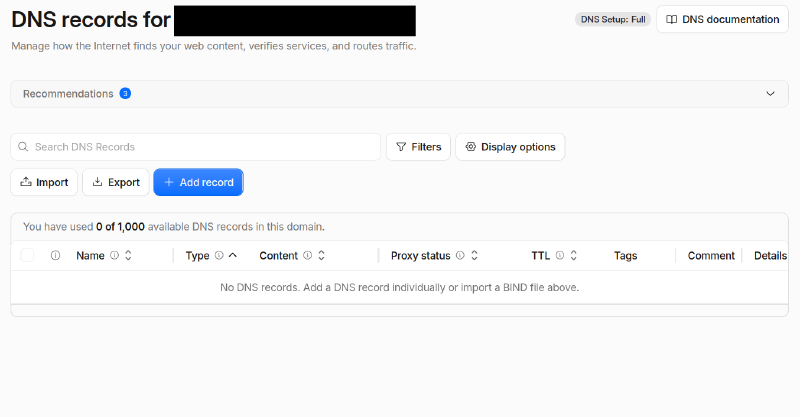
I manage all of my domains and DNS records through Cloudflare. When I went over to the Cloudflare dashboard, I was alarmed to see that all the DNS records were missing. This explained the issue, but not the cause. What caused the DNS records to be deleted? I checked my external-dns GitOps deployment. I had not changed my declarative DNS records lately, so that couldn’t be the cause, could it? It was then that I remembered merging an external-dns chart update the night before (using Renovate).
The Culprit
Last month, the external-dns project released v0.22.0 with this breaking change:
⚠️ The default annotation prefix is now
external-dns.kubernetes.io/with no fallback (#6424)- 🚨 This change can delete all your DNS records.
The source of this change was a pull request from May, which changed the default prefix for external-dns annotations. The issue is that when external-dns is configured with the sync policy, it can allow the deletion of unmanaged DNS records. When the default annotation prefix changed, any cluster resources that kept the legacy annotations were treated as unmanaged, causing external-dns to delete all DNS records for these resources.
The Solution
The external-dns pull request suggested this solution:
This change can be harmless for users that needs or want to stay with previous prefix. ExternalDNS can be configured to use it:
--annotation-prefix=external-dns.alpha.kubernetes.io/
While the change was far from harmless, and I believe this could have been communicated better, this solution does work.
An alternative is to refactor all annotations to use the new prefix by replacing external-dns.alpha.kubernetes.io/ with external-dns.kubernetes.io/. On a GitOps-managed cluster like my homelab-as-code, this solution is simple once you know what to look for. Indeed, this is the solution I went with: fix(dns): migrate ExternalDNS annotation prefix by roib20 · Pull Request #1341 · roib20/homelab-as-code.
Once the pull request was merged, the issue was fully resolved for me: the DNS records were quickly re-provisioned by external-dns connecting to Cloudflare DNS, and access to my domain was restored (after DNS propagation).
Community Reaction
Over on the external-dns pull request, the community reaction was harsh (but fair). Here are some of the comments:
In hindsight, I think the release that included this change should have been v1.0.0 by this logic and more importantly to draw more attention to the massive breaking change included in this that can wipe/misconfigure DNS, or leak sensitive info and IP addresses via misconfigured DNS entries. If the project wasn’t ready for v1.0.0 then the alpha annotation is (was) still very much necessary and this should not have been merged. Not much we can do now though, except incorporate the lessons learned for the future since the act of retracting the release would probably also cause harm as well.
how is this a minor? Not cool. ⚠️ The default annotation prefix is now external-dns.kubernetes.io/ with no fallback (#6424)
🚨 This change can delete all your DNS records.
What a disaster.
It seems extremely irresponsible to release this without a safe and easy-to-understand migration path. I’m glad I always read the release notes!
The official response was:
We hear you. Please do not upgrade if you do not have done it already we discuss the best solution to move out of this. Sorry that it happened, we are all human and can do errors (oh AI can also do errors). Thanks for your understanding.
The Helm Chart Update
Three weeks later, external-dns-helm-chart-1.22.0 was released. This was the update that deleted my DNS records. The chart update bundled the v0.22.0 app update. The chart also had its own breaking change, which required setting a policy value that wasn’t mandatory in previous chart versions.
My Opinion
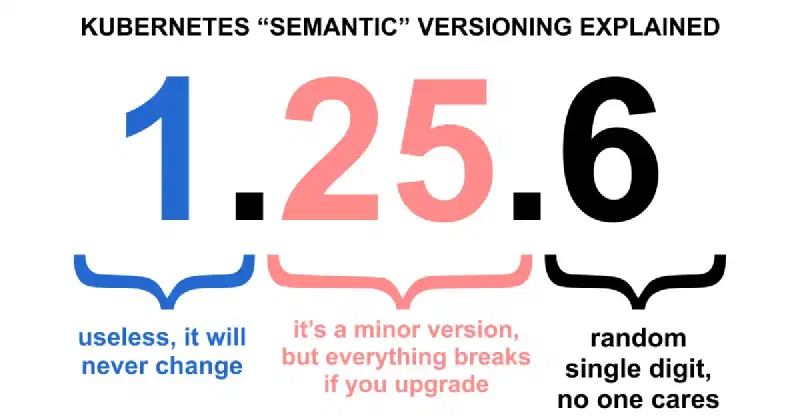
In my opinion, the external-dns maintainers should have bumped the major version of both the app and the Helm chart. While it’s always important to read release notes, developers and administrators rely on projects to follow Semantic Versioning and to bump the major version when there are breaking changes. A caveat is that to this day, nine years after its initial release, the external-dns project is still on major version 0, which is not considered stable and doesn’t offer any guarantees. On the other hand, the Helm chart is on major version 1, which should have been bumped due to the breaking changes.
The external-dns project is part of the Kubernetes SIGs organization. Kubernetes itself has received criticism for the way it follows Semantic Versioning.
At the end of the day, I view this as an important learning opportunity. I am glad this happened to me in my homelab and not in production. Rather than deterring me from using external-dns in production, this experience has encouraged me to be extra vigilant about reading release notes (for all projects). I’ve been using external-dns for years. For example, here’s a demo I made four years ago featuring declarative external-dns.
At the end of the day, the most frustrating part was that by the time I finished handling this incident, I had forgotten which movie I wanted to add to Floppy. I blame DNS.
Featured image by Conny Schneider on Unsplash.